Seeing the “Not Ready to Drive” message on your Toyota Corolla can be alarming, especially if the vehicle refuses to start or move. Whether you’re driving a gasoline-powered Corolla or a hybrid model, this warning indicates that the vehicle has not entered its normal operating state, preventing you from driving safely.
Fortunately, this message does not always mean your car has suffered a major mechanical failure. In many cases, the problem is caused by something relatively simple, such as a weak 12-volt battery, a depleted key fob battery, an improperly engaged brake pedal, or the transmission not being fully shifted into Park. However, more complex issues involving the hybrid battery, inverter, electronic control modules, or other components can also trigger the warning.
Toyota vehicles, particularly hybrid models, rely on a system known as READY Mode. Unlike conventional vehicles, a hybrid engine may remain silent after startup because the electric motor is prepared to power the vehicle. If the system cannot enter READY Mode, the dashboard displays the “Not Ready to Drive” message, indicating that one or more conditions required for safe operation have not been met.
In this comprehensive guide, you’ll learn what the Toyota Corolla Not Ready to Drive message means, the most common causes behind it, how to diagnose the problem step by step, estimated repair costs, and practical solutions to get your Corolla back on the road safely. Whether you’re hoping to fix the issue yourself or determine when professional service is necessary, this guide will help you make informed decisions and avoid unnecessary repair expenses.
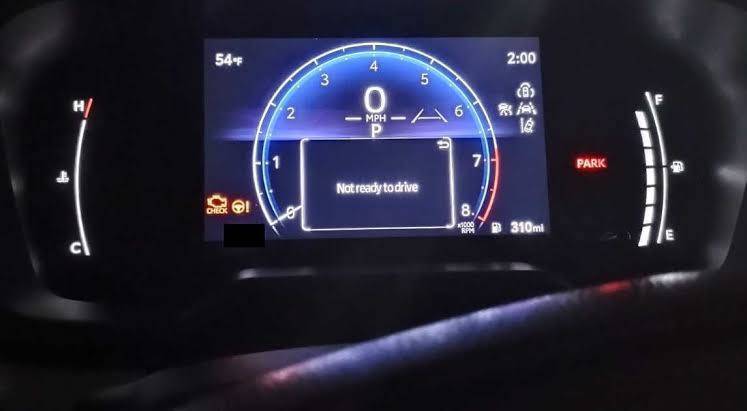
What Does “Not Ready to Drive” Mean on a Toyota Corolla?
The “Not Ready to Drive” message means your Toyota Corolla has not completed the startup process required for safe vehicle operation. The dashboard may illuminate, the infotainment system may turn on, and some electrical accessories may work, but the vehicle is not yet prepared to move.
This distinction is especially important in a Toyota Corolla Hybrid. A hybrid vehicle does not always produce engine noise when it starts. In many situations, the gasoline engine remains off while the electric motor and hybrid system stand by to power the car. The most reliable sign that the vehicle is ready is the illuminated READY indicator on the instrument panel.
If the READY light does not appear, you should not shift into Drive and attempt to move the vehicle. The system may have detected that one or more startup conditions have not been met.
Understanding Toyota READY Mode
READY Mode confirms that the vehicle’s control systems, electric motor, battery system, transmission, braking inputs, and safety checks are functioning well enough for the car to operate.
In a conventional gasoline Corolla, turning the key or pressing the engine start button normally activates the starter motor and starts the engine. You can usually hear and feel the engine running.
A Corolla Hybrid works differently. When you press the brake pedal and push the Power button, the vehicle performs a series of electronic checks. If everything is functioning correctly, the READY light appears. The gasoline engine may remain silent because the vehicle can initially operate using electric power.
This silence sometimes causes drivers to press the Power button again because they assume the car did not start. Pressing it again may switch the vehicle off or place it in accessory mode. Always check the dashboard for the READY indicator instead of relying on engine sound.
Why the Message Appears
The warning appears when the Corolla cannot confirm that it is safe to enter READY Mode. The cause may be as simple as an incorrectly performed startup sequence, or it may involve an electrical, battery, brake, key detection, transmission, or hybrid system fault.
For example, the message can appear if the driver presses the Power button without firmly pressing the brake pedal. It may also appear if the vehicle does not recognize the smart key, the transmission is not fully in Park, or the 12 volt battery cannot provide enough power to activate the control modules.
On hybrid models, the warning can also be associated with a hybrid battery fault, inverter problem, cooling issue, or stored diagnostic trouble code. In these cases, other warning lights may appear at the same time.
The message itself is not a complete diagnosis. It is a general indication that the startup process has been interrupted. The additional warning lights, recent vehicle behavior, battery condition, and diagnostic codes provide more useful clues.
Weak or Dead 12 Volt Battery
A weak 12 volt battery is one of the most common reasons a Toyota Corolla may fail to enter READY Mode. This battery is separate from the high voltage traction battery used in hybrid models.
The 12 volt battery powers essential low voltage systems, including computers, relays, lights, security functions, and the electronics required to begin the startup sequence. Even if the hybrid battery has plenty of stored energy, the car may not start if the 12 volt battery cannot activate the control systems.
Common Symptoms of a Weak 12 Volt Battery
A weak battery may cause several confusing symptoms. The dashboard lights may flicker, the interior lights may appear dim, or the instrument panel may display multiple warning messages at once. The Power button may respond slowly, and the vehicle may alternate between accessory mode and ignition mode without showing the READY indicator.
You may also hear clicking sounds when attempting to start the car. In some cases, the doors may not unlock normally, the smart key may work intermittently, or the infotainment screen may restart repeatedly.
A battery can still have enough power to illuminate the dashboard while lacking enough voltage to complete the startup process. This is why working lights do not always prove that the battery is healthy.
Why the 12 Volt Battery Becomes Weak
Battery age is a common factor. Many 12 volt automotive batteries gradually lose capacity after several years, although actual lifespan depends on climate, driving habits, battery quality, and maintenance.
Frequent short trips can prevent the battery from receiving enough charge. Long periods of inactivity can also allow the battery to discharge, particularly if the vehicle has security systems, connected services, or accessories that continue to draw a small amount of power.
Extreme heat can accelerate internal battery deterioration, while cold temperatures can reduce available starting power. Leaving interior lights, headlights, charging devices, or aftermarket electronics connected may also drain the battery.
A weak charging system, loose battery terminal, corroded connection, or damaged ground cable can produce similar symptoms.
How to Check the Battery
Begin with a visual inspection. Look for corrosion around the terminals, loose connections, damaged cables, swelling, or signs of leakage. Do not touch damaged or leaking battery material without appropriate protection.
A digital multimeter can provide a basic voltage reading. With the vehicle switched off, a fully charged 12 volt battery often reads approximately 12.6 volts. A reading near 12.2 volts indicates a partially discharged battery, while a reading below 12 volts may indicate significant discharge or deterioration.
Voltage alone does not reveal the battery’s complete condition. A damaged battery may display acceptable voltage without delivering sufficient current under load. A professional load test gives a more reliable evaluation.
Possible Fixes
If the battery is discharged but otherwise healthy, jump starting the vehicle may restore normal operation temporarily. Follow the correct jump starting procedure listed in the owner’s manual, especially on hybrid models. Connecting cables to the wrong terminals can damage expensive electronic components.
After a successful jump start, allow the vehicle to remain in READY Mode or drive it long enough for the charging system to replenish the battery. However, if the message returns, the battery and charging system should be tested.
Replace the battery if it fails a load test, cannot hold a charge, or has reached the end of its service life. Clean corroded terminals and tighten loose connections. Persistent battery discharge may require diagnosis for a parasitic electrical draw.
Brake Pedal Switch or Startup Input Problem
Your Toyota Corolla requires a valid brake pedal signal before it can start normally. When you press the brake pedal and push the Start button, a brake light switch sends a signal to the vehicle’s computer. This confirms that the brake is applied and allows the startup sequence to continue.
If the brake pedal is not pressed firmly enough, the vehicle may enter accessory mode instead of READY Mode. A faulty brake switch, damaged wiring, blown fuse, or misadjusted pedal sensor can also prevent the car from recognizing the brake input.
Signs of a Brake Switch Problem
One of the easiest warning signs is that the brake lights do not illuminate when the pedal is pressed. Ask another person to stand behind the vehicle while you press the brake, or position the car near a reflective surface where you can observe the brake lights.
A defective switch may also cause intermittent starting. The vehicle may enter READY Mode only when the pedal is pressed at a specific angle or with unusual force.
Other symptoms can include difficulty shifting out of Park, a start button that remains inactive, or dashboard instructions repeatedly asking you to depress the brake pedal even though you are already doing so.
Check the Startup Procedure First
Before assuming a component has failed, repeat the startup procedure carefully.
Confirm that the transmission is fully in Park. Press the brake pedal firmly and hold it down. Then press the Start or Power button once. Avoid rapidly pressing the button several times because this can cycle the vehicle through accessory and ignition modes.
Check whether the brake pedal feels unusually hard. A firm pedal after the car has been parked can be normal because stored brake assist pressure may have been depleted. Apply steady pressure and attempt the startup process again.
Also check that the driver’s floor mat is not folded, misplaced, or obstructing pedal movement. An incorrectly installed floor mat can prevent the pedal from traveling normally and create a safety hazard.
Inspecting the Brake Lights and Fuse
If the brake lights do not work, inspect the relevant fuse using the fuse diagram in the owner’s manual. Replace a blown fuse only with another fuse of the correct amperage.
A fuse that blows again shortly after replacement indicates an electrical fault that requires further diagnosis. Installing a higher amperage fuse is unsafe because it can overheat the wiring and increase the risk of damage or fire.
If the fuse is intact, the brake light switch may need adjustment or replacement. The switch is usually mounted near the upper section of the brake pedal assembly. Access can be difficult, and incorrect installation may affect brake light operation, shifting, or starting.
Repairing the Problem
A faulty brake light switch is usually less expensive to replace than major electrical or hybrid components. However, the issue should not be ignored. Brake lights are essential for alerting other drivers, and the same switch may be involved in the shift interlock and startup authorization systems.
If the brake lights work normally but the vehicle still does not recognize the pedal input, a technician may need to inspect the sensor circuit, wiring, connector, body control module, or stored trouble codes.
Do not repeatedly force the shifter or press the Start button in rapid succession. If the vehicle continues to display the Toyota Corolla Not Ready to Drive message, move to the next diagnostic steps and consider using an OBD II scanner to identify related fault codes.
Smart Key Detection Problems
Modern Toyota Corolla models equipped with a Smart Key system rely on continuous communication between the key fob and the vehicle. If the car cannot detect an authorized key, it will prevent the startup sequence and may display the “Not Ready to Drive” message.
In many situations, the problem is surprisingly simple. A weak key fob battery reduces the signal strength, making it difficult for the vehicle to recognize the key. This issue is more common during cold weather or after the battery has been in use for several years.
Common Symptoms
A key detection problem often comes with additional warning messages such as “Key Not Detected,” “No Key Detected,” or “Replace Key Battery.” You may need to press the Start button several times before the vehicle responds, or the doors may fail to lock and unlock consistently using the proximity function.
Sometimes the vehicle starts normally after placing the key fob directly against the Power button. This is a strong indication that the key battery is weak rather than the Smart Key system itself.
Possible Causes
Several factors can prevent successful communication between the key and the vehicle.
A depleted key fob battery is the most common cause.
Electronic interference from other wireless devices may temporarily disrupt communication.
Physical damage caused by dropping the key fob or exposing it to water can affect the internal circuitry.
A damaged Smart Key antenna inside the vehicle or a malfunctioning immobilizer system may also prevent key recognition.
In rare situations, the key may lose synchronization with the vehicle after certain electrical repairs or module replacements.
How to Fix the Problem
Begin by replacing the key fob battery with the correct battery type recommended by Toyota. Since these batteries are inexpensive, replacement is often the quickest and easiest troubleshooting step.
If the vehicle still cannot detect the key, try using your spare key fob. If the spare works correctly, the original key may require repair or replacement.
Avoid storing the key next to mobile phones, wireless chargers, or other electronic devices that may interfere with the signal.
If neither key works, professional diagnosis may be required to inspect the Smart Key receiver, immobilizer system, antenna module, or related wiring.
Transmission Not Fully in Park
The Toyota Corolla includes several safety systems designed to prevent unintended vehicle movement. One of these systems requires the transmission to be fully engaged in the Park position before the vehicle can enter READY Mode.
If the shift lever is not completely seated in Park, or if the transmission range sensor cannot verify its position, the startup sequence may stop and display the “Not Ready to Drive” warning.
Common Symptoms
Drivers may notice that the shift lever feels slightly out of position or requires additional force to engage Park completely. The dashboard may display messages such as “Shift to Park” or indicate that the transmission position cannot be confirmed.
In some cases, the vehicle starts normally after moving the shift lever into Reverse or Neutral before shifting back into Park.
Possible Causes
Normal wear inside the shift mechanism can gradually reduce precision over time.
A worn transmission range sensor may send incorrect position information to the vehicle’s control module.
Cable adjustment issues, damaged shift linkage components, or electronic shifter malfunctions can also prevent the vehicle from recognizing that Park has been selected.
Spilled liquids or debris around the center console may occasionally interfere with shifter movement on some vehicles.
How to Diagnose the Problem
Move the shift lever slowly through each gear position before returning it firmly to Park. Press the brake pedal and attempt to start the vehicle again.
If the message disappears after moving the shifter several times, the range sensor or linkage may require inspection.
Pay attention to any unusual looseness, excessive resistance, or grinding sensation while operating the shift lever. These symptoms often indicate mechanical wear.
If available, an OBD-II scanner capable of reading transmission data can confirm whether the vehicle’s computer correctly detects the selected gear position.
Recommended Repairs
Minor linkage adjustments may resolve the issue if components are merely out of alignment.
If the transmission range sensor has failed, replacement is typically required.
Vehicles equipped with electronic shift systems may require software updates or recalibration after component replacement.
Ignoring transmission position problems can eventually lead to additional drivability issues, so prompt diagnosis is recommended.
Hybrid System Malfunction
For Toyota Corolla Hybrid models, one of the more serious causes of the “Not Ready to Drive” message is a malfunction within the hybrid powertrain itself.
The hybrid system consists of numerous components working together, including the high voltage battery, inverter, electric motor generators, battery cooling system, power control unit, and multiple electronic control modules. If any critical component reports an abnormal condition, the vehicle may prevent entry into READY Mode to protect both the vehicle and its occupants.
Warning Signs
A hybrid system problem is often accompanied by additional dashboard warnings. Drivers may see messages such as “Hybrid System Malfunction,” “Check Hybrid System,” or a master warning light.
Fuel economy may decrease before the warning appears, cooling fans near the rear seat may run continuously, or the vehicle may experience reduced power during previous trips.
Some vehicles may enter a protective mode that limits performance before eventually refusing to start.
Common Causes
High voltage battery deterioration becomes more likely as the vehicle ages or accumulates significant mileage.
Battery cooling system problems, including clogged air vents or failed cooling fans, can cause excessive battery temperatures.
An inverter malfunction may interrupt the conversion of electrical energy between the battery and electric motor.
Damaged wiring, faulty sensors, coolant leaks affecting hybrid components, or software faults within the hybrid control module can also trigger the warning.
Diagnosing Hybrid System Problems
Unlike many basic electrical issues, hybrid system faults usually require specialized diagnostic equipment capable of communicating with Toyota’s hybrid control modules.
A standard code reader may identify generic fault codes, but manufacturer-specific diagnostic tools provide much more detailed information regarding battery health, inverter performance, motor operation, and individual cell voltages.
Technicians often perform additional inspections, including battery cooling system evaluation, insulation testing, and high voltage circuit analysis before replacing expensive components.
Repair Options
The appropriate repair depends entirely on the underlying fault.
Some issues involve relatively simple repairs, such as replacing a cooling fan, updating software, repairing damaged wiring, or replacing a failed sensor.
More severe cases may require inverter replacement, high voltage battery repair, or installation of a replacement battery pack.
Because hybrid systems operate with high voltage electricity, owners should avoid attempting repairs without proper training and safety equipment. Incorrect handling of hybrid components can result in serious injury and costly vehicle damage.
If the Toyota Corolla Not Ready to Drive message appears together with hybrid system warnings, scheduling a professional inspection as soon as possible is the safest course of action.
Blown Fuse or Electrical System Failure
Electrical problems are another common reason a Toyota Corolla may display the “Not Ready to Drive” message. Even a small electrical fault can interrupt communication between critical control modules, preventing the vehicle from entering READY Mode.
Modern Corollas contain dozens of fuses and relays that protect circuits responsible for starting, charging, ignition, hybrid operation, lighting, and electronic safety systems. If one of these components fails, the startup sequence may stop before the vehicle is ready to drive.
Common Symptoms
A blown fuse can produce a wide variety of symptoms depending on which circuit is affected. Some drivers notice that the dashboard remains dark, while others experience multiple warning lights, a non-responsive Power button, or accessories such as power windows, climate control, or the infotainment system suddenly stop working.
Electrical issues may also occur intermittently. The vehicle may start normally one day and refuse to enter READY Mode the next, making diagnosis more challenging.
Possible Causes
Several factors can lead to electrical failures.
A blown fuse caused by a temporary power surge.
A faulty relay preventing power from reaching essential control modules.
Loose or corroded electrical connectors.
Damaged wiring caused by vibration, rodents, moisture, or previous repair work.
Aftermarket electrical accessories that overload factory circuits.
Poor grounding between the battery and chassis.
How to Inspect the Electrical System
Begin by checking the fuse boxes identified in the owner’s manual. Inspect fuses related to the ignition system, engine control module, hybrid control system, Smart Key system, and starting circuit.
Replace only blown fuses with new fuses that have the same amperage rating. Never install a larger fuse because doing so can damage wiring or create a fire hazard.
If the replacement fuse fails immediately, the circuit likely contains a short circuit that requires professional diagnosis.
Inspect visible wiring for corrosion, loose terminals, damaged insulation, or signs of overheating. Pay particular attention to battery connections and ground cables, as poor grounding can create numerous electrical faults throughout the vehicle.
Repair Solutions
Minor electrical issues such as loose battery terminals or corroded connectors are often inexpensive to repair.
However, diagnosing damaged wiring inside the dashboard or engine compartment may require advanced electrical testing using wiring diagrams and specialized equipment.
If your Corolla has recently had aftermarket equipment installed, such as remote starters, alarms, dash cameras, or audio amplifiers, disconnecting those accessories may help determine whether they are interfering with the factory electrical system.
Software or Electronic Control Module Problems
Today’s Toyota Corolla relies on multiple electronic control modules that continuously communicate with one another. These computers manage engine performance, hybrid operation, braking, transmission control, steering assistance, safety systems, and vehicle security.
Occasionally, software glitches or communication errors between these modules can prevent the vehicle from entering READY Mode even though no major mechanical component has failed.
Signs of a Software Issue
Software-related problems often appear without warning.
The vehicle may display multiple warning messages that disappear after restarting.
Dashboard indicators may behave inconsistently.
The vehicle may fail to start once but operate normally after several minutes.
Owners sometimes report that disconnecting and reconnecting the 12-volt battery temporarily clears the warning, only for it to return later.
These symptoms often suggest an electronic communication issue rather than a failed mechanical component.
Common Causes
Software bugs within one or more control modules.
Interrupted communication across the vehicle’s Controller Area Network.
Incomplete software updates.
Low battery voltage causing temporary memory errors.
Corrupted calibration data after battery replacement or electrical repairs.
Faulty control modules that intermittently lose communication.
Diagnosis
Professional technicians use Toyota diagnostic software to communicate with every control module in the vehicle.
Rather than simply reading fault codes, they can verify module software versions, monitor live data, perform system tests, and identify communication failures between computers.
Technical Service Bulletins issued by Toyota may also identify software updates that address known startup or READY Mode issues for specific Corolla model years.
Repair Options
Some software problems can be corrected by updating the affected control module with the latest Toyota calibration.
If a control module has failed internally, replacement and programming may be necessary.
Because many modules must be synchronized with the immobilizer and Smart Key system, replacement should generally be performed using factory diagnostic equipment.
Attempting to replace electronic modules without proper programming can create additional starting problems.
Step by Step Troubleshooting Guide
If your Toyota Corolla displays the “Not Ready to Drive” message, follow these troubleshooting steps before assuming the worst. Starting with the simplest checks can often save time and unnecessary repair costs.
Step 1: Check the Dashboard
Look for additional warning lights or messages. A battery warning, brake warning, Smart Key alert, or hybrid system warning can provide valuable clues about the source of the problem.
Step 2: Verify the 12 Volt Battery
Inspect the battery terminals for corrosion or loose connections.
Measure battery voltage if you have access to a multimeter.
If the battery is weak, recharge or replace it before continuing with additional diagnosis.
Step 3: Confirm the Smart Key Is Working
Replace the key fob battery if it has not been changed recently.
If you have a spare key, attempt to start the vehicle using it.
Move electronic devices away from the key to reduce signal interference.
Step 4: Press the Brake Pedal Firmly
Ensure your foot is fully depressing the brake pedal while pressing the Start or Power button.
Check whether the brake lights illuminate.
If they do not, inspect the brake light switch and related fuse.
Step 5: Confirm the Transmission Is in Park
Move the shift lever through several positions before returning it firmly to Park.
Attempt the startup sequence again.
If the warning disappears, the transmission range sensor or shift linkage may require inspection.
Step 6: Restart the Vehicle
Turn the vehicle completely off.
Wait approximately thirty seconds before attempting another normal startup.
Occasionally, temporary communication errors between electronic modules clear after a complete restart.
Step 7: Scan for Diagnostic Trouble Codes
Use an OBD-II scanner capable of reading Toyota-specific codes whenever possible.
The stored diagnostic information can significantly reduce diagnostic time by identifying the affected system.
Record all fault codes before clearing them.
Step 8: Seek Professional Diagnosis
If the vehicle still refuses to enter READY Mode after completing the previous steps, professional diagnosis is recommended.
Continuing to repeatedly press the Start button or attempting random repairs without identifying the root cause may increase repair costs.
A qualified technician can inspect the vehicle using manufacturer-specific diagnostic equipment and determine whether the issue involves the battery, hybrid system, transmission, electrical system, software, or another critical component.
Can You Drive the Car?
Whether you can drive your Toyota Corolla depends entirely on whether the vehicle has successfully entered READY Mode. If the READY indicator is illuminated and no critical warning messages remain on the dashboard, the vehicle is generally prepared for normal operation.
However, if the dashboard displays “Not Ready to Drive,” you should not attempt to force the vehicle into motion. This warning indicates that one or more safety or powertrain systems have not completed the startup process. Ignoring the message could leave you stranded or potentially cause additional damage to certain components.
When It May Be Safe to Drive
If the warning disappears after replacing a weak key fob battery, charging the 12-volt battery, or restarting the vehicle, and no other warning lights remain, the issue may have been temporary.
Even so, monitor the vehicle carefully over the next several days. If the message returns, schedule an inspection before relying on the vehicle for long trips.
When You Should Not Drive
Do not drive your Corolla if any of the following conditions are present.
The READY indicator never appears.
The vehicle displays a Hybrid System Malfunction warning.
The engine repeatedly shuts off during startup.
The transmission cannot be shifted properly.
Multiple warning lights remain illuminated.
The vehicle enters limp mode or experiences severe power loss.
Driving under these conditions may increase repair costs or create a safety risk.
Should You Tow the Vehicle?
If the Corolla cannot enter READY Mode after basic troubleshooting, towing is usually the safest option. Consult your owner’s manual for the recommended towing procedure, especially if you own a hybrid model.
Improper towing methods may damage the transmission or hybrid drivetrain. If possible, use a flatbed tow truck to minimize the risk of additional damage.
Estimated Repair Costs
Repair costs vary depending on your Corolla’s model year, powertrain, geographic location, labor rates, and the exact cause of the problem. The estimates below provide a general idea of what owners may expect.
| Repair | Estimated Cost (USD) |
|---|---|
| Replace key fob battery | $5 to $15 |
| Replace 12-volt battery | $150 to $350 |
| Brake light switch replacement | $100 to $250 |
| Battery terminal cleaning | $20 to $80 |
| Transmission range sensor | $250 to $600 |
| Fuse replacement | $10 to $60 |
| Electrical wiring repair | $150 to $800 |
| ECU software update | $100 to $250 |
| Smart Key antenna repair | $250 to $700 |
| Inverter repair | $1,200 to $3,000 |
| Hybrid battery replacement | $2,000 to $5,000 |
Remember that these are only estimated ranges. Hybrid repairs generally cost more because of specialized components and additional labor requirements.
Before authorizing expensive repairs, consider obtaining a second opinion if the diagnosis involves replacing major components such as the hybrid battery or inverter.
How to Prevent the “Not Ready to Drive” Message
Although some failures cannot be predicted, regular maintenance significantly reduces the likelihood of seeing the Toyota Corolla Not Ready to Drive warning.
Replace the 12-volt battery before it reaches the end of its expected service life, especially if the vehicle begins showing slow electrical responses or intermittent startup issues.
Replace the Smart Key battery every few years or whenever the operating range becomes noticeably shorter.
Keep battery terminals clean and free from corrosion. Loose battery connections are responsible for many avoidable electrical problems.
For hybrid models, make sure the hybrid battery cooling vent remains clean and unobstructed. Dust, pet hair, and debris can reduce cooling efficiency and shorten battery life.
Do not ignore warning lights, even if they disappear after restarting the vehicle. Intermittent faults often become more serious over time.
Follow Toyota’s recommended maintenance schedule, including software updates when available. Manufacturers occasionally release updated calibrations that improve system reliability and correct known electronic issues.
If your vehicle will remain parked for several weeks, consider using a battery maintainer to keep the 12-volt battery fully charged.
Avoid installing poorly designed aftermarket electrical accessories that may interfere with factory wiring or communication networks.
Frequently Asked Questions
Why does my Toyota Corolla say “Not Ready to Drive”?
The message means the vehicle could not complete the startup process required to enter READY Mode. Common causes include a weak 12-volt battery, Smart Key detection problems, brake switch failure, transmission position issues, electrical faults, or hybrid system malfunctions.
Can a dead 12-volt battery cause this warning?
Yes. Even on hybrid models, the 12-volt battery powers the computers and electronic systems required during startup. If the battery cannot provide sufficient voltage, the vehicle may fail to enter READY Mode.
Can I reset the warning myself?
In some cases, the warning disappears after correcting the underlying problem, such as replacing the key fob battery or charging the 12-volt battery. However, clearing the message without fixing the root cause is only a temporary solution.
Is this problem covered under warranty?
Warranty coverage depends on the model year, mileage, vehicle history, and the failed component. Some hybrid components are covered by extended hybrid system warranties in certain markets. Check your warranty documentation or contact an authorized Toyota dealer for details.
Does this issue only affect hybrid models?
No. Both gasoline and hybrid Toyota Corolla models can display startup-related warnings. However, hybrid models rely on READY Mode, making the message more common when electrical or hybrid system problems occur.
No. Repeatedly pressing the Start button without diagnosing the problem is unlikely to resolve the issue. Instead, inspect the battery, brake pedal, Smart Key, transmission position, and any warning lights before seeking professional diagnosis.
Conclusion
The Toyota Corolla Not Ready to Drive message can be unsettling, but it does not always indicate a major mechanical failure. In many cases, the problem originates from relatively simple issues such as a weak 12-volt battery, a depleted key fob battery, an improperly engaged brake pedal, or the transmission not being fully shifted into Park.
More serious problems involving the hybrid battery, inverter, electronic control modules, or electrical system are less common but should never be ignored. Paying attention to additional warning lights and following a systematic troubleshooting process can help identify the source of the problem quickly and prevent unnecessary repairs.
Whenever the vehicle refuses to enter READY Mode, avoid forcing it into operation. Begin with the basic checks outlined in this guide, and if the warning persists, use a quality diagnostic scanner or seek assistance from a qualified Toyota technician.
Regular maintenance, timely battery replacement, routine inspections, and prompt attention to warning messages remain the best ways to reduce the risk of startup issues. By understanding how Toyota’s READY Mode works and responding appropriately when problems arise, you can keep your Corolla reliable, safe, and ready for every journey.