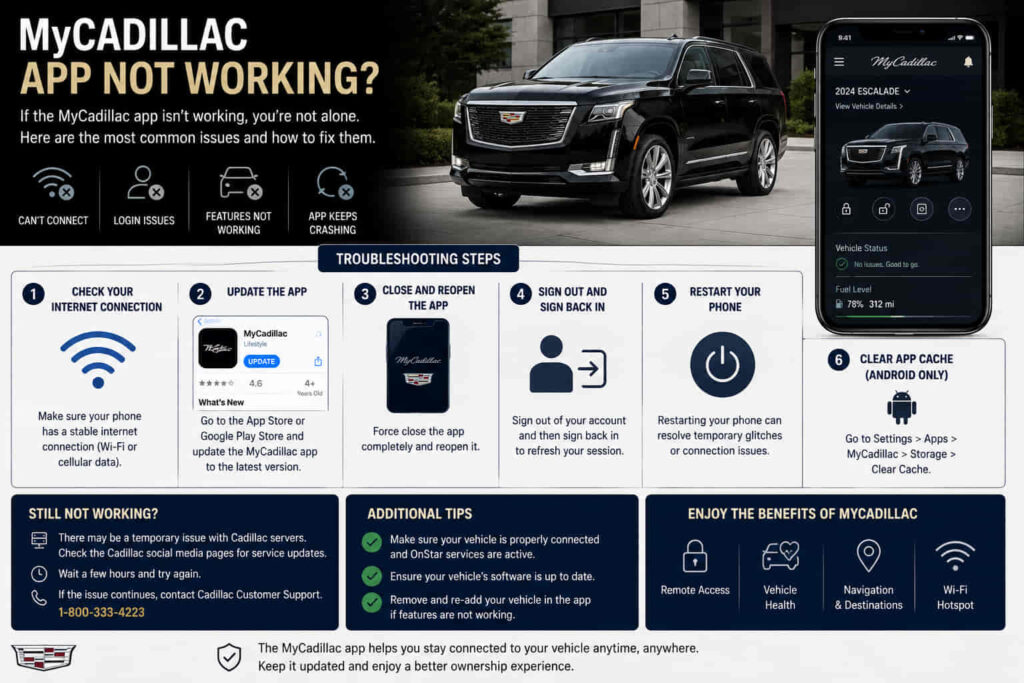
MyCadillac App may stop working because of account authentication problems, outdated software, internet connection failures, smartphone compatibility issues, or communication problems between the application and Cadillac Connected Services. The MyCadillac App is not only a mobile application but also a connection platform that allows Cadillac owners to access vehicle information and remote features through a digital system.
The app connects multiple layers of technology, including the user account, Cadillac Connected Services platform, vehicle communication module, and the Cadillac vehicle itself. Because these systems depend on each other, a problem in any single layer can prevent features from working correctly.
Common symptoms include being unable to log in, the vehicle status not updating, remote commands failing, the vehicle not appearing in the app, or the application freezing during use. These problems do not always mean the app itself is damaged because the cause may come from account settings, network conditions, service availability, or vehicle communication.
Understanding how MyCadillac App works helps owners troubleshoot problems more effectively. This guide explains the main reasons why MyCadillac App is not working, which solutions can restore normal operation, and when the issue requires support from Cadillac Connected Services.
Can MyCadillac App Login Problems Prevent It From Working?
MyCadillac App login problems can prevent the application from working because the app requires successful account authentication before it can access vehicle information and Connected Services features. The login process verifies the Cadillac account, links the user profile with the registered vehicle, and allows the app to communicate with Cadillac’s digital services.
Login failures can happen because of incorrect account credentials, password issues, authentication errors, or problems synchronizing account information. Since MyCadillac App depends on cloud-based services, a problem with account verification can prevent users from accessing features even when the application itself is installed correctly.
The account connection is an important part of the MyCadillac ecosystem because the app does not directly control the vehicle without verification. It first confirms the user identity, then retrieves vehicle information through Cadillac Connected Services. If this process fails, features such as vehicle status updates, remote commands, and maintenance information may become unavailable.
For example, a Cadillac owner may successfully open the app but receive an error when attempting to view the vehicle dashboard or send a remote command. If the problem is related to account authentication, resetting the password, signing in again, or correcting account information may restore normal access.
However, repeated login failures after verifying account details may indicate a broader service issue or account configuration problem. In these cases, checking Cadillac account status or contacting support may be necessary instead of repeatedly reinstalling the application.
Can Internet Connection Problems Cause MyCadillac App Failure?
Internet connection problems can cause MyCadillac App failure because the application requires a stable connection to communicate with Cadillac Connected Services and retrieve vehicle information. Unlike a traditional offline application, MyCadillac depends on online communication between the smartphone, Cadillac servers, and the vehicle’s connected systems.
A weak cellular signal, unstable Wi-Fi connection, or temporary server communication issue can prevent the app from completing requests. This may appear as delayed vehicle status updates, failed remote commands, or error messages when loading information.
The communication process requires multiple steps. The smartphone sends a request through the app, the Cadillac Connected Services platform processes the request, and the vehicle receives updated information through its communication module. A failure at any point can interrupt the feature the user is trying to access.
For example, a driver may attempt to lock the vehicle remotely through MyCadillac App but receive no response because the phone has poor network coverage or the service connection cannot complete the request. Once the connection becomes stable, the feature may return to normal operation.
However, a strong internet connection does not guarantee that every problem will disappear. If the app continues failing with a reliable connection, the issue may involve account synchronization, Connected Services availability, or communication between the app and the vehicle.
Can an Outdated MyCadillac App Stop Working?
An outdated MyCadillac App version can stop working because older application versions may become incompatible with updated smartphone operating systems, security requirements, or Cadillac Connected Services changes. Mobile applications require regular updates to maintain compatibility, improve performance, and fix errors that affect communication between the app and connected vehicle systems.
When a smartphone operating system receives major updates, older applications may experience unexpected problems. The app may crash, fail to load correctly, lose certain functions, or display connection errors because the software environment has changed.
Updating MyCadillac App ensures that the application uses the latest improvements and compatibility adjustments. Updates can also resolve bugs that prevent features such as vehicle status updates, remote commands, or account synchronization from working correctly.
For example, a Cadillac owner may notice that MyCadillac App worked normally before a smartphone software update but begins freezing or failing to connect afterward. Installing the latest app version may restore compatibility between the phone and Cadillac’s connected services.
However, updating the application will not solve every problem. If the issue comes from account errors, vehicle communication problems, or Cadillac Connected Services availability, the app may continue failing even after installation of the newest version. Proper diagnosis requires checking the entire connection process rather than focusing only on the application itself.
Why Is MyCadillac App Not Connecting to My Vehicle?
MyCadillac App may not connect to a vehicle because of account linking problems, inactive Connected Services, communication module issues, or incorrect vehicle registration information. The application depends on a connection between the user account and the specific Cadillac vehicle before it can display vehicle information or control remote features.
The vehicle connection process involves multiple systems working together. The Cadillac account must recognize the correct vehicle, Connected Services must be active, and the vehicle communication module must be able to exchange information with the service platform.
A connection failure can prevent features such as vehicle location, remote start, remote lock and unlock, and vehicle status updates from working. The issue may appear as the vehicle missing from the app, outdated information, or failed remote commands.
For example, a Cadillac owner may download MyCadillac App and successfully create an account but still be unable to access vehicle information because the vehicle has not been properly linked or the Connected Services activation process has not been completed.
However, vehicle connection problems are not always caused by the app. The issue may come from the vehicle’s communication module, subscription status, or service platform. Checking account details, confirming service activation, and verifying vehicle connectivity are important steps before assuming the application itself is defective.
Read more: Are Cadillac CTS Reliable
Can Cadillac Connected Services Problems Affect MyCadillac App?
Cadillac Connected Services problems can affect MyCadillac App because the application depends on this platform to process vehicle information and deliver remote features. MyCadillac App acts as the user interface, but the actual communication between the smartphone and vehicle is handled through Cadillac’s connected vehicle infrastructure.
When Cadillac Connected Services experiences a service interruption, account synchronization problem, or communication delay, the app may not function correctly even when the smartphone and application are working normally. Users may notice missing vehicle information, delayed updates, or failed commands because the request cannot complete through the connected service system.
The relationship between MyCadillac App and Connected Services is similar to a communication chain. The app sends a request, the connected platform processes the information, and the vehicle receives the command through its communication module. A failure in any part of this chain can prevent the expected result.
For example, a Cadillac owner may open MyCadillac App and see outdated vehicle information even though the phone has a stable internet connection. If the Connected Services platform cannot communicate with the vehicle, the app cannot display current data or complete remote actions.
However, not every app problem is caused by Cadillac’s service platform. Issues with the account, smartphone, application version, or vehicle communication module can create similar symptoms. Proper troubleshooting requires checking each part of the connection system.
Why Is MyCadillac Remote Start Not Working?
MyCadillac Remote Start may not work because of problems with the app, Connected Services connection, vehicle conditions, or communication between the smartphone and Cadillac vehicle. The remote start feature requires several systems to operate correctly at the same time, including account authorization, active services, vehicle communication, and acceptable vehicle operating conditions.
Remote start commands do not travel directly from the phone to the vehicle. The request passes through Cadillac Connected Services before reaching the vehicle’s communication system. If the connection process is interrupted, the vehicle may not receive the command or may reject it.
Vehicle conditions can also affect remote start operation. Certain situations, such as battery problems, safety system alerts, or vehicle status conditions, may prevent the remote start command from being completed even when the application appears to work correctly.
For example, a Cadillac owner may press the remote start button in MyCadillac App and receive no response from the vehicle. The cause may be a weak vehicle battery, inactive Connected Services, poor network communication, or a temporary service synchronization issue.
However, repeated remote start failures after checking the app and account settings may indicate a vehicle-side issue. In these situations, the communication module, vehicle battery condition, or connected system requires additional diagnosis rather than repeated attempts through the application.
Can Reinstalling MyCadillac App Fix Connection Problems?
Reinstalling MyCadillac App can fix certain connection problems when the issue is caused by corrupted application data, outdated files, or software errors stored on the smartphone. Removing and reinstalling the application creates a cleaner software environment, allowing the app to download the latest files and establish a new connection with the user account.
Mobile applications store temporary data such as login information, cached files, and configuration settings. When this data becomes corrupted or conflicts with a newer application version, MyCadillac App may fail to load correctly, display outdated information, or experience unexpected connection errors.
Reinstalling the application forces the smartphone to remove old app data and install a fresh version. After reinstalling, users may need to sign in again and verify that the Cadillac vehicle remains correctly linked with their account.
For example, a Cadillac owner may experience an app that constantly freezes when opening vehicle information even after checking the internet connection and account details. If the issue is caused by damaged application data, reinstalling MyCadillac App can restore normal operation.
However, reinstalling the app only affects the smartphone application layer. It cannot repair problems caused by Cadillac Connected Services, vehicle communication modules, inactive subscriptions, or account configuration issues. If the same problem returns after reinstalling, the cause likely exists outside the application itself.
When Should You Contact Cadillac Support for MyCadillac App Problems?
You should contact Cadillac support for MyCadillac App problems when troubleshooting steps fail and the issue involves account access, Connected Services activation, or communication between the application and vehicle. Some problems cannot be resolved from the smartphone because they require verification or adjustments within Cadillac’s connected vehicle system.
Support may be necessary when the vehicle cannot be linked to the account, remote features remain unavailable, login problems continue despite correct credentials, or Connected Services information does not update correctly. These situations often involve backend systems or vehicle-specific settings that users cannot change directly.
Before contacting support, checking basic factors such as app version, internet connection, account information, and vehicle status helps provide more useful information for diagnosis. A clear description of the problem allows support teams to identify whether the issue belongs to the app, account, service platform, or vehicle system.
For example, a Cadillac owner may reinstall the app, confirm account details, and verify network conditions, but the vehicle still does not appear correctly in the application. This situation may require Cadillac support to check vehicle registration, Connected Services status, or account synchronization.
Understanding when to seek professional assistance prevents wasted time repeating troubleshooting steps. MyCadillac App problems can originate from multiple connected systems, so the correct solution depends on identifying the exact source of the failure.