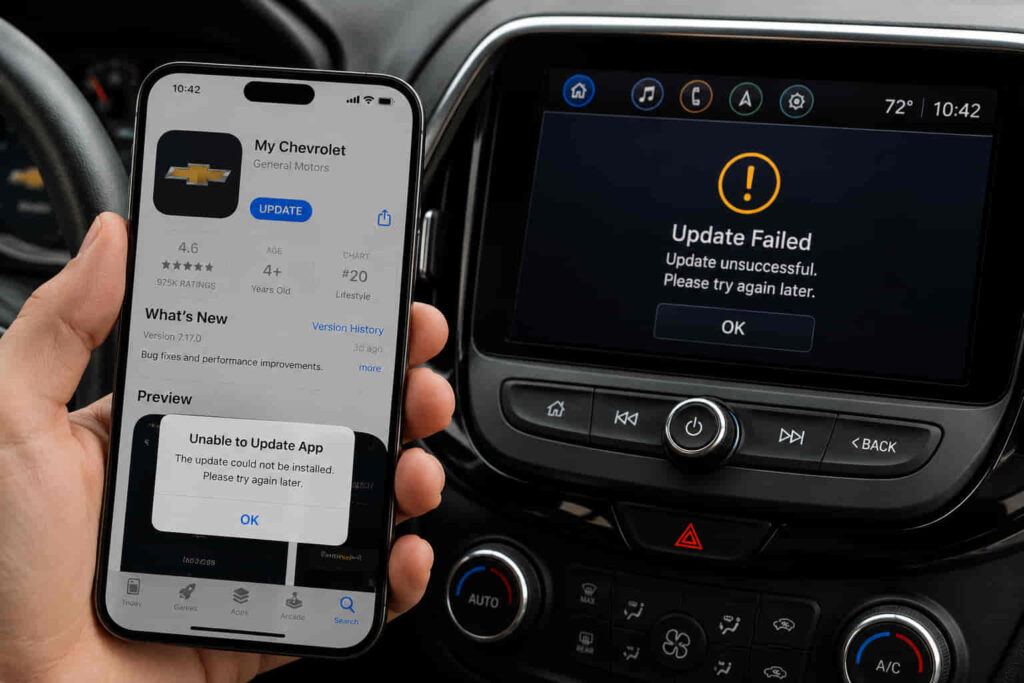
My Chevrolet App should update vehicle data automatically, allowing you to check fuel level, battery status, tire pressure, vehicle location, and remote commands from your smartphone. When the app stops refreshing, it can display outdated information, fail to execute remote start or lock commands, or lose synchronization with your Chevrolet vehicle altogether.
There are 10 primary reasons why the My Chevrolet App is not updating. Most issues originate from unstable internet connectivity, temporary Chevrolet server outages, expired OnStar or Connected Services subscriptions, outdated app versions, corrupted cache files, account synchronization errors, or vehicle software problems. Identifying the correct cause is essential because each issue requires a different solution.
This guide explains the 10 most common reasons the My Chevrolet App fails to update and provides a practical fix for each one. Instead of relying on trial and error, you’ll learn how to determine whether the problem originates from your smartphone, your Chevrolet account, your vehicle’s connectivity, or Chevrolet’s backend services. The article also includes a step-by-step troubleshooting process, explains when professional assistance is necessary, and shares best practices to help prevent synchronization problems from happening again.
By the end of this guide, you’ll be able to diagnose the issue more quickly and restore your My Chevrolet App so it updates vehicle information reliably and supports remote features as intended.
Why Is My Chevrolet App Not Updating?
My Chevrolet App stops updating when it cannot establish a successful data exchange between your smartphone, Chevrolet’s cloud services, and your vehicle. The application does not retrieve information directly from the vehicle every time you open it. Instead, vehicle data travels through Chevrolet Connected Services and OnStar before being synchronized with your account. If any part of this communication chain is interrupted, the app may continue displaying outdated information even though the vehicle is operating normally.
The problem can appear in several ways. Some owners notice that the fuel level, tire pressure, battery voltage, or vehicle location has not changed for several hours or even days. Others find that remote commands such as Remote Start, Lock, Unlock, or Vehicle Locate remain unavailable despite having an active internet connection. In many cases, the application itself launches without errors, creating the impression that everything is functioning correctly while the displayed vehicle data is no longer current.
Synchronization failures usually originate from one of four sources: the mobile device, the Chevrolet account, Chevrolet’s Connected Services infrastructure, or the vehicle itself. For example, an unstable network connection may prevent the app from communicating with Chevrolet’s servers, while an expired OnStar subscription can stop the vehicle from sending new telematics data altogether. Likewise, outdated application files, corrupted cache data, authentication errors, or vehicle software issues can interrupt synchronization without generating a clear warning message.
Understanding where the communication fails is the fastest way to resolve the issue. Rather than attempting random fixes such as repeatedly reinstalling the application, owners should identify whether the interruption occurs before the request reaches Chevrolet’s servers, during cloud synchronization, or after the vehicle receives the request. This diagnostic approach reduces unnecessary troubleshooting and leads to a more effective solution.
What Are the 10 Most Common Reasons My Chevrolet App Is Not Updating?
Most My Chevrolet App update failures are caused by connectivity interruptions, software compatibility issues, account authentication problems, or unavailable Connected Services. Although the symptoms often look identical, the underlying causes differ significantly, which is why the correct solution depends on identifying where synchronization breaks down.
A weak or unstable internet connection is one of the most common reasons the application stops refreshing vehicle information. Every request sent from the app—including checking fuel level, viewing vehicle location, or sending a remote command—must first reach Chevrolet’s cloud platform. If the smartphone frequently switches between Wi-Fi and cellular data or experiences packet loss, the synchronization request may never complete successfully. In these situations, older vehicle information remains visible because no new data has been downloaded.
Temporary outages affecting Chevrolet’s servers can produce similar symptoms even when both the vehicle and smartphone are functioning correctly. During scheduled maintenance or unexpected service interruptions, Connected Services may delay synchronization requests or temporarily disable remote commands. Owners often mistake these server-side issues for application bugs because the app opens normally while vehicle information remains unchanged.
Vehicle connectivity also plays an essential role. My Chevrolet App relies on Connected Services and, for many models, an active OnStar connection to transmit telematics data from the vehicle to Chevrolet’s servers. If the vehicle loses its cellular connection, enters an area with poor signal coverage, or no longer has an active Connected Services subscription, the application cannot receive updated information regardless of how often it refreshes.
Software compatibility is another major factor. Running an outdated version of My Chevrolet App may prevent it from communicating correctly with Chevrolet’s latest backend infrastructure. Mobile operating system updates can also introduce compatibility changes that require a newer version of the application. Similarly, outdated infotainment software inside the vehicle may affect telematics communication, particularly after Chevrolet releases firmware improvements that address connectivity or synchronization issues.
Authentication problems frequently interrupt synchronization without preventing users from logging into the application. Password changes, expired login tokens, multi-device sign-ins, or account verification failures may allow basic access to the app while blocking secure communication with Connected Services. As a result, the application appears connected but no longer retrieves fresh vehicle data.
Local application data can also become corrupted over time. Cached files are designed to improve loading speed, but damaged cache entries may prevent new information from replacing older records. Android users often resolve this issue by clearing the application’s cache, while iPhone users typically restore normal operation by reinstalling the app because iOS manages cached data differently.
Finally, some update failures originate from the vehicle rather than the mobile application. A vehicle that has recently received a battery replacement, factory reset, infotainment update, or ownership transfer may temporarily lose its connection to the registered Chevrolet account. In these cases, the application cannot authenticate the vehicle correctly until the pairing process is completed again.
Although these causes appear unrelated, they all interrupt the same synchronization pathway between the smartphone, Chevrolet’s cloud platform, and the vehicle. Identifying which component has failed is considerably more effective than repeatedly restarting the application, as each failure point requires a different troubleshooting approach.
How Do You Fix My Chevrolet App Not Updating Step by Step?
The most effective way to fix My Chevrolet App not updating is to troubleshoot the synchronization process in the same order that vehicle data travels between your Chevrolet, Chevrolet Connected Services, and your smartphone. This approach eliminates unnecessary troubleshooting and helps identify the actual point of failure instead of treating every update issue as an application bug.
The first component to verify is the smartphone’s network connection. My Chevrolet App depends on a continuous internet connection to communicate with Chevrolet’s cloud platform. Even when webpages load normally, unstable cellular coverage, restricted background data, VPN configurations, or aggressive battery optimization settings can interrupt secure API requests. When this happens, the application may continue displaying cached vehicle information because it never receives updated data from Chevrolet’s servers. Switching between Wi-Fi and cellular data or temporarily disabling VPN services often helps determine whether the network is responsible for the synchronization failure.
If the network connection is stable, the next step is confirming that the application itself is operating with the latest software. Chevrolet regularly releases updates to improve compatibility with new versions of iOS and Android while addressing server-side protocol changes. An outdated application may still launch successfully but fail to communicate with recently updated backend services. Updating the application through the App Store or Google Play Store ensures that authentication methods, security certificates, and synchronization protocols remain compatible with Chevrolet’s infrastructure.
Application cache and locally stored session data are another common source of synchronization problems. Every time the app retrieves vehicle information, temporary files are stored to improve loading performance and reduce network requests. Over time, these cached records may become corrupted or conflict with newly synchronized data, causing outdated vehicle information to persist. Clearing the application cache on Android or reinstalling the application on iPhone forces My Chevrolet App to establish a fresh synchronization session instead of relying on obsolete local data.
When the application continues displaying outdated information after reinstalling, attention should shift to the Chevrolet account and Connected Services subscription. Every vehicle connected to My Chevrolet App is authenticated through the owner’s Chevrolet account and linked to an active telematics service. Password changes, expired authentication tokens, account migration, or inactive Connected Services may prevent the vehicle from transmitting updated information even though the user can still sign into the application. Verifying that the correct VIN is associated with the account and confirming that OnStar or Connected Services remains active are essential before investigating more complex technical issues.
Vehicle software should also be considered because synchronization depends on communication between the infotainment system, telematics control module, and Chevrolet’s cloud platform. Software updates released by Chevrolet frequently improve connectivity, resolve telematics bugs, and enhance compatibility with newer versions of the mobile application. If the vehicle has not received recommended software updates or has recently undergone battery replacement or module servicing, re-establishing communication with Chevrolet Connected Services may be necessary before synchronization resumes normally.
When every local troubleshooting step has been completed without restoring real-time updates, the remaining possibility is a server-side issue or an account-specific synchronization error. Chevrolet Support and OnStar representatives can verify whether the vehicle is actively communicating with their backend systems, identify subscription or provisioning problems, and remotely refresh connected services if required. Escalating the issue at this stage is considerably more efficient than repeatedly reinstalling the application because the root cause may exist entirely within Chevrolet’s cloud infrastructure.
When Should You Contact Chevrolet Support?
Chevrolet Support should be contacted when synchronization problems persist after all standard troubleshooting procedures have been completed or when the issue originates from Chevrolet’s Connected Services platform rather than the mobile application. While many update failures can be resolved by correcting network settings or reinstalling the app, account provisioning and vehicle communication errors generally require assistance from Chevrolet or OnStar.
One clear indication that professional support is required is when the application consistently displays outdated vehicle information despite having a stable internet connection, the latest application version, and an active Connected Services subscription. If remote commands never execute, vehicle location remains unavailable for extended periods, or the application repeatedly reports communication errors without identifying a specific cause, the problem may involve backend authentication or telematics provisioning that owners cannot access themselves.
Support should also be contacted after significant account or vehicle changes. Purchasing a pre-owned Chevrolet, transferring vehicle ownership, replacing the telematics control module, updating the infotainment system, or changing the primary Chevrolet account can interrupt the relationship between the vehicle identification number (VIN) and the owner’s Connected Services profile. Although the vehicle may operate normally, synchronization cannot resume until Chevrolet’s systems recognize the updated ownership and account information.
Persistent authentication issues provide another reason to seek assistance. If the application repeatedly signs out, rejects valid credentials, fails to recognize an active subscription, or cannot add the vehicle after multiple verification attempts, the account itself may require manual correction. Chevrolet representatives can confirm whether the VIN is properly registered, verify subscription status, refresh account synchronization, and determine whether service interruptions are affecting specific vehicle models or geographic regions.
Before contacting support, preparing several details can significantly reduce the time required to diagnose the issue. Having the vehicle identification number, application version, smartphone operating system, Connected Services status, and a description of the synchronization symptoms allows Chevrolet Support to determine more quickly whether the failure originates from the mobile application, the vehicle, or Chevrolet’s backend services. This information also helps eliminate unnecessary troubleshooting steps and accelerates the resolution process.
How Can You Prevent My Chevrolet App From Stopping Updates Again?
Preventing My Chevrolet App from stopping updates requires maintaining every component involved in the synchronization process rather than focusing only on the mobile application. Because vehicle data passes through the smartphone, Chevrolet’s cloud platform, Connected Services, and the vehicle’s telematics system, a disruption in any part of this ecosystem can prevent new information from appearing inside the app. Building reliable connectivity across each component significantly reduces the likelihood of recurring synchronization issues.
Keeping the application updated is one of the simplest yet most effective preventive measures. Chevrolet regularly releases software updates that improve security, resolve compatibility issues with newer versions of iOS and Android, and optimize communication with Connected Services. Running an outdated version of the app increases the risk of authentication failures or synchronization errors after backend infrastructure changes. Enabling automatic app updates ensures that compatibility improvements are installed as soon as they become available.
Maintaining a stable Chevrolet account is equally important. Switching between multiple Chevrolet accounts, frequently changing passwords without re-authenticating the application, or sharing the same vehicle across several devices can create synchronization conflicts. Using a single primary account for vehicle management and signing in again after making account changes helps preserve a consistent authentication session between the application and Chevrolet’s cloud services.
Vehicle software maintenance also contributes to long-term synchronization reliability. Modern Chevrolet vehicles rely on embedded telematics modules and infotainment software to communicate with Connected Services. Chevrolet periodically releases software improvements that enhance data transmission, strengthen network stability, and correct communication bugs identified after vehicle production. Installing recommended software updates during scheduled maintenance helps ensure that the vehicle continues exchanging information correctly with Chevrolet’s servers.
Subscription management should never be overlooked. Many My Chevrolet App features—including vehicle status updates, remote commands, and location services—depend on an active OnStar or Chevrolet Connected Services plan. When a subscription expires, owners often assume the application has malfunctioned because vehicle information stops refreshing without any obvious hardware failure. Periodically reviewing subscription status helps avoid unexpected interruptions in connected features.
Smartphone settings can also affect synchronization even when the application appears to function normally. Restrictive battery optimization modes, disabled Background App Refresh on iPhone, background process limitations on Android, or revoked location permissions may prevent My Chevrolet App from maintaining regular communication with Chevrolet’s servers. Reviewing these settings after major operating system updates is a practical way to prevent synchronization from silently failing.
Regularly opening the application and confirming that vehicle information updates as expected provides an early indication of potential connectivity problems. Detecting delayed fuel levels, unchanged odometer readings, or missing vehicle locations before remote features stop working allows owners to investigate minor synchronization issues before they develop into larger account or connectivity problems. This proactive approach minimizes downtime and helps maintain reliable access to Chevrolet’s connected features throughout vehicle ownership.
Frequently Asked Questions
Many My Chevrolet App update problems share similar symptoms, but the underlying causes vary depending on whether the issue originates from the smartphone, the vehicle, or Chevrolet’s Connected Services platform. The following questions address the situations owners encounter most frequently after troubleshooting synchronization issues.
Why does My Chevrolet App show old vehicle information?
My Chevrolet App usually displays outdated vehicle information because the latest telematics data has not been synchronized successfully. This can occur when the vehicle temporarily loses its cellular connection, Chevrolet’s cloud platform is experiencing service interruptions, the application is using outdated cached data, or Connected Services is no longer active. Until synchronization resumes, previously downloaded information remains visible inside the application even though the vehicle’s actual status has changed.
Why is Remote Start not working through My Chevrolet App?
Remote Start fails when the application cannot complete a secure communication request with the vehicle. Network instability, inactive OnStar services, expired authentication sessions, or temporary server outages can all interrupt remote command delivery. In some situations, the vehicle may also reject the request because operating conditions such as low battery voltage, an open hood, or other safety restrictions prevent remote engine start.
How often should My Chevrolet App update vehicle data?
Vehicle information should refresh shortly after the vehicle transmits new telematics data or after a successful manual synchronization request. The exact refresh interval varies depending on the connected service, network availability, and vehicle activity. Data such as fuel level, battery status, or vehicle location may not update continuously in real time, but prolonged delays lasting several hours or days usually indicate a synchronization problem that requires investigation.
Does deleting My Chevrolet App remove my vehicle?
Deleting the application does not remove your Chevrolet from your account. Vehicle registration, subscription information, and Connected Services are stored on Chevrolet’s servers rather than inside the application itself. Reinstalling My Chevrolet App simply establishes a new connection with your existing Chevrolet account after you sign in again.
Can Chevrolet server maintenance stop vehicle updates?
Yes. Scheduled maintenance or unexpected service interruptions can temporarily prevent My Chevrolet App from receiving updated vehicle information. During these periods, vehicle status, location updates, and remote commands may be delayed even though both the smartphone and vehicle are functioning correctly. Once Chevrolet restores normal service, synchronization typically resumes automatically without requiring additional action from the vehicle owner.
Read more: Chevrolet Aveo Not Starting