If you love driving your Mini Cooper, you know that its iconic design and agile handling make every journey more enjoyable. However, many Mini owners are surprised to discover that their vehicle lacks one of the most sought after features in modern cars: Apple CarPlay.
Apple CarPlay allows you to seamlessly connect your iPhone to your vehicle’s infotainment system, giving you easy access to navigation, music, messages, phone calls, and voice commands through Siri. For drivers who rely on smartphone connectivity every day, upgrading to Apple CarPlay can dramatically improve convenience, safety, and the overall driving experience.
The challenge is that not all Mini Cooper models come equipped with factory installed CarPlay. Depending on your vehicle’s model year and infotainment system, you may need a software activation, an aftermarket retrofit kit, or even a complete head unit replacement. Choosing the right solution can be confusing, especially when considering compatibility, installation complexity, and costs.
In this complete guide, we will walk you through everything you need to know about a Mini Cooper Apple CarPlay upgrade. From identifying compatible models and comparing upgrade options to understanding installation procedures and expected expenses, this article will help you make an informed decision and enjoy a smarter, more connected drive.
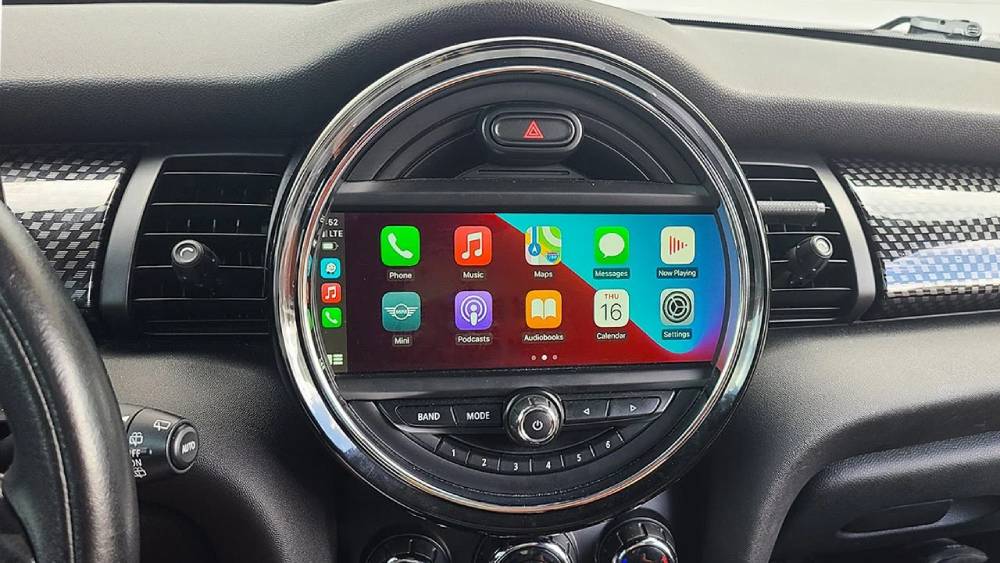
What Is Apple CarPlay and Why Upgrade Your Mini Cooper?
Apple CarPlay is a smart driving interface developed by Apple that allows iPhone users to access essential apps directly through their vehicle’s infotainment screen. Once connected, drivers can use Siri voice commands, view maps, make phone calls, send messages, and enjoy their favorite music or podcasts without constantly reaching for their phones.
For Mini Cooper owners, upgrading to Apple CarPlay is about much more than adding a modern feature. It significantly improves convenience by placing frequently used applications within easy reach. Whether you are navigating unfamiliar roads with Apple Maps or listening to playlists through Spotify, CarPlay creates a more intuitive and enjoyable driving experience.
Safety is another major advantage. Using Siri to handle calls or dictate text messages minimizes distractions and helps drivers keep their attention on the road. This hands free functionality aligns with the growing emphasis on responsible driving habits.
In addition, a Mini Cooper Apple CarPlay upgrade can increase the perceived value of your vehicle. Buyers increasingly expect smartphone integration as a standard feature, making a CarPlay equipped Mini more appealing in the used car market.
If your Mini Cooper lacks this capability, upgrading can be one of the most practical enhancements you make to your vehicle. It combines technology, convenience, and safety in a way that enhances everyday driving.
Which Mini Cooper Models Support Apple CarPlay Upgrades?
Before purchasing any upgrade solution, determining compatibility is essential. The available upgrade path depends largely on your Mini Cooper’s model year and the type of infotainment system installed at the factory.
Many newer Mini models produced from 2018 onward were built with hardware capable of supporting Apple CarPlay. In these cases, owners may only require software activation to unlock the feature. Models such as the Mini F55, F56, and F57 are among the most common candidates for this type of upgrade.
Owners of earlier vehicles often face a different situation. Older F series models and many R series Mini Coopers may require aftermarket retrofit kits to gain Apple CarPlay functionality. These systems typically integrate with the existing display while adding support for both wired and wireless connections.
To verify compatibility, start by identifying your Mini’s exact production year and infotainment configuration. Checking the head unit version and reviewing the vehicle identification number can also provide valuable information regarding available upgrade options.
Taking the time to confirm compatibility before purchasing any components can save money and prevent unnecessary installation challenges. It also ensures that you choose the most suitable solution for your specific Mini Cooper model.
Mini Cooper Apple CarPlay Upgrade Options
When planning a Mini Cooper Apple CarPlay upgrade, there are several approaches to consider. The right option depends on your budget, desired features, and the technical specifications of your vehicle.
The first option is OEM activation. If your Mini already contains compatible hardware, a software based activation may be all that is required. This approach preserves the original appearance of the dashboard and maintains seamless integration with factory controls. Although it often delivers the most polished user experience, it may not be available for every model and can sometimes involve higher costs.
Another popular solution is the use of aftermarket retrofit kits. These products are designed to add CarPlay functionality to vehicles that were not originally equipped with it. Many kits support wireless Apple CarPlay and retain compatibility with steering wheel controls and factory displays. They are generally more affordable than replacing the entire infotainment system and offer broader compatibility across different Mini Cooper generations.
The final option involves replacing the existing head unit with a modern multimedia system. While this method provides the greatest flexibility and access to advanced features, it is typically the most expensive route. It may also alter the original appearance of the interior, which could be a concern for owners who prefer maintaining the factory aesthetic.
Understanding the advantages and limitations of each upgrade method will help you select the option that best aligns with your expectations and driving needs.
Step by Step Mini Cooper Apple CarPlay Installation Guide
Once you have selected the right upgrade solution for your Mini Cooper, the next step is installation. While some drivers prefer professional assistance, many retrofit kits are designed with a straightforward installation process that can be completed with basic tools and patience.
Before beginning, gather the necessary equipment, including trim removal tools, screwdrivers, the retrofit module or activation instructions, and your iPhone for testing purposes. It is also recommended to review the installation manual provided by the manufacturer to understand the specific requirements for your Mini model.
Start by confirming that the upgrade kit matches your vehicle’s infotainment system. Disconnect the car battery to minimize the risk of electrical issues during installation. Carefully remove the dashboard trim surrounding the infotainment display and access the head unit according to the manufacturer’s instructions.
If you are installing a retrofit module, connect the necessary wiring harnesses and secure the unit in the designated location. Double check that all connections are firmly attached before reassembling the dashboard components. Once everything is back in place, reconnect the battery and power on the vehicle.
The final step involves pairing your iPhone with the system. Enable Bluetooth and Wi Fi if required, complete the Apple CarPlay setup prompts, and test key functions such as navigation, music playback, phone calls, and Siri voice commands. Successful testing ensures that the upgrade has been completed correctly and that your Mini Cooper is ready for a more connected driving experience.
How Much Does a Mini Cooper Apple CarPlay Upgrade Cost?
One of the most common questions among Mini owners is how much they should expect to spend on an Apple CarPlay upgrade. The answer depends largely on the upgrade method chosen and the specifications of the vehicle.
For Mini Coopers that already have compatible hardware, software activation can be the most cost effective solution. Prices typically range from one hundred and fifty to five hundred dollars, depending on the service provider and the complexity of the activation process.
Aftermarket retrofit kits generally fall within a price range of two hundred and fifty to seven hundred dollars. The final cost varies based on factors such as wireless functionality, brand reputation, and included features. Premium kits often offer smoother integration and enhanced performance compared to budget alternatives.
Professional installation fees should also be considered when calculating the total investment. Labor costs commonly range from one hundred to three hundred dollars, although rates may differ depending on location and installer expertise. Drivers who are comfortable with vehicle electronics may choose a do it yourself installation to reduce expenses.
Additional factors that can influence the overall price include the Mini Cooper model year, the type of infotainment system installed at the factory, and whether supplementary hardware is required. Understanding these variables will help you establish a realistic budget before moving forward with the upgrade.
Common Problems After an Apple CarPlay Upgrade and How to Fix Them
Although most Mini Cooper Apple CarPlay upgrades perform reliably, occasional issues may arise after installation. Recognizing these problems early and knowing how to address them can save time and frustration.
One of the most frequently reported concerns is difficulty establishing a connection between the iPhone and the CarPlay system. This issue may result from outdated software, incorrect Bluetooth settings, or incomplete pairing procedures. Restarting both devices, removing previously stored connections, and updating the operating system often resolve the problem.
Audio related issues can also occur after installation. Drivers may experience missing sound, delayed playback, or inconsistent volume levels. In many cases, these symptoms are linked to configuration settings or improperly secured wiring connections. Reviewing the installation steps and adjusting the audio source settings can often restore normal functionality.
Some users encounter screen freezing or slow system performance. These issues are commonly associated with outdated firmware in the retrofit module. Installing the latest software updates recommended by the manufacturer may improve responsiveness and stability.
If troubleshooting efforts do not solve the problem, contacting the product supplier or seeking assistance from a qualified installer is advisable. Prompt attention to technical concerns not only protects your investment but also ensures that you continue enjoying the convenience and safety benefits that Apple CarPlay brings to your Mini Cooper.
OEM vs Aftermarket Apple CarPlay Upgrade: Which Option Is Better?
Choosing between an OEM upgrade and an aftermarket solution is one of the most important decisions Mini Cooper owners face when adding Apple CarPlay functionality. Both options offer distinct advantages, and the best choice ultimately depends on your priorities, budget, and vehicle compatibility.
An OEM Apple CarPlay upgrade is generally considered the most seamless solution. Because it relies on factory hardware and software, it preserves the original appearance of the dashboard and integrates smoothly with existing controls. The user experience often feels more refined, and many drivers appreciate maintaining the authenticity of their Mini Cooper. However, OEM upgrades are not available for every model, and the associated costs can be higher compared to alternative methods.
Aftermarket retrofit kits provide a practical option for owners of older Mini models that lack factory support. These systems often include additional features such as wireless Apple CarPlay, Android Auto compatibility, and expanded multimedia functions. They are typically more affordable and compatible with a wider range of vehicles. The primary drawback is that product quality can vary significantly between manufacturers, making it important to choose reputable suppliers and installers.
Drivers who prioritize factory integration and long term consistency may prefer an OEM approach. Those seeking affordability and broader compatibility often find aftermarket solutions to be the better fit. Carefully evaluating your needs will help ensure satisfaction with the final result.
Is a Mini Cooper Apple CarPlay Upgrade Worth It?
For many Mini Cooper owners, upgrading to Apple CarPlay is an investment that delivers meaningful improvements to everyday driving. The ability to access navigation, communication, and entertainment features through a familiar interface enhances both convenience and comfort behind the wheel.
One of the strongest arguments in favor of the upgrade is safety. Siri voice control allows drivers to interact with their phones while keeping their focus on traffic conditions. Real time navigation updates can also contribute to a less stressful driving experience, particularly during long trips or in unfamiliar areas.
From a practical standpoint, Apple CarPlay modernizes older vehicles without requiring the purchase of a new car. It introduces features that many drivers now consider essential while preserving the character and driving enjoyment that Mini Cooper models are known for. Additionally, an upgraded infotainment system may positively influence resale value by increasing the vehicle’s appeal to prospective buyers.
Despite these benefits, the upgrade may not be necessary for everyone. Drivers who rarely use smartphone applications in the car or those planning to replace their vehicle in the near future may find the investment less compelling. Evaluating your driving habits, budget, and expectations will help determine whether a Mini Cooper Apple CarPlay upgrade is the right decision for you.
Frequently Asked Questions
Can I add Apple CarPlay to any Mini Cooper?
Not every Mini Cooper supports Apple CarPlay in the same way. Compatibility depends on factors such as the model year, head unit configuration, and existing hardware. While some vehicles only require software activation, others may need aftermarket retrofit solutions.
Is wireless Apple CarPlay available for Mini Cooper models?
Yes. Many newer Mini Cooper models support wireless Apple CarPlay through factory systems, and numerous aftermarket kits also provide wireless connectivity. Availability varies depending on the specific upgrade option selected.
Can I install Apple CarPlay myself?
Some retrofit kits are designed for do it yourself installation and include detailed instructions. However, drivers with limited experience working with vehicle electronics may prefer professional installation to minimize the risk of errors.
Will upgrading Apple CarPlay void my vehicle warranty?
Warranty implications depend on the type of upgrade performed and the policies of your local dealership. It is advisable to consult authorized service providers before proceeding with modifications.
How long does the installation process take?
Installation times vary based on the complexity of the upgrade. Software activations may require less than an hour, while aftermarket installations often take between one and three hours when performed by experienced technicians.
Conclusion
A Mini Cooper Apple CarPlay upgrade is one of the most effective ways to enhance your driving experience without sacrificing the personality and charm that make these vehicles so distinctive. Whether you choose a factory based activation, an aftermarket retrofit kit, or a complete head unit replacement, the right solution can transform how you interact with your car every day.
By understanding compatibility requirements, comparing available upgrade methods, and preparing for the associated costs, you can approach the process with confidence. The convenience of hands free communication, intelligent navigation, and seamless access to your favorite applications has become increasingly valuable for modern drivers.
If you are considering a Mini Cooper Apple CarPlay upgrade, take the time to evaluate your vehicle’s specifications and select the option that best aligns with your needs. A well planned upgrade can provide years of enjoyment while bringing contemporary technology into a vehicle that is already celebrated for its unique character and engaging driving dynamics.
Have you upgraded your Mini Cooper with Apple CarPlay, or are you still exploring your options? Share your experiences and questions in the comments section below. Your insights may help fellow Mini owners make the best decision for their own driving journeys.