A Mazda Apple CarPlay upgrade is one of the best improvements you can make to an older Mazda. Many Mazda vehicles still offer an enjoyable driving experience. However, their infotainment systems often feel outdated. Slow software and limited smartphone integration can reduce everyday convenience.
Apple CarPlay solves these problems by connecting your iPhone directly to the Mazda Connect display. You can use Apple Maps, Google Maps, Spotify, Messages, Phone, and Siri through a familiar interface. The system is easy to learn and simple to control. It also helps you stay focused while driving.
Not every Mazda supports the same upgrade process. Compatibility depends on the model, model year, infotainment system, firmware version, and installed hardware. Some vehicles only need a new USB hub and a firmware update. Others require additional parts or an aftermarket multimedia system.
This guide covers every important detail about a Mazda Apple CarPlay upgrade. You will learn which Mazda models are compatible and how to check your vehicle. You will also discover the required hardware, typical upgrade costs, installation options, and common problems. By the end of this guide, you will know how to choose the right solution for your Mazda with confidence.
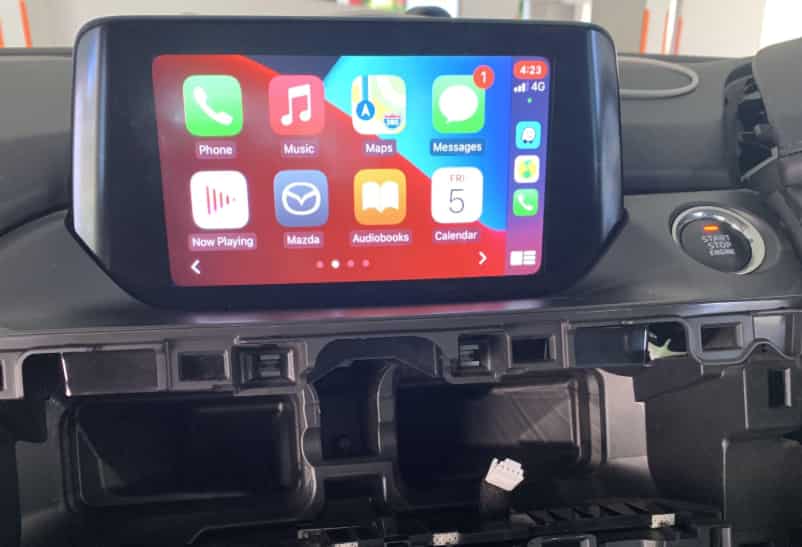
What Is a Mazda Apple CarPlay Upgrade?
A Mazda Apple CarPlay upgrade adds Apple CarPlay functionality to compatible Mazda vehicles that do not include it from the factory. The upgrade allows your iPhone to work directly with the Mazda Connect infotainment system. As a result, you can access navigation, music, calls, messages, and voice commands from the center display instead of using your phone.
Apple CarPlay is designed to make driving safer and more convenient. It displays a simplified interface that is easy to use while keeping your attention on the road. You can open Apple Maps or Google Maps for navigation, listen to Spotify or Apple Music, answer phone calls, and send messages with Siri. Everything is controlled through the touchscreen, the commander knob, or steering wheel buttons, depending on your Mazda model.
Not every Mazda requires the same upgrade process. Compatibility depends on several factors, including the model, model year, Mazda Connect system, firmware version, and installed hardware. Some vehicles only need a compatible USB hub and a software update. Others may require additional parts or an aftermarket multimedia system to support Apple CarPlay.
There are two common upgrade options. An OEM retrofit uses genuine Mazda components and preserves the original appearance of the dashboard. It also provides reliable integration with factory controls. An aftermarket solution replaces the factory infotainment system and often includes a larger display, wireless Apple CarPlay, and extra multimedia features. Choosing the right option depends on your vehicle, your budget, and the features you expect from your driving experience.
Compatible Mazda Models for Apple CarPlay Upgrade
A Mazda Apple CarPlay upgrade is available for many vehicles equipped with the Mazda Connect infotainment system. However, compatibility is not determined by the model name alone. It also depends on the model year, software version, hardware configuration, and the market where the vehicle was originally sold. Checking these details before purchasing any parts is the best way to avoid unnecessary expenses.
Several popular Mazda models can support an Apple CarPlay upgrade when they meet the required specifications. These models commonly include the Mazda3, Mazda6, Mazda CX3, Mazda CX5, Mazda CX9, and Mazda MX5 Miata. Newer vehicles such as the Mazda CX30, Mazda CX50, Mazda CX70, and Mazda CX90 usually come with Apple CarPlay from the factory. In these cases, owners may only need to enable the feature or configure a wireless connection.
Older Mazda vehicles without Mazda Connect generally cannot receive a factory style upgrade. Instead, they often require a complete aftermarket multimedia system that supports Apple CarPlay. This solution provides similar functionality, although the installation process and available features may vary between products.
Before ordering an upgrade kit, verify that your vehicle has the correct Mazda Connect system and compatible firmware. You should also confirm the required USB hub and hardware for your specific model. If you are unsure, provide your vehicle identification number to an authorized Mazda dealer or a trusted installation specialist. A quick compatibility check can save time, reduce installation problems, and ensure you purchase the correct parts for your Mazda Apple CarPlay upgrade.
How to Check if Your Mazda Supports Apple CarPlay
Before purchasing any upgrade kit, you should confirm whether your Mazda is compatible with Apple CarPlay. Taking a few minutes to verify your vehicle can help you avoid buying the wrong parts and reduce installation problems later.
Start by checking whether your vehicle uses the Mazda Connect infotainment system. Most compatible models include a center display with the Mazda Connect interface and a commander control located near the gear selector. If your vehicle has an older radio system instead, a factory style upgrade may not be available.
Next, check the software version installed on your infotainment system. Some Mazda vehicles require a firmware update before Apple CarPlay can be activated. Running the correct software version also helps ensure the new hardware works properly after installation.
You should also inspect the USB hub inside the center console. Older USB hubs often support charging and media playback only. A compatible Apple CarPlay upgrade usually requires a newer USB hub that can transfer data at a higher speed. Installing the correct hardware is just as important as updating the software.
Finally, verify your vehicle information using the VIN, model year, and trim level. These details help identify the exact components required for your Mazda. If you are still unsure, contact an authorized Mazda dealer or a qualified installer. They can confirm compatibility and recommend the correct upgrade kit. Completing these checks before purchasing any parts makes the entire Mazda Apple CarPlay upgrade process faster, easier, and more reliable.
What You Need Before Upgrading
Preparing the right components before starting a Mazda Apple CarPlay upgrade can save both time and money. Many installation problems happen because owners purchase incompatible parts or skip important preparation steps. Verifying everything in advance helps the upgrade run smoothly and reduces the risk of unexpected issues.
The first requirement is a compatible Mazda Connect infotainment system. If your vehicle meets the compatibility requirements, you will also need an Apple CarPlay USB hub designed for your specific Mazda model. This upgraded hub replaces the original unit and allows high speed data communication between your iPhone and the infotainment system.
A compatible firmware version is equally important. Some vehicles must receive a software update before the new USB hub can function correctly. Installing new hardware without the required firmware may prevent Apple CarPlay from working as expected. For this reason, many owners choose to verify the software version before ordering any replacement parts.
You should also prepare a high quality Lightning or USB C cable that supports both charging and data transfer. Low quality cables often cause connection failures or random disconnections. If you plan to use wireless Apple CarPlay, you may also need a compatible wireless adapter after completing the factory upgrade.
Finally, gather the basic tools required for the installation. Plastic trim removal tools, screwdrivers, and protective gloves are commonly used when removing interior panels. Having every component ready before you begin makes the Mazda Apple CarPlay upgrade easier, reduces installation time, and helps protect your vehicle from accidental damage.
Mazda Apple CarPlay Upgrade Cost
The cost of a Mazda Apple CarPlay upgrade varies depending on your vehicle, the installation method, and the parts you choose. Some owners prefer a factory style upgrade because it preserves the original look of the dashboard. Others choose an aftermarket system to gain additional features and a larger display. Understanding the available options makes it easier to plan your budget.
An OEM upgrade usually includes a compatible USB hub, replacement cables, and any required software updates. If the installation is completed by an authorized Mazda dealer, labor costs will also be included. Although this option is often more expensive, it provides reliable compatibility and seamless integration with the Mazda Connect system.
Many owners choose to install the upgrade themselves. A DIY installation can reduce labor expenses, but it requires the correct parts, proper tools, and careful attention during the installation process. Purchasing incompatible components or skipping a firmware update may lead to additional costs later.
An aftermarket multimedia system is another option for vehicles that cannot receive a factory style upgrade or for owners who want more advanced features. Depending on the product, you may receive a larger touchscreen, wireless Apple CarPlay, improved audio functions, and support for additional cameras. However, installation costs can increase if extra adapters or professional wiring are required.
Before purchasing any upgrade kit, compare the total cost rather than the price of individual parts. Include hardware, software updates, installation fees, and any optional accessories in your estimate. A well planned Mazda Apple CarPlay upgrade often provides better value than replacing the entire infotainment system without careful research.
OEM vs Aftermarket Apple CarPlay Upgrade
Choosing between an OEM and an aftermarket Apple CarPlay upgrade depends on your driving needs, budget, and long term expectations. Both options improve smartphone connectivity, but they offer different advantages. Understanding these differences will help you invest in the right solution for your Mazda.
An OEM upgrade is the preferred choice for many Mazda owners. It uses genuine Mazda components and works seamlessly with the original Mazda Connect system. The factory display, commander control, steering wheel buttons, and vehicle settings continue to function as expected. This option also preserves the original appearance of the dashboard, making it an excellent choice for drivers who value reliability and factory integration.
An aftermarket upgrade replaces the original infotainment system with a new multimedia unit. Many models include a larger touchscreen, wireless Apple CarPlay, Android Auto, improved sound quality, and support for additional features such as front or rear cameras. These systems often provide more customization, but installation is usually more complex. Some vehicles may also require extra adapters to maintain factory controls and other built in functions.
Cost is another important factor when comparing the two options. An OEM upgrade may have a higher installation price, but it typically offers better compatibility and fewer software issues. An aftermarket system can deliver more features for the money, although product quality varies between manufacturers. Choosing a trusted brand and an experienced installer is essential for long term performance.
If your Mazda already supports an OEM retrofit, it is usually the safest and most reliable option. However, an aftermarket system may be the better investment if you want modern multimedia features or if your vehicle is not compatible with the factory upgrade.
How to Install Mazda Apple CarPlay
Installing a Mazda Apple CarPlay upgrade is not difficult if your vehicle is compatible and you have the correct parts. Careful preparation is the key to a successful installation. Before you begin, confirm that the upgrade kit matches your Mazda model and verify that the infotainment system meets the required firmware version.
The installation usually starts by removing the interior trim around the center console. This step provides access to the original USB hub and the cables connected to the Mazda Connect system. Use the proper trim removal tools to avoid damaging plastic panels or interior clips. Taking your time during this stage helps protect the dashboard and makes reassembly much easier.
After removing the original USB hub, install the replacement hub and connect the new data cables according to the manufacturer’s instructions. Make sure every connector is fully secured before reassembling the interior. Loose connections can cause Apple CarPlay to disconnect or fail to launch after the installation is complete.
Once the hardware has been installed, reconnect the system and test every function before replacing the remaining trim panels. Connect your iPhone using a certified data cable and confirm that Apple CarPlay opens correctly. Check navigation, phone calls, music playback, voice commands, and steering wheel controls to ensure everything works as expected.
If you are not comfortable working with vehicle electronics, consider using a professional installation service. An experienced technician can complete the Mazda Apple CarPlay upgrade correctly and reduce the risk of wiring errors, damaged interior panels, or software related problems. A professional installation also provides greater peace of mind, especially for owners with limited automotive experience.
Can You Upgrade to Wireless Apple CarPlay?
Many Mazda owners want the convenience of wireless Apple CarPlay because it removes the need for a USB cable. Whether this upgrade is possible depends on your vehicle and the type of Apple CarPlay system it uses. Some newer Mazda models already support wireless connectivity from the factory. Older vehicles with a wired Apple CarPlay system may still be able to use a compatible wireless adapter.
A wireless adapter plugs into the existing USB port that normally connects your iPhone. After the initial setup, the adapter creates a wireless connection whenever you start the vehicle. Your iPhone connects automatically, allowing you to use navigation, music, calls, and other Apple CarPlay features without connecting a cable each time you drive.
Wireless Apple CarPlay offers greater convenience for daily commuting and short trips. It keeps the cabin free of charging cables and makes it easier to enter or leave the vehicle with your phone. Many drivers appreciate the faster and more comfortable experience once the connection is established.
However, wireless connectivity may not be the best choice for every driver. Some adapters take longer to connect after the engine starts. Others may experience occasional audio delays or connection interruptions, especially if low quality hardware is used. Battery consumption is also higher because the iPhone uses both Bluetooth and WiFi during operation.
If your Mazda already supports a wired Apple CarPlay upgrade, adding a high quality wireless adapter can be an excellent next step. Choosing a reliable product helps ensure a stable connection and allows you to enjoy the convenience of wireless Apple CarPlay without replacing the original infotainment system.
Common Mazda Apple CarPlay Problems and Solutions
Most Mazda Apple CarPlay upgrades work reliably when you install the correct hardware and update the software properly. However, connection problems can still appear over time. Knowing the most common issues helps you identify the cause quickly and restore normal operation without unnecessary repairs.
Many drivers cannot find the Apple CarPlay icon after completing the upgrade. An outdated firmware version, an incompatible USB hub, or a charging only cable often creates this problem. Use a certified data cable and confirm that your infotainment system runs the correct firmware. These simple checks solve many connection issues.
Some drivers notice that the iPhone charges normally but never launches Apple CarPlay. This usually happens when the phone connects to the wrong USB port or a damaged cable interrupts data transfer. Restart the infotainment system, reconnect the cable, and review your iPhone settings. These steps often restore the connection within minutes.
Random disconnections can also interrupt your driving experience. A worn cable, a loose connector, outdated iPhone software, or a low quality wireless adapter may trigger this issue. Update your iPhone, check every cable connection, and replace damaged accessories when necessary. These actions improve stability and reduce unexpected interruptions.
Sound issues can affect calls, music, or voice commands. Check the audio settings on both your iPhone and the Mazda Connect system. Then confirm that Siri is active and has permission to use Apple CarPlay. If the problem continues, ask an authorized Mazda dealer or an experienced installer to inspect the system. Professional testing can identify hardware faults, software conflicts, or installation mistakes before they become more serious.
Is the Mazda Apple CarPlay Upgrade Worth It?
A Mazda Apple CarPlay upgrade offers excellent value for many drivers. It improves everyday convenience and gives older vehicles a more modern driving experience. Instead of relying on outdated software, you can use the apps and services that you already know from your iPhone.
Navigation is one of the biggest advantages. Apple Maps and Google Maps provide real time traffic updates, faster route planning, and accurate directions. You can also listen to music, answer calls, send messages, and use Siri without taking your hands off the steering wheel. These features make every trip more enjoyable while helping you stay focused on the road.
The upgrade can also increase the appeal of your vehicle. Many buyers prefer a car that already supports Apple CarPlay because they do not need to install it later. Although the upgrade may not increase the resale price significantly, it can make your Mazda more attractive in the used car market.
However, not every driver needs this upgrade. If you rarely use an iPhone or your vehicle does not support a factory retrofit, the investment may not provide the same level of value. In some cases, replacing the entire infotainment system with an aftermarket unit may offer a better solution.
For most owners, a Mazda Apple CarPlay upgrade remains a practical investment. It combines modern smartphone integration with the original driving experience that Mazda owners enjoy. Before making a decision, confirm your vehicle’s compatibility, compare the available options, and choose the solution that best matches your needs and budget.
Conclusion
A Mazda Apple CarPlay upgrade is one of the easiest ways to improve your driving experience without replacing your vehicle. It gives you access to modern navigation, hands free communication, music streaming, and voice control through the familiar Mazda Connect system. For many owners, this simple upgrade makes every journey safer, more convenient, and more enjoyable.
Before purchasing any parts, take time to verify your vehicle’s compatibility. Check the model year, firmware version, infotainment system, and hardware requirements. These small steps help you avoid unnecessary expenses and ensure that every component works correctly after installation. If your Mazda supports an OEM retrofit, it often delivers the best combination of reliability, factory integration, and long term value. If your vehicle is not compatible, a quality aftermarket system may provide a better solution.
Choosing the right Mazda Apple CarPlay upgrade depends on your budget, driving habits, and feature preferences. Compare the available options carefully and select the solution that matches your needs. A well planned upgrade can continue to deliver value for many years.
Which Mazda model do you own, and are you planning to install an OEM Apple CarPlay upgrade or choose an aftermarket solution? Share your experience or questions in the comments. Your feedback may help other Mazda owners make a more informed decision.