Apple CarPlay has become one of the most popular in-car technologies for modern drivers, allowing seamless access to navigation, music, phone calls, messages, and more directly from a vehicle’s infotainment screen. If you own a Subaru and want to enjoy a safer, more connected driving experience, learning how to connect Apple CarPlay to Subaru is an essential first step.
While Subaru’s STARLINK multimedia system is designed to work smoothly with Apple CarPlay, many drivers still encounter challenges during setup. Common issues include the iPhone not being detected, Apple CarPlay failing to launch, or confusion about whether a vehicle supports wired or wireless connectivity. These problems can be frustrating, especially when you’re eager to access your favorite apps on the road.
Fortunately, connecting Apple CarPlay to a Subaru is usually a quick and straightforward process when you know the correct steps. Whether you drive a Subaru Outback, Forester, Crosstrek, Ascent, Legacy, or Impreza, this guide will walk you through everything you need to know. From checking compatibility and setting up a wired connection to enabling wireless Apple CarPlay and troubleshooting common issues, you’ll be ready to make the most of your Subaru’s infotainment system in just a few minutes.
What Is Apple CarPlay and Why Subaru Drivers Use It?
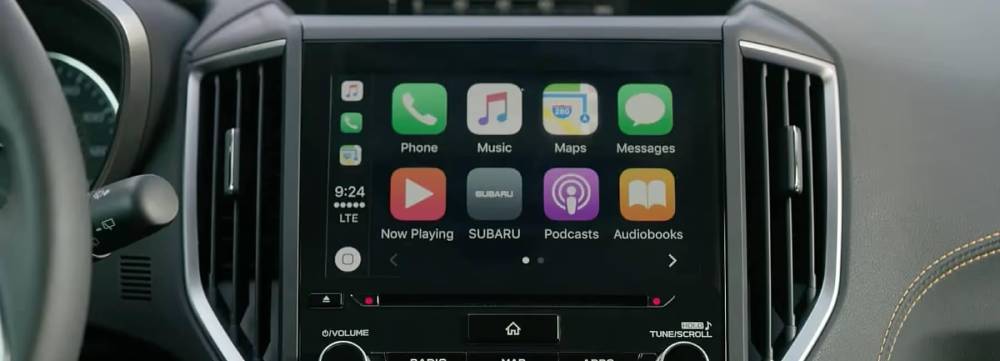
Apple CarPlay is a smart driving interface developed by Apple that allows iPhone users to access selected apps directly through their vehicle’s infotainment system. Instead of handling your phone while driving, CarPlay displays a simplified, driver-friendly version of your favorite apps on the Subaru touchscreen. This integration helps reduce distractions and improves convenience by keeping important information within easy reach.
One of the biggest advantages of Apple CarPlay is its ability to provide real-time navigation through apps such as Apple Maps, Google Maps, and Waze. Drivers can receive turn-by-turn directions, traffic updates, and estimated arrival times without needing a separate GPS device. For daily commuting, road trips, or exploring unfamiliar areas, this feature can significantly improve the driving experience.
Subaru drivers also appreciate the entertainment options available through CarPlay. Popular apps like Spotify, Apple Music, Audible, and Podcasts can be controlled directly from the vehicle’s display. Instead of scrolling through playlists on a smartphone, users can safely manage audio content using touchscreen controls or Siri voice commands.
Communication is another area where Apple CarPlay excels. Drivers can make phone calls, send text messages, listen to incoming messages, and access contacts without taking their hands off the wheel. Siri can handle many of these tasks through simple voice commands, helping drivers stay connected while keeping their focus on the road.
For Subaru owners, Apple CarPlay transforms the vehicle’s infotainment system into an extension of the iPhone. The result is a safer, more convenient, and more enjoyable driving experience that integrates the digital tools drivers use every day.
Requirements Before Connecting Apple CarPlay to Subaru
Before beginning the setup process, it is important to verify that both your Subaru and your iPhone meet the necessary requirements. Taking a few minutes to check compatibility can help prevent connection issues and save time during installation.
The first requirement is an Apple CarPlay-compatible iPhone. Most Subaru models support CarPlay with iPhone 6 and newer devices running a recent version of iOS. Updating your iPhone to the latest software version is strongly recommended because newer updates often include performance improvements and bug fixes related to CarPlay functionality.
Next, ensure that Siri is enabled on your device. Apple CarPlay relies heavily on Siri for voice commands, hands-free calling, messaging, and navigation. To verify Siri is active, open the Settings app on your iPhone, select Siri & Search, and confirm that voice assistant features are enabled.
Vehicle compatibility is equally important. Most modern Subaru vehicles equipped with the STARLINK Multimedia System support Apple CarPlay, although features may vary depending on the model year and trim level. Some newer Subaru models support wireless Apple CarPlay, while others require a wired USB connection.
If your Subaru uses a wired connection, you will need a high-quality Lightning cable. Using an original Apple cable or an Apple-certified accessory is recommended because low-quality cables are one of the most common causes of connection failures.
Before proceeding, confirm the following checklist:
• Your iPhone is updated to the latest iOS version.
• Siri is enabled.
• Apple CarPlay is allowed in iPhone settings.
• Your Subaru infotainment system is powered on.
• A compatible Lightning cable is available if required.
Once these requirements are met, you are ready to connect Apple CarPlay to your Subaru.
How to Connect Apple CarPlay to Subaru Using a USB Cable
For many Subaru owners, a wired connection remains the easiest and most reliable way to use Apple CarPlay. The setup process typically takes only a few minutes and requires minimal configuration.
Start by turning on your Subaru. You can either start the engine or switch the vehicle into accessory mode. Wait for the STARLINK infotainment system to fully load before connecting your iPhone.
Next, locate the correct USB port inside the vehicle. Many Subaru models include multiple USB ports, but not all of them support Apple CarPlay data transfer. Consult your owner’s manual if you are unsure which port is designated for CarPlay connectivity.
Once you have identified the appropriate USB port, connect your iPhone using a certified Lightning cable. After a few seconds, your phone should display a prompt asking whether you would like to allow Apple CarPlay while the device is locked. Select “Allow” to continue.
Depending on the model, the Subaru infotainment system may also display a confirmation message. Follow any on-screen instructions to complete the pairing process. After approval, the Apple CarPlay interface should automatically launch on the touchscreen.
If CarPlay does not open immediately, look for the Apple CarPlay icon on the home screen and tap it manually. You should now see familiar apps such as Maps, Phone, Messages, Music, and Podcasts displayed on the screen.
To personalize your experience, open Settings on your iPhone and navigate to General, then CarPlay. From there, you can customize app layouts, rearrange icons, and choose which applications appear on the dashboard.
Once connected, you can begin using Siri voice commands, navigation apps, music streaming services, and hands-free communication features directly through your Subaru’s infotainment system. This simple setup process provides a safer and more convenient way to stay connected while driving.
How to Set Up Wireless Apple CarPlay in Subaru
Wireless Apple CarPlay offers a more convenient way to connect your iPhone to your Subaru without the need for a USB cable. Once configured, your phone can automatically connect whenever you start the vehicle, making every drive smoother and more efficient.
Before beginning, verify that your Subaru model supports wireless Apple CarPlay. While many newer Subaru vehicles include this feature, availability may vary depending on the model year and trim level. Checking your owner’s manual or infotainment system specifications can help confirm compatibility.
To start the setup process, ensure that both Bluetooth and Wi Fi are enabled on your iPhone. Wireless Apple CarPlay uses a combination of these technologies to establish and maintain a connection between your phone and the vehicle.
Turn on your Subaru and access the STARLINK infotainment system. Navigate to the Bluetooth settings menu and select the option to add or pair a new device. On your iPhone, open Bluetooth settings and choose your Subaru from the list of available devices. A pairing code will appear on both screens. Confirm that the codes match and approve the connection request.
After the Bluetooth pairing is completed, your Subaru may prompt you to enable wireless Apple CarPlay. Accept the request and follow any additional instructions displayed on the infotainment screen. Your iPhone may also ask for permission to use CarPlay wirelessly. Select Allow to continue.
Within a few moments, the Apple CarPlay interface should appear on the Subaru touchscreen. To verify that everything is functioning correctly, open a navigation app, play music, or activate Siri using a voice command. If all features respond as expected, the setup has been completed successfully.
One of the greatest benefits of wireless Apple CarPlay is its ability to reconnect automatically each time you enter the vehicle. As long as Bluetooth and Wi Fi remain enabled on your iPhone, the connection process should happen in the background without any additional input.
How to Use Apple CarPlay Features After Connecting
Once Apple CarPlay is connected, your Subaru’s infotainment system becomes a powerful extension of your iPhone. Understanding the available features will help you get the most value from the technology and improve your daily driving experience.
Navigation is one of the most frequently used functions within Apple CarPlay. Drivers can choose from Apple Maps, Google Maps, or Waze to receive turn by turn directions, traffic updates, route suggestions, and estimated arrival times. These navigation tools are often more accurate and responsive than traditional built in GPS systems because they continuously receive real time data from the internet.
Music and entertainment are equally easy to access. Popular streaming services such as Apple Music, Spotify, Amazon Music, YouTube Music, and Audible integrate seamlessly with CarPlay. Drivers can browse playlists, listen to podcasts, enjoy audiobooks, and switch between content sources without touching their phones.
Communication features help drivers stay connected while keeping their attention on the road. Apple CarPlay allows users to make phone calls, access contacts, send messages, and listen to incoming texts through Siri. Voice control reduces distractions and supports safer driving habits.
Siri serves as the centerpiece of the Apple CarPlay experience. By activating Siri through the steering wheel controls or a voice command, drivers can perform a wide range of tasks without touching the screen. For example, you can ask Siri to navigate to a destination, call a contact, send a message, play a playlist, or provide weather updates.
Many Subaru owners also appreciate the CarPlay dashboard view, which displays navigation, music controls, and calendar information in a single screen. This layout makes it easier to monitor multiple pieces of information while driving and reduces the need to switch between apps.
By exploring these features and customizing the interface to suit your preferences, you can create a driving environment that is both more productive and more enjoyable.
Common Apple CarPlay Problems in Subaru and How to Fix Them
Although Apple CarPlay is generally reliable, occasional connection issues can occur. Fortunately, most problems can be resolved with a few simple troubleshooting steps.
One of the most common complaints is that Apple CarPlay does not appear on the infotainment screen after connecting the iPhone. In many cases, the problem is related to the USB cable. Damaged or uncertified cables may provide charging power but fail to transfer data properly. Replacing the cable with an original Apple accessory or a certified alternative often resolves the issue immediately.
Another frequent problem involves CarPlay disconnecting unexpectedly while driving. This issue may result from a loose cable connection, outdated software, or wireless interference. Check the cable for wear, ensure that all software is updated, and restart both the iPhone and the infotainment system. If you are using wireless CarPlay, deleting and reestablishing the connection may improve stability.
Some users discover that Siri does not respond correctly through Apple CarPlay. When this happens, verify that Siri is enabled in your iPhone settings and that microphone permissions are active. You should also ensure that your phone is not operating in a restricted mode that limits voice assistant functionality.
Occasionally, a Subaru may fail to recognize the connected iPhone entirely. If this occurs, disconnect the phone, restart both devices, and reconnect them. You can also reset network settings on the iPhone by navigating to Settings, General, Transfer or Reset iPhone, and Reset Network Settings. This process often resolves communication issues between the vehicle and the phone.
Outdated software can also cause performance problems. Apple regularly releases iOS updates that improve CarPlay compatibility, while Subaru may provide infotainment system updates that enhance connectivity. Keeping both systems current is one of the most effective ways to prevent recurring issues.
If none of these solutions work, removing the existing CarPlay profile from both the iPhone and the Subaru infotainment system and then performing a fresh setup may restore normal functionality. In rare situations where hardware issues are suspected, contacting a Subaru dealership or authorized service center may be necessary.
Most Apple CarPlay problems can be fixed without professional assistance. By following a systematic troubleshooting process, Subaru owners can quickly restore connectivity and return to enjoying the convenience of their favorite iPhone features on the road.
Which Subaru Models Support Apple CarPlay?
Apple CarPlay is available on many modern Subaru vehicles, although support may vary depending on the model year, trim level, and infotainment system configuration. Subaru began introducing Apple CarPlay across its lineup several years ago, and today it has become a standard or widely available feature on most new models.
The Subaru Outback is one of the most popular models equipped with Apple CarPlay. Recent generations offer seamless integration through the STARLINK Multimedia System, with many trims also supporting wireless Apple CarPlay. Outback owners can easily access navigation, music, and communication features directly from the vehicle’s touchscreen.
The Subaru Forester also includes Apple CarPlay compatibility across most modern model years. As one of Subaru’s best selling SUVs, the Forester benefits greatly from smartphone integration, making it easier for drivers to navigate, stream music, and stay connected during daily commutes or outdoor adventures.
Subaru Crosstrek models have supported Apple CarPlay in recent generations as well. The compact crossover’s technology package makes it especially attractive to drivers who rely heavily on smartphone apps for navigation and entertainment.
The Subaru Ascent, Subaru Legacy, and Subaru Impreza also offer Apple CarPlay support in many configurations. Depending on the model year, some vehicles may require a wired connection while newer versions include wireless functionality.
Because Subaru continuously updates its technology offerings, drivers should verify compatibility using their vehicle’s owner’s manual, dealership resources, or official Subaru documentation. If your Subaru was manufactured within the past several years and features the STARLINK Multimedia System, there is a strong possibility that Apple CarPlay is available.
For drivers considering a used Subaru, checking Apple CarPlay support before purchase can help ensure the vehicle meets modern connectivity expectations and provides a more convenient driving experience.
Frequently Asked Questions
Can I use Apple CarPlay without a USB cable in my Subaru?
Yes. If your Subaru supports wireless Apple CarPlay, you can connect your iPhone using Bluetooth and Wi Fi without needing a physical cable. Once the initial setup is completed, the connection can occur automatically whenever you enter the vehicle.
Why is Apple CarPlay not working in my Subaru?
Several factors can prevent Apple CarPlay from working correctly. Common causes include incompatible USB cables, outdated iOS software, disabled Siri settings, infotainment system glitches, or incorrect connection configurations. Reviewing the troubleshooting steps in this guide can help identify and resolve the issue.
Does Apple CarPlay work with Google Maps and Waze?
Yes. Apple CarPlay supports several popular navigation applications, including Apple Maps, Google Maps, and Waze. Many drivers prefer these apps because they provide real time traffic information and route updates.
Do I need the STARLINK system to use Apple CarPlay?
Most Subaru vehicles rely on the STARLINK Multimedia System to provide Apple CarPlay functionality. If your vehicle does not include a compatible infotainment system, Apple CarPlay may not be available.
Can I connect more than one iPhone to my Subaru?
Multiple devices can typically be paired with the infotainment system, but only one iPhone can actively use Apple CarPlay at a time. To switch devices, disconnect the current phone and select the preferred device from the infotainment settings.
Why does Apple CarPlay keep disconnecting while driving?
Frequent disconnections are often caused by damaged cables, unstable wireless connections, outdated software, or temporary communication issues between the phone and the vehicle. Updating software and reestablishing the connection usually resolves the problem.
Is Apple CarPlay safe to use while driving?
Apple CarPlay is designed to reduce distractions by providing voice control, simplified menus, and hands free communication features. While it can improve safety compared to using a phone directly, drivers should always remain focused on the road and use technology responsibly.
Conclusion
Learning how to connect Apple CarPlay to Subaru is one of the easiest ways to enhance your driving experience. Whether you prefer a wired connection or the convenience of wireless Apple CarPlay, the setup process is typically straightforward and can be completed in just a few minutes.
By connecting your iPhone to your Subaru’s infotainment system, you gain access to powerful features such as real time navigation, hands free communication, music streaming, messaging, and voice controlled assistance through Siri. These capabilities help reduce distractions, improve convenience, and make every journey more enjoyable.
The key to a successful setup is ensuring compatibility between your iPhone and your Subaru, using the correct connection method, and keeping both devices updated with the latest software. If you encounter any issues, most problems can be resolved through simple troubleshooting steps such as replacing a cable, restarting devices, updating software, or reconfiguring connection settings.
As Subaru continues to expand smartphone integration across its lineup, Apple CarPlay has become an essential feature for drivers who value connectivity, convenience, and safety. Whether you drive an Outback, Forester, Crosstrek, Ascent, Legacy, or Impreza, following the steps outlined in this guide will help you unlock the full potential of your vehicle’s infotainment system.
Have you successfully connected Apple CarPlay to your Subaru, or are you still experiencing issues? Share your experience and questions in the comments. Your insights may help other Subaru owners enjoy a smoother and more connected driving experience.