If your Tesla is not holding charge, the problem is not always a failing battery. In many cases, battery loss results from background features such as Sentry Mode, Cabin Overheat Protection, climate control, software activity, or cold weather rather than permanent battery damage. Identifying the actual cause is the first step toward restoring normal battery performance and avoiding unnecessary service visits.
Tesla vehicles continuously consume energy even when parked. This behavior differs from conventional gasoline vehicles because multiple systems remain active to monitor security, manage battery temperature, and maintain software functions. As a result, a small amount of battery loss each day is expected. However, rapid or excessive charge loss may indicate abnormal energy consumption, inaccurate battery estimation, charging issues, or, in less common cases, battery degradation.
This guide explains why a Tesla may lose charge faster than expected, how to distinguish normal battery drain from a genuine problem, and the practical steps you can take to diagnose and resolve the issue. You’ll also learn when battery loss can be fixed through settings or software updates and when it’s time to schedule an inspection with Tesla Service. By understanding how Tesla’s Battery Management System (BMS) manages energy, you can improve battery charge retention, reduce phantom drain, and maintain long-term battery health.
What Does It Mean When a Tesla Is Not Holding Charge?
A Tesla is not holding charge when its battery loses energy faster than expected after charging, whether the vehicle is parked or driven under normal conditions. The issue is measured by how quickly the State of Charge (SOC) decreases rather than by charging speed. In many cases, the battery itself is functioning normally, while energy is being consumed by vehicle systems operating in the background.
A small amount of battery loss is a normal characteristic of every Tesla. Features such as the Battery Management System (BMS), security monitoring, temperature regulation, and wireless connectivity continue operating after the vehicle is parked. Tesla owners commonly refer to this gradual energy consumption as phantom drain. Losing approximately 1–2% of battery charge per day is generally considered normal, although the exact amount varies depending on vehicle settings, ambient temperature, and software activity.
Battery loss becomes abnormal when the charge decreases much faster than expected without a clear explanation. For example, a Tesla that loses 8–15% of its battery overnight while parked with minimal features enabled may indicate excessive background power consumption, charging irregularities, inaccurate battery estimation, or a hardware-related issue. Repeated abnormal battery loss should not be ignored because it can affect driving range and reduce confidence in trip planning.
It is also important to distinguish battery drain from battery degradation, as the two terms describe different conditions. Battery drain refers to electricity being consumed after charging, often because vehicle systems continue using power. Battery degradation refers to the gradual reduction of the battery’s maximum capacity over years of use and charging cycles. A degraded battery can still hold its charge normally, while a healthy battery can experience rapid charge loss if background systems consume excessive energy.
Before assuming the high-voltage battery is failing, review how the vehicle is being used. Active features such as Sentry Mode, Cabin Overheat Protection, climate control, frequent mobile app access, scheduled software updates, and extremely low temperatures can all increase energy consumption while the vehicle is parked. Identifying these factors first eliminates the most common causes of unnecessary battery loss before more advanced diagnostics are required.
Why Is My Tesla Losing Charge So Quickly?
A Tesla can lose charge quickly because background systems continue consuming energy after the vehicle is parked. In most cases, rapid battery loss is caused by normal vehicle functions rather than a defective high-voltage battery. Identifying which system is using power is essential before assuming the battery requires repair.
Phantom drain is the most common cause of unexpected battery loss. Phantom drain refers to electricity consumed while the vehicle is parked and not being driven. Tesla vehicles remain partially active to support remote connectivity, security monitoring, battery management, and software communication. Under normal conditions, phantom drain is relatively small. However, enabling multiple features simultaneously can increase daily battery loss well beyond the expected level.
Sentry Mode is one of the largest contributors to battery consumption while parked. When enabled, the vehicle continuously powers cameras, onboard computers, and security systems to detect potential threats. Depending on the model, parking duration, and surrounding activity, Sentry Mode can consume several percentage points of battery over a single day. Drivers who leave the feature enabled at home or in secure parking areas often notice significantly faster battery loss.
Cabin Overheat Protection also increases energy usage in warm weather. This feature automatically activates the air conditioning or ventilation system when cabin temperatures exceed a predefined threshold. While it helps protect passengers, electronics, and interior materials from excessive heat, it requires additional battery power. Vehicles parked outdoors during summer months may continue cooling the cabin for several hours, resulting in noticeable charge reduction.
Climate Control and remote vehicle access can consume more energy than many owners expect. Preconditioning the cabin, heating the battery before departure, or frequently waking the vehicle through the Tesla mobile app prevents the car from entering deep sleep. Every remote status check temporarily activates multiple electronic systems, and repeated app access throughout the day can contribute to unnecessary battery drain.
Cold weather naturally reduces available battery energy and driving range. Lithium-ion batteries become less efficient at low temperatures because chemical reactions inside the cells slow down. The Battery Management System may also use additional energy to warm the battery pack before charging or driving. As a result, owners often notice lower available range and faster apparent battery loss during winter, even when the battery itself remains healthy.
Software updates and background system processes can temporarily increase energy consumption. After installing a firmware update, Tesla may perform battery calibration, optimize system data, or complete maintenance tasks while parked. These processes usually last only a short period, but they can create temporary battery drain that disappears once the update is fully completed.
When a Tesla begins losing charge faster than normal, the first step is to review active vehicle settings instead of assuming battery failure. Disabling unnecessary background features, minimizing repeated app wake-ups, and considering weather conditions often resolve the issue without requiring professional repairs. If excessive battery loss continues after these factors have been eliminated, the next step is to evaluate battery health and perform a systematic diagnosis using the vehicle’s energy data.
Can Battery Degradation Cause a Tesla to Lose Charge?
Yes, battery degradation can reduce the amount of energy a Tesla is able to store, but it is not the same as a vehicle that is losing charge rapidly while parked. Battery degradation is a gradual reduction in the maximum capacity of the high-voltage battery that occurs naturally as the battery ages, completes charging cycles, and is exposed to environmental factors such as extreme heat or cold. By contrast, rapid battery drain occurs when energy is consumed after charging, often because vehicle systems remain active or another issue is increasing power consumption.
Most Tesla batteries experience gradual capacity loss during their lifetime. The largest decline usually occurs during the early years of ownership before the degradation rate stabilizes. This process reduces the vehicle’s maximum driving range but does not normally cause the battery percentage to drop dramatically overnight. For example, a Tesla that originally displayed 330 miles of estimated range may show 310 miles after several years of use while still maintaining stable daily charge retention.
Battery degradation is managed continuously by Tesla’s Battery Management System (BMS). The BMS monitors battery temperature, charging behavior, voltage balance, and cell performance to protect the battery pack and estimate its available capacity. Because the displayed range is based on BMS calculations, inaccurate calibration can sometimes make it appear that the battery is degrading faster than it actually is. Recalibrating the system by following Tesla’s recommended charging practices may improve the accuracy of the displayed range without changing the battery’s actual condition.
Several factors can accelerate long-term battery degradation. Frequently charging to 100% when it is unnecessary, leaving the battery at a very high or very low state of charge for extended periods, repeated DC fast charging, and prolonged exposure to extreme temperatures all increase stress on lithium-ion battery cells. These habits have a cumulative effect over thousands of charging cycles rather than causing immediate charge loss after a single charging session.
If a Tesla suddenly begins losing a large percentage of charge within hours or overnight, battery degradation is unlikely to be the primary cause. A rapid change in battery behavior is more commonly linked to phantom drain, software activity, charging interruptions, or a fault within the charging or battery management system. Comparing recent energy consumption, reviewing charging history, and checking for warning messages provide a more accurate diagnosis than relying on estimated driving range alone.
Understanding the difference between battery degradation and battery drain helps owners avoid unnecessary concern. A battery with moderate degradation can continue to perform reliably for many years, while a relatively new battery can still experience excessive charge loss if background systems consume abnormal amounts of energy. Distinguishing these two conditions is an essential step before attempting repairs or scheduling service.
How Do You Diagnose a Tesla That Is Not Holding Charge?
Diagnosing a Tesla that is not holding charge requires identifying where energy is being consumed before assuming the battery has failed. Tesla provides several built-in tools that help owners determine whether battery loss is caused by driving habits, background features, charging problems, or a potential hardware issue. Following a systematic diagnosis reduces unnecessary repairs and makes it easier to determine whether professional service is required.
Start by reviewing the Energy application on the vehicle’s touchscreen. This tool compares your actual energy consumption with Tesla’s projected estimates and shows which systems are using the most electricity. If the Energy app indicates unusually high consumption from climate control, driving behavior, or environmental conditions, the battery itself is usually not the source of the problem. Instead, the vehicle is consuming more energy than expected because of operating conditions or driver settings.
Next, inspect your recent charging history. Confirm that the vehicle reaches the selected charge limit and maintains that level after charging is complete. If charging sessions repeatedly stop early, fail to reach the target percentage, or display charging interruptions, the issue may involve the charging equipment, electrical supply, charging cable, or charging port rather than the battery pack itself. Checking whether the same problem occurs with a Wall Connector, Mobile Connector, or Supercharger can help isolate the source of the fault.
Review all vehicle features that continue operating while the Tesla is parked. Sentry Mode, Cabin Overheat Protection, climate preconditioning, Dog Mode, scheduled departure, and third-party applications connected through the Tesla API can all prevent the vehicle from entering sleep mode. If the vehicle remains awake for extended periods, battery consumption increases continuously. Disabling these features for one or two days provides a simple way to determine whether background systems are responsible for the charge loss.
Battery Management System (BMS) calibration should also be considered if the displayed range appears inconsistent with actual driving performance. The BMS estimates available battery capacity based on charging history, battery voltage, and operating conditions. Over time, these estimates can become less accurate, causing the displayed State of Charge or estimated range to fluctuate unexpectedly. Following Tesla’s recommended charging routine over several complete charging cycles allows the BMS to improve its calculations without replacing any battery components.
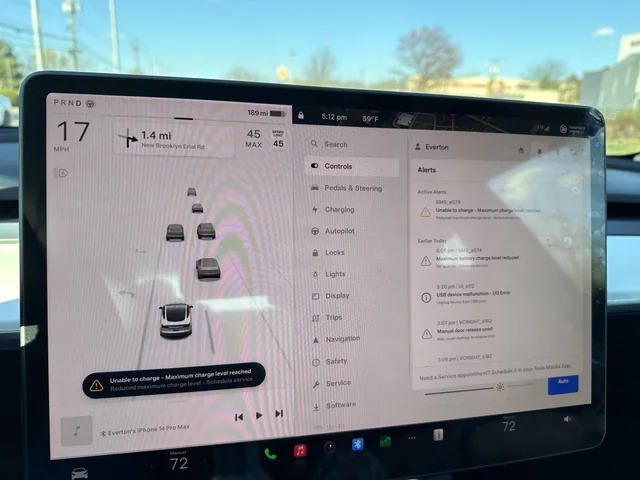
Pay attention to warning messages displayed on the instrument panel or touchscreen. Notifications related to the high-voltage battery, charging system, thermal management system, or power conversion components should never be ignored. Unlike normal phantom drain, these alerts often indicate a system fault that requires professional diagnosis through Tesla Service.
If the vehicle continues losing a significant amount of charge after disabling unnecessary features, confirming normal charging behavior, and reviewing energy usage, a deeper inspection is recommended. Tesla Service technicians can perform battery diagnostics, analyze Battery Management System data, and evaluate individual battery modules to determine whether the issue is caused by software, electrical components, or the high-voltage battery itself. Completing these basic diagnostic steps before scheduling service helps eliminate common causes and allows technicians to identify genuine hardware problems more efficiently.
How Do You Fix a Tesla That Is Not Holding Charge?
Fixing a Tesla that is not holding charge depends on identifying the underlying cause rather than replacing battery components immediately. Most cases of excessive battery loss are resolved by adjusting vehicle settings, improving charging habits, updating software, or recalibrating battery estimates. If these solutions do not improve charge retention, a professional inspection may be necessary.
The first step is to disable features that consume energy while the vehicle is parked. Sentry Mode, Cabin Overheat Protection, Climate Control, Dog Mode, and frequent remote access through the Tesla mobile app all prevent the vehicle from entering its low-power sleep state. If these features are not required, turning them off can significantly reduce phantom drain and improve overnight charge retention. After making these changes, monitor battery loss for several days to determine whether energy consumption returns to a normal level.
Optimizing charging settings is another effective solution. Tesla recommends setting the daily charge limit to approximately 80% for most driving situations instead of charging to 100% every day. Maintaining the battery within a moderate state of charge reduces long-term stress on lithium-ion cells and allows the Battery Management System to estimate battery capacity more accurately. Charging to 100% should generally be reserved for long-distance trips when maximum driving range is required.
Keeping the vehicle software up to date is equally important. Tesla regularly releases over-the-air software updates that improve battery management, optimize energy consumption, and correct known system issues. Some updates also refine Battery Management System algorithms, resulting in more accurate range estimates and improved charge retention. If the vehicle has a pending software update, install it before performing additional troubleshooting because the update may resolve the issue automatically.
Recalibrating the Battery Management System can also improve battery estimation if the displayed range appears inconsistent with actual performance. The BMS calculates available battery capacity by analyzing charging history, battery voltage, and driving patterns. Over time, these calculations may become less accurate, particularly if the battery is repeatedly charged within a narrow range. Allowing the battery to complete several normal charging cycles and following Tesla’s recommended charging practices helps the system recalibrate without affecting battery health.
Daily driving and charging habits have a direct impact on battery performance. Frequent hard acceleration, high-speed highway driving, aggressive climate control usage, and repeated DC fast charging increase overall energy consumption and place additional thermal stress on the battery pack. Smoother acceleration, moderate cruising speeds, scheduled charging during off-peak hours, and regular AC charging at home help improve efficiency while supporting long-term battery health.
Environmental conditions should also be considered before assuming a battery problem exists. Extremely cold temperatures reduce the efficiency of lithium-ion batteries and require additional energy to warm the battery pack before driving or charging. Parking the vehicle inside a garage, using scheduled preconditioning while the vehicle remains plugged in, and allowing the battery to reach its optimal operating temperature before driving can reduce unnecessary energy loss during winter.
If excessive battery drain continues after disabling unnecessary features, confirming proper charging behavior, updating software, and improving charging habits, the problem may involve the Battery Management System, charging hardware, or the high-voltage battery itself. At this stage, scheduling a Tesla Service appointment is the most appropriate solution. Service technicians can access detailed diagnostic data that is not available to vehicle owners and determine whether a software correction, hardware repair, or battery replacement is required.
When Should You Contact Tesla Service?
Most cases of battery drain can be resolved by changing vehicle settings or improving charging habits, but some situations require professional diagnosis. If your Tesla continues losing a significant amount of charge after disabling unnecessary features, updating the software, and confirming that charging sessions complete normally, the problem may involve the Battery Management System, charging hardware, or the high-voltage battery.
Warning messages displayed on the touchscreen are the clearest indication that professional service is required. Notifications related to the high-voltage battery, charging system, thermal management system, or reduced vehicle power should not be ignored because they may indicate faults that cannot be diagnosed through normal vehicle settings. Continuing to drive with these warnings may affect vehicle performance and, in some cases, limit charging capability.
Unexpected charging behavior is another sign that Tesla Service should inspect the vehicle. Charging sessions that stop without explanation, repeated failures to reach the selected charge limit, or inconsistent charging speeds across different charging stations may point to problems with the onboard charger, charging port, battery electronics, or external charging equipment. Testing the vehicle with multiple charging methods helps determine whether the issue is vehicle-related or charger-related.
Abnormal battery loss that appears suddenly also deserves professional attention. If the vehicle begins losing 10% or more of its battery overnight despite Sentry Mode, Cabin Overheat Protection, and other background features being disabled, the cause is unlikely to be normal phantom drain. Tesla technicians can access diagnostic information unavailable to owners, including battery cell balancing data, Battery Management System logs, thermal system performance, and fault codes that help identify the exact source of the problem.
Battery warranty coverage depends on the Tesla model and battery configuration, but defects resulting from manufacturing or component failure are generally covered during the warranty period. Normal battery degradation, however, is expected over time and is not considered a defect unless battery capacity falls below Tesla’s warranty threshold. If you suspect a warranty issue, scheduling an inspection allows Tesla to determine whether the battery qualifies for repair or replacement.
How Can You Prevent Future Battery Charge Loss?
Preventing unnecessary battery loss begins with adopting charging habits that reduce stress on the battery while minimizing background energy consumption. Most Tesla owners experience stable battery performance for many years by following Tesla’s recommended charging practices and limiting features that consume power when the vehicle is parked.
Set the daily charging limit to around 80% for routine driving unless additional range is needed for a long trip. Keeping the battery within a moderate state of charge reduces long-term battery stress while giving the Battery Management System more consistent operating conditions. Avoid leaving the vehicle at either 100% or a very low battery level for extended periods because both situations accelerate battery aging.
Use AC charging as the primary charging method whenever possible. Home charging through a Wall Connector or Mobile Connector generates less heat than repeated DC fast charging and places less stress on battery cells over time. Supercharging remains an excellent solution for road trips, but relying on it as the primary charging method every day can increase battery wear over the life of the vehicle.
Reduce phantom drain by reviewing features that remain active while the vehicle is parked. Disable Sentry Mode in trusted locations, turn off Cabin Overheat Protection when it is unnecessary, close third-party applications that frequently wake the vehicle, and avoid checking the Tesla mobile app more often than needed. Allowing the vehicle to enter sleep mode significantly reduces background power consumption.
Protect the battery from extreme temperatures whenever possible. Parking in a garage during very hot or cold weather reduces the energy required for battery heating or cooling. If cold weather is unavoidable, keep the vehicle plugged in and use scheduled preconditioning before departure so the battery reaches its optimal operating temperature using external power instead of stored battery energy.
Regular software updates also contribute to long-term battery performance. Tesla frequently improves energy management algorithms, charging efficiency, thermal control, and Battery Management System calibration through over-the-air updates. Installing these updates promptly ensures the vehicle benefits from the latest battery optimization features and performance improvements.
Following these practices helps maximize battery charge retention, reduce unnecessary energy consumption, and extend the lifespan of the high-voltage battery. While no lithium-ion battery can completely avoid gradual degradation, proper charging, sensible vehicle settings, and routine software updates significantly reduce the likelihood of excessive battery loss throughout the vehicle’s lifetime.
Frequently Asked Questions
Is it normal for a Tesla to lose charge overnight?
Yes. A Tesla normally loses a small amount of battery charge while parked because several systems continue operating in the background. The Battery Management System, cellular connection, thermal management, and security features all require power even when the vehicle is not being driven. A daily battery loss of around 1–2% is generally considered normal under typical conditions. If the vehicle consistently loses significantly more charge with background features disabled, further diagnosis is recommended.
Why does my Tesla lose charge while parked?
A Tesla loses charge while parked because the vehicle never shuts down completely. Features such as Sentry Mode, Cabin Overheat Protection, scheduled climate control, battery temperature management, and frequent communication with the Tesla mobile app continue drawing electricity. External factors including cold weather, software updates, and third-party applications connected through the Tesla API can also increase energy consumption while the vehicle is idle.
Should I charge my Tesla to 100% every day?
No. Charging to 100% every day is unnecessary for most Tesla owners and may increase long-term battery stress. Tesla recommends setting the daily charge limit to approximately 80% for routine driving and reserving a full charge for long-distance travel. Maintaining a moderate state of charge helps preserve battery health while still providing sufficient driving range for everyday use.
Does Supercharging damage the battery?
Occasional Supercharging does not damage a healthy Tesla battery because the Battery Management System carefully controls charging speed and battery temperature. However, relying on DC fast charging as the primary charging method for many years can contribute to faster battery degradation compared with regular AC charging. Home charging through a Wall Connector or Mobile Connector remains the preferred option for daily charging because it generates less heat and places less stress on battery cells.
How much battery drain is considered normal each day?
Battery drain varies according to vehicle settings, ambient temperature, and parking conditions, but approximately 1–2% per day is considered normal for most Tesla vehicles. Higher battery loss may occur when Sentry Mode, Cabin Overheat Protection, or climate control remains active. If battery consumption consistently exceeds expected levels after these features are disabled, reviewing energy usage or scheduling a Tesla Service inspection is recommended.