Apple CarPlay has become an important feature for modern drivers. It helps Honda CR-V owners access navigation, make hands free calls, listen to music, and use apps safely while driving. However, many drivers face Honda CR-V Apple CarPlay Not Working issues that interrupt their daily journeys.
A failed CarPlay connection can happen without warning. Your iPhone may not appear on the screen, the system may disconnect randomly, or the infotainment display may stop responding. These problems can quickly become frustrating, especially when you depend on Apple Maps, calls, or music during your drive.
Several factors can cause Apple CarPlay problems in a Honda CR-V. A faulty USB cable, incorrect iPhone settings, outdated software, or wireless connection errors can prevent the system from working properly. The Honda infotainment system can also experience temporary glitches that affect device communication.
The good news is that most CarPlay issues do not require expensive repairs. You can solve many problems with simple troubleshooting steps. This guide explains the common causes of Honda CR-V Apple CarPlay Not Working issues and provides practical solutions to restore your connection. Whether you use wired or wireless Apple CarPlay, these methods can help you fix the problem quickly.
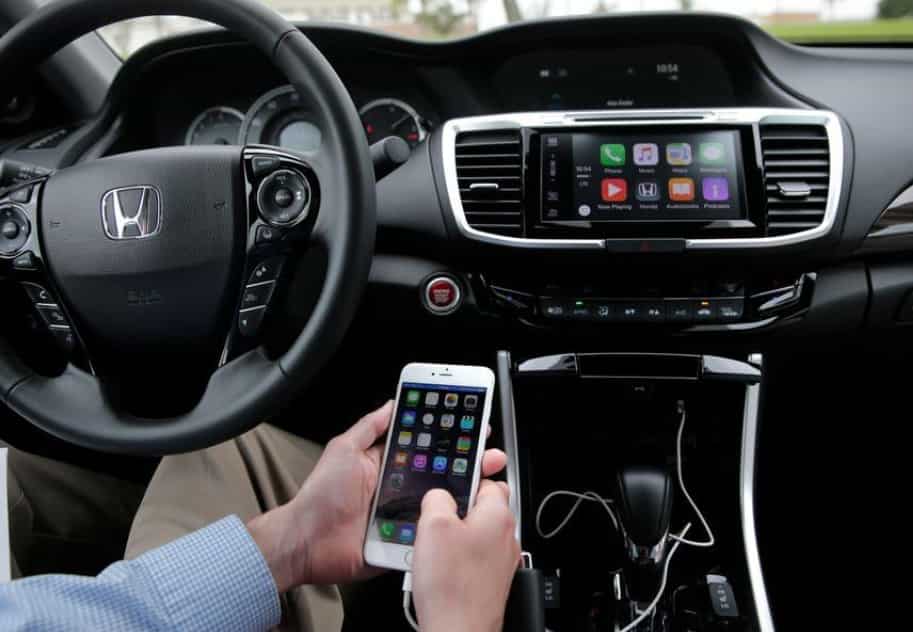
Why Is Honda CR-V Apple CarPlay Not Working?
Many Honda CR-V owners notice Apple CarPlay problems when the system stops connecting with their iPhone. The issue can appear in different ways, depending on the source of the problem. Some drivers cannot see the Apple CarPlay option on the display, while others experience random disconnections during a trip.
One common sign involves the iPhone failing to connect with the Honda CR-V infotainment system. The vehicle may charge the phone through the USB port, but Apple CarPlay does not launch. In other cases, the system connects successfully but loses access to navigation, music, or phone features after a short time.
Some users also report a frozen screen, missing CarPlay icons, or no audio output. These symptoms often make drivers think they need expensive repairs. However, many issues come from simple connection errors, software settings, or temporary system problems.
Honda CR-V Apple CarPlay works through communication between several components. The iPhone, USB cable or wireless connection, Bluetooth system, Wi Fi connection, and Honda infotainment software must work together. If one part fails, the entire CarPlay experience can stop.
Understanding these symptoms helps you identify the right solution. Instead of replacing hardware immediately, you should first check the most common causes. A quick inspection of your phone settings, connection method, and infotainment system can often restore Apple CarPlay without professional assistance.
Common Causes of Honda CR-V Apple CarPlay Connection Problems
Honda CR-V Apple CarPlay issues can come from several sources. Finding the correct cause helps you choose the right fix instead of trying random solutions. Most connection problems relate to the iPhone, the connection method, or the vehicle infotainment system.
A damaged USB cable remains one of the most common reasons Apple CarPlay fails. Some cables can charge an iPhone but cannot transfer the data required for CarPlay. A loose connection or a faulty USB port can also prevent the Honda CR-V from recognizing the device.
Incorrect iPhone settings can create similar problems. Apple CarPlay requires certain permissions to work correctly. If Siri is disabled, CarPlay access is restricted, or the iPhone blocks vehicle connections, the system may not start properly.
Software compatibility also affects Apple CarPlay performance. An outdated iOS version can create connection errors, especially when the vehicle uses an older infotainment system. Honda CR-V software updates can also improve system stability and device compatibility.
Wireless Apple CarPlay users may face additional connection problems. The system depends on both Bluetooth and Wi Fi communication. Interference, failed pairing, or old connection profiles can cause frequent disconnections.
The Honda infotainment system itself can sometimes create problems. Temporary software glitches, frozen displays, or incorrect system settings may stop Apple CarPlay from working. Checking each possible cause step by step allows you to find the problem faster and avoid unnecessary repair costs.
How to Fix Honda CR-V Apple CarPlay Not Working Step by Step
When Honda CR-V Apple CarPlay stops working, you can solve many problems with a few simple troubleshooting steps. Start with the easiest solutions before checking advanced settings or visiting a repair center.
First, restart both your iPhone and Honda CR-V infotainment system. A simple restart can remove temporary software errors that affect the connection between your phone and vehicle.
Next, check your iPhone CarPlay settings. Open the Settings app, select General, and choose CarPlay. Make sure your Honda CR-V appears in the list and allows connection. You should also confirm that Siri remains active because Apple CarPlay depends on Siri for many features.
If you use wired Apple CarPlay, inspect your USB cable carefully. Use an Apple certified cable that supports data transfer. A cable that only provides charging power cannot establish a proper CarPlay connection.
For wireless Apple CarPlay users, remove the existing Bluetooth and Wi Fi connection between your iPhone and Honda CR-V. Then pair both devices again. This process can fix connection errors caused by outdated pairing information.
You can also update your iPhone software to the latest iOS version. New updates often improve compatibility and fix known CarPlay problems. If the issue continues, reset the Honda infotainment system and reconnect your device.
Following these steps helps you identify whether the problem comes from your phone, connection method, or vehicle system. In many cases, these simple fixes can restore Apple CarPlay without professional help.
Honda CR-V Wireless Apple CarPlay Not Working: What You Should Check
Wireless Apple CarPlay gives Honda CR-V drivers a convenient way to connect their iPhones without using a cable. However, wireless connections can sometimes create problems that do not appear with wired CarPlay. When Honda CR-V Wireless Apple CarPlay stops working, the issue usually comes from Bluetooth, Wi Fi, device pairing, or software settings.
The first thing to check is the Bluetooth connection between your iPhone and Honda CR-V. Wireless Apple CarPlay needs Bluetooth to start the connection process. If your phone cannot communicate with the vehicle, the system will not launch properly.
You should also check the Wi Fi connection on your iPhone. Wireless CarPlay uses Wi Fi technology to transfer data between your phone and the infotainment system. A weak connection or network conflict can cause delays, failed connections, or frequent disconnections.
Old pairing information can also create problems. If you recently changed your iPhone, updated iOS, or connected another device, your Honda CR-V may keep outdated connection data. Removing the previous pairing and setting up the connection again can often solve the issue.
Some drivers use wireless CarPlay adapters to add wireless features to older Honda CR-V models. These adapters can improve convenience, but compatibility issues may occur. Always check whether the adapter supports your specific vehicle system and iPhone model.
Before visiting a dealer, review your Bluetooth settings, Wi Fi connection, and paired devices. These simple checks can help restore wireless Apple CarPlay and improve your overall driving experience.
Honda CR-V Apple CarPlay Compatibility by Model Year
Before troubleshooting Apple CarPlay problems, you should confirm that your Honda CR-V supports this feature. Different model years use different infotainment systems, and compatibility can affect how your iPhone connects with the vehicle.
Honda introduced Apple CarPlay support on selected CR-V models starting with the 2017 model year. Since then, newer generations have continued to improve smartphone integration with faster performance and more advanced connectivity features.
Many Honda CR-V models from 2017 to 2022 support wired Apple CarPlay through the vehicle USB connection. These models allow drivers to access navigation, music, messages, and phone functions through the Honda display screen.
Newer Honda CR-V models, including recent 2023, 2024, and 2025 versions, offer improved infotainment technology. Some versions support wireless Apple CarPlay, which allows drivers to connect their iPhones without a physical cable.
However, compatibility does not always guarantee a perfect connection. An older Honda CR-V system may experience problems with newer iPhone models or updated iOS versions. Software differences between the vehicle and phone can affect performance.
If your Honda CR-V Apple CarPlay is not working, check your vehicle model year and infotainment system first. Knowing your system capabilities helps you understand whether the issue comes from compatibility, settings, or a technical problem.
Before replacing cables or visiting a repair shop, confirm that your Honda CR-V supports the type of Apple CarPlay connection you want to use. This simple step can save time and help you find the correct solution.
When Should You Take Your Honda CR-V to a Dealer or Repair Shop?
Most Honda CR-V Apple CarPlay problems come from simple connection issues, settings, or software errors. However, some situations require professional support. Knowing when to stop troubleshooting can help you avoid unnecessary time and prevent further damage to the vehicle system.
You should consider professional assistance if your Honda CR-V does not recognize any iPhone after testing different cables and devices. This situation may indicate a problem with the USB port, infotainment hardware, or internal vehicle software.
A damaged USB port can prevent wired Apple CarPlay from working correctly. If the port cannot transfer data or has physical damage, a technician may need to inspect or replace the component.
You may also need expert help when the infotainment screen freezes, restarts repeatedly, or stops responding. These symptoms can point to deeper software or hardware problems within the Honda Display Audio system.
Before visiting a dealer, prepare important information about your issue. Note your Honda CR-V model year, iPhone model, iOS version, and whether you use wired or wireless Apple CarPlay. This information helps technicians identify the cause faster.
Professional support does not always mean expensive repairs. A proper diagnosis can prevent unnecessary part replacements and save money in the long term. However, completing basic troubleshooting first allows you to understand the problem and explain the situation more clearly.
Frequently Asked Questions About Honda CR-V Apple CarPlay Issues
Why is my Honda CR-V Apple CarPlay not working?
Honda CR-V Apple CarPlay may stop working because of connection problems, incorrect iPhone settings, faulty cables, outdated software, or infotainment system errors. Checking each part of the connection process can help you find the cause quickly.
How do I reset Apple CarPlay on my Honda CR-V?
To reset Apple CarPlay, remove your Honda CR-V from the CarPlay list on your iPhone. Then delete the iPhone connection from the vehicle Bluetooth settings. After removing the old connection, pair both devices again.
Why does my Honda CR-V keep disconnecting from Apple CarPlay?
Frequent disconnections usually happen because of unstable USB connections, wireless interference, outdated software, or Bluetooth and Wi Fi pairing problems. Testing another cable or reconnecting your device can often solve the issue.
Why is my iPhone not connecting to Honda CR-V Apple CarPlay?
Your iPhone may not connect because CarPlay permissions are disabled, Siri is turned off, or the vehicle connection profile has errors. Check your iPhone settings and confirm that your Honda CR-V has permission to use CarPlay.
Does Honda CR-V support wireless Apple CarPlay?
Some newer Honda CR-V models support wireless Apple CarPlay, while older models typically require a USB connection. Check your specific model year and infotainment system to confirm compatibility.
Can an iOS update cause Apple CarPlay problems?
Yes, an iOS update can sometimes create temporary compatibility issues. Updating both your iPhone and Honda infotainment software can help improve stability and restore normal CarPlay performance.
Conclusion
Honda CR-V Apple CarPlay Not Working issues can interrupt your driving experience, but most problems do not require expensive repairs. In many cases, the cause comes from simple factors such as incorrect iPhone settings, damaged cables, outdated software, or connection errors between your phone and vehicle.
The best approach is to troubleshoot the problem step by step. Start with basic checks like restarting your devices, reviewing CarPlay settings, testing your USB cable, and reconnecting your iPhone. These solutions can resolve many common Apple CarPlay problems within minutes.
If your Honda CR-V still cannot connect after trying these methods, the issue may involve the infotainment system or vehicle hardware. A professional inspection can help identify deeper problems and prevent unnecessary replacements.
Understanding how Apple CarPlay works with your Honda CR-V allows you to solve issues faster and maintain a better driving experience. Whether you use wired or wireless CarPlay, regular software updates and proper connection settings can improve system reliability.
Have you experienced Honda CR-V Apple CarPlay problems before? Share your Honda CR-V model year, iPhone model, and the issue you encountered. Your experience may help other drivers find the right solution.