A Dodge Ram volume knob that is not working usually points to a faulty volume knob or rotary encoder, a temporary Uconnect software problem, a loose electrical connection, a power issue, or an internal radio/head-unit fault. The exact cause depends on how the volume control behaves and whether other audio controls still work.
The symptoms provide the fastest way to narrow down the problem. The knob may turn without changing the volume, work only intermittently, make the volume jump between levels, or increase the volume when turned in the opposite direction. In other cases, the physical knob stops responding while the steering-wheel volume controls continue to work. These symptoms do not necessarily indicate the same failure.
Start with the least invasive checks before removing or replacing the radio. Test the steering-wheel and touchscreen audio controls, check whether other Uconnect functions respond normally, and restart the infotainment system when the symptoms indicate a software fault. If the problem remains, inspect the physical volume control, electrical connections, radio power supply, and head unit. The diagnostic steps below identify the most likely causes and the appropriate fixes for each type of Dodge Ram volume-control failure.
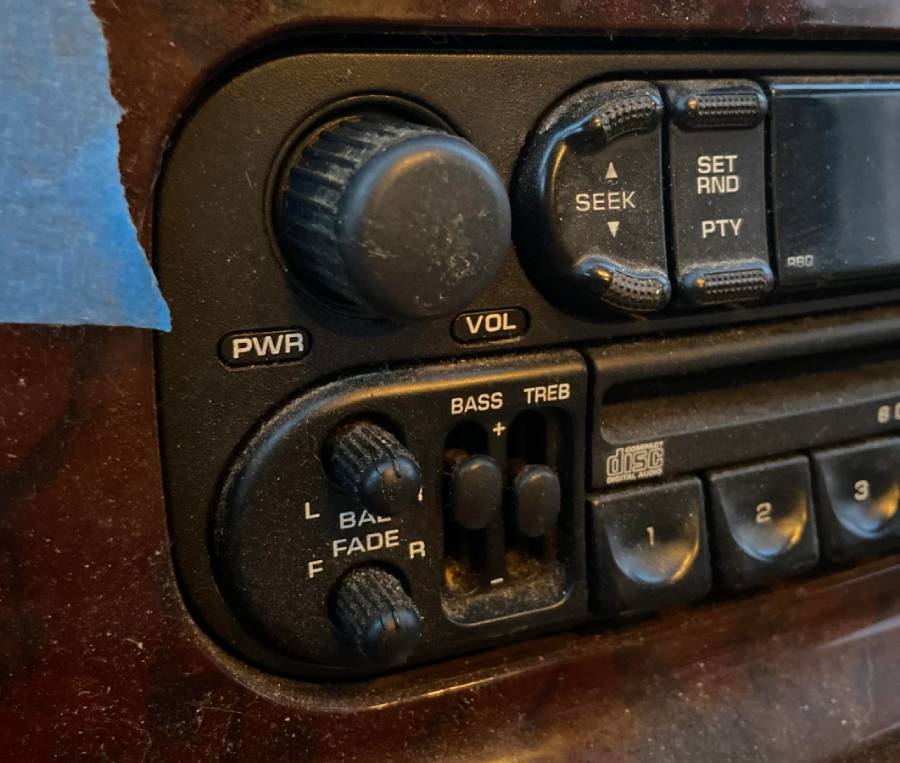
Why Is My Dodge Ram Volume Knob Not Working?
A Dodge Ram volume knob can stop working because of 5 main problems: a faulty volume knob or rotary encoder, a Uconnect software glitch, a loose electrical connection, a radio power problem, or an internal head-unit failure. The symptom pattern helps distinguish these causes because a damaged physical control behaves differently from a software or power-related failure.
Start by determining whether the problem affects only the physical knob or the entire audio-control system. A knob that fails while the steering-wheel volume controls still work points toward a localized control problem. If the knob, steering-wheel controls, touchscreen, and other radio functions fail together, the fault is more likely to involve the infotainment system, its power supply, or the head unit.
Can a Faulty Volume Knob or Rotary Encoder Cause the Problem?
A faulty volume knob or rotary encoder can cause the Dodge Ram radio to ignore, skip, or incorrectly interpret volume adjustments. The physical knob provides an input that the radio uses to determine whether the driver wants to increase or decrease the audio level. Wear or failure in this control can prevent the head unit from receiving a consistent input.
A failing control does not always stop working completely. The volume may jump several levels after a small turn, remain unchanged during part of the rotation, or move in the wrong direction. For example, turning the knob clockwise may occasionally lower the volume instead of raising it. Intermittent responses of this type make the physical knob or its underlying control mechanism a stronger diagnostic target than the speakers because the speakers reproduce the output rather than interpret the knob movement.
The condition of the alternative volume controls provides additional evidence. If the steering-wheel buttons can reliably raise and lower the volume while the dashboard knob cannot, the audio system is still capable of processing volume commands. Diagnosis should therefore focus first on the knob and its control interface rather than immediately replacing the entire radio.
Can a Uconnect Software Glitch Stop the Volume Knob From Working?
A Uconnect software malfunction can make the volume knob temporarily unresponsive even when the physical control is not damaged. The infotainment system processes multiple user inputs, so a frozen or unstable system can prevent a valid knob input from producing the expected volume change.
Software-related failures are more likely when the volume problem occurs together with other infotainment symptoms. Examples include a touchscreen that responds slowly, menus that freeze, delayed audio controls, an unresponsive display, or a problem that appears immediately after the system starts. A control that begins working normally after the infotainment system restarts also supports a temporary software problem rather than permanent mechanical damage.
The distinction matters because replacing the knob or radio before testing the software state can lead to unnecessary repairs. A system restart is therefore one of the first troubleshooting steps when several Uconnect functions behave abnormally. Reset procedures can differ by radio, Uconnect version, and model year, so the correct procedure should be verified for the specific Ram rather than assuming one button combination works for every vehicle.
Can a Loose Connector or Wiring Problem Affect the Volume Control?
A loose connector, damaged wire, or poor electrical connection can interrupt communication between the volume control and the radio system. This type of fault becomes more relevant when the knob works intermittently or the problem started after dashboard, radio, or other electrical work.
Electrical connections can create inconsistent symptoms because vibration and vehicle movement may change the quality of the connection. For example, the knob may work normally during one drive but fail during another, or the control may respond when the dashboard area is disturbed. Multiple controls on the same interface may also malfunction when they share a connector or circuit.
Inspecting the wiring requires more caution than performing a software restart or testing the steering-wheel controls. The correct wiring layout and connector configuration can vary between Ram models, model years, and radio systems. For that reason, electrical diagnosis should follow the wiring information for the specific vehicle rather than relying solely on wire colors or connector positions from another Ram.
Can a Fuse or Power Supply Problem Cause the Volume Knob to Stop Working?
A fuse or power-supply fault can affect the radio system, but it is a less direct explanation when the radio works normally and only the volume knob has failed. A blown fuse generally affects the circuit receiving power rather than selectively disabling the mechanical movement of one control.
Check for broader power-related symptoms before treating the fuse as the primary cause. A radio that does not turn on, repeatedly reboots, loses its display, or has several nonfunctional controls provides stronger evidence of a power-supply problem. By contrast, normal audio playback combined with working steering-wheel controls and one dead dashboard knob makes an isolated control fault more plausible.
Fuse locations and assignments differ by Ram model and model year. Use the vehicle’s fuse information to identify the circuit associated with the radio or infotainment system before removing a fuse. A fuse that repeatedly fails should not simply be replaced multiple times because repeated failure can indicate an underlying electrical problem that requires diagnosis.
Can a Faulty Radio or Head Unit Cause the Volume Problem?
An internal radio or head-unit fault can cause the volume knob to stop working when the unit no longer processes the control input correctly. This diagnosis becomes more relevant after software, physical-control, connection, and power problems have been checked.
Head-unit problems can affect more than volume adjustment. The radio may freeze, restart unexpectedly, lose multiple controls, produce inconsistent audio behavior, or stop responding through several input methods. These broader symptoms separate a possible internal radio failure from an isolated worn knob.
Replacing the complete head unit should therefore not be the first repair for a nonworking volume knob. Test alternative volume controls, restart the infotainment system when appropriate, and investigate the physical control and electrical connections first. Head-unit repair or replacement becomes more reasonable when diagnosis shows that the unit itself cannot consistently receive or process control inputs.
How Can You Diagnose a Dodge Ram Volume Knob That Is Not Working?
Diagnose a Dodge Ram volume knob by checking 4 things: how the knob responds when turned, whether the steering-wheel volume controls work, whether another available audio control works, and whether other radio or Uconnect functions are affected. These checks separate an isolated knob problem from a broader infotainment, electrical, or head-unit fault without immediately removing the radio.
Perform the checks in order because each result narrows the diagnostic path. If alternative volume controls work normally, the radio can still receive and process volume commands, which shifts attention toward the physical knob or its control interface. If several audio and infotainment controls fail together, investigate the Uconnect system, radio power, electrical connections, and head unit instead.
What Happens When You Turn the Volume Knob?
The way the volume responds when you turn the knob helps identify whether the control is producing no input, intermittent input, or incorrect input. Do not treat every nonworking volume knob as the same failure because different response patterns point toward different parts of the system.
There are 5 useful symptom patterns to check. No volume change at any knob position indicates that the input is not being recognized. Intermittent operation indicates that the input reaches the system inconsistently. Volume that jumps several levels suggests irregular control signals. Volume that changes in the opposite direction indicates that the system is receiving an incorrect directional input. A knob that responds only after repeated turns also points toward an inconsistent physical or electrical input.
For example, a radio that plays audio normally but changes from volume level 10 to 16 after a small knob movement is producing a different symptom from a radio that completely ignores the knob. The first symptom gives stronger reason to investigate how the knob input is being interpreted, while the second requires checking whether the input reaches the system at all.
Do the Steering Wheel Volume Controls Still Work?
Test the steering-wheel volume controls because working steering-wheel buttons can help isolate the problem to the dashboard volume control rather than the entire audio system. Both controls ultimately request a change in audio level, but they provide that request through different user-input points.
Turn on an audio source at a safe volume and test both volume-up and volume-down buttons on the steering wheel. If both buttons consistently change the audio level while turning the dashboard knob produces no response, the radio is still capable of changing volume from another control. The physical knob, its control mechanism, or the interface carrying its input therefore becomes a stronger diagnostic target.
If neither the steering-wheel controls nor the dashboard knob changes the volume, broaden the diagnosis. Check whether the radio responds to other commands and whether the infotainment system is frozen or behaving abnormally. Failure of multiple controls provides more evidence of a system-level problem than failure of one physical knob.
Does the Touchscreen Volume Control Still Work?
Test another available volume-control method when the specific Ram radio or infotainment configuration provides one. A working alternative control shows that the system can still execute a volume command even though the dashboard knob does not provide a usable input.
The available controls depend on the installed radio and infotainment configuration, so this test should not assume that every Dodge Ram has an identical touchscreen volume interface. Use the controls actually provided by the vehicle. The diagnostic principle remains the same: compare the failed physical knob with another method that commands the same audio function.
For example, if an available on-screen audio control and the steering-wheel buttons both adjust volume correctly but the physical knob does nothing, replacing speakers or diagnosing the amplifier first would not match the symptom. The failure is more closely associated with the knob input path because the system is already demonstrating that it can change output volume.
Are Other Radio or Uconnect Functions Also Not Working?
Check other radio and Uconnect functions to determine whether the failure is isolated to the volume knob or affects the infotainment system more broadly. Multiple simultaneous control problems increase the likelihood that the fault extends beyond the physical knob.
Test functions that are easy to observe without disassembling the dashboard. Check whether the display responds normally, audio sources can be selected, available touchscreen functions respond, and other physical controls operate as expected. Also note whether the system freezes, responds with a delay, restarts, or behaves differently after the vehicle is restarted.
Use the results to divide the problem into 2 diagnostic paths. An otherwise normal radio with a single nonresponsive volume knob points first toward the knob and its input mechanism. A volume problem accompanied by a frozen display, several failed controls, repeated radio restarts, or other infotainment abnormalities requires broader investigation of the Uconnect system, radio power supply, electrical connections, or head unit.
The diagnosis should therefore identify the scope of the failure before any component is replaced. A single failed input and a malfunctioning infotainment system can produce the same initial complaint—no response from the volume knob—but they require different repairs.
How Do You Fix a Dodge Ram Volume Knob That Is Not Working?
Fix a Dodge Ram volume knob by starting with the least invasive solution and progressing to component-level diagnosis only when the problem remains. The repair sequence is to restart or reset the radio when the symptoms indicate a software problem, inspect and clean the physical knob, check the radio power circuit when broader power symptoms exist, inspect electrical connections, and repair the knob or control assembly when diagnosis confirms a hardware fault.
Do not replace the head unit simply because the dashboard volume knob stops responding. A working radio, functional steering-wheel volume controls, and normal audio output indicate a different failure scope from a radio that freezes, loses power, or has several nonresponsive controls. The repair should match the symptoms identified during diagnosis.
How Do You Restart or Reset the Dodge Ram Radio?
Restart the Dodge Ram radio first when the volume problem appears together with freezing, delayed controls, an unresponsive interface, or other temporary infotainment symptoms. A restart allows the system to initialize its control functions again without immediately treating the volume knob as a failed hardware component.
Use the restart or reset procedure specified for the installed radio and vehicle. Dodge Ram and Ram trucks have used different radio and Uconnect configurations across model years, so one button combination should not be treated as a universal reset procedure. Confirm the applicable procedure before performing a reset.
After the system restarts, test the physical volume knob and alternative controls separately. A knob that returns to normal operation after the restart supports a temporary system or software fault. A knob that remains completely unresponsive while the steering-wheel volume controls work consistently shifts the diagnosis back toward the physical knob or its control interface.
How Do You Clean a Dodge Ram Volume Knob?
Clean the exterior of the volume knob when dirt or debris interferes with its movement, but do not apply liquid directly into the radio or head unit. Exterior cleaning addresses contamination around the knob without exposing electronic components to unnecessary moisture.
Turn the vehicle and radio off before cleaning the control. Remove loose dust from the perimeter of the knob and clean accessible exterior surfaces with a suitable non-abrasive method. The knob should rotate without being physically obstructed by accumulated debris.
Cleaning has limited value when the knob rotates freely but sends incorrect commands. For example, a knob that changes the volume in the wrong direction, skips levels, or works only at certain positions may have an internal control problem rather than exterior contamination. Further diagnosis of the knob mechanism or control assembly is required when basic exterior cleaning does not change the symptom.
How Do You Check the Radio Fuse?
Check the radio fuse when the volume problem occurs with power-related symptoms such as a dead radio, blank display, repeated shutdowns, or several nonfunctional radio controls. A fuse is less likely to explain an isolated volume-knob failure when the radio continues playing normally and alternative volume controls still work.
Identify the correct fuse using information for the specific Ram model, model year, and equipment configuration. Fuse assignments can differ between vehicles, so a fuse number from another Ram should not be assumed to apply to the vehicle being diagnosed.
Inspect the appropriate fuse and replace a failed fuse only with the specified type and rating. Do not install a higher-rated fuse to prevent it from blowing. A replacement fuse that fails again indicates that the circuit requires further electrical diagnosis rather than repeated fuse replacement.
How Do You Check the Volume Knob and Radio Connections?
Inspect the volume-control and radio connections when the knob works intermittently, the problem follows dashboard or radio work, or several controls on the same interface behave inconsistently. A loose or damaged electrical connection can interrupt the signal between a physical control and the system that processes its input.
Begin with non-invasive observations before removing dashboard components. Note whether vibration, vehicle movement, or previous radio work corresponds with the failure. These details can strengthen the case for a connection problem without unnecessary disassembly.
Accessing connectors behind the radio or control panel requires greater care because trim-removal procedures, connector layouts, and electrical configurations vary by vehicle. Use service information appropriate to the specific model and model year before disconnecting components. Avoid probing unknown terminals or applying power directly to a connector without an applicable wiring diagram.
Once accessible, inspect relevant connectors for incomplete seating, damaged locking mechanisms, bent or damaged terminals, corrosion, or visible wiring damage. Correct a confirmed connection problem before replacing the radio because an otherwise functional head unit cannot reliably process a control signal that does not reach it.
How Do You Fix a Faulty Volume Knob or Rotary Encoder?
Repair or replace the volume-control component when diagnosis confirms that the physical knob or its input mechanism is faulty. This conclusion is strongest when the radio operates normally, alternative volume controls consistently change the audio level, and restarting the infotainment system does not restore the dashboard knob.
The required repair depends on the construction of the installed radio or control assembly. On some configurations, servicing the control may involve work on the radio faceplate, control board, or related assembly rather than simply pulling off the visible knob and installing another one. Component availability and serviceability therefore need to be verified for the specific unit.
Do not assume that replacing the plastic knob itself repairs an electronic input failure. The visible knob is the part the driver touches, while the underlying mechanism is responsible for translating rotation into an electrical or electronic command. Replacing only the exterior piece will not correct a failed internal control mechanism.
Use head-unit replacement as a later repair option when the failed control is integrated into a non-serviceable unit or diagnosis identifies a broader internal radio fault. This avoids replacing an expensive assembly when the problem is limited to a repairable control, connector, or temporary infotainment malfunction.
How Do You Reset the Uconnect System When the Volume Knob Does Not Work?
Reset the Uconnect system when the volume knob failure occurs with software-related symptoms such as a frozen interface, delayed control response, or other infotainment functions that stop responding correctly. A reset is most useful when the problem originates from the system processing the knob input rather than from physical damage to the knob or its underlying control mechanism.
There are 2 reset levels to consider: a soft restart and a factory reset. Start with the least disruptive option because a temporary software fault does not justify immediately erasing stored settings. The exact procedure depends on the installed Uconnect system, radio configuration, and model year, so use the procedure specified for the vehicle rather than applying one reset sequence to every Ram truck.
When Should You Try a Uconnect Soft Reset?
Try a Uconnect soft reset when the volume knob stops responding while the infotainment system shows signs of a temporary software malfunction. Relevant signs include a frozen screen, delayed button response, audio controls that stop responding after startup, or functions that return after the vehicle or infotainment system is restarted.
A soft restart is useful because it tests whether the failure is temporary without immediately changing hardware. After restarting the system, play an audio source and test the dashboard knob, steering-wheel controls, and other available audio controls separately. This comparison determines whether the restart restored the complete volume-control system or only some input methods.
For example, a volume knob that immediately works normally after the infotainment system restarts provides evidence that the failure involved system operation rather than a permanently failed physical control. If the steering-wheel buttons work after the restart but the dashboard knob remains unresponsive, continue diagnosing the knob and its input path.
When Should You Perform a Factory Reset?
Perform a factory reset only after less disruptive troubleshooting has failed and the symptoms still indicate an infotainment-system problem. A factory reset is different from a normal restart because it can remove stored settings and return supported system configurations to their default state.
Before using this option, confirm what information or preferences the installed system will erase and use the procedure applicable to that Uconnect version. A factory reset should not be used repeatedly to compensate for an obvious mechanical problem. A knob that skips volume levels, works only at certain rotational positions, or sends commands in the wrong direction provides stronger evidence of an input-control fault than a settings problem.
Test the volume controls again after the reset. Restored operation supports a software or configuration-related cause. An unchanged failure means additional resets are unlikely to provide diagnostic value, and the troubleshooting process should move toward the physical and electrical components.
What Should You Do If the Volume Knob Still Does Not Work After a Reset?
Test the alternative volume controls and inspect the physical control path when resetting Uconnect does not restore the volume knob. A failed reset does not automatically mean the entire head unit needs replacement.
Use the steering-wheel controls as the next diagnostic reference. If they consistently change the volume while the dashboard knob remains unresponsive, focus on the knob, its underlying input mechanism, and the associated electrical connection. If the knob and alternative controls all fail while other infotainment problems remain, broaden the diagnosis to the radio, electrical supply, connections, and head unit.
Avoid performing repeated resets when the symptom remains identical. The troubleshooting sequence should progress from software testing to hardware diagnosis once the software-related explanation has been reasonably eliminated.
Why Does the Dodge Ram Volume Knob Work Intermittently?
A Dodge Ram volume knob that works intermittently is more consistent with an unstable control input, electrical connection, or infotainment operation than with a completely failed audio output system. The key diagnostic detail is that the system can still respond correctly at certain times, which means the failure conditions need to be identified rather than treating the control as permanently dead.
Check whether the failure corresponds with knob position, repeated rotation, vehicle movement, or other infotainment symptoms. A knob that responds only at certain rotational positions places more attention on the physical input mechanism. A control that fails at the same time as the touchscreen or other radio functions points more strongly toward the infotainment system.
Intermittent electrical connections can also create inconsistent operation. Vehicle vibration can affect a loose connector or damaged connection, causing the control to alternate between normal operation and failure. This possibility becomes more relevant when the symptom begins after radio removal, dashboard work, accessory installation, or other work near the infotainment system.
Software behavior provides another distinction. If the knob becomes unresponsive together with other Uconnect functions and returns to normal after the system restarts, software instability deserves further investigation. If restarting the system has no effect but repeated knob movement changes the symptom, the physical control path becomes the stronger diagnostic target.
Why Does the Dodge Ram Volume Go Up or Down When You Turn the Knob?
A Dodge Ram volume knob that makes the volume jump, skip levels, or move in the wrong direction indicates that the system is receiving an inconsistent or incorrect control input. This symptom differs from a completely dead knob because the radio receives an input but does not consistently interpret the intended direction or amount of adjustment.
The distinction helps narrow the diagnosis. Speakers reproduce the audio signal and an amplifier increases the signal supplied to the speakers, but neither component determines the direction in which the driver turns the dashboard volume control. A problem that closely follows knob movement therefore directs diagnosis toward the input side of the system.
For example, turning the knob clockwise and seeing the volume alternate between increasing and decreasing is more consistent with an irregular control signal than with a speaker failure. Likewise, a small turn that unexpectedly changes several volume levels indicates that the input does not correspond consistently with the driver’s movement.
Compare this behavior with the steering-wheel controls. If the steering-wheel volume-up and volume-down buttons adjust the sound predictably while the dashboard knob produces erratic changes, the physical knob or its associated control mechanism becomes the primary area to investigate. This comparison isolates the malfunction before more expensive audio components are considered.
Why Does the Steering Wheel Volume Control Work but the Radio Knob Does Not?
If the steering-wheel volume controls work but the radio knob does not, the problem is more likely to be isolated to the physical volume knob, its input mechanism, or its connection to the radio. Working steering-wheel controls demonstrate that the audio system can still receive a volume command and change the output level through another input.
This distinction significantly narrows the diagnostic path. The dashboard knob and steering-wheel buttons provide different control inputs, while the radio or infotainment system processes those inputs to adjust audio volume. When one input works consistently and the other does not, replacing speakers or diagnosing the entire audio output system first does not match the observed failure.
For example, assume the radio is playing normally at volume level 15. Pressing the steering-wheel volume-up button raises the level predictably, while rotating the dashboard knob produces no response. The system has demonstrated that it can process a volume-change command, making the dashboard control path the more relevant area to inspect.
The exact symptom can narrow the problem further. A knob that produces no response may have a failed input mechanism or connection. A knob that works only at certain positions, skips levels, or changes volume in the wrong direction indicates that an input is reaching the system inconsistently. These behaviors justify inspecting the knob and its associated control mechanism before considering complete head-unit replacement.
An exception exists when the radio has additional abnormal behavior. Working steering-wheel controls do not prove that every internal part of the head unit is functional. If the display freezes, the radio repeatedly restarts, other dashboard controls fail, or the infotainment system develops additional faults, diagnosis should include the head unit and Uconnect system rather than focusing exclusively on the knob.
Can You Drive a Dodge Ram With a Broken Volume Knob?
A Dodge Ram can generally still be driven when the only problem is an isolated radio volume-knob failure and the vehicle otherwise operates normally. The volume knob is part of the audio or infotainment control system rather than a control required to accelerate, steer, or brake the truck.
The important distinction is whether the failure is truly isolated. A dashboard knob that does not respond while the engine, instrument cluster, exterior lighting, vehicle controls, and other electrical systems operate normally represents a different situation from a radio problem accompanied by broader electrical symptoms.
Do not assume every volume-control failure is harmless when additional symptoms appear. Repeated radio shutdowns, electrical components losing power, abnormal battery behavior, warning messages, or several electronic systems malfunctioning at the same time indicate a wider electrical problem that should be diagnosed separately. In that situation, the nonworking volume knob is one symptom rather than the complete problem.
Driver distraction also matters even when the failure does not affect vehicle operation. Repeatedly attempting to operate a malfunctioning knob or navigate infotainment menus while driving can divert attention from the road. Set the audio level before driving or use a functioning control method that does not require prolonged interaction with the center display.
When Should You Replace the Dodge Ram Radio or Head Unit?
Replace the Dodge Ram radio or head unit when diagnosis confirms an internal failure that cannot be economically repaired, not simply because the physical volume knob has stopped working. Head-unit replacement sits near the end of the troubleshooting process because software faults, control problems, connectors, and other localized failures can produce similar symptoms.
There are 4 conditions that make head-unit repair or replacement more reasonable. First, several infotainment controls fail rather than only the volume knob. Second, the system continues freezing, restarting, or behaving abnormally after appropriate software troubleshooting. Third, electrical diagnosis confirms that the unit receives the required connections and power but still does not operate correctly. Fourth, the failed volume-control component is integrated into an assembly that cannot be practically serviced separately.
An isolated knob problem provides weaker justification for replacing the entire radio. For example, if audio playback works normally and the steering-wheel controls reliably adjust volume, the head unit still performs major parts of its audio function. The knob or its input mechanism should be evaluated before replacing the complete unit.
Replacement decisions should also account for vehicle configuration. Ram trucks have used different factory radios and Uconnect systems across model years and trim levels. A replacement unit must therefore be compatible with the specific vehicle and its installed features. Treating every Ram radio as interchangeable can create additional compatibility or functionality problems.
Professional diagnosis becomes valuable when determining whether the fault exists on an internal circuit or control assembly that requires electronic repair. Component-level repair may be preferable when available, while replacement becomes the practical solution when the relevant part is integrated into a non-serviceable or uneconomical unit.
How Much Does It Cost to Fix a Dodge Ram Volume Knob?
The cost to fix a Dodge Ram volume knob depends on whether the failure requires basic cleaning, electrical diagnosis, control repair, or complete radio/head-unit replacement. A single universal repair price would be misleading because these repairs involve substantially different parts and labor requirements.
The lowest-cost scenario is an external problem that requires no electronic component replacement. Cleaning debris around the knob or correcting a simple accessible issue involves less work than removing the radio and diagnosing its internal controls.
Electrical diagnosis adds labor because the technician may need to inspect connectors, wiring, power, and the relationship between the dashboard control and head unit. The final cost then depends on whether diagnosis identifies a loose connection, damaged wiring, a failed control assembly, or another electrical fault.
Control-level repair can cost less than complete head-unit replacement when the failed component is serviceable. However, the visible plastic knob and the electronic mechanism behind it are not necessarily the same replacement part. A new exterior knob does not repair a failed internal input mechanism.
Complete radio or head-unit replacement is generally the most extensive repair path covered in this troubleshooting process. The total depends on the Ram model year, installed radio or Uconnect system, availability of compatible parts, OEM versus aftermarket equipment, programming or configuration requirements, and local labor rates.
For that reason, obtain a diagnosis before comparing replacement prices. A quote for an entire head unit has limited value when the actual problem has not been separated from a knob, connection, or software fault. Confirming the failed component first prevents a relatively localized volume-control problem from becoming an unnecessarily expensive radio replacement.