A Dodge Charger screen that does not turn on is usually caused by an infotainment software glitch, a power-supply problem, a blown fuse, a weak or recently disconnected battery, damaged wiring, or a failed display or head unit. The correct fix depends on whether the screen has completely lost power or the Uconnect system is still operating while the display remains black.
Start with the least invasive checks before removing dashboard components or replacing the screen. Restart the vehicle and infotainment system first, then determine whether the radio, steering-wheel controls, or other Uconnect functions still work. A screen with no power points more strongly toward the fuse, battery, wiring, connector, or power circuit. A black screen with working audio or controls can instead indicate a software, display, connection, or head-unit problem.
The exact troubleshooting procedure can also vary by Dodge Charger model year and Uconnect version, especially for reset procedures and fuse locations. This guide explains the main causes of a Dodge Charger screen not turning on, how to narrow down the failed system, which fixes to try first, and when the problem requires professional diagnosis or component replacement.
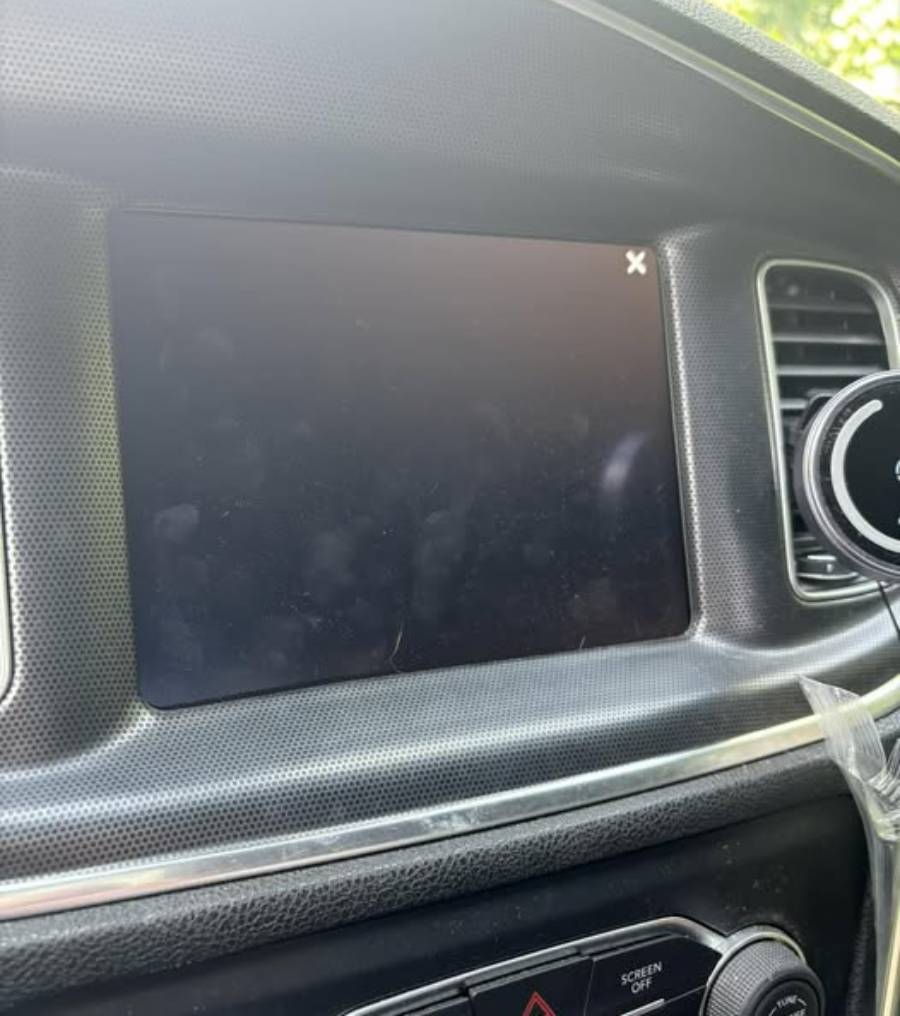
Why Is My Dodge Charger Screen Not Turning On?
A Dodge Charger screen can fail to turn on because of six main problems: a Uconnect software glitch, a blown fuse, a weak or disconnected battery, damaged wiring, a loose electrical connection, or a failed screen or head unit. The symptom alone does not identify the failed component because several faults can produce the same black or completely inactive display.
The first diagnostic distinction is whether the infotainment system has lost power or only the display has stopped working. Check whether the radio produces sound, steering-wheel audio controls respond, or the screen briefly illuminates during startup. A completely inactive infotainment system points more strongly toward a power-supply problem. Working audio with a black display shifts attention toward the screen, its connection, software, or the head unit.
Can a Uconnect Software Glitch Cause the Screen to Stay Off?
A Uconnect software glitch can cause the Dodge Charger screen to remain black even when the infotainment hardware still receives power. The Uconnect system relies on software to initialize the interface and control functions such as the touchscreen, audio, navigation, and vehicle settings. A failed startup or software crash can therefore leave the display blank without necessarily indicating that the screen itself has failed.
Software-related problems are more likely when the failure appears suddenly without other electrical symptoms. For example, the screen may remain black after starting the Charger while audio or steering-wheel controls continue to function. The display may also return after the vehicle or infotainment system is restarted. A problem that disappears after a reboot provides stronger evidence of a temporary software failure than a physically damaged display.
A persistent black screen should not automatically be classified as a software problem. Repeated resets that produce no change indicate that the power supply, wiring, connectors, display, and head unit also need diagnosis. Resetting the system repeatedly cannot repair an open electrical circuit or failed electronic component.
Can a Blown Fuse Cause the Dodge Charger Screen to Go Black?
A blown fuse can prevent the Dodge Charger infotainment system from receiving electrical power, leaving the screen completely black. Automotive fuses protect electrical circuits by opening the circuit when current exceeds the fuse’s designed limit. Once the relevant circuit is open, the components supplied through it can stop operating.
A fuse problem becomes more likely when both the display and associated infotainment functions stop working at the same time. Checking whether other electrical components operate normally helps narrow the diagnosis. If most vehicle electronics work but the infotainment system remains completely dead, the circuit supplying the radio or infotainment equipment deserves closer inspection.
The correct fuse cannot be identified from the vehicle name alone. Fuse assignments and locations can differ by Dodge Charger model year and equipment configuration. The owner’s manual or the fuse information specified for the exact vehicle should therefore be used before removing or replacing a fuse. A replacement must also use the specified amperage rather than a higher-rated fuse.
A fuse that blows again after replacement indicates a separate electrical fault rather than a fuse that simply “went bad.” Continuing to install replacement fuses does not correct the cause of excessive current. Wiring, connectors, the head unit, or another component on the affected circuit may require electrical diagnosis.
Can a Weak or Disconnected Battery Stop the Screen From Turning On?
A weak, disconnected, or recently reconnected battery can contribute to a Dodge Charger screen that does not start normally. The infotainment system depends on stable electrical power during startup. Battery or power interruptions can therefore affect electronic modules even when enough power remains to operate some other vehicle functions.
Look for additional electrical symptoms before concluding that the battery is responsible. Slow starting, dim lighting, unusual warning messages, resetting electronics, or multiple systems behaving abnormally provide more evidence of a broader voltage or power problem than an isolated black screen does. A screen failure by itself is not enough to diagnose a bad battery.
Recent battery work is also relevant to the troubleshooting sequence. If the screen stopped functioning immediately after the battery was disconnected, replaced, or discharged, the timing creates a useful diagnostic clue. The infotainment system should be checked for proper startup before assuming the display hardware suddenly failed at the same time.
Can Damaged Wiring or a Loose Connector Cause a Black Screen?
Damaged wiring, poor grounding, or a loose connector can interrupt power or communication to the Dodge Charger infotainment system and cause a black screen. Unlike a simple software crash, a physical connection problem may produce either a permanent failure or an intermittent one depending on how consistently the circuit is interrupted.
Intermittent behavior is particularly useful for diagnosis. For example, a screen that works on some starts but not others, unexpectedly shuts off, or changes behavior after vibration can indicate an unstable electrical connection. Recent dashboard, stereo, or interior electrical work also increases the relevance of inspecting connectors because components may have been disconnected during the repair or modification.
Electrical diagnosis becomes more complex once troubleshooting requires access behind dashboard panels. Do not replace the display solely because the screen is black when its power, ground, and connections have not been verified. A functioning display cannot operate when its electrical supply or communication connection is interrupted.
Can the Dodge Charger Screen or Head Unit Fail?
The display or infotainment head unit can fail, but hardware replacement should normally come after basic software and electrical causes have been checked. The screen and head unit perform different functions, so a black display does not prove that the visible screen assembly is the failed component.
A display-related fault becomes more plausible when the infotainment system continues to produce audio or respond to controls while the screen remains unusable. A head-unit problem can affect a broader set of functions because the unit processes and controls multiple infotainment operations. The exact symptoms depend on the Charger model year and installed system.
The most useful diagnostic sequence is therefore software check → power check → fuse check → battery check → wiring and connector check → head-unit/display diagnosis. This sequence prevents an expensive screen replacement from becoming the first response to a fault caused by a resettable software issue or loss of electrical power.
How Do I Fix a Dodge Charger Screen That Won’t Turn On?
Fix a Dodge Charger screen that won’t turn on by restarting the infotainment system first, then checking the fuse, battery power, and electrical connections if the screen remains black. This order separates temporary software failures from electrical and hardware faults without replacing components unnecessarily.
The repair should match the symptom. A screen that returns after a restart points toward a temporary Uconnect or software problem. A completely dead screen with no radio or infotainment response requires more attention to electrical power. A black display with working audio requires diagnosis of the display, its connection, software, and head unit.
How Do I Restart the Dodge Charger Infotainment System?
Restart the Dodge Charger infotainment system before performing electrical repairs when the screen suddenly stops turning on. A restart forces the system to initialize again and can restore a display that remained black because Uconnect failed to complete its normal startup process.
Begin by shutting the vehicle down completely and allowing the infotainment system to power off before restarting the Charger. Then check whether the display boots normally and whether audio, touchscreen functions, and steering-wheel controls respond. If the screen immediately returns and continues operating normally, a temporary software or startup failure is more likely than a failed display.
Some Dodge Charger and Uconnect configurations also support button combinations for rebooting the infotainment system. The exact procedure depends on the model year and installed Uconnect system, so one button sequence should not be treated as universal for every Dodge Charger. Use the procedure specified for the vehicle rather than repeatedly trying reset combinations intended for another model year or infotainment version.
How Do I Reset the Uconnect Screen in a Dodge Charger?
Reset the Uconnect system when a restart does not correct a black or unresponsive screen and there are signs that the infotainment system still has electrical power. A reset can address persistent software or configuration problems, but it cannot restore a screen that has lost power because of a blown fuse, disconnected circuit, or failed component.
A reboot and a factory reset are not the same procedure. A reboot restarts the operating system without intentionally erasing stored settings. A factory reset is more extensive and may remove saved preferences, paired devices, presets, or other user data depending on the Uconnect version. For that reason, the less disruptive restart should come first.
Do not repeatedly reset the system when there is no evidence that it receives power. If the screen has no illumination, audio does not work, controls do not respond, and the system shows no startup activity, move to electrical diagnosis. Software troubleshooting requires a functioning electrical supply; a reset cannot bypass an open fuse or disconnected power circuit.
How Do I Check the Fuse for the Dodge Charger Screen?
Check the fuse by identifying the fuse assigned to the radio or infotainment circuit for the exact Dodge Charger model year, switching the vehicle off, and inspecting or testing that fuse. Fuse numbers and locations can differ between model years and equipment configurations, so the vehicle-specific fuse information should be used instead of a generic Dodge Charger fuse number.
A visual inspection can reveal a fuse with a visibly broken internal element, but electrical testing provides a more reliable diagnosis when the condition is unclear. Replace a confirmed blown fuse only with one of the specified amperage rating. Installing a higher-amperage fuse removes part of the circuit protection and can allow excessive current to damage wiring or electronic components.
After replacing a confirmed blown fuse, start the vehicle and test the infotainment system again. A screen that returns to normal operation indicates that restoring the circuit restored power to the system. However, the diagnostic process is not finished if the replacement fuse blows again.
A fuse that repeatedly blows indicates an underlying electrical problem that needs diagnosis. A short circuit, damaged wiring, connector problem, or defective component can cause excessive current. Replacing the fuse repeatedly treats the result of the fault rather than its source.
How Do I Check the Battery and Power Supply to the Screen?
Check the battery and vehicle power supply when the Dodge Charger screen failure occurs alongside other electrical symptoms or immediately after battery discharge, disconnection, or replacement. The infotainment system requires stable electrical power to initialize, so a broader voltage problem can interfere with its startup.
Look beyond the screen for supporting evidence. Slow engine cranking, dim lights, multiple warning messages, electronics resetting, lost settings, or several systems malfunctioning at the same time make a vehicle-level electrical problem more plausible. In contrast, normal operation of every other electrical system with only the display affected shifts the diagnosis toward the infotainment circuit or its components.
Battery terminals and connections also matter because the battery itself can be serviceable while a poor connection interrupts electrical delivery. Loose or contaminated connections can create unstable power conditions. Recent battery service is especially relevant when the infotainment problem begins immediately afterward because the timing connects the symptom to a change in the vehicle’s electrical system.
Do not diagnose battery condition from the infotainment screen alone. Battery testing and voltage measurements provide stronger evidence than assuming that a black screen means the battery is weak. If battery and charging-system tests are normal, continue diagnosis at the infotainment fuse, power circuit, connectors, and components.
When Should I Inspect the Wiring and Connectors?
Inspect the Dodge Charger infotainment wiring and connectors when the screen has verified power-related problems, operates intermittently, or began malfunctioning after dashboard, stereo, or electrical work. Wiring faults can interrupt power, ground, or communication signals even when the battery and fuse are functional.
Intermittent symptoms provide useful evidence. A display that works on one startup and fails on another, shuts off unexpectedly while driving, or repeatedly loses and restores operation can indicate an unstable connection. The same applies when the problem begins immediately after aftermarket stereo installation, dashboard disassembly, or another repair involving the surrounding wiring.
Connector diagnosis requires more care than restarting Uconnect or checking an accessible fuse. Reaching the infotainment assembly may require removing trim panels, and electrical diagnosis may require checking power, ground, continuity, and connectors. Stop DIY troubleshooting when access requires procedures you cannot perform without damaging trim, wiring, connectors, or electronic modules.
How Can I Tell Whether the Dodge Charger Screen Has Power?
Determine whether the Dodge Charger screen has power by checking the display for illumination or startup activity and testing whether related infotainment functions still respond. This distinction divides the problem into two diagnostic branches: loss of electrical power or a powered system with a failed display or software function.
Start the vehicle and observe the screen closely. Look for a startup logo, backlight, brief flash, or any change from a completely unpowered display. Then test the radio, volume controls, steering-wheel audio buttons, and other available infotainment functions. The objective is not simply to confirm that the screen is black but to establish which parts of the system remain operational.
No screen activity combined with no audio or infotainment response points more strongly toward a power, fuse, wiring, connector, or head-unit problem. For example, a system that remains completely inactive after startup deserves an electrical check before the visible display is considered defective.
A black screen with working audio or responsive controls points more strongly toward the display path, software, display connection, or related infotainment hardware. In this situation, the system is demonstrating that at least some functions remain operational. Replacing a fuse or battery without evidence of a power problem becomes a less targeted response.
A startup logo followed by a black screen provides another diagnostic clue. It demonstrates that the display can produce an image during at least part of the startup process. Diagnosis should then focus more heavily on what happens after initialization rather than assuming that the screen receives no electrical power at all.
This power-versus-display distinction reduces unnecessary component replacement. Confirm whether the infotainment system is completely dead before treating a black screen as a failed screen. The same visible symptom can result from faults at different points between the vehicle’s electrical supply, head unit, software, connection, and display.
Why Is My Dodge Charger Screen Black but the Radio Still Works?
A Dodge Charger screen that stays black while the radio still works points more strongly to a display, software, display-connection, or infotainment hardware problem than to a complete loss of electrical power. Working audio demonstrates that at least part of the infotainment system remains operational, so diagnosis should distinguish the visible display from the rest of the system.
Start by checking exactly which functions still operate. Test the radio audio, volume controls, steering-wheel buttons, Bluetooth audio if already connected, and any physical controls associated with the infotainment system. A system that responds normally to these inputs while showing no image provides stronger evidence that the failure is concentrated in the display path rather than the entire infotainment system.
The screen itself is only one component in that path. The head unit processes infotainment functions, software controls the interface, electrical connections carry power and signals, and the display produces the visible image. A failure at any point between these components can produce a black screen while other functions continue working.
A temporary software problem should be tested before replacing hardware. Restart the vehicle and use the appropriate Uconnect reboot procedure for the installed system. A screen that returns after a reboot indicates that replacement should not be the first repair decision. A screen that remains black through repeated startups requires further diagnosis of its connections, display hardware, and head unit.
The symptom also differs from a completely dead infotainment system. When both the screen and radio are inactive, the diagnostic priority moves toward power supply, fuse, battery, wiring, and head-unit power. When the radio works but the display does not, the diagnostic scope becomes narrower.
Why Does My Dodge Charger Screen Keep Turning Off and Back On?
A Dodge Charger screen that repeatedly turns off and back on can result from unstable electrical power, an intermittent wiring or connector problem, repeated software crashes, or an infotainment hardware fault. This symptom differs from a screen that never turns on because the system demonstrates that it can receive power and operate at least temporarily.
The timing of each shutdown provides useful diagnostic information. A screen that repeatedly displays the startup sequence may indicate that the infotainment system itself is rebooting. In contrast, audio that continues uninterrupted while only the display disappears suggests that the failure may be closer to the display or its connection.
Electrical instability can also create intermittent operation. A loose connector or damaged wire can maintain contact under one condition and lose it under another. For example, a display that shuts off after vibration or works inconsistently between vehicle starts deserves inspection for an unstable connection rather than immediate screen replacement.
Software behavior should also be considered when the screen follows a consistent reboot cycle. A system that starts, freezes, shuts down, and initializes again is behaving differently from a display that loses electrical power unpredictably. Restarting the system can eliminate a temporary crash, but recurring rebooting after repeated vehicle starts indicates that further diagnosis is necessary.
Document when the failure occurs before pursuing a repair. Note whether the radio also stops, whether the Dodge Charger is stationary or moving, whether the screen shows a startup logo when it returns, and whether the problem began after battery or dashboard work. These observations help separate display failure, system rebooting, and intermittent power loss.
Why Is My Dodge Charger Screen Frozen or Not Responding?
A frozen Dodge Charger screen is primarily an infotainment responsiveness problem rather than the same condition as a screen with no electrical power. A frozen display produces an image but stops responding correctly, while an unpowered display shows no evidence that the screen or infotainment system has started.
There are several ways the distinction can appear. The screen may display a normal interface while touch inputs stop responding, remain stuck on the Dodge or Uconnect startup screen, or show one menu without allowing the driver to change functions. In each case, the presence of an image confirms that the symptom differs from a completely dead screen.
Restarting the infotainment system is the logical first response to a temporary freeze because it forces the software to initialize again. Check whether normal touchscreen response returns after the restart. If it does, the event is more consistent with a temporary software or startup problem than with complete display failure.
A recurring frozen screen requires a broader diagnosis. Determine whether physical controls still work, whether audio continues playing, whether the system eventually reboots itself, and whether the same failure returns after every startup. These details show which infotainment functions remain operational when the touchscreen stops responding.
Do not use “black screen,” “frozen screen,” and “touchscreen not responding” as interchangeable diagnoses. A black screen describes the absence of a visible image, a frozen screen describes an interface that stops progressing, and an unresponsive touchscreen describes a failure to register touch input. Identifying the exact symptom prevents troubleshooting the wrong part of the Dodge Charger infotainment system.
Does the Fix Depend on the Dodge Charger Model Year?
Yes. The correct Dodge Charger screen troubleshooting procedure can depend on the model year, installed infotainment hardware, and Uconnect version. Fuse assignments, electrical layouts, infotainment configurations, and reset procedures are not necessarily identical across all Dodge Chargers.
This difference is especially important when checking fuses. A fuse number or location documented for one Dodge Charger configuration should not automatically be applied to another. The correct vehicle-specific fuse information should be confirmed before removing or replacing a fuse.
Reset instructions require the same caution. Different infotainment configurations can use different procedures for restarting or resetting the system. Use instructions that match the specific Dodge Charger model year and installed Uconnect system rather than assuming one reset sequence applies to every Charger.
Hardware diagnosis is also affected by vehicle configuration. Different systems can use different screens, head units, connections, and integrated functions. A replacement part must therefore be matched to the vehicle and infotainment configuration instead of being selected solely because it is described as a Dodge Charger screen.
For owners who do not know which system is installed, identify the model year and infotainment configuration before following model-specific electrical or reset instructions. This step prevents a generic troubleshooting guide from becoming an incorrect repair procedure for a specific vehicle.
When Does a Dodge Charger Screen Need Professional Repair?
A Dodge Charger screen needs professional diagnosis when basic resets and power checks do not restore operation, a fuse repeatedly blows, wiring damage is suspected, or testing requires access to the infotainment unit and electrical circuits. These conditions indicate that troubleshooting has moved beyond a temporary software problem or a simple user-accessible check.
Professional diagnosis becomes appropriate when the screen remains completely inactive after the correct restart or reset procedure and the relevant fuse is functional. At that point, the technician may need to determine whether electrical power and ground are reaching the infotainment components. This distinction matters because a display cannot operate without the required electrical supply, even when the display itself is functional.
A repeatedly blown fuse is another reason to stop replacing parts and diagnose the circuit. A replacement fuse that blows again indicates that the underlying electrical fault remains present. Wiring damage, a short circuit, a connector problem, or a defective component may be drawing excessive current. Installing additional fuses does not identify or repair that fault.
Intermittent failures can also justify professional testing. A screen that randomly shuts down, works only on certain starts, or loses operation after vibration may require inspection of wiring and connectors. These problems are harder to isolate because the circuit can test normally while the connection is temporarily restored.
Professional service is also appropriate when diagnosis requires dashboard disassembly. Removing trim and infotainment components creates the possibility of damaging connectors, wiring, mounting points, or interior panels. Electrical testing should establish the failed part before an expensive display or head unit is ordered.
Does a Dodge Charger Screen Need to Be Replaced If It Won’t Turn On?
No. A Dodge Charger screen that will not turn on does not automatically need replacement because the same symptom can result from software, fuse, battery, wiring, connector, head-unit, or display problems. Replacing the visible screen before identifying the failed component can leave the original problem unchanged.
Use a diagnostic sequence before making the replacement decision:
- Restart the vehicle and infotainment system.
- Perform the appropriate Uconnect reset when the system still shows signs of power.
- Determine whether the screen and infotainment system receive electrical power.
- Check the correct fuse for the specific model year and configuration.
- Check the battery and broader electrical system when other electrical symptoms are present.
- Inspect or test wiring, grounds, and connectors when an electrical connection problem is suspected.
- Diagnose the head unit and display after the previous causes have been eliminated.
The distinction between the display and head unit is especially important. A working radio with a consistently black display provides different diagnostic evidence from a completely dead infotainment system. Working audio or controls demonstrate that at least part of the system remains functional, making the display path more relevant. Loss of the screen, audio, controls, and other infotainment functions together creates stronger reason to investigate power delivery or the head unit.
Screen replacement becomes more reasonable when testing confirms that the display receives the required power and signals but cannot produce a usable image. Likewise, head-unit repair or replacement becomes more relevant when diagnosis identifies the infotainment unit itself as the failed component. The replacement decision should therefore follow component-level diagnosis rather than the appearance of a black screen alone.
The model year and installed infotainment system must also be identified before purchasing replacement hardware. Dodge Charger screens and infotainment configurations are not universally interchangeable across model years and equipment packages. Matching the replacement component to the vehicle prevents compatibility problems and unnecessary repair costs.
For most owners, the practical troubleshooting order is reset first, verify power second, inspect the fuse and electrical supply third, and consider hardware replacement last. This sequence addresses the less invasive causes before moving to display or head-unit replacement and keeps the diagnosis focused on the component that actually failed.