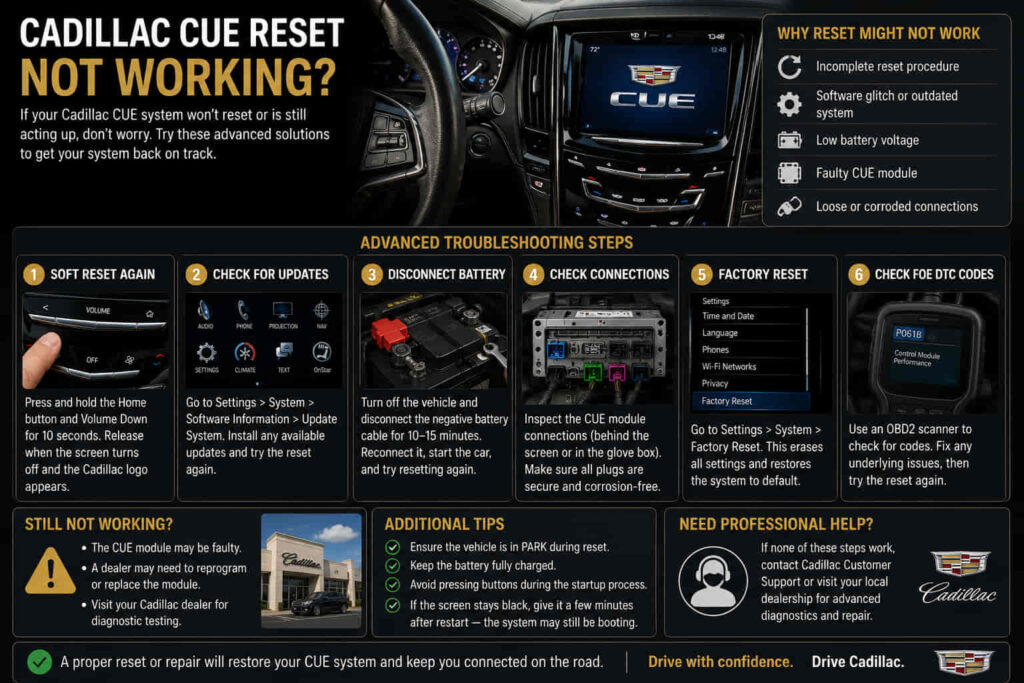
A Cadillac CUE reset may not work because the underlying problem is caused by hardware failure, corrupted software, unstable electrical power, or communication issues inside the infotainment system. Resetting the system only restarts the Cadillac User Experience (CUE) platform and clears certain temporary conditions; it cannot repair damaged components or replace failed modules.
The Cadillac CUE system controls important vehicle functions, including audio settings, navigation, Bluetooth connectivity, smartphone integration, and various vehicle controls. Because CUE operates through multiple connected components, a failure in any part of the system can prevent a reset from restoring normal operation.
A failed reset can appear in different ways. The touchscreen may remain frozen, the display may stay black, the system may fail to boot, or the same error may return immediately after restarting. These symptoms indicate that the issue may exist beyond a simple software glitch.
Understanding why a Cadillac CUE reset is not working helps owners avoid repeating the same troubleshooting step without addressing the actual cause. Some problems can be resolved through software updates or electrical corrections, while others require inspection of the touchscreen, display assembly, or infotainment control module.
This guide explains the main reasons Cadillac CUE reset fails, which issues can be solved without replacement, and when professional diagnosis becomes necessary.
Can an Incorrect Cadillac CUE Reset Procedure Cause Failure?
An incorrect Cadillac CUE reset procedure can make it appear that the reset is not working because the action performed may not fully restart the system or address the actual cause of the failure. The Cadillac CUE system has different levels of troubleshooting, including simple restarts, power cycles, and deeper system resets, and each method affects the infotainment system differently.
A basic reset is mainly designed to restart the CUE software environment and clear temporary operating errors. It can help when the system becomes frozen because of a short-term software issue, memory conflict, or communication interruption between internal components.
However, a reset does not restore damaged hardware or remove every type of software problem. If the infotainment module has corrupted data, the touchscreen has failed, or the system cannot complete its startup process, repeating the same reset procedure will usually produce the same result.
For example, a Cadillac owner may restart the CUE system several times after the touchscreen freezes, but the display remains unresponsive because the problem is related to the digitizer or infotainment module rather than a temporary software condition.
Understanding the purpose of a reset prevents unnecessary troubleshooting. A reset is a diagnostic step that helps identify temporary faults, but it is not a complete repair method for every Cadillac CUE problem.
Can Low Battery Voltage Prevent Cadillac CUE Reset From Working?
Low battery voltage can prevent Cadillac CUE reset from working because the infotainment system requires stable electrical power to restart correctly and communicate with other vehicle modules. The CUE system depends on consistent voltage to operate its processor, display, and communication circuits.
When the vehicle battery becomes weak, voltage fluctuations can interrupt the normal startup process. This may cause the CUE system to freeze, restart repeatedly, display a blank screen, or fail to complete the reset process.
Electrical problems are often difficult to identify because the vehicle may still start and drive normally while sensitive electronic systems experience unstable power. Modern infotainment systems require more precise electrical conditions than basic mechanical components.
For example, a Cadillac owner may notice that CUE problems begin after a weak battery event, a jump start, or battery replacement. In some cases, restoring proper battery voltage and allowing the vehicle modules to restart can resolve temporary communication errors.
However, correcting the battery condition will not fix every CUE problem. If the reset continues failing after stable electrical power is restored, the issue may involve software corruption, a damaged display component, or a faulty infotainment control module.
Can Cadillac CUE Software Problems Ignore a Reset?
Cadillac CUE software problems can prevent a reset from working when the system has deeper software corruption, failed startup processes, or communication errors that cannot be cleared through a normal restart. The reset process only reloads the current software environment, so it may not resolve problems caused by damaged system data or persistent software conflicts.
The Cadillac CUE system functions similarly to a computer because it uses software to control the touchscreen interface, vehicle settings, audio functions, navigation, and connected features. When software files become unstable, the system may freeze, restart repeatedly, or fail to respond even after a reset attempt.
Software-related failures can develop after interrupted updates, electrical interruptions, communication errors between modules, or long-term system glitches. In these situations, the system may require additional steps such as software updates, module reprogramming, or professional diagnostic testing rather than another reset.
For example, a Cadillac CUE system may successfully restart but continue returning to the same frozen screen because the underlying software problem remains unchanged. The reset temporarily reloads the system but does not repair corrupted software data.
A repeated reset failure is an important diagnostic signal. If the system continues failing after multiple restarts, identifying whether the issue comes from software, hardware, or communication problems is necessary before choosing a repair solution.
Can a Frozen Cadillac CUE Screen Mean Hardware Failure?
A frozen Cadillac CUE screen can indicate hardware failure when the problem comes from damaged touchscreen components, display assembly issues, or a failing infotainment module. While software problems are common causes of an unresponsive screen, physical component failures cannot be corrected by resetting the system.
The Cadillac CUE touchscreen contains several separate components that work together, including the touch-sensitive layer, display panel, internal connections, and control electronics. A failure in any of these parts can cause the screen to stop responding even when the reset procedure is performed correctly.
Hardware-related symptoms often include a display that remains black, areas of the touchscreen that do not respond, random touch inputs, or a system that repeatedly freezes after startup. These signs suggest that the problem exists beyond the software environment.
For example, a Cadillac owner may restart the CUE system several times, but the screen continues showing the same frozen image or fails to recognize touch commands. If software and electrical conditions have been verified, the touchscreen assembly or related hardware may require inspection.
A reset is useful for identifying temporary system errors, but it cannot repair physical damage. When hardware failure is the cause, replacing or repairing the affected component is the only way to restore reliable CUE operation.
Read more: cadillac stabilitrak reset
Can Cadillac CUE Module Problems Prevent a Reset From Working?
Cadillac CUE module problems can prevent a reset from working because the infotainment control module is responsible for processing system commands, managing software operations, and communicating with other vehicle components. When the module itself has an internal failure or communication problem, restarting the system cannot restore normal operation.
The CUE infotainment module acts as the central processing unit of the system. It receives input from the touchscreen, manages connected features, controls system functions, and communicates with other vehicle networks. If this module cannot complete its operations correctly, the entire CUE system may become unresponsive.
Module-related failures can occur because of internal electronic faults, corrupted programming, power interruptions, or communication errors within the vehicle network. These problems often create symptoms that look similar to software issues, including frozen screens, failed startup, repeated restarts, or missing infotainment functions.
For example, a Cadillac owner may perform a reset correctly, but the CUE system continues displaying a blank screen or fails to load the interface. If the module cannot process the startup sequence, another reset will not change the outcome.
A proper diagnosis is necessary before replacing the module because similar symptoms can come from simpler causes such as battery voltage problems or touchscreen failures. Diagnostic testing helps determine whether the CUE module is actually the source of the failure.
Can Software Updates Fix Cadillac CUE Reset Problems?
Software updates can fix some Cadillac CUE reset problems when the failure is caused by outdated software, compatibility issues, or known system bugs. The CUE system depends on software to control its interface and communication functions, so outdated programming can affect how the system responds after a restart.
Software updates can improve system stability by correcting programming errors, improving compatibility with connected devices, and resolving issues that cause freezing or failed startup. In some cases, a system that repeatedly fails after a reset may require updated software rather than hardware replacement.
The relationship between software and hardware is important because a malfunctioning CUE system does not always mean a physical component has failed. If the touchscreen, display, and electrical systems are functioning correctly, the issue may exist within the software layer controlling the system.
For example, a Cadillac CUE system may experience repeated freezing after connecting a smartphone or after a system update interruption. Installing the correct software update may restore normal operation by replacing unstable system files.
However, software updates cannot repair damaged hardware components. If the touchscreen digitizer, display assembly, or infotainment module has failed, updating software will not restore functionality. Proper diagnosis ensures that software solutions are used only when they match the actual cause of the problem.
When Does Cadillac CUE Need Repair Instead of Another Reset?
Cadillac CUE needs repair instead of another reset when the system continues failing after repeated restarts, the same symptoms return, or diagnostic testing reveals a hardware or communication problem. Resetting the system is useful for temporary faults, but repeatedly performing resets will not solve a component that has physically failed.
The Cadillac CUE system contains several interconnected parts, including the touchscreen, display assembly, infotainment module, software system, and vehicle communication network. A failure in any of these components can create similar symptoms, which makes identifying the actual source of the problem more important than repeating the same reset procedure.
Persistent problems usually indicate that the system requires deeper inspection. A screen that remains frozen, a display that stays black, repeated system crashes, or a touchscreen that does not respond after reset may point toward hardware damage or a module failure rather than a temporary software issue.
For example, a Cadillac owner may attempt multiple resets after experiencing a frozen CUE screen, but the problem returns every time the vehicle starts. If electrical power is stable and software solutions have been considered, the next step is checking the touchscreen assembly, wiring connections, or infotainment module.
Understanding the difference between a temporary CUE error and a permanent failure helps prevent unnecessary repairs. Resetting should be considered an initial troubleshooting step, while repeated failures require proper diagnosis to identify the component that needs attention.
How Can You Fix a Cadillac CUE Reset That Is Not Working?
Fixing a Cadillac CUE reset that is not working requires identifying whether the problem comes from a temporary software issue, electrical instability, or a failed hardware component. A reset can restore normal operation when the system experiences a temporary freeze, communication error, or minor software problem, but it cannot repair physical damage inside the infotainment system.
The Cadillac CUE system depends on multiple connected components, including the touchscreen, display assembly, infotainment module, software environment, and vehicle electrical network. Because these parts work together, a failure in one area can prevent the reset process from producing a permanent solution.
The most effective troubleshooting approach is to start with basic checks, including verifying battery condition, confirming the correct reset procedure, and checking whether software updates are available. If the problem continues, further diagnosis is needed to determine whether the issue involves the touchscreen, CUE module, wiring, or another electronic component.
Repeatedly resetting the system without identifying the cause only removes symptoms temporarily. Understanding the difference between software-related failures and hardware problems helps Cadillac owners choose the correct repair method and avoid unnecessary replacement costs.
A properly functioning Cadillac CUE system depends on both reliable software and healthy hardware components. When a reset fails repeatedly, professional diagnosis provides the most accurate path to restoring the infotainment system’s normal operation.