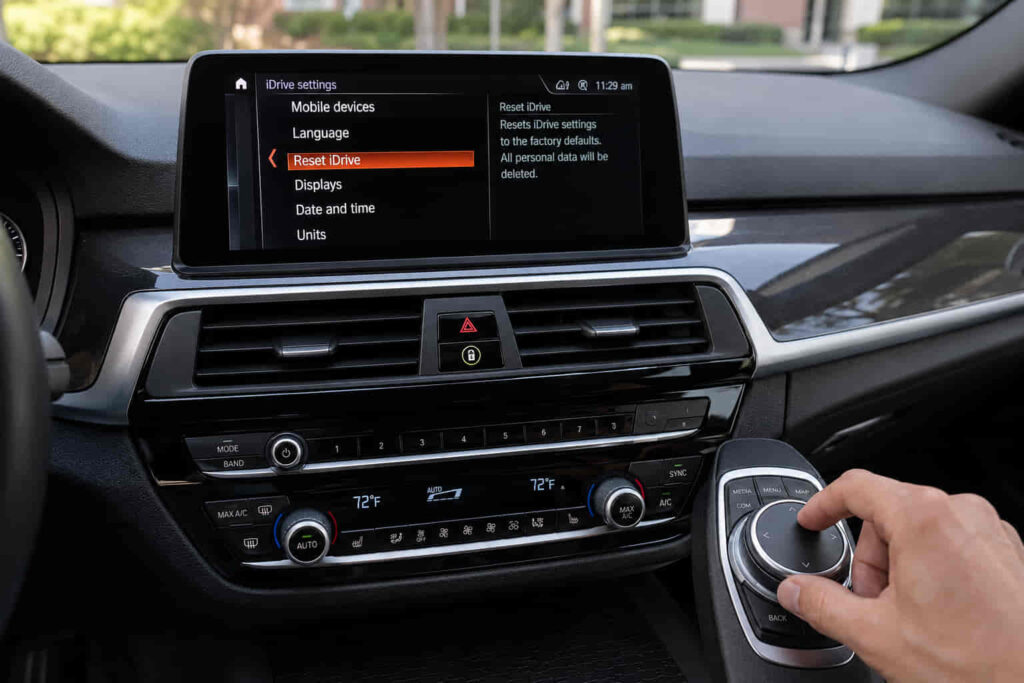
A BMW iDrive reset can mean two different things: restarting the iDrive system or resetting the vehicle’s stored settings and personal data. These operations are not interchangeable, and choosing the wrong one can produce a very different result. A simple restart is intended to reboot the current iDrive system, while a full reset can return iDrive settings to their factory defaults and remove stored personal information.
Drivers commonly search for a BMW iDrive reset when the infotainment display freezes, the system becomes unresponsive, applications stop working correctly, or connected services experience temporary problems. In these situations, restarting iDrive is generally the relevant first concept to understand. A restart refreshes the system without serving the same purpose as deleting the vehicle’s stored data.
The distinction becomes more important because BMW has used different generations of iDrive and Operating System across its vehicles. The available menus, controls, and reset procedures can therefore vary between systems. A procedure that applies to one BMW should not automatically be treated as a universal method for every model.
This guide explains the 7 key things to know about BMW iDrive reset, including the difference between restarting iDrive and resetting vehicle data, when a reset is appropriate, how the procedure varies between BMW operating systems, what happens to stored settings, and what to do when the system continues to malfunction after the reset.
What Does a BMW iDrive Reset Actually Mean?
A BMW iDrive reset can refer to either restarting the iDrive system or resetting the vehicle’s stored data, and these operations have different purposes. A restart, also called a reboot, temporarily shuts down and reloads the iDrive system. A vehicle-data reset is a more extensive operation that returns applicable settings to factory defaults and can remove stored personal data. BMW provides separate procedures for these two operations.
For a temporary infotainment problem, the restart is usually the relevant operation. BMW specifically states that an iDrive restart can be used for issues such as device disconnections, application problems, and difficulties connecting to in-vehicle apps and services. The purpose is to reload the current system rather than erase the driver’s stored configuration.
A vehicle-data reset has a different mechanism. BMW states that individual settings can be reset to factory settings while the vehicle is stationary and the drive-ready state is switched off. Depending on the operating system, the procedure is accessed through the vehicle or Apps menus, and BMW notes that personal settings synchronized with a BMW ID can remain in the BMW Cloud.
This distinction is essential when someone searches for BMW iDrive reset. If the screen is frozen or an app temporarily stops responding, deleting vehicle data is unnecessarily aggressive. The correct troubleshooting path is to identify whether the problem requires a system restart or an actual vehicle-data reset before changing any stored settings.
How Do You Restart BMW iDrive?
You can restart BMW iDrive by using the vehicle’s audio volume control, but the exact procedure depends on the BMW Operating System installed in the vehicle. For applicable BMW vehicles using Operating System 7, 8, or 8.5, BMW’s official instructions describe pressing and holding the volume control until the display switches off and the iDrive system restarts. BMW also recommends performing the procedure while the vehicle is safely parked.
This type of restart is designed to reload the current iDrive system rather than erase stored vehicle information. That makes it fundamentally different from resetting vehicle data. If the Central Information Display is frozen, an application has stopped responding, or an in-vehicle service has temporarily lost connectivity, restarting iDrive can refresh the software environment without requiring the driver to remove personal settings.
The mechanism is similar to restarting another electronic device: the system shuts down its active software processes and loads them again. This can resolve temporary software states that prevent the display, applications, or connected services from responding normally. BMW specifically identifies iDrive restart as a potential solution for device disconnections, application problems, and difficulties connecting to in-vehicle apps and services.
The important limitation is that an iDrive restart does not repair a persistent hardware or software fault. If the same problem immediately returns after the system has restarted, repeating the restart is unlikely to address the underlying cause. At that point, the problem should be evaluated according to the specific symptom rather than treated as a simple frozen-screen issue.
When Should You Restart BMW iDrive?
You should consider restarting BMW iDrive when the infotainment system is temporarily unresponsive or when a digital function stops behaving normally without evidence of a broader vehicle fault. Common situations include a frozen display, an application that will not respond, a temporary loss of connected services, or a device connection that suddenly stops working.
BMW specifically identifies restart as a troubleshooting step for problems involving device disconnection, in-vehicle applications, and connections to apps and services. This makes restart a useful first-line action because it addresses the software state before more disruptive procedures are considered.
A restart is particularly appropriate when the vehicle itself continues to operate normally but the infotainment layer behaves abnormally. For example, if the screen stops responding while the vehicle’s driving functions remain unaffected, rebooting iDrive can reload the infotainment software without treating the problem as a mechanical or braking-system failure.
However, not every BMW electronic problem should be solved with an iDrive reset. A warning involving the vehicle’s safety systems, repeated system shutdowns, persistent loss of multiple electronic functions, or a problem that returns immediately after restarting requires a different diagnostic approach.
The correct troubleshooting sequence is therefore identify the symptom → determine whether it is an iDrive problem → restart the system → verify normal operation → investigate further if the problem returns. This approach prevents a simple iDrive restart from being confused with a factory reset or used as a substitute for proper diagnosis.
Read more: Is BMW Ultimate Care Worth It
Is the BMW iDrive Reset Procedure Different for OS 7, 8, 8.5, and 9?
Yes, the BMW iDrive reset procedure can differ between Operating System 7, 8, 8.5, and 9, so a procedure for one BMW should not automatically be applied to every model. BMW provides operating-system-specific instructions because the available menus, controls, and software architecture change between iDrive generations.
For applicable BMW vehicles with Operating System 7, 8, and 8.5, BMW describes restarting iDrive by pressing and holding the volume control until the display switches off and the system restarts. The procedure is intended to reboot the infotainment system rather than erase vehicle data.
The distinction becomes more important with newer operating systems. BMW provides separate guidance for Operating System 9, meaning drivers should identify the system installed in their vehicle before following a reset instruction found online. The same physical control may have a similar function across generations, but the surrounding software behavior and menu structure can differ.
This is why “hold the volume button for a specific number of seconds” should not be treated as a universal BMW iDrive rule. The correct procedure depends on the vehicle’s operating system and equipment. Using the appropriate BMW-specific procedure reduces the risk of confusing a simple restart with a vehicle-data reset.
What Is the Difference Between Restarting iDrive and Resetting BMW Vehicle Data?
Restarting BMW iDrive reloads the infotainment system, while resetting vehicle data changes stored settings and personal information. The two procedures address different problems and should be selected according to the symptom you are trying to solve.
An iDrive restart is primarily a troubleshooting action. It shuts down and reloads the active infotainment software, which can resolve temporary problems involving the display, applications, device connections, or connected services. BMW specifically recommends iDrive restart as a potential solution for these types of temporary issues.
A vehicle-data reset is more extensive because it affects stored configuration and personal information. BMW provides different menu paths for resetting vehicle data depending on the operating system, and the reset can return applicable vehicle settings to their factory state. BMW also notes that personal settings associated with a BMW ID can remain synchronized with BMW Cloud.
The practical distinction is therefore restart for system troubleshooting versus vehicle-data reset for restoring stored settings. If the iDrive screen is temporarily frozen, performing a full vehicle-data reset is unnecessary because the underlying problem may only require a system restart.
A factory-style reset becomes more relevant when the vehicle is being transferred to another person, when stored personal information needs to be removed, or when a more extensive software/settings problem requires returning the applicable configuration to its default state. Before performing it, the driver should understand which settings and locally stored data may be affected.
How Do You Know if the BMW iDrive Reset Worked?
A BMW iDrive reset has worked when the infotainment system returns to normal operation and the original symptom does not immediately reappear. The most useful verification is to check the function that was failing before the restart rather than assuming that the screen turning off and back on means the problem has been solved.
For example, if the original problem was a frozen Central Information Display, the display should respond normally after the restart. If an application or connected service was failing, that function should also be tested after iDrive has restarted. BMW identifies restart as a troubleshooting measure for problems involving device disconnections, applications, and connections to in-vehicle apps and services.
The mechanism is straightforward: restarting iDrive reloads the current infotainment software state. If the problem was caused by a temporary software condition, the system can return to normal without changing the driver’s stored vehicle configuration. If the same problem returns immediately, however, the restart has only demonstrated that the system can reboot; it has not established that the underlying problem has been resolved.
A useful verification sequence is therefore restart the system → wait for iDrive to load completely → test the function that failed → observe whether the symptom returns. This is more reliable than repeatedly restarting the system without checking what caused the original problem.
A successful restart should restore normal behavior, not merely restart the screen. If the same malfunction continues, the next step should focus on the specific symptom rather than treating another restart as the solution.
What Should You Do If BMW iDrive Reset Does Not Work?
If restarting BMW iDrive does not resolve the problem, the next step is to determine whether the issue involves software, connectivity, stored settings, or a persistent vehicle-specific fault. A failed restart does not automatically mean that the iDrive hardware is defective.
The first distinction is whether the system actually restarted but the original problem remained, or whether the system could not complete the restart normally. If iDrive restarts but an application, device connection, or connected service continues to malfunction, the problem may require troubleshooting beyond a simple reboot. BMW specifically identifies restart as one possible response to application and connectivity problems, which means persistent symptoms require further evaluation.
A software update is also different from an iDrive restart. A restart reloads the software that is already installed, while a supported BMW software update changes the software version itself. Therefore, restarting iDrive repeatedly will not resolve a problem caused by an outdated or incompatible software state if an applicable update or other corrective procedure is required.
A full vehicle-data reset should also not be the automatic next step. BMW’s vehicle-data reset function affects stored settings and personal information, making it substantially different from simply rebooting iDrive. Before using that procedure, the driver should understand what information and settings may be affected.
If the problem persists after the appropriate restart and software-related checks, the issue should be diagnosed according to the specific BMW and symptom. Persistent freezing, repeated unexpected restarts, loss of multiple electronic functions, or problems accompanied by vehicle-system warnings require a more comprehensive diagnostic approach rather than repeated iDrive resets.
Can a BMW iDrive Reset Fix Apple CarPlay or Android Auto Problems?
Restarting BMW iDrive can resolve temporary Apple CarPlay, Android Auto, or connected-service problems, but it does not guarantee a permanent fix for every connectivity issue. BMW identifies iDrive restart as a potential solution for device disconnections, application problems, and difficulties connecting to in-vehicle apps and services.
The reason a restart can help is that smartphone integration depends on several software and communication processes operating together. A temporary connection state can prevent the vehicle from communicating correctly with a paired smartphone even when the phone itself is functioning normally. Restarting iDrive reloads those processes and can restore the connection without deleting the driver’s stored vehicle data.
If CarPlay or Android Auto continues to fail after the restart, the problem may involve pairing information, smartphone settings, connectivity, software compatibility, or the vehicle’s infotainment system. In that situation, repeatedly restarting iDrive does not address the underlying cause.
The correct approach is to use an iDrive restart as a first troubleshooting step, then investigate the smartphone connection if the problem persists. This keeps the reset procedure proportional to the actual problem instead of immediately performing a more disruptive vehicle-data reset.
Does BMW iDrive Reset Delete Your Settings?
A normal iDrive restart is different from resetting vehicle data and should not be treated as a procedure for deleting the driver’s stored settings. Restarting the system reloads the infotainment software, whereas a vehicle-data reset can return applicable settings to factory defaults and remove stored personal information. BMW provides separate procedures for these operations.
This distinction matters when troubleshooting. If the display is frozen or an application is temporarily unresponsive, a restart addresses the software state without making a broader change to the vehicle’s configuration. Performing a vehicle-data reset for a temporary software problem can therefore create unnecessary work because settings and personal information may need to be configured again.
BMW also explains that personal settings associated with a BMW ID can remain synchronized with BMW Cloud, depending on the applicable system and configuration. This means the effect of a vehicle-data reset should be understood in the context of BMW ID and cloud-synchronized settings rather than assuming that every piece of information is permanently lost.
Restart when the goal is to reload iDrive; reset vehicle data when the goal is to restore applicable settings and remove local vehicle information. Keeping these two operations separate is one of the most important parts of correctly interpreting “BMW iDrive reset.”
How Do You Reset BMW Vehicle Data?
Resetting BMW vehicle data is a separate procedure from restarting iDrive, and the menu path depends on the Operating System installed in the vehicle. BMW provides different instructions for Operating System 7, Operating System 8/8.5, and newer systems, so the vehicle’s software generation should be identified before changing stored data.
On supported BMW systems, the reset is accessed through the vehicle’s settings or Apps/System menus rather than through the simple volume-control restart procedure. The purpose is to restore applicable vehicle settings and remove locally stored personal information, making this procedure more appropriate when preparing a vehicle for another driver or when a broader configuration reset is actually required.
Because the menu structure changes between operating systems, an online instruction showing a particular menu path should not be assumed to apply to every BMW. BMW’s own documentation separates the procedures by operating system for this reason.
A vehicle-data reset should therefore be treated as a deliberate configuration reset, not as a stronger version of an iDrive reboot. If the only symptom is a temporarily frozen display, restarting iDrive is the more targeted operation.
Should You Disconnect the BMW Battery to Reset iDrive?
Disconnecting the BMW battery is not the same as performing a normal iDrive restart and should not be treated as the default method for troubleshooting an iDrive problem. A standard iDrive restart is specifically designed to reload the infotainment system without deliberately interrupting the vehicle’s entire electrical system.
The distinction is important because modern BMW vehicles contain numerous electronic control units that communicate with one another. Battery disconnection affects the vehicle’s electrical state far beyond the infotainment system, while an iDrive restart targets the relevant software environment more directly.
For a frozen display, application problem, or temporary connectivity issue, the BMW-documented iDrive restart procedure is therefore the more appropriate first-line approach. BMW specifically provides restart instructions for iDrive-related problems rather than requiring a battery disconnect as the normal reset method.
If an iDrive problem remains after the appropriate restart, the next step should be based on the actual symptom. Using a battery disconnect as a substitute for diagnosis can obscure the original problem rather than identify its cause.
Can a BMW Software Update Fix an iDrive Problem?
A BMW software update can address software-related iDrive problems when an applicable update contains a correction, but a software update is fundamentally different from an iDrive restart. Restarting reloads the software already installed in the vehicle; an update changes the software itself.
This distinction explains why a restart can temporarily restore normal operation without permanently resolving a recurring problem. If the underlying issue is associated with the installed software version, restarting the same software repeatedly does not change the underlying code or functionality.
BMW’s Remote Software Upgrade system provides supported software updates for eligible vehicles, but availability depends on the specific vehicle and its software configuration. The appropriate update path should therefore be determined from the BMW-specific system rather than assuming that every iDrive vehicle receives the same update.
Restart is a troubleshooting action; software update is a software-version change. If the problem repeatedly returns after an iDrive restart, checking whether an applicable BMW software update is available can be a more meaningful next step.
Why Does BMW iDrive Keep Restarting or Freezing?
BMW iDrive can continue freezing or restarting when the underlying problem is not a temporary software state that a reboot can resolve. A recurring symptom should therefore be treated differently from a one-time system freeze.
A single frozen display can result from a temporary software condition, but repeated freezing indicates that the problem is persistent. The relevant causes can include software behavior, application problems, connectivity issues, or a vehicle-specific electronic fault. A restart can establish whether the symptom is temporary, but it cannot by itself identify which of these conditions is responsible.
The pattern of the failure provides useful diagnostic information. If the system works normally after a restart and remains stable, the original problem may have been temporary. If it freezes again shortly afterward, particularly under the same circumstances, the repeated behavior suggests that additional investigation is warranted.
Repeated iDrive resets should not become the entire troubleshooting strategy. Once the system repeatedly reproduces the same fault, the objective should shift from restarting the system to identifying the underlying software, connectivity, or vehicle-specific cause.
When Should a BMW iDrive Problem Be Diagnosed Professionally?
A BMW iDrive problem should be professionally diagnosed when the system repeatedly freezes or restarts, the display remains unusable after the correct restart procedure, multiple electronic functions fail together, or the problem is accompanied by vehicle-system warnings. These symptoms indicate that the issue may extend beyond a temporary infotainment software state.
Professional diagnosis is particularly relevant when a restart produces only a short-term improvement. The technician can then evaluate the vehicle’s specific software configuration and electronic systems rather than repeatedly applying the same reset procedure.
The diagnostic path should remain proportional to the problem. A temporary frozen screen can justify an iDrive restart, while persistent failures may justify software checks or vehicle-specific diagnostic testing. A vehicle-data reset should only be used when restoring settings or removing stored information is actually part of the intended solution.
The correct troubleshooting journey is therefore restart → verify → identify the persistent symptom → check the appropriate software or system condition → diagnose when necessary. This approach preserves the distinction between a simple iDrive reboot, a vehicle-data reset, a software update, and a genuine electronic fault.