WOLFBOX dash cams are worth considering for drivers who want front and rear video recording combined with a digital rearview mirror. Unlike traditional dashboard cameras, WOLFBOX mirror dash cams replace the standard mirror view with a live camera feed, helping drivers monitor traffic behind their vehicles while recording potential road incidents. However, their overall value depends on video quality, nighttime performance, installation requirements, and the specific model.
WOLFBOX offers several mirror dash cam models, including the G840S, G850 Pro, and G900 Pro, with different recording capabilities, display features, and price points. These cameras combine wide-angle recording, touchscreen controls, and rear camera coverage, while selected models support GPS tracking and parking surveillance. Although these features make WOLFBOX an appealing option for drivers seeking an integrated camera system, differences in image clarity, storage requirements, and installation complexity can affect the ownership experience.
This Wolfbox dash cam review examines the brand’s key features, daytime and nighttime video quality, rearview mirror functionality, advantages, disadvantages, and reliability. It also compares popular WOLFBOX models and discusses installation, vehicle compatibility, and alternative dash cams to help you determine whether a WOLFBOX camera fits your driving needs and budget.
Is the Wolfbox Dash Cam Worth Buying?
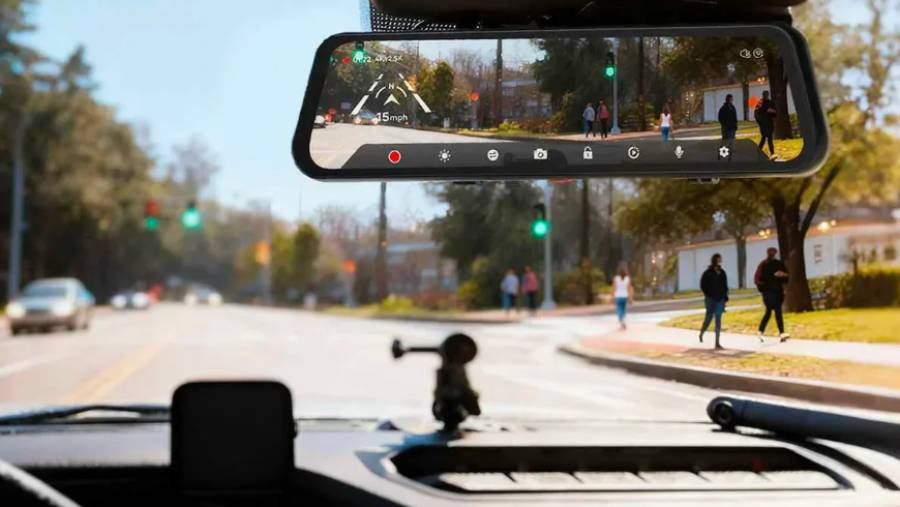
WOLFBOX dash cams are worth buying for drivers who want front and rear recording combined with a digital rearview mirror, particularly in vehicles with limited rear visibility. Models such as the G840S, G850 Pro, and G900 Pro integrate a touchscreen mirror display with a rear-facing camera, allowing drivers to monitor traffic behind their vehicles without relying entirely on a conventional reflective mirror. However, drivers who only need basic incident recording may find a traditional dash cam more practical.
The main advantage of a WOLFBOX mirror dash cam is its ability to combine video recording and rearview monitoring in one device. The rear camera transmits a live image to the mirror display, providing a view that is less obstructed by rear passengers, headrests, or cargo. This design is particularly useful for SUVs, pickup trucks, and vehicles with restricted rear-window visibility. The system also records footage that drivers can review after an accident or other road incident, provided the relevant recording has been saved.
WOLFBOX dash cams have limitations that buyers should consider. Installing the rear camera requires routing a cable through the vehicle, while parking surveillance generally requires a compatible hardwire kit and a suitable power connection. The digital mirror also depends on camera positioning, display brightness, and image processing. Glare, dirty lenses, and unfavorable lighting conditions can reduce visibility, and the display does not eliminate blind spots.
A WOLFBOX dash cam is a stronger choice for drivers who value rearview visibility and dual-camera coverage than for those seeking the simplest recording setup. Buyers should compare individual models based on actual recording performance, installation requirements, and price rather than assuming every WOLFBOX camera delivers identical results.
What Are the Main Features of Wolfbox Dash Cams?
The main features of WOLFBOX mirror dash cams include front and rear video recording, touchscreen mirror displays, loop recording, G-sensors, and reversing camera functionality. Selected models also offer GPS data recording, parking surveillance, and higher-resolution video capture. Feature availability varies by model, so buyers should verify the specifications of the exact camera they intend to purchase.
The dual-camera system is a defining feature of WOLFBOX mirror dash cams. A front-facing camera records the road ahead, while a separate rear camera captures traffic behind the vehicle. The mirror-mounted display allows drivers to view the rear camera feed and access recording settings through touchscreen controls. This arrangement combines two recording perspectives with a digital rearview display, although the recording resolution and frame rate depend on the model and selected settings.
WOLFBOX cameras also include recording functions designed to preserve footage during everyday driving. Loop recording divides video into consecutive files and automatically overwrites older, unprotected recordings when the memory card becomes full. A G-sensor detects sudden acceleration changes associated with events such as hard braking or collisions and can protect the corresponding recording from routine overwriting. These functions help manage storage, but important footage should still be backed up because protected files, memory card capacity, and recording behavior depend on device settings.
Parking monitoring and GPS are additional features worth checking before purchase. Compatible WOLFBOX models can support parking recording when connected to an appropriate power supply, while GPS-equipped configurations can associate location and speed information with recorded journeys. Parking surveillance does not necessarily mean continuous 24-hour recording, since activation methods and power requirements differ between products. Similarly, GPS support may depend on the model or an external antenna.
The reversing camera function provides another practical benefit. On supported installations, connecting the rear camera’s trigger wire to the vehicle’s reversing light circuit allows the mirror display to switch to a rear view when reverse gear is selected. Some models also display adjustable parking guidelines. This feature helps drivers judge obstacles behind the vehicle, but it does not replace checking mirrors, blind spots, and surrounding traffic.
WOLFBOX’s most useful features are its integrated rearview display and dual-camera recording system. Buyers should prioritize reliable footage, clear rear visibility, and compatible installation hardware over the total number of advertised features.
How Good Is the Video Quality of Wolfbox Dash Cams?
WOLFBOX dash cams can capture detailed daytime footage and provide usable nighttime recordings, but image quality depends on the model, camera sensor, lighting conditions, and recording settings. Higher-resolution models offer more image detail under suitable conditions, while factors such as motion blur, windshield reflections, and video compression affect how clearly vehicles, road signs, and license plates appear.
WOLFBOX offers mirror dash cams with different front and rear recording specifications. Models such as the G840S, G850 Pro, and G900 Pro are designed to provide front-facing road footage alongside rear camera recordings. However, advertised 4K resolution does not guarantee that every frame will contain readable details. Sensor performance, lens quality, bitrate, and exposure control determine how effectively the camera preserves information during real driving conditions.
How Clear Is Wolfbox Dash Cam Footage During the Day?
WOLFBOX dash cams generally produce their clearest footage during daylight because adequate illumination allows the image sensor to capture more detail with less electronic noise. Under favorable conditions, recordings can show surrounding vehicles, lane markings, traffic signals, and road signs. Higher-resolution front cameras provide additional pixels that may help preserve fine details when reviewing footage, although the actual improvement depends on the camera’s optical and processing capabilities.
Daytime recording quality changes with vehicle speed, sunlight direction, and the distance between the camera and surrounding objects. Strong sunlight entering the windshield can produce reflections or overexposed areas, while shaded roads create differences between bright and dark parts of the image. Exposure processing helps balance these conditions, but details may still disappear in extreme contrast. Keeping the windshield and camera lens clean also reduces glare and unwanted reflections.
License plate readability is a useful way to evaluate daytime performance. A nearby vehicle’s plate is easier to capture when both vehicles are moving slowly and the plate occupies a sufficient portion of the recorded image. At highway speeds, motion blur and compression can make individual characters difficult to distinguish, even when the footage is recorded at 4K resolution. Buyers should therefore examine original video samples rather than relying only on advertised resolution.
How Well Do Wolfbox Dash Cams Record at Night?
WOLFBOX dash cams can record nighttime traffic, headlights, road markings, and nearby vehicles, but fine details become harder to capture as available light decreases. Night recording performance depends on the image sensor’s sensitivity, exposure settings, lens aperture, and the camera’s ability to control bright light sources. Models with more capable imaging hardware may retain better detail in challenging conditions, although performance must be evaluated individually.
Nighttime footage presents two major challenges: limited illumination and high contrast. On poorly lit roads, the camera must gather enough light to produce a visible image, which can increase noise or require longer exposure times. Longer exposures make moving objects more susceptible to blur. At the same time, headlights and streetlights can create bright areas that obscure nearby details. Image processing can reduce these problems, but it cannot recover information that the sensor fails to capture.
Reading license plates at night is particularly difficult when another vehicle’s headlights reflect directly toward the camera or when both vehicles are moving. A plate may appear readable in a stationary recording but become overexposed or blurred during motion. Rear camera performance also deserves attention because rear-facing cameras may use different sensors and recording resolutions from the front camera.
WOLFBOX video quality should be judged by the clarity of moving vehicles, road details, and license plates in original daytime and nighttime recordings, not by resolution specifications alone. Drivers who frequently travel on poorly lit highways should prioritize verified nighttime footage when comparing WOLFBOX models, while daytime commuters may place greater emphasis on overall image clarity and reliable recording.
How Well Does the Wolfbox Rearview Mirror Camera Work?
The WOLFBOX rearview mirror camera provides a wider digital view of the area behind a vehicle than many conventional rearview mirrors, particularly when passengers, cargo, or vehicle structures obstruct the rear window. The system uses a rear-mounted camera to transmit live footage to a touchscreen display positioned over the existing mirror. Its effectiveness depends on camera placement, screen visibility, and lighting conditions.
The rear camera is particularly useful for SUVs, pickup trucks, and vehicles with limited rear visibility. Unlike a conventional mirror, which depends on an unobstructed line of sight through the rear window, the WOLFBOX camera captures images directly from its mounting position. A camera installed near the rear license plate or upper rear window can provide a clearer view of approaching vehicles and obstacles. However, the wide-angle lens can make objects appear smaller or farther away than they actually are, requiring drivers to adjust their distance judgment.
The touchscreen mirror display allows drivers to switch between camera views, adjust settings, and monitor the rear-facing video feed. Its larger display offers more viewing space than compact dash cam screens, making surrounding traffic easier to observe. However, direct sunlight, reflections, and screen brightness can affect visibility. Some drivers may also need time to adapt because a digital display presents a camera image rather than the optical reflection of a traditional mirror.
WOLFBOX mirror dash cams also support reversing assistance on compatible models. When the rear camera’s trigger wire is connected to the vehicle’s reversing light circuit, the display can automatically show the rear camera view when reverse gear is selected. Adjustable parking guidelines on supported models help drivers estimate the vehicle’s position relative to nearby obstacles. However, these guidelines are visual references rather than precise distance measurements, and the camera does not replace direct observation or existing parking sensors.
The WOLFBOX rearview mirror camera is most valuable for drivers who need improved rear visibility alongside continuous video recording. Its practical performance depends on correct installation, a clean camera lens, and a display that remains readable under changing lighting conditions.
What Are the Pros and Cons of Wolfbox Dash Cams?
The main advantages of WOLFBOX dash cams are their integrated mirror displays, front and rear recording coverage, and reversing assistance, while their main disadvantages involve installation complexity, display visibility, and model-dependent recording performance. These strengths and limitations make WOLFBOX mirror cameras more suitable for certain driving needs than conventional dashboard cameras.
| Pros | Cons |
|---|---|
| Front and rear cameras provide two recording perspectives. | Rear camera installation requires additional wiring. |
| Digital mirror displays can improve rear visibility when the rear window is obstructed. | Screen glare and reflections can reduce display readability. |
| Large touchscreen displays provide access to camera views and settings. | The mirror display is larger than a compact dash cam and may require adjustment. |
| Compatible models provide reversing camera assistance. | Parking monitoring may require a separate hardwire kit. |
| Loop recording and G-sensor functions support incident recording. | Recording quality and available features vary between models. |
One of WOLFBOX’s strongest advantages is the combination of rearview monitoring and dual-channel recording. Drivers can observe traffic behind their vehicles while the camera system records activity in front of and behind the car. This integration reduces the need for separate mirror displays and recording devices. It is especially practical for vehicles where the rear window provides a restricted view, although camera coverage still has blind spots.
Another advantage is the touchscreen interface, which provides access to recording settings and video playback through the mirror display. Supported reversing functions also add convenience when maneuvering in parking spaces. However, these benefits depend on correct camera positioning and wiring. A poorly positioned rear camera can produce an unsuitable viewing angle, while exposed or improperly routed cables can interfere with vehicle trim or moving components.
Installation complexity is a significant disadvantage compared with a basic front-facing dash cam. WOLFBOX mirror systems require the main unit to be secured over the existing rearview mirror and the rear camera cable to be routed through the vehicle. Drivers who want parking surveillance may also need a compatible hardwire kit. Professional installation adds another potential expense, particularly in vehicles with complicated interior panels or electrical systems.
Video performance and display usability are additional considerations. Higher advertised resolution does not automatically guarantee clearer license plates, especially at night or during fast movement. Similarly, the mirror display’s usefulness depends on brightness, glare, and the driver’s ability to interpret a wide-angle camera image. These limitations do not make WOLFBOX cameras unsuitable, but they should influence model selection.
WOLFBOX dash cams offer the greatest value when digital rearview visibility and dual-camera recording are priorities. Drivers who prefer discreet hardware, minimal wiring, or a simple front-facing recording system may be better served by a conventional dash cam.
Which Wolfbox Dash Cam Model Should You Buy?
The WOLFBOX G840S is the best starting point for budget-conscious drivers, the G850 Pro is better suited to drivers who want assistance alerts, and the G900 Pro is the strongest choice for buyers prioritizing higher-resolution front and rear recording. All three models use a 12-inch digital rearview mirror display, but their camera hardware and additional features serve different needs.
The main differences involve recording resolution, image sensors, and driver assistance functions. The G840S provides the essential mirror dash cam experience, while the G850 Pro adds advanced driver assistance features. The G900 Pro uses a Sony STARVIS 2 IMX678 front sensor and a higher-resolution rear camera, making it the more compelling option for buyers focused on image capture.
| Feature | G840S | G850 Pro | G900 Pro |
|---|---|---|---|
| Front recording | 4K | 4K | 4K |
| Rear recording | 1080p | 1080p | 2.5K |
| Mirror display | 12-inch | 12-inch | 12-inch |
| GPS | Yes | Yes | Yes |
| ADAS alerts | Not a core feature | Yes | No |
| Parking mode | Hardwire kit required | Hardwire kit required | Hardwire kit required |
| Best suited for | Everyday driving | Driver assistance | Higher-resolution recording |
These specifications reflect WOLFBOX’s published model information. Buyers should verify the exact product version and included accessories before ordering.
Who Should Choose the Wolfbox G840S?
The WOLFBOX G840S is suitable for drivers who want an affordable mirror dash cam with 4K front recording, 1080p rear recording, and a large digital rearview display. It covers the essential functions of a dual-camera system without requiring buyers to pay for every feature available in higher-tier models.
Its 12-inch display provides a live rear camera view, while the front and rear cameras record traffic from both directions. The G840S also supports GPS and parking monitoring with compatible equipment. This combination makes it particularly relevant for daily commuters and drivers who want better rear visibility in vehicles with obstructed rear windows.
The main limitation is the 1080p rear camera, which captures fewer pixels than the G900 Pro’s 2.5K rear camera. This difference matters when reviewing small details in rear-facing footage, although resolution alone does not determine image clarity. Drivers who primarily want a digital mirror, reversing assistance, and front-facing incident recording will find the G840S a practical entry-level option.
Who Should Choose the Wolfbox G850 Pro?
The WOLFBOX G850 Pro is better suited to drivers who want a mirror dash cam with additional driver assistance functions, including ADAS and blind spot detection features. It combines 4K front recording and 1080p rear recording with alerts designed to improve awareness of certain driving conditions.
Its driver assistance system includes functions such as lane departure and forward collision warnings. These features use camera-based information to identify specific situations and provide alerts. They can supplement driver awareness, but they do not control the vehicle or replace attentive driving. Their effectiveness depends on camera calibration, road markings, lighting, and operating conditions.
The G850 Pro also offers a 12-inch touchscreen, GPS functionality, and wireless connectivity. Its principal advantage over the G840S is the additional assistance technology rather than a major increase in rear recording resolution. Buyers interested in alerts and connected features should consider this model, while drivers focused primarily on capturing the finest possible rear video detail may prefer the G900 Pro.
Who Should Choose the Wolfbox G900 Pro?
The WOLFBOX G900 Pro is the strongest option among these three models for drivers who prioritize higher-resolution recording from both cameras. It combines 4K front video with 2.5K rear recording and uses a Sony STARVIS 2 IMX678 front image sensor designed for demanding lighting conditions.
The IMX678 sensor provides an important hardware distinction because sensor performance influences light capture, image noise, and fine-detail reproduction. Its advantages are particularly relevant when recording at night or in scenes with strong contrasts between headlights and dark surroundings. However, a more capable sensor does not guarantee readable license plates in every situation, since vehicle speed, exposure, and camera positioning still affect the result.
The G900 Pro also provides a 12-inch touchscreen mirror, GPS functionality, and wireless connectivity. Its higher-resolution rear camera is useful for drivers who want more detailed recordings of traffic approaching from behind. This makes the model particularly appealing for frequent highway drivers and owners of vehicles where rear-facing footage is an important purchasing consideration.
The G900 Pro is the preferred choice when recording hardware takes priority over driver assistance alerts. Buyers who specifically want ADAS features should compare it with the G850 Pro rather than assuming the more premium camera includes every function offered by the other models.
How Reliable Are Wolfbox Dash Cams?
WOLFBOX dash cam reliability depends on recording stability, memory card condition, power supply, installation quality, and the durability of individual components. Available customer reports describe both satisfactory long-term operation and problems involving frozen displays, camera failures, or unresponsive controls. These reports provide useful ownership insights but do not establish a verified failure rate for the brand.
Continuous recording places repeated demands on a dash cam’s storage system. Loop recording writes new video files throughout a journey, while protected recordings and parking surveillance can increase storage activity. A compatible high-endurance microSD card is therefore important because it is designed for repeated video writing. Drivers should also check saved footage periodically rather than assuming that a powered-on camera is recording correctly.
Power stability is another factor affecting performance. Loose connectors, unsuitable power adapters, and incorrectly installed hardwire kits can cause unexpected restarts or recording interruptions. Parking surveillance introduces additional electrical requirements because the camera must receive power when the ignition is off. A compatible hardwire kit with low-voltage protection helps manage battery discharge, although proper installation remains essential.
Customer experiences indicate that reliability is not uniform across all units. Some owners report extended use without significant problems, while others describe freezing, black screens, or component failures. Warranty and support experiences also vary, with reports of prompt replacements alongside complaints about delayed responses. These accounts should be considered individual experiences rather than proof that a particular defect affects every WOLFBOX model.
The best way to maintain reliable WOLFBOX dash cam operation is to use compatible storage and power accessories, install the cameras correctly, and verify recordings regularly. Buyers should also review the warranty terms for their region and purchase channel before ordering. Long-term durability cannot be established from advertised specifications alone, making verified owner feedback and independent extended-use testing important sources of evidence.
How Do You Install a Wolfbox Dash Cam?
Installing a WOLFBOX dash cam involves mounting the mirror display, positioning the rear camera, connecting the power supply, and routing the camera cables through the vehicle. Models such as the G840S, G850 Pro, and G900 Pro follow a similar installation process, although cable connections and included accessories vary. Most installations require basic tools and careful cable routing, while parking surveillance may require additional electrical work.
The first step is attaching the WOLFBOX display over the vehicle’s existing rearview mirror using the supplied mounting straps. The display should fit securely without interfering with mirror adjustment, overhead controls, or the driver’s forward visibility. Once mounted, the front camera lens must be positioned to capture the road ahead without obstruction from the windshield frame, rearview mirror housing, or other vehicle components. Drivers should check the camera preview before securing the cables.
The rear camera requires more preparation because its cable must run from the mirror display to the back of the vehicle. Depending on the vehicle and installation requirements, the camera can be mounted near the rear license plate or inside the rear window. An external mounting position generally provides a direct view behind the vehicle but exposes the camera to rain, dirt, and road debris. An internal installation protects the camera from weather but may introduce reflections or reduced visibility through tinted glass. Camera mounting must also follow the model’s instructions and environmental protection specifications.
After positioning the rear camera, the connecting cable should be routed along existing interior trim where practical. Cables must remain clear of pedals, seat mechanisms, moving tailgate components, and side-curtain airbag deployment areas. When the model supports automatic reversing display, the designated trigger wire can be connected to the appropriate reversing light circuit according to the installation manual. This connection allows the display to switch to the rear camera view when reverse gear is selected.
The final step is connecting the camera to a compatible power source and configuring its recording settings. Standard installations generally use the supplied vehicle power adapter, while parking surveillance requires a compatible hardwire kit on supported models. Hardwiring involves connecting the camera to suitable vehicle electrical circuits and configuring low-voltage protection. Drivers unfamiliar with automotive electrical systems should use a qualified installer to avoid wiring faults or battery discharge.
A properly installed WOLFBOX dash cam should provide a stable mirror display, an unobstructed rear camera view, and consistent recording from both cameras. Before driving, users should verify the front and rear video feeds, test recording playback, check reversing functionality where installed, and confirm that no cables interfere with vehicle safety equipment.
Are Wolfbox Dash Cams Compatible With All Cars?
WOLFBOX mirror dash cams are compatible with many passenger cars, SUVs, and pickup trucks, but they are not universally compatible with every vehicle. Compatibility depends on the original rearview mirror’s dimensions, mounting clearance, electrical system, rear camera installation options, and the vehicle’s existing safety equipment. Buyers should check these requirements before selecting a model.
Rearview mirror dimensions are the first compatibility consideration. WOLFBOX mirror cameras attach over the factory mirror, so the original mirror must provide a suitable mounting surface for the supplied straps. Vehicles with unusually thick mirrors, integrated control panels, or specialized mirror housings may present installation difficulties. A large mirror display can also interfere with sun visors or nearby interior components if clearance is insufficient.
Electrical compatibility is equally important. WOLFBOX dash cams require a suitable power supply, and the included vehicle adapter must match the vehicle’s available power connection. Vehicles with conventional 12V accessory outlets are generally straightforward to accommodate when the supplied adapter is compatible. However, vehicles with different electrical arrangements or limited accessory connections may require additional equipment. Parking surveillance also depends on a compatible hardwire kit and an appropriate electrical connection.
Rear camera placement creates another compatibility requirement. Sedans generally offer straightforward rear-window or exterior mounting options, while SUVs, hatchbacks, and pickup trucks may require additional planning because of moving tailgates, long cable routes, or exposed exterior mounting locations. Vehicles with factory reversing cameras can still use a separate WOLFBOX rear camera, but the two systems operate independently unless the manufacturer explicitly supports integration.
Modern vehicles may also contain rain sensors, driver assistance cameras, and other equipment near the factory rearview mirror. The WOLFBOX display and its wiring must not obstruct these systems or interfere with their operation. Drivers should also confirm that the installation complies with local rules governing windshield-mounted equipment and driver visibility.
The most reliable way to confirm WOLFBOX dash cam compatibility is to check the vehicle’s mirror dimensions, power connections, rear camera mounting options, and available cable routing space against the selected model’s installation requirements. These checks help prevent fitment problems and unexpected installation costs.
Read more: Can a Car Get Hit by Lightning? Safety & Damage
What Memory Card Do Wolfbox Dash Cams Need?
WOLFBOX dash cams require a compatible microSD card designed for continuous video recording, with high-endurance models being the preferred choice for everyday driving. Storage capacity and card compatibility depend on the specific camera model, recording resolution, and manufacturer requirements. Drivers should verify the maximum supported capacity before purchasing a memory card.
High-endurance microSD cards are particularly suitable for dash cams because loop recording repeatedly writes and overwrites video files. Unlike ordinary storage cards intended primarily for photos or occasional file transfers, high-endurance cards are designed to withstand frequent write cycles. Cards such as the Samsung PRO Endurance and SanDisk High Endurance are examples of storage products developed for continuous video applications. However, buyers should confirm that the selected card meets WOLFBOX’s compatibility and speed requirements.
Storage capacity determines how much footage a dash cam can retain before older, unprotected recordings are overwritten. A 128GB card provides approximately 5.7 hours of recording at a combined bitrate of 50 Mbps, excluding file-system overhead and other storage use. Actual recording duration varies with front and rear video resolution, compression settings, and bitrate. Higher-resolution configurations generally consume more storage space, making larger compatible cards useful for extended journeys.
Proper formatting also affects recording reliability. WOLFBOX users should format a compatible memory card through the camera’s settings menu when instructed by the manufacturer. Formatting prepares the card for the camera’s file system and removes existing recordings, so important footage must be backed up beforehand. Drivers should periodically check saved videos for missing files, playback errors, or recording interruptions, particularly after long periods of continuous use.
A compatible high-endurance microSD card is more important than simply choosing the largest available capacity. Drivers should prioritize the manufacturer’s supported storage specifications, reliable write performance, and regular recording checks to reduce the risk of losing important footage.
What Are the Best Alternatives to Wolfbox Dash Cams?
The main alternatives to WOLFBOX dash cams include 70mai and VIOFO cameras, which offer different approaches to video recording, installation, and everyday usability. WOLFBOX primarily appeals to drivers seeking an integrated digital rearview mirror, while 70mai and VIOFO offer conventional dashboard camera systems that emphasize recording performance, compact installation, and connected features.
70mai is a relevant alternative for drivers who want a compact dash cam with high-resolution recording and smartphone connectivity. Models such as the 70mai A810S combine 4K front recording with features designed for incident capture and parking surveillance. Unlike WOLFBOX mirror cameras, conventional 70mai dash cams do not replace the rearview mirror with a large digital display. This makes them more suitable for drivers who prefer a discreet camera installation and want to retain their factory mirror.
VIOFO is another alternative, particularly for buyers who prioritize recording hardware and front and rear video coverage. Models such as the VIOFO A229 Pro use Sony STARVIS 2 image sensors and offer dual-channel recording configurations. This approach focuses on capturing road incidents rather than providing a digital rearview mirror interface. Drivers who frequently travel at night or want detailed footage should compare original video samples from VIOFO and WOLFBOX before deciding, since sensor specifications alone cannot establish which camera performs better in every condition.
| Buying Factor | WOLFBOX | 70mai | VIOFO |
|---|---|---|---|
| Main product approach | Digital mirror dash cams | Compact dash cams | Conventional high-resolution dash cams |
| Rearview mirror display | Available on mirror models | Not a standard feature | Not a standard feature |
| Front and rear recording | Available | Available on selected models | Available on selected models |
| Smartphone connectivity | Model-dependent | Available on selected models | Available on selected models |
| Installation priority | Mirror mounting and rear camera wiring | Compact windshield mounting | Compact windshield mounting |
| Best suited for | Rear visibility and recording integration | Everyday recording and connected features | Recording-focused buyers |
The most important distinction is the intended function of each system. WOLFBOX mirror dash cams combine a digital rearview display with video recording, making them attractive for vehicles with limited rear visibility. In contrast, 70mai and VIOFO cameras generally preserve the original rearview mirror and concentrate on recording traffic incidents. A conventional dash cam may therefore be a better fit for drivers who do not need an additional rearview display.
Price comparisons should also account for installation accessories, rear camera availability, memory cards, and parking surveillance hardware. A camera with a lower initial price may require additional purchases to provide equivalent recording coverage. Similarly, a premium model is not automatically the better investment if its additional features do not address the driver’s needs.
Choose WOLFBOX when a digital rearview mirror and dual-camera coverage are the main priorities, 70mai when compact design and connected features matter most, or VIOFO when recording-focused hardware is the primary consideration. The final decision should be based on verified video performance, total installation cost, and the features required for the vehicle.