A tire pressure warning light often appears after you inflate the tires, rotate them, or replace one of them. Many Honda Civic owners try to clear the warning immediately. However, the light usually stays on because the TPMS still needs a new calibration. The system cannot recognize the updated tire conditions until you complete that process.
Start by checking all four tires with a reliable pressure gauge. Compare each reading with the recommended cold tire pressure on the driver-side door jamb label. Inflate or deflate every tire until it matches Honda’s specification. Then begin the TPMS calibration through the touchscreen, the steering-wheel controls, or the TPMS button, depending on your Civic model.
Many drivers think restarting the engine will clear the warning light. Others press the TPMS button without checking the tire pressure first. Neither method solves the problem. The TPMS only works correctly after it learns the current tire conditions. If one tire still has low pressure or a slow leak, the warning light will return during normal driving.
This guide explains how to reset the tire pressure light on a Honda Civic step by step. You will also learn when to calibrate the TPMS, why the warning light stays on, and how to fix the most common reset problems without unnecessary guesswork.
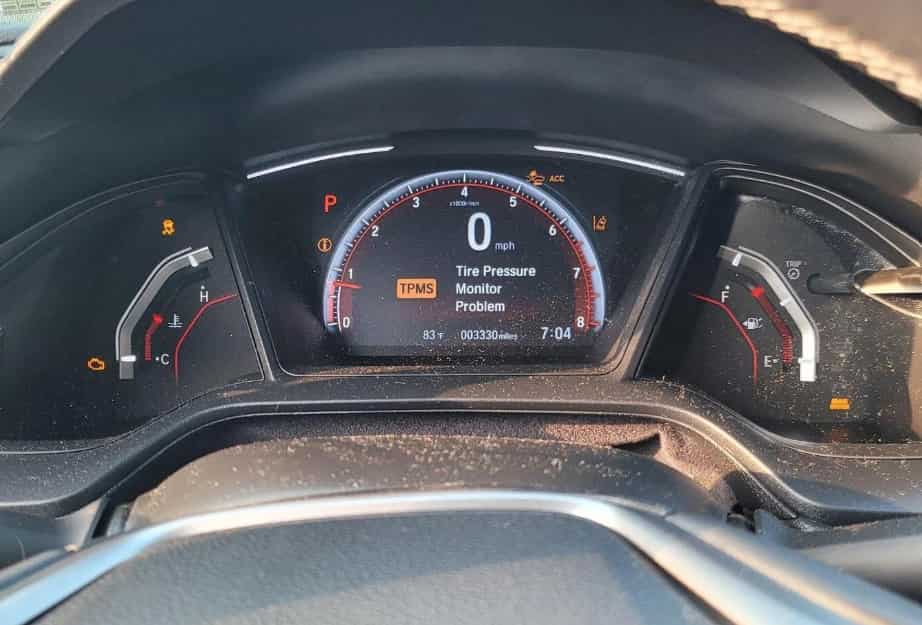
How Do You Reset the Tire Pressure Light on a Honda Civic?
Resetting the tire pressure light on a Honda Civic starts with checking the tires instead of pressing the TPMS button. The warning light often appears because one or more tires have incorrect pressure. If you ignore that problem and reset the system immediately, the light may return after a short drive. For that reason, always correct the tire pressure before starting TPMS calibration.
Park your Honda Civic on a flat surface and let the tires cool before checking them. Tire pressure increases after driving, so a warm tire can produce an inaccurate reading. Use a quality tire pressure gauge to measure every tire, including the rear tires. Next, compare each reading with the recommended cold tire pressure shown on the driver-side door jamb label. Inflate or release air until every tire matches Honda’s specification.
After you adjust the tire pressure, inspect each tire for visible damage. Look for nails, cuts, sidewall cracks, or signs of a slow air leak. Even a small puncture can trigger the warning light again after calibration. If you find any damage, repair or replace the tire before moving to the next step.
Once the tires reach the correct pressure, switch the ignition to the ON position or start the engine if your model requires it. Open the TPMS calibration menu through the touchscreen or driver information display. Older Honda Civic models may use a dedicated TPMS button instead. Start the calibration process and follow the confirmation message on the display if one appears.
Drive the vehicle normally after calibration begins. The TPMS needs time to compare the rolling characteristics of all four tires and create a new reference. The warning light may disappear quickly, but the learning process can continue during normal driving. Avoid repeating the reset unless the warning light returns after the system finishes calibration.
Many drivers confuse the number printed on the tire sidewall with the correct tire pressure. However, that number only shows the maximum pressure the tire can safely hold. Honda recommends using the cold tire pressure listed on the driver-side door jamb label because that value matches the vehicle’s weight, suspension, and handling characteristics. Following this recommendation improves TPMS accuracy and helps the tires wear evenly over time.
How Do You Reset the Honda Civic TPMS Through the Touchscreen?
Many newer Honda Civic models allow you to start TPMS calibration through the touchscreen display. This method is simple, but the menu layout may vary slightly between model years and trim levels. Even so, the overall process remains almost the same. The most important step is making sure all four tires have the correct cold tire pressure before you open the calibration menu.
Start the vehicle and keep it parked on a level surface. Open the Settings menu on the touchscreen, then select Vehicle or Vehicle Settings. Next, choose TPMS Calibration and tap Calibrate. Some models ask you to confirm the command before the system begins the calibration process. Once you confirm the selection, the system stores a new pressure reference for all four tires.
Do not expect the warning light to disappear the moment you press Calibrate. The TPMS still needs to compare the rolling characteristics of each tire during normal driving. In many cases, the light turns off after a short drive, while the learning process continues in the background. This behavior is completely normal and does not indicate a problem with the system.
If the touchscreen displays a calibration error, stop the procedure and check the vehicle again. Make sure the transmission remains in Park and confirm that the ignition is fully on. Then verify the tire pressure one more time with an accurate gauge. Even a small pressure difference between the tires can prevent the system from completing calibration correctly.
You should also avoid starting TPMS calibration immediately after a long drive. Warm tires produce higher pressure readings, which can create an incorrect reference value. Instead, let the tires cool before checking the pressure. This simple step improves calibration accuracy and reduces the chance of seeing the warning light again.
Honda may change menu names across different Civic generations, but the function remains the same. Some vehicles display TPMS Calibration, while others use Initialize or similar wording. Follow the options shown on your touchscreen instead of relying on screenshots from another model year. Using the correct menu ensures the system records an accurate baseline and continues monitoring tire pressure as intended.
How Do You Reset the Honda Civic TPMS With Steering Wheel Controls?
Some Honda Civic models use steering wheel controls instead of a touchscreen to access vehicle settings. Although the interface looks different, the calibration process follows the same principle. The system needs a new reference after you correct the tire pressure. For that reason, check every tire before you begin.
Turn the ignition to the ON position while keeping the vehicle parked. Use the steering wheel controls to open the driver information display. Navigate to Vehicle Settings or Customize Settings, then find the TPMS Calibration option. Select Initialize or Calibrate, depending on the menu shown on your vehicle. Confirm your selection and allow the system to save the new reference.
Some Honda Civic models use the word Initialize, while others display Calibrate. Honda changed the menu names across different generations, but both options perform the same function. They tell the TPMS to learn the current tire conditions after you adjust the tire pressure. Always follow the menu displayed on your own vehicle instead of copying the steps from another model year.
After you start the calibration, drive the vehicle under normal conditions. The TPMS compares the rotation of each wheel and builds a new baseline while you drive. The warning light may turn off during this process, but the system can continue learning for a short time afterward. This behavior is normal and does not require another reset.
If the tire pressure light remains on after a reasonable drive, stop and inspect the tires again. Check the pressure with an accurate gauge and compare each reading with the specification on the driver side door jamb label. Look for a nail, a damaged valve stem, or a slow air leak that could cause pressure to drop again. Solving the root cause is more important than repeating the calibration.
Avoid pressing random buttons or restarting the calibration several times in a row. Repeating the same procedure without checking the tires rarely fixes the problem. Instead, verify the tire condition first and let the TPMS complete its learning process. This approach improves accuracy and helps the warning system detect future pressure changes more effectively.
How Do You Reset the Honda Civic TPMS With a Physical Button?
Older Honda Civic models may include a dedicated TPMS button instead of a touchscreen menu or steering wheel controls. Honda usually places this button below the dashboard on the left side of the steering column. Before you press it, make sure every tire has the correct cold tire pressure. The system cannot complete an accurate calibration if one or more tires still have incorrect pressure.
Turn the ignition to the ON position while keeping the vehicle parked. Locate the TPMS button and press it until the tire pressure indicator blinks twice. Release the button after the light flashes. The blinking light confirms that the system has accepted the calibration command and started learning the current tire conditions.
Start driving normally after the calibration begins. The TPMS does not finish the process while the vehicle remains parked. Instead, it compares the rolling characteristics of all four tires during everyday driving. The warning light may turn off quickly, but the system can continue collecting data before it completes the learning process.
Do not worry if you cannot find a TPMS button in your Honda Civic. Many newer models remove the physical button and move the calibration function to the touchscreen or the driver information display. The reset method depends on the model year and trim level, so always use the controls available in your vehicle instead of following instructions for a different Civic generation.
Some drivers press the TPMS button several times because they expect the warning light to disappear immediately. This habit often creates confusion and wastes time. The calibration only works after the system finishes learning the tire conditions during normal driving. Press the button once, then allow the vehicle to complete the process without interruption.
If the tire pressure light returns after calibration, inspect the tires instead of pressing the button again. A slow air leak, damaged valve stem, or incorrect tire pressure can trigger the warning even after a successful reset. Fix the underlying problem first, then repeat the calibration only if necessary.
How Long Does Honda Civic TPMS Calibration Take?
Honda Civic TPMS calibration does not finish the moment you start the reset process. The system needs time to collect data from all four wheels before it establishes a new reference. In most cases, you only need to drive the vehicle normally after starting the calibration. The exact time depends on road conditions, driving speed, and the model year of your Civic.
Drive the vehicle at a steady speed whenever possible. Normal city streets and regular highway driving both help the system learn the rolling characteristics of each tire. Short trips with frequent stops may delay the process because the TPMS receives less consistent data. A smooth and uninterrupted drive usually allows the calibration to finish more efficiently.
Many drivers expect the warning light to disappear immediately after they select Calibrate or press the TPMS button. However, the light may stay on for a short period while the system continues collecting information. This delay does not always indicate a problem. The TPMS simply needs enough driving data to confirm that all four tires operate under normal conditions.
Avoid restarting the calibration every few minutes if the warning light does not turn off right away. Repeating the process interrupts the learning cycle and makes troubleshooting more difficult. Instead, continue driving normally and give the system enough time to complete its work. Patience often solves the issue without any additional action.
If the warning light remains on after a normal drive, inspect the tires again before attempting another reset. Check the cold tire pressure with a reliable gauge and compare every reading with the specification on the driver side door jamb label. Look for a slow air leak, a damaged tire, or another issue that could prevent the system from learning correctly. Once you correct the problem, start a new calibration and allow the TPMS to complete the process.
Remember that calibration does not follow a fixed countdown. One Honda Civic may complete the process sooner than another because driving conditions and TPMS software differ between model years. Instead of focusing on the time, focus on following the correct procedure and confirming that every tire remains at the recommended pressure.
Why Is the Honda Civic Tire Pressure Light Still On After Resetting It?
A Honda Civic tire pressure light can stay on even after TPMS calibration if the system still detects a problem. In many cases, the reset process works correctly, but the underlying issue remains. The TPMS continues to monitor tire conditions after calibration, so it will illuminate the warning light again if it finds abnormal pressure or unusual wheel behavior. Finding the real cause is more important than repeating the reset.
Incorrect tire pressure is the most common reason for a persistent warning light. Even a small pressure difference can prevent the system from recognizing normal driving conditions. Check every tire with an accurate pressure gauge after the tires have cooled. Then compare each reading with the recommended pressure on the driver side door jamb label instead of using the maximum pressure printed on the tire sidewall.
A slow air leak can also trigger the warning after a successful calibration. A small nail, damaged valve stem, or worn tire bead may allow air to escape gradually. The tires may appear normal when you park the vehicle, yet the pressure can drop enough to activate the TPMS after several hours or days. Inspect each tire carefully if the warning light returns repeatedly.
Temperature changes often affect tire pressure as well. Cold weather reduces the air pressure inside each tire, while warmer weather increases it. A sudden drop in outdoor temperature can activate the warning light even if the tires were properly inflated a few days earlier. Checking the pressure during seasonal changes helps prevent unnecessary TPMS warnings.
Sometimes the issue involves the TPMS itself instead of the tires. A blinking warning light that later stays on usually points to a system fault rather than low tire pressure. The problem may involve a damaged sensor, a communication error, or another electronic component. In this situation, another calibration will not solve the problem because the system cannot monitor the tires correctly.
If the warning light remains on after you verify the tire pressure and complete the correct calibration procedure, inspect the tires one more time for damage or air leaks. When you cannot find any obvious problem, schedule a professional inspection. A technician can diagnose the TPMS and identify faults that are not visible during a routine tire check. This approach saves time and ensures the system continues protecting you during everyday driving.
When Should You Calibrate the TPMS on a Honda Civic?
You should calibrate the TPMS whenever a change affects tire pressure or the way the tires contact the road. The system relies on a reference that reflects normal driving conditions. When that reference no longer matches the current condition of the tires, the TPMS may display a warning even though the tires are in good shape. Starting a new calibration helps the system recognize the updated baseline and monitor the tires more accurately.
One of the most common situations occurs after you adjust the tire pressure. Whether you add air or release it, the system needs to learn the new pressure values. The same rule applies after rotating the tires because each tire moves to a different position on the vehicle. Although the tire pressure may remain correct, the TPMS still benefits from a new calibration after the rotation.
You should also calibrate the system after replacing a tire or installing a new wheel. A new tire may have a different tread depth or rolling characteristic than the old one. These small differences can affect how the TPMS interprets wheel movement during normal driving. Completing a calibration allows the system to adapt to the new tire without generating unnecessary warnings.
Seasonal temperature changes provide another good reason to recalibrate the TPMS. Tire pressure naturally decreases when the weather becomes colder and increases as temperatures rise. After you adjust the pressure to match Honda’s recommended specification, start a new calibration so the system can record the updated tire condition. This simple step helps reduce false warnings during seasonal weather changes.
Always finish any tire maintenance before you begin the calibration process. Check every tire with an accurate pressure gauge and inspect the tread and sidewalls for visible damage. Inflate each tire to the cold pressure listed on the driver side door jamb label before starting the reset procedure. Following this sequence improves TPMS accuracy and reduces the chance of seeing the warning light return during everyday driving.
Can You Reset the Honda Civic Tire Pressure Light Without Fixing the Tire?
No, you should not reset the Honda Civic tire pressure light without fixing the underlying problem first. The TPMS warns you when it detects an abnormal change in tire pressure. If you ignore the cause and start a new calibration, the warning light will likely return after the system finishes monitoring the tires. A reset does not repair a puncture or restore the correct tire pressure.
Many drivers believe the reset function clears every TPMS warning. In reality, the calibration process only tells the system to learn the current tire conditions. If one tire still has low pressure, the TPMS accepts inaccurate information as its starting point. As soon as the system detects another pressure difference, it turns the warning light on again.
A slow air leak is one of the most common reasons for repeated TPMS warnings. A small nail, damaged valve stem, or worn wheel seal can release air gradually without making the tire appear flat. You may reset the system successfully, but the pressure will continue to drop during the next few days. Checking the tires with a pressure gauge is far more effective than performing another calibration.
Cold weather can create a similar situation. Lower temperatures reduce the air pressure inside every tire, especially during the winter months. If the pressure falls below Honda’s recommended specification, the warning light may appear even though the tires have no damage. Inflate the tires to the correct cold pressure before starting the TPMS calibration. This approach solves the problem more reliably than resetting the system alone.
Overinflating the tires is not a safe solution either. Some drivers add extra air because they believe higher pressure will prevent the warning light from returning. Excessive pressure reduces the tire’s contact with the road, increases uneven tread wear, and can affect braking and ride comfort. Always follow the recommended pressure on the driver side door jamb label instead of guessing the correct value.
Think of TPMS calibration as the final step instead of the first one. Correct the tire pressure, repair any damage, and inspect every tire carefully before you reset the system. When you follow this sequence, the TPMS can learn accurate tire conditions and continue warning you whenever a real pressure problem develops.
What Are the Most Common Honda Civic TPMS Reset Mistakes?
Many TPMS problems result from simple mistakes during the reset process. Drivers often focus on turning off the warning light instead of finding the real cause. As a result, the light returns after a short drive and creates unnecessary frustration. Understanding these common mistakes helps you complete the calibration correctly the first time.
One of the biggest mistakes is resetting the TPMS before checking the tire pressure. The system cannot learn accurate information if one or more tires remain underinflated or overinflated. Always measure the pressure with a reliable gauge and compare each reading with the specification on the driver side door jamb label. This step provides the correct reference for the calibration process.
Another common mistake involves using the maximum pressure printed on the tire sidewall. Many drivers assume this number represents the recommended operating pressure. In reality, it only shows the highest pressure the tire can safely hold. Inflating the tires to this value can affect handling, reduce ride comfort, and increase uneven tread wear. Honda’s recommended cold tire pressure remains the correct value for everyday driving.
Checking tire pressure immediately after driving can also lead to inaccurate results. As the tires warm up, the air inside expands and raises the pressure reading. If you adjust the pressure while the tires are hot, the final cold pressure may fall below Honda’s recommendation. Let the tires cool before making any adjustments to ensure the calibration starts with accurate measurements.
Some drivers repeat the TPMS reset several times when the warning light stays on. This approach rarely fixes the problem because the system continues detecting the same issue. A slow air leak, damaged valve stem, or tire puncture requires inspection and repair before another calibration will succeed. Repeating the reset without troubleshooting only delays the real solution.
Another mistake is following instructions for the wrong Honda Civic model year. Honda has changed the TPMS controls across different generations, so one model may use a touchscreen while another uses steering wheel controls or a physical TPMS button. Always follow the procedure that matches your vehicle. Using the correct reset method and confirming the tire condition first gives the TPMS the best chance to complete calibration successfully.
When Should You Take the Honda Civic to a Dealer or Tire Shop?
Most TPMS warnings disappear after you correct the tire pressure and complete the calibration process. However, some problems require professional diagnosis. If the warning light continues to return after several inspections, the issue may involve more than tire pressure alone. A qualified technician can identify faults that are difficult to detect during a visual inspection.
Pay close attention to the way the warning light behaves. A solid light usually indicates that one or more tires have incorrect pressure. A blinking light that stays on afterward often points to a TPMS malfunction instead of a simple pressure issue. In this situation, resetting the system again will not solve the problem because the TPMS cannot monitor the tires correctly.
You should also schedule an inspection if one tire loses air repeatedly. A slow puncture, damaged valve stem, cracked wheel, or leaking wheel bead can reduce tire pressure over time. These problems often develop gradually, so the tire may look normal even though it continues to lose air. A tire shop can perform a leak test and recommend the appropriate repair or replacement.
Recent tire or wheel service can also affect TPMS performance. Replacing a tire, installing new wheels, or repairing suspension components may change the vehicle’s tire characteristics. If the warning light appears soon after this type of work, ask the service provider to inspect the tires and verify that the calibration procedure was completed correctly.
Electronic faults sometimes prevent the TPMS from operating as expected. Wiring damage, communication errors, or a failed component can keep the warning light on even when the tires have the correct pressure. Professional diagnostic equipment allows technicians to identify these faults quickly and avoid unnecessary tire replacements.
Do not ignore a warning light that returns repeatedly. The TPMS plays an important role in vehicle safety because it alerts you to pressure changes before they affect handling or tire wear. A professional inspection can identify the root cause, restore normal system operation, and help you drive with greater confidence.
What Should You Remember When Resetting the Honda Civic Tire Pressure Light?
Resetting the tire pressure light on a Honda Civic is a straightforward process when you follow the correct order. Always begin by checking the condition and pressure of all four tires. Compare each reading with the recommended cold tire pressure on the driver side door jamb label instead of the maximum value printed on the tire sidewall. This step gives the TPMS accurate information before calibration begins.
Choose the reset method that matches your Honda Civic. Some models use the touchscreen, while others rely on steering wheel controls or a dedicated TPMS button. After you start the calibration, drive the vehicle normally and allow the system enough time to learn the current tire conditions. Avoid repeating the reset unless you confirm that the first calibration failed.
Remember that TPMS calibration does not repair tire problems. A puncture, slow air leak, damaged valve stem, or cracked wheel can cause the warning light to return even after a successful reset. Finding and repairing the underlying issue is always more effective than clearing the warning repeatedly.
If the warning light continues to appear after you verify the tire pressure and complete the correct procedure, inspect the tires again or arrange a professional diagnosis. A solid warning light often indicates a pressure problem, while a blinking light may signal a system malfunction. Understanding this difference helps you respond quickly and protect both your tires and your safety.
Following the correct procedure improves TPMS accuracy, extends tire life, and reduces the chance of unnecessary warning lights. More importantly, it helps your Honda Civic continue monitoring tire pressure as Honda designed it, giving you greater confidence every time you drive.