A Honda Accord infotainment system works best when you use the correct reset method for the problem. In most cases, a simple reboot fixes a frozen screen, slow performance, or connection errors. If the problem continues, you can perform a Factory Data Reset to restore the system to its default settings. The correct procedure depends on your Accord’s model year and infotainment software.
Before you reset the system, park the vehicle on a level surface and shift the transmission into Park. Keep the battery charged throughout the process because unstable voltage can interrupt the reset. If you plan to perform a factory reset, record your Bluetooth pairings, radio presets, navigation favorites, and other customized settings. You may need to restore them after the reset finishes.
This guide explains how to reset a Honda Accord infotainment system safely from start to finish. You will learn when a reboot is enough and when a Factory Data Reset makes more sense. You will also discover which settings the reset may erase, how to reconnect Apple CarPlay or Android Auto, and what to do if the problem returns after the reset. By following the correct steps, you can solve many infotainment issues without creating new ones.
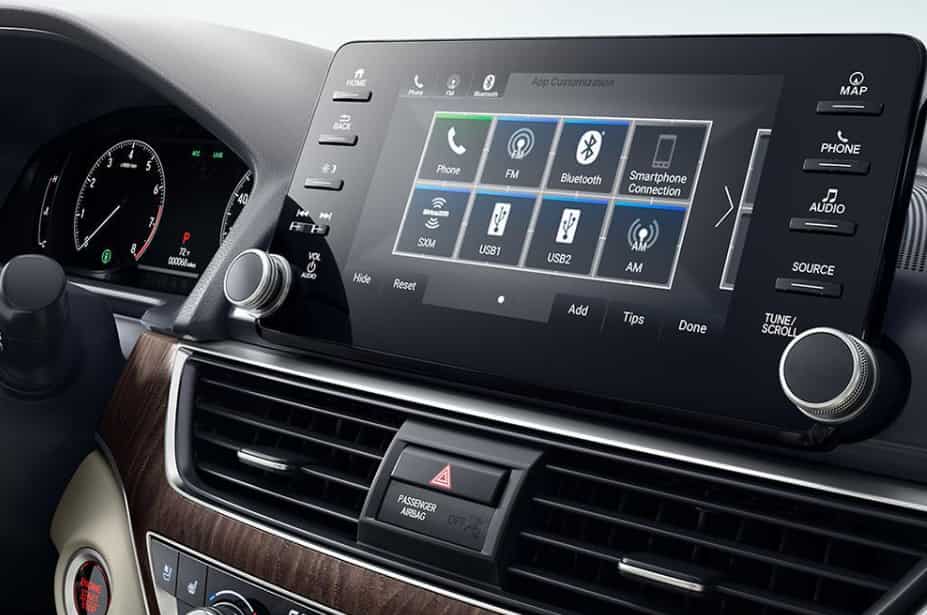
What Should You Do Before Resetting a Honda Accord Infotainment System?
You should prepare both the vehicle and the infotainment system before starting any reset procedure. A few simple checks can prevent unnecessary data loss and reduce the risk of interrupting the reset. More importantly, proper preparation helps you choose the correct reset method instead of using a factory reset when a simple reboot would solve the problem.
Start by parking the vehicle on a level surface and shifting the transmission into Park. Apply the parking brake and keep the ignition in the power mode required for your model. A stable power supply is essential because the infotainment system relies on consistent battery voltage during startup and software recovery. If the battery voltage drops while the system restarts, the reset may fail or the software may not load correctly.
Next, identify your Honda Accord model year and trim level. Honda has introduced different infotainment platforms over the years, so the reset procedure is not identical for every vehicle. Older Accord models may use physical buttons or a volume knob, while newer versions rely on touchscreen controls and software menus. Following instructions for the wrong generation can lead to confusion and unnecessary troubleshooting.
If you plan to perform a Factory Data Reset, take a few minutes to record your personalized settings. Save your Bluetooth pairings, radio presets, navigation favorites, and display preferences before continuing. You should also note any Apple CarPlay or Android Auto connections because you may need to pair your phone again after the reset.
Finally, pay attention to the symptoms before choosing a reset method. A frozen screen, delayed response, or temporary Bluetooth issue usually points to a software problem that a reboot can resolve. However, a completely black display, repeated restart loops, or multiple electrical warning messages may indicate a deeper hardware or power issue. In those situations, further diagnosis is more effective than repeatedly resetting the infotainment system.
Should You Reboot or Factory Reset the Honda Accord Infotainment System?
You should always start with a system reboot before considering a Factory Data Reset. A reboot refreshes the infotainment software without intentionally removing your saved settings. In many cases, this simple step restores normal performance and saves you from spending time setting up the system again.
A reboot works best when the problem appears suddenly. For example, the touchscreen may freeze, the menus may respond slowly, or Bluetooth may disconnect without warning. Apple CarPlay or Android Auto may also fail to connect after a software glitch. These issues usually result from temporary software conflicts instead of damaged hardware. Restarting the system clears the active processes and allows the software to load again from a clean state.
A Factory Data Reset serves a different purpose. It restores the infotainment system to its default configuration and removes many personalized settings. Depending on your Honda Accord model, the reset may erase Bluetooth pairings, radio presets, navigation favorites, user profiles, display preferences, and smartphone permissions. Because of this, you should use a factory reset only after a reboot fails to solve the problem or when you want to remove personal data before selling the vehicle.
Choosing the correct reset method helps you avoid unnecessary work. A reboot is faster, safer, and suitable for most software-related problems. A Factory Data Reset requires additional setup after the process finishes, so it should remain your second option. If the screen stays black, the system enters a continuous reboot loop, or multiple electrical warnings appear, stop resetting the infotainment system and inspect the battery, software, or hardware instead.
How Do You Soft Reset a Honda Accord Infotainment System?
A soft reset is the safest way to fix most infotainment problems because it restarts the software without intentionally deleting your saved settings. In many situations, this simple procedure restores normal operation within a few minutes. You should always try a soft reset before performing a Factory Data Reset or seeking more advanced repairs.
Before you begin, park the vehicle on a level surface and shift the transmission into Park. Keep the engine running or switch the ignition to the power mode recommended for your Honda Accord. Stable battery voltage helps the infotainment system complete the restart without interruption. You should also disconnect any unnecessary USB devices because an external accessory can sometimes interfere with the reboot process.
On many newer Honda Accord models, press and hold the Home button until the reboot message appears on the screen. Select OK to confirm the restart, then wait while the infotainment system shuts down and loads again. The display may turn black for a short time before the Honda logo and Home screen appear. Avoid pressing additional buttons during this process because repeated inputs can interrupt the restart sequence.
Older Honda Accord models may use a different reboot method. Some systems rely on a physical power or volume knob, while others include the restart option inside the settings menu. Since Honda has updated its infotainment platform several times, you should follow the instructions in the owner’s manual for your specific model year instead of using a procedure designed for another generation.
After the system finishes restarting, test the function that caused the problem. Open the touchscreen menus, reconnect your phone, and check whether Bluetooth, Apple CarPlay, Android Auto, navigation, and audio controls work normally. If the original issue disappears, no further action is necessary. However, if the same problem returns immediately, a Factory Data Reset or a more detailed diagnosis may provide a better solution.
How Do You Factory Reset a Honda Accord Infotainment System?
A Factory Data Reset restores the infotainment system to its default configuration and removes many saved settings. You should use this option only after a soft reset fails to fix the problem or when you want to erase personal information before selling the vehicle. Because this process can delete customized data, take a few minutes to record important settings before you begin.
Start by parking the vehicle in a safe location and keeping a stable power supply throughout the reset. Open the Home screen, then navigate to General Settings, System, and Factory Data Reset if your Honda Accord uses this menu structure. Follow the prompts on the display, select Continue, and confirm the reset. The infotainment system will restart automatically and return to its default configuration when the process finishes.
The exact menu names may vary across Honda Accord model years. Older infotainment systems can use labels such as Factory Default, Reset Settings, or Restore Factory Settings instead of Factory Data Reset. For that reason, always match the instructions to your vehicle instead of following a guide written for a different generation. Using the correct procedure reduces confusion and helps you avoid changing the wrong settings.
During the reset, do not switch off the ignition, disconnect the battery, or remove an infotainment fuse. The system needs uninterrupted power while it restores the software and reloads the default configuration. Interrupting this process may leave the infotainment system unstable or require additional troubleshooting before it works normally again.
Once the reset finishes, the infotainment system may display the initial setup screen instead of the familiar Home screen. Take a few minutes to restore your preferred language, reconnect Bluetooth devices, enable Apple CarPlay or Android Auto, and save your radio presets again. Finally, test the touchscreen, navigation, audio controls, and smartphone connectivity to confirm that the original problem has been resolved.
What Information Is Deleted After a Honda Accord Factory Reset?
A Factory Data Reset removes many of the personalized settings stored in the Honda Accord infotainment system. However, the exact data that disappears depends on the model year, trim level, and software version. A soft reset simply restarts the system, while a factory reset restores it to its original configuration. Understanding this difference helps you decide whether a full reset is really necessary.
In most Honda Accord models, a factory reset deletes Bluetooth pairings, Wi-Fi connections, radio presets, user profiles, and customized display settings. It may also remove navigation favorites, recent destinations, voice recognition preferences, and saved smartphone permissions. As a result, you will need to reconnect your phone and personalize the infotainment system after the reset completes. Taking a few minutes to record these settings beforehand can save time later.
Many drivers worry that a factory reset will affect the vehicle itself, but that is not how the process works. The reset only targets the infotainment system and its stored data. It does not reset the engine, transmission, braking system, or Honda Sensing features. Even so, some vehicle preferences are managed through the infotainment display, so you may need to configure options such as display themes, clock settings, or convenience features again.
If you use Apple CarPlay or Android Auto every day, expect to complete the initial setup after the reset. The system treats your smartphone as a new device, so you must pair it again and approve the required permissions. You may also need to reconnect to your preferred Wi-Fi network if your vehicle supports connected services. This extra setup only takes a few minutes, but planning for it prevents unnecessary frustration.
Before performing a Factory Data Reset, think about the information you want to keep. Save important navigation locations, write down your favorite radio stations, and confirm that you know the login details for any connected services. If you simply need to fix a frozen screen or a temporary software glitch, a soft reset is usually the better choice because it preserves your personal settings while refreshing the system.
Which Honda Accord Infotainment Problems Can a Reset Fix?
A reset can solve many common infotainment problems, but it cannot repair every issue. In most cases, a reboot or Factory Data Reset fixes software-related errors instead of hardware failures. Knowing what a reset can and cannot do helps you choose the right solution and avoid unnecessary repairs.
A reset often resolves problems that appear without warning. The touchscreen may freeze, the display may respond slowly, or the audio system may stop working after startup. Bluetooth connections can also fail, while Apple CarPlay or Android Auto may refuse to connect even though they worked previously. These symptoms usually occur because the software fails to load correctly or an application becomes unresponsive. Restarting the infotainment system clears temporary errors and reloads the operating software.
A Factory Data Reset can also fix problems caused by damaged settings or corrupted system data. For example, the infotainment system may continue crashing after a software update, repeatedly disconnect from a paired phone, or fail to remember user preferences. Restoring the default configuration removes those settings and gives the software a clean starting point. Although the process requires additional setup afterward, it often resolves persistent software issues that a simple reboot cannot fix.
However, a reset has clear limitations. It cannot repair a cracked touchscreen, a damaged display panel, faulty wiring, or a defective infotainment control unit. It also cannot solve problems caused by a weak 12-volt battery or a blown fuse. If the screen remains black, the system enters a continuous reboot loop, or multiple warning lights appear on the dashboard, the problem likely extends beyond the infotainment software.
After completing the reset, test every major function before assuming the problem is solved. Check the touchscreen response, play audio from different sources, reconnect your smartphone, and open the navigation system if your vehicle includes one. If every feature works normally, the issue was probably software-related. If the same symptoms return within a short time, inspect the vehicle’s electrical system or schedule a professional diagnosis to identify the root cause.
How Do You Reconnect Bluetooth, Apple CarPlay, and Android Auto After the Reset?
After a Factory Data Reset, you need to reconnect your smartphone before you can use Bluetooth, Apple CarPlay, or Android Auto again. The reset removes many saved connection settings, so the infotainment system treats your phone as a new device. Completing a fresh setup helps prevent connection errors and improves overall stability.
Start by deleting the old Honda Accord connection from your smartphone. Then open the Bluetooth menu on the infotainment system and remove the previously paired phone if it still appears in the device list. Restart your phone before pairing it again. This step clears temporary connection data and reduces the chance of repeated pairing failures.
Once both devices restart, enable Bluetooth and Wi-Fi on your smartphone. If your Honda Accord supports wireless Apple CarPlay or Android Auto, both features must remain active during the setup process. For wired connections, use a high-quality USB data cable instead of a charging-only cable. A damaged or incompatible cable can interrupt data transfer and cause the infotainment system to lose the connection.
Follow the pairing instructions on the infotainment screen and approve every permission request on your phone. Depending on your device, you may need to allow access to contacts, messages, notifications, location services, and media files. These permissions enable voice commands, navigation, hands-free calling, and music streaming. Skipping any of them can limit the available features even if the connection succeeds.
After the setup finishes, test every function before driving. Make a hands-free call, stream music, open your preferred navigation app, and confirm that voice commands respond correctly. If the connection drops or fails repeatedly, restart both devices and try again. When the problem continues after several attempts, check for software updates on both the infotainment system and your smartphone. Keeping both devices up to date often resolves compatibility issues and improves connection reliability.
What Should You Do If the Infotainment System Still Does Not Work?
If the infotainment system still does not work after a reboot and a Factory Data Reset, you should stop repeating the same procedure and investigate the underlying cause. A successful reset removes most software-related issues, so recurring problems often point to outdated software, unstable battery voltage, or a hardware fault. Identifying the root cause saves time and prevents unnecessary troubleshooting.
Start by checking whether your Honda Accord has the latest infotainment software. Manufacturers regularly release updates to improve system stability, fix software bugs, and enhance compatibility with Bluetooth, Apple CarPlay, and Android Auto. Install any available updates according to Honda’s instructions and allow the process to finish without interruption. Restart the infotainment system after the update and verify whether the original problem has disappeared.
Next, inspect the condition of the 12-volt battery. Modern infotainment systems depend on stable voltage during startup and normal operation. A weak battery can cause slow boot times, random restarts, frozen screens, or repeated connection failures. If you notice dim interior lights, a slow engine start, or warning messages on the dashboard, test the battery before assuming the infotainment system has failed.
You should also avoid using battery disconnection or fuse removal as routine troubleshooting methods. These procedures rarely solve software problems on their own and may erase additional settings or create new issues. Since fuse locations and electrical layouts vary by model year, removing the wrong fuse can affect other vehicle systems. Follow the owner’s manual if you need to inspect a fuse, and replace it only when you confirm that it has failed.
Finally, consider professional diagnosis if the problem continues after completing every recommended step. A permanently black screen, an unresponsive touchscreen, continuous reboot loops, or complete audio failure often indicates a hardware or electrical issue rather than a software error. Before visiting a Honda dealer, record your vehicle’s model year, trim level, software version, and the symptoms you observed. This information helps the technician diagnose the problem more efficiently and reduces the time required for repairs.
How Can You Prevent Honda Accord Infotainment Problems?
You can prevent many infotainment problems by keeping both the software and the vehicle in good condition. Most system failures develop over time instead of appearing without warning. Regular maintenance reduces software conflicts, improves connection stability, and helps the infotainment system perform as expected.
Keep the infotainment software up to date whenever Honda releases a new version for your vehicle. Software updates often improve system performance, fix known bugs, and increase compatibility with newer smartphones. If your Accord supports over-the-air updates, install them when the vehicle has a stable power supply. Never interrupt the update because doing so can leave the system unstable.
Your smartphone also plays an important role in system performance. Install the latest version of iOS or Android to reduce compatibility issues with Apple CarPlay and Android Auto. If you use a wired connection, choose a certified USB data cable instead of a low-quality charging cable. A reliable cable transfers data more consistently and reduces unexpected disconnections while driving.
Managing connected devices also improves long-term reliability. Remove phones that you no longer use and avoid pairing too many devices with the infotainment system. When several phones connect automatically, the system may struggle to determine which device has priority. Limiting the number of stored devices creates a faster and more stable connection each time you start the vehicle.
Finally, pay attention to the condition of your vehicle’s electrical system. A healthy 12-volt battery supplies the stable voltage required for the infotainment system to boot correctly and operate without interruption. If you notice slow engine starts, flickering interior lights, or repeated electronic glitches, inspect the battery before assuming the infotainment system is faulty. Preventive maintenance costs less than repairing a damaged electrical component and helps you avoid many common infotainment problems.
Conclusion
Resetting a Honda Accord infotainment system safely starts with choosing the right solution for the problem. In most situations, a soft reset restores normal operation without affecting your personal settings. A Factory Data Reset should become your next option only when the issue continues or when you need to remove personal information before selling the vehicle.
Following the correct order makes troubleshooting faster and more effective. First, confirm your Honda Accord model year and infotainment system. Next, perform a soft reset and test every major function. If the problem remains, complete a Factory Data Reset and reconnect your Bluetooth devices, Apple CarPlay, or Android Auto. This step-by-step approach reduces unnecessary data loss and helps you identify whether the issue comes from the software or another component.
Some problems require more than a reset. A permanently black screen, repeated reboot loops, complete audio failure, or multiple electrical warning messages often indicate a battery, wiring, or hardware issue. In these situations, professional diagnosis is the safest solution because repeated resets will not repair the underlying fault.
By using the correct reset method and maintaining both the infotainment software and your vehicle’s electrical system, you can prevent many common issues before they become serious. Regular software updates, stable battery voltage, and properly connected devices all contribute to a smoother infotainment experience and more reliable daily driving.