A Honda Fit radio code unlocks the factory audio system after a power interruption. The radio asks for this security code after events such as battery replacement, battery failure, fuse removal, or electrical repairs. The “CODE” message usually means the anti-theft system works correctly. It does not mean the radio has failed.
Each Honda Fit radio uses a unique security code. The code belongs to the audio unit, not the vehicle model. Two Honda Fit vehicles from the same year can have different radio codes. A code from another vehicle will not unlock your radio.
You need three key details to recover your Honda Fit radio code. These details include the vehicle identification number, the radio serial number, and access to the original vehicle records or Honda’s official retrieval system. The VIN identifies your vehicle, while the serial number identifies the specific radio installed in the dashboard.
This guide explains how to find your Honda Fit radio code, retrieve it with the correct information, and enter it safely. It also explains what to do when the code fails, when the radio has been replaced, and when dealer support becomes necessary. Following the correct process helps you restore your factory audio system without unnecessary resets or repeated failed attempts.
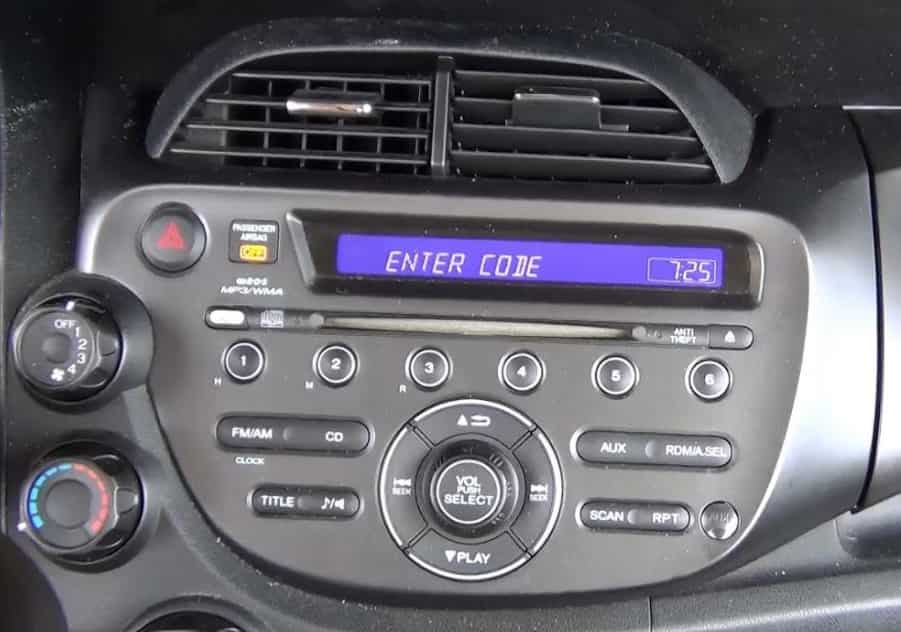
What Is a Honda Fit Radio Code?
A Honda Fit radio code is a security code that unlocks the factory audio system after it loses electrical power. Honda uses this system to reduce the risk of radio theft. When someone removes the radio or disconnects the battery, the audio unit requests the correct code before it works again.
The radio code does not work as a universal password for every Honda Fit. Honda assigns each compatible radio unit its own code during production. The vehicle owner must use the code connected to that specific audio system. This means a code from another Honda Fit will not unlock your radio.
The radio code also differs from other vehicle security information. A radio code restores audio access after power loss. A Bluetooth PIN connects a phone to the vehicle. A navigation code protects a navigation system. These systems use different security functions, so entering the wrong type of code will not solve the problem.
The code becomes important when the radio loses stored authorization data. This usually happens after a battery replacement, a dead battery, or electrical service. Once you understand the purpose of the radio code, you can identify the correct information needed for recovery and avoid entering incorrect numbers.
Why Is the Honda Fit Radio Asking for a Code?
The Honda Fit radio asks for a code when the audio system loses power and activates its anti-theft protection. The radio stores security information inside its memory. When the power supply disappears, the system requests the original code before it allows normal operation again.
A battery problem is the most common reason for this message. A weak battery, a completely discharged battery, or a battery replacement can interrupt the radio’s electrical connection. The same situation can happen when a technician disconnects the battery during repairs or removes a related fuse.
The radio may also request a code after someone removes or replaces the audio unit. The security system recognizes that the radio has lost its previous power connection. It then asks for verification before it restores access.
There are 5 common situations that trigger a Honda Fit radio code request:
- Battery replacement. A new battery removes power from the radio and may reset the security system.
- Dead battery. A fully discharged battery can erase the radio’s stored authorization status.
- Fuse removal. Removing a radio or electrical fuse can interrupt the power supply.
- Electrical repair. Work on the vehicle’s wiring system can disconnect the audio unit temporarily.
- Radio replacement. A different factory radio may require the code linked to that specific unit.
The “CODE” message does not usually mean the radio has a mechanical problem. The audio system still works, but it needs the correct security code to confirm ownership. This design protects the radio from unauthorized use if someone removes it from the original vehicle.
Before searching for a Honda Fit radio code, confirm that the vehicle still has its original factory audio unit. A replacement radio may need a different code. Checking the radio type first prevents incorrect retrieval attempts and saves time during the recovery process.
Do All Honda Fit Model Years Require a Radio Code?
Not every Honda Fit model year uses the same radio code recovery process. The requirement depends on the vehicle year, market, audio system generation, and whether the vehicle still has its original factory radio. Older Honda Fit models commonly use a manual radio code system, while some newer systems may restore access differently.
The Honda Fit has different audio systems across generations. Honda introduced the first Fit generation in 2001 in Japan, while many international markets received later versions under the Honda Fit or Honda Jazz name. Each generation introduced different dashboard designs, audio units, and security features. Because of these differences, a code procedure that works for one model year may not work for another.
The vehicle market also affects the recovery process. A Honda Fit sold in the United States may follow a different retrieval process from a Honda Jazz imported from Japan, Europe, or another region. Honda’s online tools usually support specific markets, so imported vehicles may require assistance from the original regional distributor or an authorized dealer.
Owners should confirm 4 details before searching for a radio code:
- Model year. The production year helps identify the correct audio system and recovery method.
- Vehicle market. The country where Honda originally sold the vehicle affects available support options.
- Radio type. Factory radios and aftermarket systems use different security procedures.
- Vehicle history. A replacement radio may require the code assigned to that replacement unit.
The owner’s manual remains one of the most reliable sources for model-specific instructions. It explains the audio system features, button combinations, and security procedures for that exact vehicle.
Before entering any code, verify that the instructions match your Honda Fit model. Using the correct procedure reduces failed attempts and prevents unnecessary troubleshooting.
Where Can You Find the Original Honda Fit Radio Code?
The original Honda Fit radio code is usually stored with the vehicle documents or ownership records. Before using an online retrieval service or contacting a dealer, check the information that came with the vehicle. Many owners find the code without additional assistance because the previous owner or dealership recorded it during delivery or service.
The first place to check is the anti-theft radio code card. Honda often provides this small card with the vehicle documents. The card may include the radio code and the radio serial number. These numbers help identify the correct security information for the factory audio system.
The owner’s manual packet is another important location. Some Honda Fit owners find the radio code written on a separate label, a service record, or a document stored with the manual. However, the code does not appear in every owner’s manual because Honda uses different documentation methods across markets and model years.
There are 5 common places where owners can search for the original radio code:
- Anti-theft radio code card. This is the most direct source because it contains security information provided for the audio system.
- Owner’s manual folder. Previous owners or dealerships may store the code with the original vehicle documents.
- Glove compartment records. Some dealers or owners write the code inside the glove box for quick access.
- Service history documents. Maintenance records may include radio information after previous battery replacements or repairs.
- Honda owner account records. Some owners may find vehicle information through official Honda ownership services.
The radio code, VIN, and radio serial number serve different purposes. The VIN identifies the vehicle, while the radio serial number identifies the specific audio unit. The radio code unlocks that unit after a power interruption.
Avoid entering random numbers found in the vehicle. An incorrect code can create additional delays and may temporarily prevent further attempts. Always confirm that the number belongs to your Honda Fit radio before entering it.
What Information Do You Need to Retrieve a Honda Fit Radio Code?
To retrieve a Honda Fit radio code, you need information that identifies both the vehicle and the installed audio system. The VIN confirms the vehicle identity, while the radio serial number identifies the specific radio unit. Honda uses both details because the security code belongs to the audio system, not only the car model.
The first important detail is the vehicle identification number (VIN). A VIN is a unique 17-character code assigned to every vehicle. It connects the Honda Fit to its production records, ownership information, and factory details. You can usually find the VIN on the driver-side dashboard near the windshield, the driver-side door frame, vehicle registration documents, insurance records, or the vehicle title.
The second required detail is the radio serial number. This number identifies the factory audio unit installed in the vehicle. Honda uses this information to match the correct security code with the correct radio. A VIN alone may not provide enough information because the radio may have been replaced during the vehicle’s lifetime.
You may also need additional ownership information during the retrieval process. This information can include your name, phone number, email address, vehicle registration details, or proof of ownership. These details help Honda or a dealership confirm that the request comes from the vehicle owner.
The 5 key pieces of information needed for radio code retrieval include:
- Vehicle identification number. This identifies the Honda Fit.
- Radio serial number. This identifies the specific audio unit.
- Model year. This helps match the correct radio system.
- Owner information. This supports verification during online or dealer requests.
- Vehicle history. This helps determine whether the radio is original or replaced.
Before requesting a code, check that every detail is accurate. A single incorrect character in the VIN or serial number can prevent the retrieval system from finding the correct radio code. Accurate information makes the recovery process faster and reduces unnecessary troubleshooting.
How Do You Find the Honda Fit Radio Serial Number?
The Honda Fit radio serial number identifies the specific audio unit installed in your vehicle. You need this number before retrieving the correct radio code because Honda links the security code to the radio hardware. The VIN identifies the vehicle, but the serial number identifies the radio.
Most Honda Fit owners can find the serial number without removing the radio. The factory audio system often displays the serial number through a button combination on the radio panel. The exact method depends on the model year and audio system type, so owners should follow the procedure for their specific vehicle.
To find the Honda Fit radio serial number, follow these general steps:
- Turn the ignition to the ON position without starting the engine.
- Turn the radio off if the display requires this step.
- Press and hold the correct preset buttons for your radio model.
- Turn the radio back on while holding the buttons.
- Check the display for the serial number information.
- Record every number shown on the screen.
Some Honda Fit radios display the serial number in two parts. The screen may show letters and numbers separately, so record the complete sequence before leaving the vehicle. Missing one character can prevent the retrieval system from finding the correct code.
The button combination can differ between Honda Fit generations. A method that works on an older factory radio may not work on a newer infotainment system. For this reason, owners should confirm the procedure in the owner’s manual or use Honda’s model-specific instructions.
If the serial number does not appear, check several common issues. Confirm that the radio is the original factory unit, verify the ignition position, and repeat the correct procedure for the installed audio system. A damaged display, broken radio buttons, or a replacement radio may require professional assistance.
Removing the radio should not be the first solution. Physical removal requires access to the dashboard and may create unnecessary risks, including trim damage or wiring problems. Electronic retrieval is usually the safer starting point for finding the Honda Fit radio serial number.
How Do You Retrieve a Honda Fit Radio Code Online?
You can retrieve a Honda Fit radio code online by providing the correct vehicle and radio information through Honda’s official retrieval service. The process matches your vehicle identification number (VIN) and radio serial number with the security code assigned to your factory audio system.
The online retrieval process usually requires two main identifiers. The VIN confirms the vehicle details, while the radio serial number confirms the installed audio unit. Both numbers must match Honda’s records before the system can provide the correct code.
To retrieve your Honda Fit radio code online, follow these steps:
- Locate your 17-character VIN. You can find it on the dashboard, driver-side door frame, registration documents, or vehicle title.
- Find your radio serial number. Use the radio display procedure for your specific Honda Fit model to locate this information.
- Access Honda’s official radio code retrieval service for your vehicle’s market.
- Enter the VIN and radio serial number carefully.
- Provide the requested owner information if the system asks for verification details.
- Record the radio code and store it in a secure location.
The VIN alone may not retrieve the code because Honda assigns the security code to the audio unit. If the original radio has been replaced, the vehicle records may not match the installed radio. In this situation, you need the serial number from the replacement unit instead of the original factory radio.
Online retrieval may fail for several reasons. Common causes include an incorrect VIN, an incorrect serial number, an imported vehicle, a replacement radio, or a vehicle that belongs to a different regional database.
Avoid using random radio code websites that promise instant unlock codes without verification. These websites may provide incorrect information because they do not have access to Honda’s official records. Some services may also request unnecessary personal information.
If the official retrieval system cannot find your Honda Fit radio code, contact an authorized Honda dealer. A dealer can verify ownership, inspect the installed audio unit, and help identify the correct security code.
How Do You Get the Code From a Honda Dealer?
A Honda dealer can help you retrieve a Honda Fit radio code when online recovery does not work. Dealers have access to vehicle service resources and can verify information that online systems may not recognize. This option becomes important when the radio history, ownership records, or vehicle market creates a mismatch.
Dealer assistance is useful in several situations. The most common cases include a replaced radio, an imported Honda Fit, an incorrect serial number, a failed online retrieval attempt, or a radio that does not display its serial number. A dealer can inspect the vehicle and confirm whether the installed audio unit matches the original factory equipment.
Before visiting a Honda dealer, prepare the information needed for verification. This helps reduce the time required to identify the correct radio code.
Bring these 5 items when requesting assistance:
- Vehicle identification number. The VIN helps the dealer locate the vehicle records.
- Radio serial number. This identifies the specific audio unit installed in the dashboard.
- Vehicle registration or title. These documents confirm ownership.
- Photo identification. Dealers may request identification before providing security information.
- Radio replacement records. These records help when the installed radio is not the original unit.
The dealer may check the radio serial number, compare it with available records, and confirm the correct security code. If the vehicle contains a replacement factory radio, the dealer will usually need information from that specific unit because the original vehicle code may no longer match.
Dealer policies vary by location. Some dealerships provide radio code assistance as part of customer support, while others may charge a service fee for diagnosis or inspection. Contacting the correct Honda dealer for your vehicle’s market can prevent delays, especially with imported Honda Fit models.
A dealer should be the next step when official online retrieval cannot identify the correct code. This approach avoids repeated incorrect entries and protects the audio system from unnecessary troubleshooting attempts.
How Do You Enter a Honda Fit Radio Code?
To enter a Honda Fit radio code, use the preset buttons or controls on the factory audio system to match the security code assigned to your radio. The correct entry method depends on the radio model and generation, but most Honda Fit systems use the numbered preset buttons to input each digit.
Before entering the code, confirm that you have the correct number. The radio code must match the specific audio unit installed in your vehicle. A code from another Honda Fit will not unlock the system, even if both vehicles use the same radio model.
Follow these general steps to enter your Honda Fit radio code:
- Turn the ignition to the ON position without starting the engine.
- Turn on the audio system and confirm that the display shows “CODE.”
- Press the preset buttons that match each digit of your radio code.
- Enter every number in the correct order.
- Wait for the radio to process the complete code.
- Confirm that normal audio operation returns.
Most Honda Fit radios unlock automatically after you enter the final digit. Some systems may require an additional confirmation step, depending on the audio unit design. Always follow the instructions for your specific model year.
If the radio does not accept the code, check each digit again before trying another attempt. A common mistake occurs when owners record the wrong number or confuse the radio code with the navigation code.
Avoid entering random combinations. Repeated incorrect attempts may temporarily lock the radio and prevent additional entries. If the system rejects the correct code, verify the radio serial number first because the code may belong to a different audio unit.
After the radio unlocks, save the code and serial number in a secure location. Store this information with your vehicle documents so future battery replacements or electrical repairs do not require another recovery process.
What Happens If You Enter the Wrong Honda Fit Radio Code?
Entering the wrong Honda Fit radio code does not damage the audio system, but repeated incorrect attempts can temporarily prevent further code entries. The radio uses this restriction as part of its anti-theft protection. It slows down unauthorized attempts and protects the factory audio unit.
The most common reason for a failed code entry is incorrect information. Many owners enter a code that belongs to another radio, copy the serial number incorrectly, or confuse the radio code with another security number. Checking the source of the code before entering it prevents unnecessary lockouts.
When the radio rejects a code, check these 5 details:
- Confirm the radio serial number. The serial number must match the installed audio unit.
- Check every digit of the radio code. A single incorrect number prevents the radio from unlocking.
- Verify the radio type. A replacement radio may require a different code from the original unit.
- Confirm the requested security code. A navigation code and a radio code may not work interchangeably.
- Check the vehicle market. Imported Honda Fit models may use different support systems.
If you enter an incorrect code several times, the radio may display an error message or stop accepting new attempts temporarily. The waiting period depends on the radio model. Some systems require the radio to remain powered for a specific amount of time before another attempt becomes available.
Avoid disconnecting the battery repeatedly as a troubleshooting method. Removing power may restart the security request and create additional settings issues, such as losing clock settings or stored radio presets.
If the correct code still fails after verification, the problem usually involves a mismatch between the code and the installed radio. In this situation, confirm the serial number again or contact a Honda dealer for assistance.
The correct recovery process starts with accurate identification. A verified radio code, matched serial number, and correct entry procedure provide the safest way to restore the Honda Fit audio system.
Why Is the Correct Honda Fit Radio Code Not Working?
The correct Honda Fit radio code may fail when the code does not match the installed audio unit. The radio code connects to one specific radio, not simply to the vehicle identification number or Honda Fit model. A mismatch between the code, serial number, and installed radio creates the most common unlocking problems.
There are 6 main reasons why a Honda Fit radio code does not work:
- The code belongs to a different radio. A previous owner or service record may contain the code for the original radio, while the vehicle now uses a replacement unit.
- The radio serial number contains an error. One missing letter or incorrect number can lead to the wrong code retrieval result.
- The radio has been replaced. A replacement factory radio uses its own security code because Honda links the code to the installed audio unit.
- The vehicle comes from another market. Imported Honda Fit or Honda Jazz vehicles may not appear correctly in regional retrieval systems.
- The entered number is not a radio code. Owners sometimes enter a navigation code, Bluetooth PIN, or another vehicle security number by mistake.
- The radio has another problem. A display error, damaged control panel, or electrical fault may prevent normal code acceptance.
Start troubleshooting by checking the radio serial number again. The serial number should come directly from the audio unit currently installed in the vehicle. Do not rely only on old paperwork because previous records may belong to a different radio.
Next, confirm that the code format matches the number provided by Honda or the dealer. Avoid changing digits, adding extra numbers, or testing random combinations. Each failed attempt creates additional delays and makes troubleshooting more difficult.
If the verified code still fails, inspect the radio history. A replacement radio, previous repair, or aftermarket installation can change the required security information. In these cases, the fastest solution is to identify the installed unit and request assistance from Honda support or an authorized dealer.
A successful radio unlock requires three matching elements: the correct VIN, the correct radio serial number, and the correct security code. When these elements match, the Honda Fit audio system can restore normal operation.
The Honda Fit navigation code and radio code are not always the same security credential. Both codes protect different vehicle systems, so entering the wrong type of code will not unlock the requested function. The radio code restores access to the audio system, while the navigation code protects the navigation unit.
Many Honda Fit models combine audio and navigation features into one dashboard system. This design can confuse owners because the same screen may display different security messages. However, each protected function can use separate identification information and different recovery procedures.
The radio code usually relates to the factory audio unit. It allows the owner to use features such as AM/FM radio, speakers, and other audio controls after a power interruption. The navigation code relates to the navigation system and may protect map functions, location services, or navigation settings.
Owners should identify the exact message on the screen before entering any code. A display that requests a radio code requires the radio security number. A navigation prompt requires the navigation code. Entering one code into the wrong system will not unlock the vehicle.
Store these security details separately to avoid confusion:
- Radio code. This unlocks the audio system after power loss.
- Navigation code. This restores access to navigation features when required.
- Radio serial number. This identifies the audio unit.
- Navigation serial number. This identifies the navigation hardware.
A common mistake occurs when owners retrieve a code online and assume it applies to every dashboard function. The retrieval process may provide radio and navigation information separately because Honda links each code to different hardware components.
If you are unsure which code your Honda Fit needs, check the screen message, owner’s manual, or the vehicle’s audio documentation. Identifying the correct system before entering a code prevents failed attempts and avoids unnecessary troubleshooting.
Does an Aftermarket or Replacement Radio Use the Original Honda Fit Radio Code?
An aftermarket radio does not use the original Honda Fit radio code. The factory Honda security system only applies to compatible Honda audio units. An aftermarket stereo uses its own security system, which depends on the manufacturer, model, and installation method.
A replacement factory radio also may not use the original vehicle code. Honda links each factory audio unit to its own security code. If a previous owner or technician replaced the radio, the new unit may require a different code from the one recorded with the original vehicle documents.
Identifying the type of radio installed in your Honda Fit is the first step. A factory replacement radio usually keeps Honda branding and the original dashboard design. An aftermarket unit often has different controls, a different display layout, or another manufacturer’s logo.
There are 4 common signs that your Honda Fit may have a different radio system:
- Different branding. The radio displays a manufacturer name other than Honda.
- Different dashboard design. The unit does not match the original factory appearance.
- Different controls. The buttons, menus, or screen functions differ from standard Honda systems.
- Separate security information. The installation documents include another unlock method.
If the vehicle has a replacement Honda factory radio, retrieve the code using the serial number from the current unit. The original radio code may no longer work because it belongs to the previous audio system.
If the vehicle has an aftermarket stereo, check the manufacturer’s documentation instead. The VIN and Honda radio code system will not unlock a third-party audio system because Honda does not control its security features.
Before requesting a new Honda Fit radio code, confirm which radio is installed. This simple check prevents owners from searching for the wrong code and avoids repeated failed entry attempts.
How Can You Prevent Losing the Honda Fit Radio Code Again?
You can prevent future Honda Fit radio code problems by storing the code and radio information in a secure location. Many owners lose access to their radio after a battery replacement because they save the code only in the vehicle documents or do not record it at all.
The easiest prevention method is to save the radio code together with the radio serial number. These two details work together during future recovery. The code unlocks the audio system, while the serial number helps identify the correct radio if the vehicle information changes.
There are 6 practical ways to keep your Honda Fit radio code available:
- Save the code digitally. Store it in a password manager, phone note, or secure cloud document.
- Keep the original documents. Place the anti-theft card and owner records in a safe location.
- Record the radio serial number. This information helps recover the code if the original document disappears.
- Add vehicle information to your Honda owner account. Official ownership records may provide additional support.
- Check the code before battery replacement. Confirm the radio information before disconnecting vehicle power.
- Keep replacement records. Save documents if a dealer or technician installs a new radio.
Avoid writing the radio code in an exposed location inside the vehicle. A visible security code can create an unnecessary risk if someone gains access to the car.
It is also useful to record other vehicle details at the same time. These details include the VIN, radio model, installation date, and service history. Keeping complete records makes future repairs faster and reduces the need for repeated code retrieval.
A small amount of preparation prevents most Honda Fit radio code problems. When owners store the code, serial number, and vehicle records together, they can restore the audio system quickly after a battery issue or electrical repair.
When Should You Contact a Honda Dealer?
You should contact a Honda dealer when the normal radio code recovery process cannot identify or unlock your Honda Fit audio system. A dealer provides a reliable solution when the vehicle information, radio history, or security records do not match the available retrieval options.
Most Honda Fit owners can recover the radio code by using the VIN and radio serial number. However, some situations require professional assistance because the problem involves the radio unit itself, ownership verification, or regional database limitations.
There are 7 situations when contacting a Honda dealer becomes the best option:
- The official retrieval service cannot find your radio code. This usually happens because the vehicle information does not match Honda’s records.
- The radio serial number does not appear. A damaged display, faulty buttons, or an unsupported audio system may prevent electronic retrieval.
- The radio has been replaced. A replacement unit may require a different code from the original factory radio.
- The vehicle was imported from another market. Regional Honda systems may not recognize vehicles sold in another country.
- The correct code does not unlock the radio. This often indicates a mismatch between the code and the installed audio unit.
- The radio shows another error message. Messages other than “CODE” may indicate a different electrical or hardware issue.
- The vehicle history is unclear. Previous repairs or ownership changes may affect available radio information.
Before visiting a Honda dealer, prepare important documents. Bring the VIN, vehicle registration, proof of ownership, identification, and the radio serial number if available. These details help the dealer verify the vehicle and locate the correct security information.
Avoid repeated code attempts when the radio continues to reject the correct number. Random entries can create additional delays and make the recovery process more difficult.
A Honda dealer should be the final troubleshooting step when standard retrieval methods fail. Professional verification ensures that the radio receives the correct security code without unnecessary resets or replacement costs.
Honda Fit Radio Code Frequently Asked Questions
How Many Digits Is a Honda Fit Radio Code?
A Honda Fit radio code usually contains a short numeric sequence, but the exact format depends on the audio system and vehicle market. Honda uses different radio systems across model years, so owners should use the code provided for their specific radio instead of assuming a fixed number of digits.
The correct code comes from the radio information linked to the installed audio unit. The radio serial number helps identify the unit, while the code unlocks its security function after a power interruption.
Can You Find a Honda Fit Radio Code Using Only the VIN?
You usually cannot retrieve a Honda Fit radio code using only the VIN. The VIN identifies the vehicle, but the radio serial number identifies the specific audio unit that needs unlocking.
This distinction matters because a Honda Fit may receive a replacement radio during its lifetime. The vehicle records may show the original radio, while the dashboard contains a different unit with a different security code.
Does Disconnecting the Battery Reset the Honda Fit Radio Code?
Disconnecting the battery does not create a new Honda Fit radio code. The radio keeps its original security code, but the power interruption causes the system to request that code again.
Battery replacement, battery failure, or electrical repairs can trigger the “CODE” message because the radio loses its stored authorization. Entering the original code restores access.
Is the Honda Fit Radio Code the Same for Every Vehicle?
No, Honda Fit radio codes are not the same for every vehicle. Honda assigns each compatible radio unit its own security code.
Two Honda Fit vehicles from the same production year can have different codes because each vehicle may contain a different audio unit with a separate security identity.
Can a Mechanic Retrieve a Honda Fit Radio Code?
A mechanic can help identify the radio serial number or inspect the audio system, but the official code retrieval process usually depends on Honda records or dealer verification.
A mechanic becomes especially helpful when the radio has been replaced, the serial number cannot appear on the display, or the vehicle has electrical problems.
Can You Unlock a Honda Fit Radio Without the Code?
You should not bypass the Honda Fit radio security system. The correct solution is to retrieve the original code through verified vehicle and radio information.
The safest method is to find the radio serial number, retrieve the matching code, and enter it correctly. If the process fails, Honda support or an authorized dealer can verify the correct information.
Conclusion: Restoring Your Honda Fit Radio Access
Recovering a Honda Fit radio code requires the correct match between the vehicle, the radio unit, and the security code. The fastest solution starts with identifying the radio serial number and confirming the vehicle VIN. These two details allow owners to retrieve the code connected to their specific factory audio system.
Most radio lock situations happen after common events such as battery replacement, battery failure, fuse removal, or electrical repairs. The “CODE” message does not usually indicate a damaged radio. It shows that the anti-theft system needs verification before it restores normal operation.
Owners should avoid testing random codes because incorrect attempts can delay the recovery process. Instead, check the original vehicle documents, use Honda’s official retrieval options, and contact a dealer when the radio information does not match.
Once the Honda Fit radio unlocks, save the code and serial number in a secure location. Recording this information prevents future problems during battery service or electrical maintenance.
A correct recovery process protects the factory audio system and saves time. By following the proper steps, Honda Fit owners can restore radio access without unnecessary resets, replacements, or troubleshooting.