Apple CarPlay has become an essential feature for many Mercedes-Benz owners, providing seamless access to navigation, music, calls, messages, and apps directly from the vehicle’s infotainment system. Whether you rely on CarPlay for daily commuting or long road trips, a sudden connection failure can be both frustrating and inconvenient.
If your Mercedes CarPlay is not working, you are not alone. Many drivers experience issues such as CarPlay not connecting, the iPhone not being recognized, the CarPlay icon disappearing from the screen, or wireless CarPlay disconnecting unexpectedly. In some cases, the problem may occur after an iOS update, while in others it could be related to the vehicle’s infotainment system, Bluetooth settings, Wi-Fi connectivity, or even a faulty USB cable.
The good news is that most Mercedes CarPlay issues can be resolved without an expensive repair or a visit to the dealership. Identifying the root cause is often the first step toward restoring a stable connection between your iPhone and your Mercedes-Benz.
In this guide, we will explain the most common reasons why Mercedes CarPlay stops working and provide practical troubleshooting steps to help you get back on the road with a fully functioning infotainment experience.
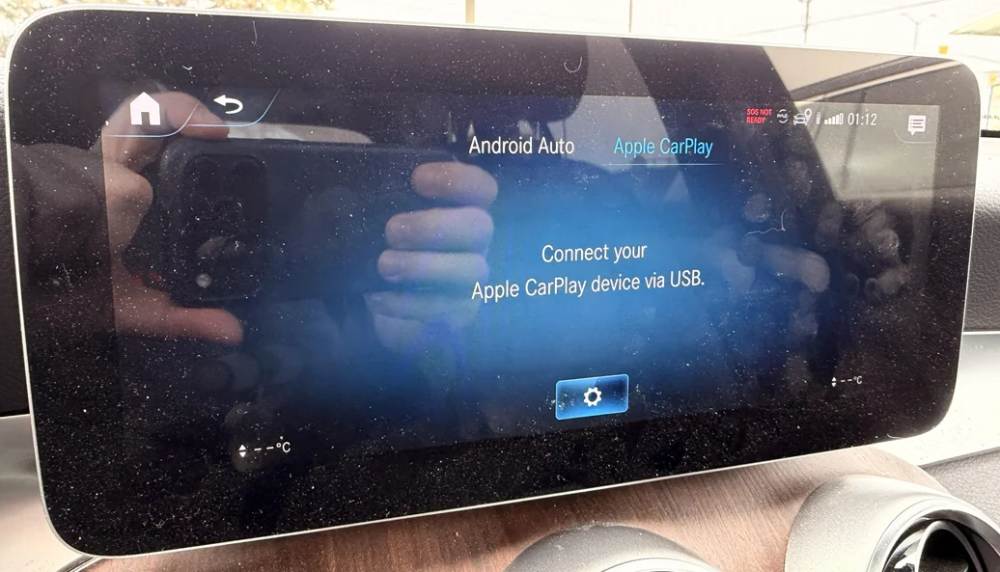
Understanding How Mercedes Apple CarPlay Works
Before troubleshooting any CarPlay issue, it is helpful to understand how the system operates in a Mercedes-Benz vehicle. Apple CarPlay is designed to mirror selected iPhone apps and functions onto the vehicle’s infotainment display, allowing drivers to stay connected while keeping their attention on the road.
Mercedes vehicles typically support either wired CarPlay, wireless CarPlay, or both depending on the model year and infotainment system installed. Older Mercedes models often require a USB connection, while newer vehicles equipped with the MBUX infotainment platform may support wireless CarPlay through a combination of Bluetooth and Wi-Fi connectivity.
For CarPlay to function properly, several requirements must be met. The iPhone must be compatible with Apple CarPlay, Siri must be enabled, and the device should be running a supported version of iOS. In addition, the vehicle’s infotainment software must be functioning correctly and, in some cases, updated to the latest available version.
Many drivers assume that a CarPlay failure automatically indicates a serious problem with the vehicle. In reality, most issues stem from simple configuration errors, outdated software, connectivity conflicts, or hardware accessories such as damaged USB cables. Understanding these basic requirements can make troubleshooting much easier and save significant time.
Common Reasons Mercedes CarPlay Is Not Working
Several factors can prevent Apple CarPlay from connecting to your Mercedes. Identifying the specific cause is often the fastest way to restore functionality.
One of the most common causes is an incompatible or outdated iOS version. If your iPhone has not been updated for an extended period, CarPlay may fail to establish a proper connection. Conversely, newly released iOS updates can occasionally introduce temporary compatibility issues until Apple or Mercedes releases a software patch.
A faulty USB cable is another frequent culprit. Many users overlook the importance of using a high-quality Apple-certified cable. Even if the cable charges the phone successfully, it may not transfer data reliably enough for CarPlay to function.
Disabled Siri settings can also prevent CarPlay from launching. Since CarPlay relies heavily on Siri for voice commands and system integration, disabling Siri may cause the feature to disappear entirely from available options.
Wireless CarPlay users may encounter additional challenges related to Bluetooth and Wi-Fi connectivity. Interference from previously paired devices, unstable wireless signals, or software conflicts can lead to repeated disconnections or failed connections.
Software glitches within the Mercedes infotainment system can also affect CarPlay performance. Temporary bugs may cause frozen screens, black displays, delayed responses, or complete connection failures. In many cases, a simple system restart can resolve these problems.
Finally, corrupted pairing data between the vehicle and iPhone may prevent successful communication. This often occurs after software updates, phone replacements, or repeated connection attempts.
Step by Step Mercedes CarPlay Troubleshooting Guide
When Mercedes CarPlay stops working, following a structured troubleshooting process can help isolate the problem quickly.
Begin by restarting your iPhone. While this may seem simple, a restart can clear temporary software conflicts that interfere with CarPlay connectivity. After the device powers back on, reconnect it to the vehicle and check whether CarPlay launches normally.
Next, restart the Mercedes infotainment system. Temporary software glitches within the MBUX or COMAND system can occasionally disrupt communication with connected devices. A reboot often restores normal functionality without requiring additional intervention.
If the problem persists, remove the vehicle from your iPhone’s CarPlay settings and delete the phone from the vehicle’s paired device list. Once both devices have been cleared, establish a fresh connection. This process eliminates corrupted pairing information that may be preventing communication.
You should also verify Siri settings on your iPhone. Navigate to Siri settings and ensure that Siri is enabled along with the option to allow Siri when the phone is locked. Without these settings, CarPlay may fail to initialize correctly.
For wired connections, test a different USB cable. Ideally, use an Apple-certified cable known to support data transfer. Low-quality or damaged cables are among the most overlooked causes of CarPlay failures.
If you use wireless CarPlay, reset Bluetooth and Wi-Fi connections. Disconnect all paired devices, disable Bluetooth and Wi-Fi temporarily, and reconnect them before attempting to pair the phone again.
Finally, check for software updates on both the iPhone and the vehicle’s infotainment system. Manufacturers regularly release updates that address compatibility issues, security vulnerabilities, and performance bugs. Keeping both systems current significantly reduces the likelihood of future CarPlay problems.
How to Reset Mercedes MBUX to Fix CarPlay Issues
If basic troubleshooting does not resolve the problem, resetting the Mercedes MBUX system may help restore CarPlay functionality. Like any advanced software platform, MBUX can occasionally experience temporary glitches, memory conflicts, or communication errors that affect connected devices.
A soft reset is usually the first option to try. This process restarts the infotainment system without deleting personal settings, saved destinations, or paired devices. In many cases, a simple reboot can clear temporary software issues that prevent CarPlay from launching correctly. After performing a soft reset, reconnect your iPhone and test the system again.
If the issue continues, a factory reset may be necessary. A factory reset restores the infotainment system to its original settings and removes saved user preferences, paired phones, navigation history, and customized configurations. Because this process erases stored information, it should only be performed after other troubleshooting methods have failed.
Once the reset is complete, pair your iPhone as if it were a new device and configure Apple CarPlay again. Many drivers find that a complete reset resolves persistent connection problems that survived previous troubleshooting attempts.
It is important to note that while resetting MBUX can fix software-related issues, it will not solve hardware failures such as damaged USB ports, defective wireless modules, or malfunctioning infotainment components.
Wireless Mercedes CarPlay Not Working
Wireless Apple CarPlay offers greater convenience because it eliminates the need for a physical cable. However, wireless connectivity introduces additional variables that can sometimes lead to connection problems.
One common complaint among Mercedes owners is that wireless CarPlay disconnects randomly during a drive. This issue is often linked to Bluetooth pairing conflicts or unstable Wi-Fi communication between the vehicle and the iPhone. Since wireless CarPlay relies on both technologies working together, a problem with either connection can disrupt the entire experience.
Multiple paired devices inside the vehicle can also create interference. For example, if several smartphones have been connected to the infotainment system previously, the vehicle may attempt to communicate with the wrong device. Removing unused devices from the paired list can improve stability.
Certain VPN applications and network security tools installed on an iPhone may also interfere with wireless CarPlay communication. Temporarily disabling these applications can help determine whether they are contributing to the problem.
Another effective solution is to completely reset wireless CarPlay settings. Delete the vehicle from the iPhone’s CarPlay menu, remove the phone from the Mercedes infotainment system, restart both devices, and perform the pairing process again from the beginning.
Drivers should also ensure that the iPhone remains within an appropriate distance of the vehicle’s wireless receiver. Although modern systems are designed for convenience, physical obstructions and interference from nearby electronic devices can occasionally weaken the connection.
Mercedes CarPlay Not Working After an iOS Update
Many CarPlay issues appear shortly after an iPhone receives a major iOS update. While software updates often introduce new features and security improvements, they can occasionally create temporary compatibility problems between Apple devices and vehicle infotainment systems.
After an update, some users report that CarPlay no longer connects automatically, fails to launch altogether, or repeatedly disconnects during use. In many situations, these issues occur because existing connection data becomes incompatible with the updated software environment.
The first step is to restart the iPhone and reconnect it to the vehicle. This simple action often allows the updated operating system to establish a fresh connection with the infotainment system.
If the issue remains unresolved, remove the Mercedes vehicle from the CarPlay settings menu and reconnect it from scratch. Rebuilding the connection can eliminate corrupted configuration data left behind after the update process.
Resetting network settings on the iPhone can also be effective. This action clears Bluetooth, Wi-Fi, and network-related configurations that may interfere with CarPlay functionality. Although saved Wi-Fi passwords will need to be entered again later, many users find that this step successfully restores connectivity.
It is also worth checking whether Apple has released a follow-up update. Occasionally, bugs discovered after a major iOS launch are corrected through smaller updates released shortly afterward. Installing the latest available version may resolve known compatibility issues automatically.
Likewise, Mercedes may release infotainment software updates designed to improve compatibility with newer versions of iOS. Keeping both systems updated is one of the most effective ways to ensure a stable and reliable CarPlay experience over the long term.
When to Contact Mercedes-Benz Service
Most Apple CarPlay issues can be resolved through software updates, configuration adjustments, or simple troubleshooting procedures. However, there are situations where professional assistance becomes necessary.
If you have already restarted both the iPhone and infotainment system, tested multiple cables, reset network settings, and reconfigured CarPlay without success, the issue may be related to the vehicle itself. Persistent failures that continue despite repeated troubleshooting often indicate a deeper software or hardware problem.
One possible cause is a damaged USB port. Over time, ports can accumulate dirt, debris, or physical wear that prevents reliable communication between the vehicle and the iPhone. While charging may still function, data transmission required for CarPlay may fail.
Another potential issue involves the infotainment hardware. Faulty communication modules, malfunctioning wireless receivers, or internal software corruption can prevent CarPlay from operating correctly. These problems typically require diagnostic equipment available at authorized Mercedes-Benz service centers.
Drivers should also seek professional assistance if the infotainment screen frequently freezes, reboots unexpectedly, displays error messages, or experiences widespread connectivity issues beyond CarPlay. Such symptoms may indicate broader system problems that affect multiple vehicle functions.
During a service appointment, technicians can perform a comprehensive diagnostic scan, inspect hardware components, verify software versions, and install manufacturer-recommended updates. This process helps identify hidden faults that may not be visible through standard troubleshooting procedures.
While dealership visits may seem inconvenient, professional diagnostics can save time and prevent unnecessary replacement of accessories or components that are not actually causing the problem.
Frequently Asked Questions
This message usually appears when the vehicle cannot establish communication with the iPhone. Common causes include disabled Siri settings, outdated software, connection conflicts, or unsupported devices. Restarting both systems and reconnecting the device often resolves the issue.
Why is my iPhone charging but CarPlay not working?
Charging and data transfer use different functions within a USB cable. A damaged or low-quality cable may provide power while failing to transmit data required for CarPlay. Using an Apple-certified cable is recommended.
How do I reset CarPlay in my Mercedes?
Remove the vehicle from the CarPlay settings on your iPhone and delete the phone from the Mercedes infotainment system. Restart both devices and complete the pairing process again. This creates a fresh connection and removes potentially corrupted data.
Does Mercedes charge for Apple CarPlay?
In most modern Mercedes-Benz vehicles, Apple CarPlay is included as a standard or pre-installed feature. However, availability may vary depending on the model year, trim level, market, and optional equipment package.
Why does wireless CarPlay keep disconnecting?
Frequent disconnections are often caused by Bluetooth interference, unstable Wi-Fi communication, outdated software, or multiple paired devices competing for connection priority. Removing unused pairings and updating both systems can improve reliability.
Conclusion
Experiencing a Mercedes CarPlay not working issue can be frustrating, especially when you rely on the system for navigation, communication, and entertainment during daily drives. Fortunately, most CarPlay problems are not caused by major vehicle defects. In many cases, the root cause can be traced to outdated software, incorrect settings, wireless connectivity conflicts, corrupted pairing data, or faulty USB cables.
The most effective approach is to start with simple troubleshooting steps. Restart your iPhone, reboot the Mercedes infotainment system, verify Siri settings, test a different cable, and reconnect the vehicle through Apple CarPlay settings. These solutions resolve the majority of connection problems without requiring professional assistance.
For wireless CarPlay users, maintaining stable Bluetooth and Wi-Fi connections is essential for consistent performance. Regular software updates for both the iPhone and Mercedes infotainment system can also help prevent future compatibility issues.
If none of the recommended fixes restore functionality, professional diagnostics may be necessary to identify hardware-related concerns. By following the troubleshooting methods outlined in this guide, most Mercedes owners can quickly restore CarPlay performance and enjoy a safer, more connected driving experience.