The Hyundai Service Required Message is one of the most common dashboard alerts drivers see, yet it is also one of the most misunderstood. Many vehicle owners feel confused or even worried when this message suddenly appears on their screen, especially when the car seems to be running normally. Is it a serious malfunction or just a simple reminder that can be ignored for a while
In most cases, this message is part of the built in maintenance reminder system in Hyundai vehicles from Hyundai Hyundai designed to help drivers keep track of regular servicing schedules. It does not usually indicate an immediate mechanical failure, but rather a signal that the vehicle has reached a predefined mileage or time interval and is due for routine maintenance such as an oil change or inspection
Understanding the Hyundai Service Required Message is important because ignoring it for too long can lead to reduced engine performance, higher fuel consumption, or long term wear issues. At the same time, resetting the message without actually servicing the vehicle can also create hidden risks for your car’s health
In this article, you will learn exactly what the Hyundai Service Required Message means, why it appears, and how to reset it correctly after maintenance. The goal is to help you avoid confusion, prevent unnecessary repairs, and keep your vehicle running smoothly with proper care and timing
What Does Hyundai Service Required Message Mean
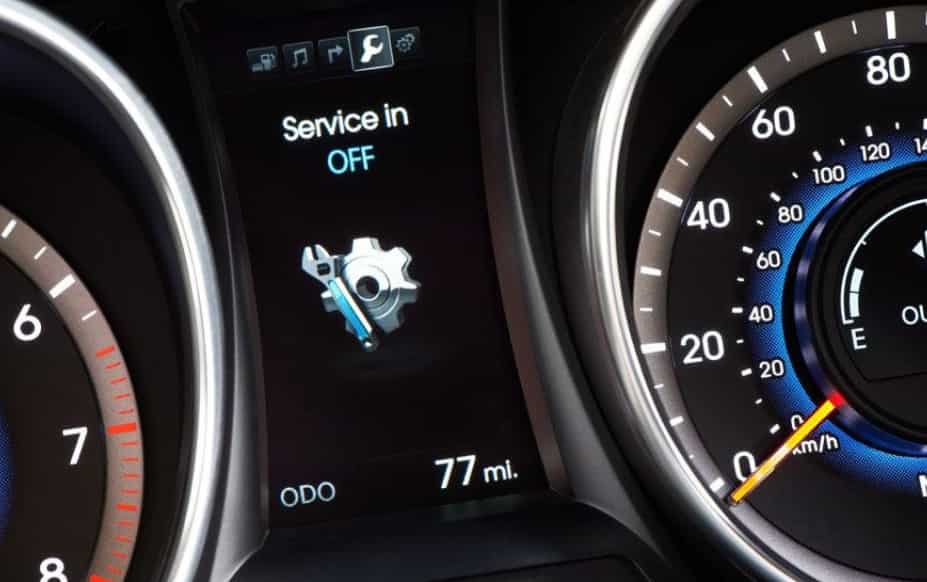
The Hyundai Service Required Message is a maintenance reminder that appears on the dashboard of Hyundai vehicles from Hyundai Hyundai. The system uses it to tell the driver that the car needs scheduled servicing. It is not an error code or a sign of immediate failure. Instead, it acts as a simple alert for routine maintenance
The vehicle tracks service intervals using time and mileage. When the limit is reached, the system shows this message. The purpose is to remind the driver to perform basic maintenance. This often includes oil changes, filter replacements, tire checks, and general inspections
This message is different from a check engine warning. A check engine light usually signals a technical problem in the engine or emissions system. The Service Required Message only indicates that maintenance is due or overdue. It does not point to a breakdown at the moment
Even though it is not urgent, drivers should not ignore it for too long. Regular maintenance helps keep the engine healthy. It also supports fuel efficiency and stable performance. If you delay service for too long, you may face higher repair costs later
Understanding this difference helps drivers react correctly. You avoid unnecessary worry when the message appears. At the same time, you still take timely action to maintain the vehicle properly
Common Causes of Hyundai Service Required Message
The Hyundai Service Required Message usually appears because the vehicle reaches a scheduled maintenance point. In most cases, it is not related to a technical failure. It is simply the system reminding the driver that routine service is due on Hyundai vehicles from Hyundai Hyundai
One of the most common causes is an overdue oil change. The system tracks mileage and engine runtime. When the oil service interval is exceeded, the message turns on to alert the driver. Dirty or old engine oil can reduce lubrication and affect engine performance, so the reminder appears to prevent long term damage
Another frequent cause is reaching the preset mileage limit. Many Hyundai models are programmed to trigger the message after a specific distance, even if the car still feels normal to drive. This helps ensure regular inspection and maintenance are not missed
Time based service intervals can also trigger the message. Even if you do not drive often, engine oil and fluids still degrade over time. The system uses time thresholds to make sure the vehicle receives maintenance at least once within a recommended period
In some cases, the message appears because the previous service reminder was not reset correctly. When the system still detects the old service cycle, it continues to show the alert even after maintenance has been done
Driving conditions can also influence how quickly the message appears. Frequent short trips, heavy traffic, or harsh environments can accelerate wear. The system may trigger the reminder sooner under these conditions
Understanding these causes helps drivers react correctly. It also prevents confusion when the message appears unexpectedly
How to Reset Hyundai Service Required Message Correctly
You can reset the Hyundai Service Required Message after completing maintenance on Hyundai vehicles from Hyundai Hyundai. The reset process is simple, but you must only do it after real servicing. If you reset without maintenance, the system will lose its tracking accuracy
Most Hyundai models allow you to reset the message through the dashboard settings. First, turn the ignition to the ON position without starting the engine. Next, go to the vehicle settings menu on the display screen. Look for the service interval or maintenance section. Then select the reset option and confirm the action. The system will clear the reminder and start a new service cycle
Some models use steering wheel buttons instead of a touchscreen. In this case, navigate through the instrument cluster menu using the control buttons. Find the service interval screen and hold the confirmation button until the reset completes. The message should disappear from the dashboard after a few seconds
It is important to understand that resetting the message does not fix any mechanical issue. It only clears the reminder system. If you reset it without changing oil or completing maintenance, you risk engine wear and reduced performance over time
A common mistake is ignoring the maintenance and only turning off the warning. This can lead to serious long term damage because the vehicle will no longer track the correct service schedule. Always perform maintenance first, then reset the system
After a successful reset, the system starts a new countdown based on mileage or time. This helps you stay on track with future service intervals and keeps the vehicle running in good condition
Model Specific Notes for Hyundai Service Required Message
Different Hyundai models from Hyundai Hyundai may display and reset the Service Required Message in slightly different ways. While the function stays the same, the menu layout and control method can vary depending on the vehicle generation and infotainment system
In models like Hyundai Accent, the reset process is usually done through a simple instrument cluster menu. Drivers often use steering wheel buttons to access vehicle settings and locate the service interval option. The interface is basic, so the reset process is usually quick and straightforward
In Hyundai Elantra, the system is more advanced. Many versions include a digital display or infotainment screen. Drivers can navigate through the settings menu to find maintenance or service reminders. The reset option is typically located inside vehicle or convenience settings
In Hyundai Tucson, the interface may include a larger touchscreen system with more detailed menus. The service reminder reset is usually found under vehicle settings or cluster settings. Some versions also allow customization of service intervals, which helps drivers adjust reminders based on driving habits
Even though the steps differ slightly, the logic is the same across all models. The system tracks mileage and time, then triggers a reminder when service is due. After maintenance, the driver resets the system so it can start a new tracking cycle
It is also important to check the owner’s manual for your specific model. Hyundai updates software and interfaces over time, so the exact menu path may change between model years. Following the correct procedure ensures the system works accurately and continues to remind you at the right time
When Should You Be Concerned
The Hyundai Service Required Message on Hyundai vehicles from Hyundai Hyundai is usually not a serious warning. However, there are situations where you should pay closer attention instead of treating it as a normal reminder
You should be concerned when the message appears together with performance changes. If the engine feels weaker, vibrates unusually, or consumes more fuel, it may indicate that maintenance has been delayed too long. In this case, the issue goes beyond a simple reminder
Another warning sign is when the check engine light appears at the same time. Unlike the service reminder, the check engine light often points to a mechanical or electronic problem. When both signals appear together, the vehicle may need a diagnostic check as soon as possible
You should also pay attention if the message keeps coming back immediately after a reset. This can happen when the system detects that service conditions have not actually been met. It may also indicate an incorrect reset procedure or an unresolved maintenance issue
Harsh driving conditions can also increase risk. Frequent short trips, heavy traffic, or long periods without servicing can put extra stress on the engine. In these situations, ignoring the message for too long may lead to long term wear and higher repair costs
If you are unsure, the safest option is to perform a full inspection or use a diagnostic scan tool. A quick check can help confirm whether the issue is only a maintenance reminder or a deeper mechanical problem
Conclusion
The Hyundai Service Required Message is a routine maintenance reminder designed to help drivers keep their vehicles in good condition. On Hyundai vehicles from Hyundai Hyundai, this message plays an important role in tracking service intervals based on mileage and time. It does not usually indicate a serious malfunction, but it should never be ignored for too long
Throughout this article, you learned what the message means, why it appears, and how it differs from critical warnings like the check engine light. You also saw the most common causes, including overdue oil changes, mileage limits, time based service cycles, and incorrect resets. In addition, you now understand the correct way to reset the system after proper maintenance on different Hyundai models
The key takeaway is simple. Always treat the message as a helpful reminder, not just an annoyance on your dashboard. If you see the Hyundai Service Required Message, check your service history and make sure your vehicle has received the necessary maintenance. After that, reset the system correctly so it can continue tracking the next interval
By following this approach, you can avoid unnecessary repairs, improve vehicle performance, and extend the life of your car. Proper maintenance and timely response to dashboard alerts will always keep your driving experience safer and more reliable