Your Mercedes-Benz navigation system is designed to help you reach every destination with confidence, but even the most advanced GPS technology can become outdated over time. New roads, changed traffic patterns, updated speed limits, and newly developed neighborhoods are added every year. If your navigation maps haven’t been updated recently, you could experience inaccurate directions, longer travel times, or even miss your destination altogether.
Fortunately, learning how to update Mercedes navigation is easier than many owners realize. Whether your vehicle is equipped with the latest MBUX infotainment system, a COMAND navigation system, or an older NTG platform, Mercedes-Benz offers several methods to keep your maps current. Depending on your model, you may be able to install updates over the air through Mercedes me Connect, download map data to a USB drive or SD card, or have the update performed by an authorized Mercedes-Benz dealership.
In this complete step-by-step guide, you’ll learn how to identify your vehicle’s navigation system, choose the correct update method, and avoid common installation mistakes. We’ll also explain how often you should update your maps, discuss potential costs, and provide practical troubleshooting tips to ensure a smooth update process. By the end of this guide, you’ll have everything you need to keep your Mercedes navigation system accurate, reliable, and ready for every journey.
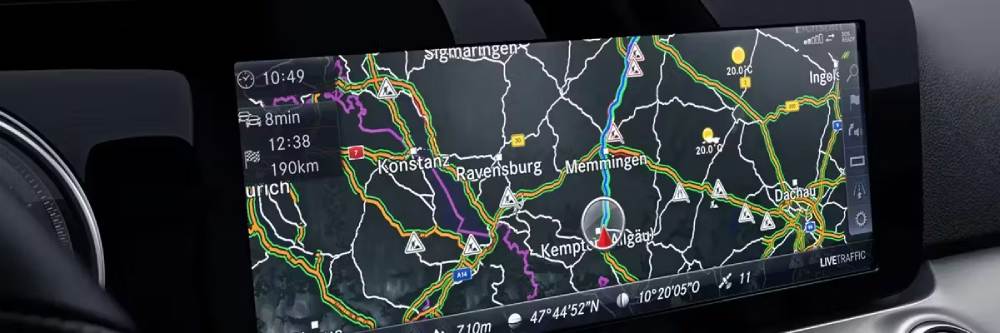
Keeping your Mercedes navigation system up to date is not just about convenience. It can directly affect route accuracy, travel time, safety, and the overall driving experience. Roads change constantly. New highways open, intersections are redesigned, speed limits are adjusted, and businesses move to new locations. When your navigation database is outdated, your Mercedes may guide you through longer routes, miss new roads, or display incorrect Points of Interest.
For many drivers, the biggest frustration is realizing the map is wrong only after they are already on the road. This can be especially stressful during business trips, family vacations, airport transfers, or long-distance travel. A luxury vehicle should deliver a smooth and confident journey, but outdated maps can make the experience feel unreliable.
Regular Mercedes navigation updates help improve route planning, estimated arrival times, traffic guidance, and destination search. Updated maps can also make the system more responsive and accurate when searching for restaurants, hotels, fuel stations, charging points, parking areas, and service centers.
Another important benefit is safety. Accurate navigation can help reduce last-minute lane changes, missed exits, and unnecessary distractions while driving. Instead of second-guessing your route, you can focus more on the road.
If you want your Mercedes-Benz to perform as intended, updating the navigation system should be part of your regular vehicle maintenance routine.
Before learning how to update Mercedes navigation, you first need to identify which navigation system your vehicle uses. This step is important because different Mercedes-Benz models and model years use different infotainment platforms, and each system may require a different update method.
Newer Mercedes-Benz vehicles are commonly equipped with MBUX, short for Mercedes-Benz User Experience. This system is found in many modern models and often supports online services, voice control, touchscreen operation, and in some cases, over-the-air map updates through Mercedes me Connect. If your vehicle has a wide digital display, “Hey Mercedes” voice assistant, and connected services, there is a good chance it uses MBUX.
Older models may use the COMAND system. COMAND was widely used before MBUX became common. These vehicles often require map updates through a USB drive, SD card, DVD, or dealership installation, depending on the exact NTG version. Some COMAND systems are very reliable, but the update process may feel less automatic compared with newer MBUX vehicles.
Mercedes navigation systems are also often identified by NTG versions, such as NTG4, NTG5, NTG5.5, NTG6, and NTG7. In general, higher NTG versions are newer and more likely to support connected features.
To check your system, look through the infotainment settings menu, owner’s manual, vehicle documentation, or Mercedes me account. You can also contact a Mercedes-Benz dealer with your VIN to confirm the exact system and compatible update method.
One of the most convenient ways to update Mercedes navigation is through Mercedes me Connect, especially if your vehicle supports online map updates. This method is commonly available on newer Mercedes-Benz models equipped with MBUX and active connected services.
First, make sure your Mercedes me account is active and linked to your vehicle. You may need to log in through the Mercedes me app or website and confirm that navigation services are available for your model. Some features may require an active subscription, so it is worth checking your service status before starting the update.
Next, connect your vehicle to a stable internet source. Depending on your model, this may happen through the vehicle’s built-in mobile connection or a Wi-Fi network. A strong connection is important because map files can be large, and interrupted downloads may cause the update to fail.
Once connected, open the infotainment system and go to the navigation or system update section. Look for available map updates. If an update is available, follow the on-screen instructions to download and install it. In some vehicles, regional map updates may install automatically in the background.
After installation, restart the infotainment system or turn the vehicle off and on again to allow the system to refresh. Then open the navigation menu and check the map version to confirm the update was successful.
This method is ideal because it is simple, official, and does not require external storage. However, not every Mercedes model supports over-the-air updates, so older vehicles may need USB, SD card, or dealer assistance.
If your Mercedes-Benz does not support over the air updates through Mercedes me Connect, you can still update the navigation system using a USB drive or SD card. This method is commonly used for vehicles equipped with COMAND or certain NTG navigation systems and allows owners to install the latest map data without visiting a dealership.
Before starting, verify that your vehicle is compatible with USB or SD card updates. You should also confirm the required storage capacity, as navigation files can be several gigabytes in size. Using a high quality USB drive or SD card with sufficient free space helps reduce the risk of installation errors. It is also recommended to back up any personal settings or saved destinations if your system allows it.
Begin by downloading the latest navigation map files from the official Mercedes-Benz update service or another authorized source. Once the files have been downloaded, format your USB drive or SD card according to the recommended file system, usually FAT32 or exFAT depending on your vehicle’s requirements. Copy all update files to the storage device without changing the folder structure.
With the engine running or the battery connected to a charger, insert the USB drive or SD card into the appropriate port in your Mercedes. The infotainment system should automatically detect the update package and prompt you to begin the installation. Follow the instructions displayed on the screen and avoid removing the storage device or turning off the vehicle until the process is complete.
The installation time varies depending on the vehicle model and map size but generally ranges from 30 minutes to two hours. Some vehicles allow you to continue driving during the update, while others require the vehicle to remain stationary.
After the installation finishes, restart the infotainment system and verify the map version in the navigation settings. Testing a nearby destination is also a good way to confirm that the updated maps are functioning correctly.
Although many Mercedes owners can perform navigation updates themselves, there are situations where visiting an authorized Mercedes-Benz dealership is the safest and most reliable option. Professional technicians have access to the latest diagnostic equipment, official software, and manufacturer approved update packages, ensuring that your navigation system is installed correctly.
A dealership update is particularly recommended if your vehicle requires a major software upgrade, if the navigation database has become corrupted, or if previous update attempts have failed. It is also the preferred option for owners who are unsure which navigation system their vehicle uses or who want to avoid the possibility of installing incompatible files.
During your appointment, technicians will first verify your vehicle identification number and determine the correct navigation software for your specific model. They will then install the latest available map data and check for any related infotainment software updates that may improve system stability or performance.
Depending on your location, dealership pricing may vary. Some vehicles covered by certain service plans or connected service subscriptions may receive map updates at no additional cost, while others may require payment for new map licenses or labor. Contacting your local Mercedes-Benz dealership in advance is the best way to confirm pricing and appointment availability.
Although this method may cost more than performing the update yourself, it offers peace of mind. Professional installation minimizes the risk of software errors and ensures that your navigation system operates exactly as intended.
Most Mercedes navigation updates are completed without difficulty, but occasional issues can occur. Understanding the most common problems and their solutions can help you complete the update successfully without unnecessary frustration.
One of the most frequent issues is that the USB drive or SD card is not recognized by the infotainment system. This is often caused by an unsupported file format, damaged storage media, or incorrectly copied update files. Reformatting the storage device and downloading a fresh copy of the update usually resolves the problem.
Another common issue is an interrupted installation. This may happen if the vehicle loses power, the engine is switched off too early, or the storage device is removed during the update. If the installation stops unexpectedly, restart the vehicle and repeat the installation process using the original update files.
Some owners also experience download failures when updating through Mercedes me Connect. In most cases, this is related to an unstable internet connection or a temporary server issue. Connecting to a stronger network and checking again later often solves the problem.
If the navigation system displays missing maps, incorrect locations, or database errors after the update, restarting the infotainment system may refresh the navigation database. If the issue remains, reinstalling the update or visiting an authorized Mercedes-Benz dealership may be necessary.
Finally, some drivers notice that no updates are available even though they believe newer maps exist. This can happen because certain models require an active subscription, while others have reached the end of official map support. Checking your vehicle’s eligibility through Mercedes me or contacting a dealership will help determine whether additional updates are available.
Frequently Asked Questions
The answer depends on your vehicle model, navigation system, and service plan. Some newer Mercedes-Benz vehicles include complimentary map updates for a limited period through Mercedes me Connect, while others require the purchase of a map update package or an active navigation subscription. If you are unsure, check your Mercedes me account or contact an authorized Mercedes-Benz dealership to confirm your eligibility.
Most experts recommend checking for navigation updates every six to twelve months. If you frequently drive in rapidly developing cities or travel long distances, updating more often can help ensure your maps include the latest roads, speed limits, and points of interest.
Yes. Many Mercedes-Benz owners can successfully update their navigation system using Mercedes me Connect, a USB drive, or an SD card. The correct method depends on the infotainment system installed in your vehicle. Following the official instructions carefully will help reduce the risk of installation errors.
No. Over the air updates are generally available only on newer Mercedes-Benz models equipped with compatible MBUX systems and active connected services. Older COMAND and NTG systems typically require updates through external storage devices or professional installation at a dealership.
The installation time depends on the size of the update, your internet speed, and the navigation system in your vehicle. Online updates may take less than one hour under ideal conditions, while USB or SD card installations often require between thirty minutes and two hours.
In most cases, updating the navigation maps does not remove saved destinations, favorite locations, or personal settings. However, creating a backup before performing any software update is always recommended whenever the option is available.
Many newer Mercedes-Benz models allow navigation updates to continue while the vehicle is being driven. However, some systems may require the vehicle to remain parked or the engine to stay running until the installation has finished. Always follow the instructions displayed on your infotainment screen.
Maintaining an up to date navigation system requires more than simply installing the latest map package. Developing a regular maintenance routine helps ensure your Mercedes navigation continues to perform accurately and reliably throughout the year.
Check for available map updates at least twice a year, especially before long road trips or vacations. This simple habit helps ensure that your navigation system recognizes new highways, updated traffic patterns, and recently opened destinations.
Always download navigation files from official Mercedes-Benz sources or authorized service providers. Using unofficial or modified software may cause compatibility issues, installation failures, or unexpected system errors.
Keep your infotainment software updated whenever Mercedes releases new versions. In many cases, software improvements enhance navigation performance, increase system stability, and improve compatibility with new map databases.
If you are installing updates through Mercedes me Connect, use a stable internet connection to prevent interrupted downloads. When using a USB drive or SD card, select reliable storage devices with sufficient capacity and avoid removing them until the installation is fully complete.
Finally, periodically review your navigation settings and ensure your preferred route options, home address, favorite destinations, and voice guidance preferences remain accurate after each update.
By following these best practices, you can maximize the performance of your Mercedes navigation system while reducing the likelihood of update failures or outdated route information.
Conclusion
Knowing how to update Mercedes navigation is an essential part of maintaining your vehicle’s technology and ensuring every journey is as smooth as possible. Whether your Mercedes is equipped with the latest MBUX system, a COMAND infotainment platform, or an earlier NTG navigation system, keeping your maps current improves route accuracy, reduces unnecessary delays, and provides access to the latest roads, traffic information, and points of interest.
Fortunately, Mercedes-Benz offers several convenient update methods. Owners of newer vehicles may benefit from over the air updates through Mercedes me Connect, while others can install official map files using a USB drive or SD card. For more complex situations, an authorized Mercedes-Benz dealership can provide professional assistance and ensure the update is completed correctly.
Making navigation updates part of your regular vehicle maintenance schedule will help you get the most from your Mercedes-Benz for years to come. Checking for new map releases every six to twelve months is a simple habit that can significantly improve your driving experience.
If you have recently updated your Mercedes navigation system or encountered any issues during the process, share your experience in the comments below. Your insights may help other Mercedes owners successfully update their navigation systems and enjoy more accurate, reliable journeys.