HondaLink is partially free. Honda includes several connected services at no additional cost. However, premium features require an active subscription. Your experience also depends on your vehicle model and model year.
Many Honda owners download the HondaLink app because they expect every feature to work immediately. That is not always the case. The app itself is free to install, but some connected services remain locked behind paid plans. As a result, many drivers are unsure which features they can use without paying.
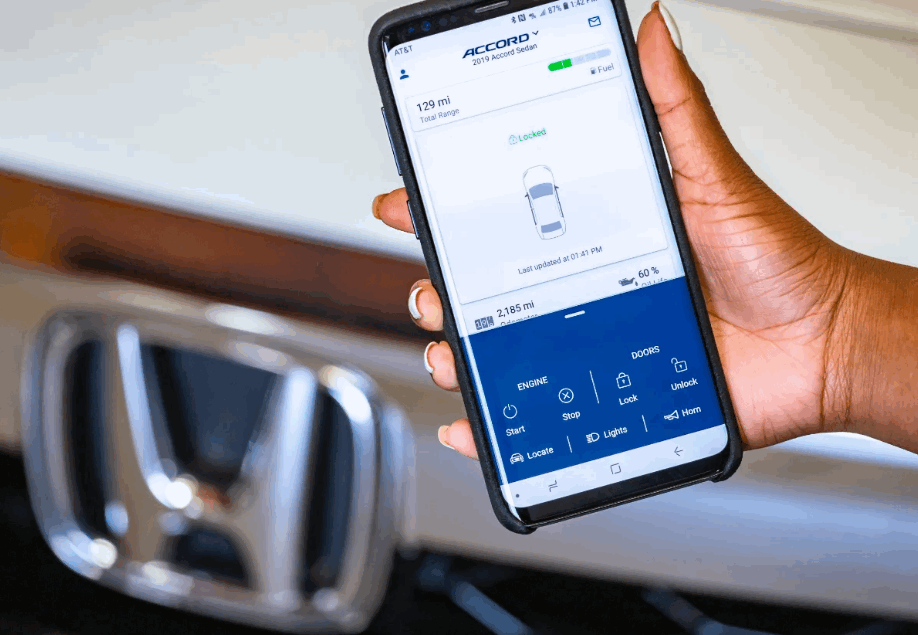
HondaLink connects your smartphone to your vehicle. It lets you check vehicle information, receive maintenance reminders, schedule service appointments, and access connected services on supported models. Some vehicles also support advanced features such as Remote Start, Vehicle Locator, Remote Lock and Unlock, and Security Alerts. These features usually require a subscription after any complimentary trial ends.
This guide explains whether HondaLink is free and identifies the features included at no extra cost. It also covers subscription plans, pricing, compatible Honda models, and the value of upgrading to a paid package. By the end, you will know which HondaLink services fit your needs and whether a subscription is worth the cost.
Is HondaLink Free?
HondaLink is partially free because Honda offers basic connected services at no extra cost, while advanced features require a paid subscription. The HondaLink app is free to download from the App Store and Google Play. After signing in with a Honda Owner account, you can access several standard features if your vehicle supports the platform. However, premium connected services remain available only through eligible subscription plans.
Free HondaLink features focus on convenience rather than remote vehicle control. Depending on your Honda model and model year, you can view vehicle information, receive maintenance reminders, schedule service appointments, access owner’s resources, and locate nearby Honda dealerships. These services help owners manage routine maintenance and stay informed about their vehicles without paying an additional monthly fee.
The confusion begins because many drivers assume every HondaLink feature is free once they install the app. In reality, the application serves as a gateway to multiple connected services. Some services come standard with the vehicle, while others belong to subscription packages such as HondaLink Remote, Security, or Concierge. These premium plans unlock remote commands, vehicle monitoring, and emergency support that are unavailable through the free version.
Whether you need a subscription depends on how you use your vehicle. Drivers who only want maintenance information and basic vehicle management can rely on the free services. On the other hand, owners who value remote access, enhanced security, or connected convenience may benefit from upgrading to a paid HondaLink package. Checking your vehicle’s compatibility and available services is the best way to understand which features you can use without additional costs.
What Features Can You Use for Free with HondaLink?
HondaLink includes several free features that help owners manage their vehicles without paying for a subscription. These services focus on vehicle information, maintenance support, and owner resources instead of remote vehicle control. The exact features vary by model and model year, but every compatible vehicle receives a set of basic connected services.
One of the most useful free features is vehicle information. HondaLink allows you to view important details such as your vehicle identification number, maintenance schedule, and service history when available. The app also sends maintenance reminders based on your vehicle’s recommended service intervals. This makes it easier to keep your Honda in good condition and avoid missing routine maintenance.
HondaLink also gives owners quick access to helpful resources. You can find your owner’s manual, locate nearby Honda dealerships, schedule service appointments, and receive important recall notifications. These tools simplify vehicle ownership because you can manage many routine tasks from your smartphone instead of visiting multiple websites or contacting a dealership directly.
Some Honda models include complimentary connected services for a limited period after purchase. During this trial, drivers may access selected premium features before deciding whether to subscribe. The available services depend on the vehicle and the package included by Honda. Once the trial expires, only the standard free features remain available unless you purchase an eligible HondaLink subscription.
Although the free version does not include advanced remote functions, it provides enough value for many drivers. Owners who mainly want maintenance updates, vehicle information, and dealership support can continue using HondaLink without paying additional fees. Those who need remote access or enhanced security features should consider upgrading to one of Honda’s subscription plans.
Which HondaLink Features Require a Paid Subscription?
HondaLink requires a paid subscription to unlock advanced connected services such as remote vehicle control, security monitoring, and concierge support. These premium features are designed for owners who want greater convenience and peace of mind. While the HondaLink app remains free, the most advanced capabilities are available only through eligible subscription packages.
The HondaLink Remote package adds several features that you cannot access through the free version. Depending on your vehicle, you can remotely start the engine, lock or unlock the doors, locate your parked vehicle, and check its status from your smartphone. These functions are especially useful when you want to warm up or cool down your vehicle before driving or quickly find it in a crowded parking area.
HondaLink Security provides another layer of protection for compatible vehicles. This package can send automatic collision notifications, offer emergency roadside assistance, and help locate a stolen vehicle in certain situations. Some plans also include security alerts that notify you if your vehicle is moved unexpectedly or leaves a predefined area. These services improve driver confidence because they deliver support when unexpected events occur.
Some Honda models also qualify for HondaLink Concierge. This premium service connects drivers with live assistants who can help with tasks such as making restaurant reservations, finding nearby destinations, or sending navigation information directly to the vehicle. Although this package is not available on every Honda model, it offers additional convenience for drivers who frequently travel or rely on connected services.
Choosing a paid subscription depends on your driving habits and daily needs. Drivers who value remote access, vehicle security, and connected convenience often benefit from these premium services. However, owners who only need maintenance reminders and basic vehicle information may find that the free HondaLink features provide everything they need.
How Much Does HondaLink Cost?
HondaLink pricing depends on your vehicle, the connected service package, and your subscription status. Basic HondaLink features remain free on compatible vehicles. However, premium services require a monthly or annual subscription after any complimentary trial ends. The available plans and prices may also vary by model and model year.
Honda offers several subscription packages instead of a single plan. HondaLink Remote usually provides remote vehicle commands such as Remote Start, Remote Lock and Unlock, and Vehicle Locator. HondaLink Security adds emergency assistance and security-related services for eligible vehicles. Some models also support HondaLink Concierge, which includes personalized assistance for navigation, reservations, and other travel-related requests. Each package includes different features, so owners only pay for the services they need.
Many new Honda vehicles include a complimentary trial for selected connected services. This allows owners to experience premium features before deciding whether to continue with a paid subscription. Once the trial expires, the premium functions become unavailable unless the subscription is renewed. The standard HondaLink features, however, continue to work without additional charges on supported vehicles.
Before purchasing a subscription, it is worth checking which services your Honda actually supports. Not every model includes the same connected technology, and some premium packages are available only on specific vehicles. Comparing the available features with your daily driving needs can also help you avoid paying for services that you may rarely use. If remote convenience, enhanced security, and connected vehicle management are important to you, a HondaLink subscription can provide meaningful value beyond the free version.
Which Honda Vehicles Support HondaLink?
HondaLink is available on many modern Honda vehicles, but compatibility depends on the model, model year, trim level, and installed connected technology. Not every Honda includes the same HondaLink services. Some vehicles support only the basic features, while others can access premium connected services through eligible subscription plans.
Many recent Honda models support HondaLink, including popular vehicles such as the Accord, Civic, CR-V, Pilot, Odyssey, Passport, Ridgeline, and selected Prologue models. However, the available features are not identical across every vehicle. A newer trim may include Remote Start, Vehicle Locator, or Security services, while an older version of the same model may only support maintenance information and owner resources.
Model year also plays an important role. Honda has expanded its connected technology over time, so newer vehicles generally offer more HondaLink capabilities than older ones. In addition, some premium features require factory-installed hardware. Downloading the HondaLink app alone does not add functions that your vehicle does not support.
The easiest way to confirm compatibility is to register your vehicle in the HondaLink app or sign in to your Honda Owner account. After entering the vehicle identification number, the system displays the services available for your specific vehicle. You can also ask your local Honda dealership to verify which HondaLink packages your vehicle supports before purchasing a subscription.
Checking compatibility before subscribing helps you avoid unnecessary costs. It also ensures that you choose the right HondaLink package based on the features your vehicle can actually use. This simple step allows you to get the most value from Honda’s connected services without paying for unavailable functions.
Is HondaLink Worth Paying For?
HondaLink is worth paying for if you regularly use remote vehicle functions, value connected safety features, or want greater convenience in your daily routine. The free version covers basic ownership needs, but it does not provide the advanced services that many drivers expect from a connected vehicle. Whether the subscription offers good value depends on how often you use its premium features.
Drivers who frequently park in large public areas often benefit from the Remote package. Features such as Remote Start, Vehicle Locator, and Remote Lock and Unlock save time and add convenience throughout the day. These tools also make it easier to prepare your vehicle before driving in extremely hot or cold weather. For many owners, this level of convenience justifies the subscription cost.
The Security package delivers additional value for drivers who prioritize safety. Emergency assistance, automatic collision response, and stolen vehicle support provide extra protection during unexpected situations. Although many owners may never need these services, they can become valuable when an emergency occurs. The added peace of mind is one of the main reasons many Honda owners continue their subscriptions after the complimentary trial ends.
On the other hand, not every driver needs a paid HondaLink plan. If you mainly use the app to check maintenance reminders, access owner resources, or schedule service appointments, the free features may be enough. Paying for premium services makes less sense when you rarely use remote vehicle controls or connected security functions.
Overall, HondaLink offers the best value to owners whose vehicles fully support its premium services and who use those features regularly. Before subscribing, compare the available package with your driving habits and confirm that your vehicle supports every feature you plan to use. This approach helps you choose the most suitable HondaLink plan while avoiding unnecessary subscription costs.
Common HondaLink Questions
Many Honda owners have similar questions about HondaLink because available features vary by vehicle and subscription plan. The answers below address the most common concerns and clarify how the service works before and after a subscription begins.
Is HondaLink free forever? HondaLink is not completely free forever. The app and several basic services remain free on compatible vehicles. However, premium features such as Remote Start, Vehicle Locator, and Security services require an active subscription after any complimentary trial expires.
Does HondaLink include a free trial? Many new Honda vehicles include a complimentary trial for selected HondaLink subscription packages. The trial period depends on the model, model year, and package included with the vehicle. Once the trial ends, premium features stop working unless you purchase a subscription.
Can I use HondaLink without a subscription? Yes. You can continue using the free HondaLink features without paying for a subscription. These services typically include maintenance reminders, owner resources, service scheduling, and selected vehicle information. The available features depend on your vehicle’s compatibility.
Can multiple drivers use HondaLink? Multiple drivers may use HondaLink if they have the appropriate account access for the same vehicle. However, account permissions and available features may vary depending on the connected service and Honda’s account settings.
What happens when a HondaLink subscription expires? Premium connected services become unavailable after the subscription expires. You will no longer have access to remote vehicle controls or premium security features. However, eligible free HondaLink services continue to operate on supported vehicles without additional charges.
Conclusion
HondaLink is partially free because Honda separates basic connected services from premium subscription features. Owners can use the HondaLink app, maintenance reminders, owner resources, and several vehicle management tools without paying an additional fee. Premium services, including Remote Start, Vehicle Locator, Security, and Concierge features, require an active subscription on compatible vehicles.
Whether a paid HondaLink plan is worthwhile depends on your driving habits and your vehicle’s supported technology. Drivers who regularly use remote access and connected safety features often receive meaningful value from a subscription. Meanwhile, owners who only need basic vehicle information and maintenance support may find that the free version meets their daily needs.
Before subscribing, confirm which HondaLink services are available for your specific model and model year. Comparing the included features with your daily routine helps you choose the right package and avoid unnecessary costs. By understanding the difference between free and paid services, you can make an informed decision and get the most value from Honda’s connected vehicle platform.