To use the NOCO Boost Plus GB40, connect the red clamp to the positive (+) battery terminal and the black clamp to the negative (−) terminal or an approved chassis ground, then turn on the jump starter and start your vehicle. Once the engine starts, turn off the GB40 and disconnect the clamps in reverse order. The device delivers up to 1,000 peak amps to jump-start compatible 12V lead-acid batteries without requiring another vehicle.
The NOCO Boost Plus GB40 supports gasoline engines up to 6.0 liters and diesel engines up to 3.0 liters. Its built-in safety features include spark-proof technology and reverse polarity protection, which help prevent electrical hazards during normal operation. However, proper clamp placement, sufficient battery charge, and correct operating procedures remain essential for a successful jump-start.
This guide explains how to prepare the NOCO GB40, connect it to your car battery, activate the jump starter, and safely disconnect it after the engine starts. It also covers LED indicators, Manual Override for deeply discharged batteries, common troubleshooting problems, charging instructions, and maintenance practices to keep your jump starter ready for roadside emergencies.
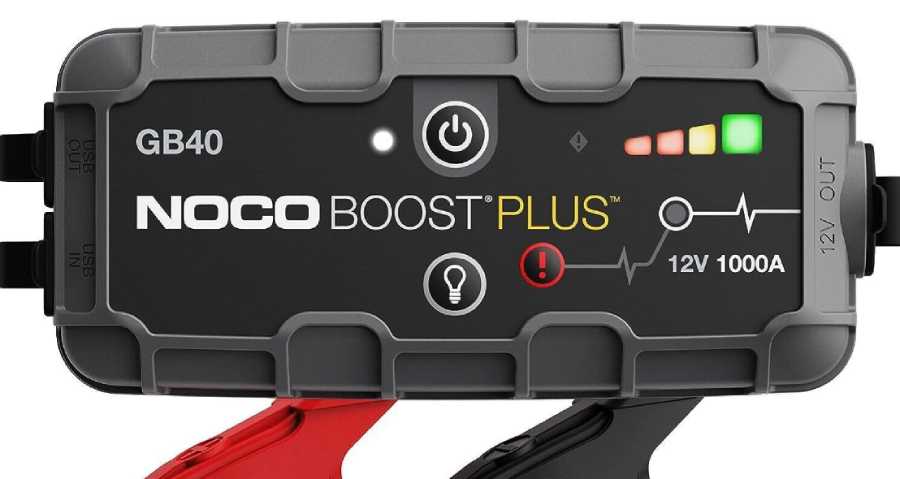
How Do You Use the NOCO Boost Plus GB40 to Jump-Start a Car?
To jump-start a car with the NOCO Boost Plus GB40, charge the jump starter, connect its clamps to the correct battery terminals, turn on the device, and start the engine. After the engine starts, turn off the GB40 and remove the clamps in the correct order. The procedure works with compatible 12V lead-acid batteries, provided the jump starter has sufficient charge and the vehicle’s starting system is functional.
How Do You Prepare the NOCO GB40 Before Jump-Starting?
Prepare the NOCO GB40 by checking its charge level, confirming vehicle compatibility, and locating the battery terminals. The GB40 delivers up to 1,000 peak amps and supports gasoline engines up to 6.0 liters and diesel engines up to 3.0 liters. It is designed for 12V lead-acid batteries, including wet-cell, gel, maintenance-free, enhanced flooded, and AGM batteries.
Press the power button to check the GB40’s internal battery level using its charge indicator LEDs. A fully charged unit provides the greatest available starting capacity, particularly when jump-starting larger engines or batteries with a low state of charge. Recharge the device before use if its charge level is insufficient, and turn it off before connecting the clamps.
Park the vehicle in a safe, ventilated location, engage the parking brake, and switch off the ignition and electrical accessories. Locate the positive (+) and negative (−) battery terminals, which are typically identified by their respective symbols. Inspect the battery for visible damage, leakage, or freezing. Do not attempt to jump-start a damaged or frozen battery.
How Do You Connect the NOCO GB40 to a Car Battery?
Connect the NOCO GB40 by attaching the red clamp to the positive (+) battery terminal first, followed by the black clamp to the negative (−) terminal or an approved chassis ground. Correct polarity allows the jump starter to deliver power through the vehicle’s electrical system while reducing the risk of incorrect connections.
Follow these steps to connect the GB40:
- Insert the GB40’s battery clamp connector securely into the jump starter’s 12V output port.
- Attach the red positive (+) clamp to the vehicle battery’s positive terminal.
- Attach the black negative (−) clamp to the negative battery terminal or an approved grounding point specified by the vehicle manufacturer.
- Confirm that both clamps have firm contact with clean, conductive surfaces.
- Keep the clamps and cables away from moving engine components, including belts and cooling fans.
The GB40 includes reverse polarity protection that detects incorrectly connected clamps during normal operation. If the error LED illuminates, leave the device off, disconnect the clamps, and verify the battery terminal markings before reconnecting them. Never rely on the protection system as a substitute for checking polarity.
How Do You Start the Car and Disconnect the NOCO GB40?
Start the car by turning on the NOCO GB40, checking that its Boost LED indicates readiness, and cranking the engine. The jump starter automatically detects a compatible battery when the clamps are connected correctly and the battery voltage is within its detection range.
Press the GB40’s power button and check the indicator lights. A solid white Boost LED indicates that the device is ready to jump-start the vehicle. If the Boost LED does not illuminate, stop and check the battery connections, device charge level, and error indicators before attempting to start the engine.
Turn the ignition key or press the vehicle’s start button to crank the engine. Limit each starting attempt to 5 seconds. If the engine does not start, wait 20–30 seconds before trying again. Avoid repeated continuous cranking because it places additional stress on the starter motor, vehicle battery, and jump starter. Follow the manufacturer’s limits for repeated attempts and allow the GB40 to cool when necessary.
Once the engine starts, complete the disconnection procedure:
- Turn off the NOCO GB40 by pressing its power button.
- Remove the black negative (−) clamp from the battery terminal or grounding point.
- Remove the red positive (+) clamp from the positive battery terminal.
- Disconnect the battery clamp connector from the GB40 and store the cables securely.
- Recharge the GB40 after use so it is ready for the next emergency.
Keep the engine running after a successful jump-start and assess the vehicle battery’s condition. A jump-start supplies the electrical power needed to start the engine, but it does not repair a deteriorated battery, faulty alternator, or other charging-system problem. If the vehicle repeatedly requires jump-starting, have the battery and charging system tested before relying on the vehicle for another trip.
What Safety Precautions Should You Follow When Using the NOCO GB40?
Using the NOCO Boost Plus GB40 safely requires correct battery polarity, compatible battery voltage, secure clamp connections, and protection against sparks, heat, and damaged batteries. The GB40 includes spark-proof technology and reverse polarity protection during normal operation, but these features do not eliminate every electrical or battery-related hazard.
The GB40 is designed for 12V lead-acid batteries, including flooded, AGM, GEL, and maintenance-free types. Do not connect it to 6V or 24V electrical systems, lithium vehicle batteries, or batteries with incompatible specifications. Using a jump starter with the wrong battery voltage or chemistry can damage electrical components and create safety hazards. Always confirm the vehicle manufacturer’s jump-starting requirements before connecting the device.
Correct clamp placement is essential because reversing positive and negative connections can create electrical faults. Connect the red clamp to the positive (+) terminal and the black clamp to the negative (−) terminal or an approved chassis ground. The GB40’s reverse polarity protection prevents power delivery when it detects an incorrect connection during normal operation. However, Manual Override disables this protection, making accurate terminal identification especially important.
Inspect the battery and surrounding area before attempting a jump-start. Do not use the GB40 on a frozen, leaking, swollen, cracked, or visibly damaged battery. Lead-acid batteries can release flammable hydrogen gas, particularly during charging or heavy electrical loads. Keep cigarettes, flames, sparks, and other ignition sources away from the battery, and work in a well-ventilated area. Wear eye protection and avoid touching exposed metal parts of the clamps while the device is operating.
Keep the GB40 and its cables away from moving engine components, hot exhaust surfaces, and standing water. Do not allow the positive and negative clamps to touch each other, and never leave the jump starter connected longer than necessary. Stop the procedure immediately if the battery becomes unusually hot, produces smoke, leaks fluid, or shows signs of physical damage.
Manual Override requires additional precautions because it disables the GB40’s spark-proof and reverse polarity protection. This mode is intended for specific situations involving deeply discharged batteries that the device cannot detect through normal operation. It should never be used to bypass an error caused by incorrect clamp connections or an incompatible battery.
What Do the Lights on the NOCO Boost Plus GB40 Mean?
The NOCO Boost Plus GB40 uses battery charge indicators, a Boost LED, an error LED, and a Manual Override indicator to communicate its operating status. These lights help users determine whether the jump starter has sufficient charge, is ready to deliver starting power, or has detected a condition that requires attention.
The four internal battery charge LEDs indicate the GB40’s approximate remaining battery capacity. They represent 25%, 50%, 75%, and 100% charge levels. Checking these indicators before connecting the device helps prevent unsuccessful jump-start attempts caused by insufficient stored energy. A fully charged GB40 provides the greatest available starting capacity, especially when starting larger engines.
The white Boost LED indicates that the GB40 has detected a battery and is ready to provide jump-starting power. Under normal operating conditions, the device must detect sufficient battery voltage before activating its output. If the Boost LED does not illuminate after the clamps are connected and the device is turned on, the vehicle battery may be deeply discharged, the clamps may have poor contact, or the GB40 may not have enough charge.
The red error LED indicates a connection or operating problem. A solid red error light identifies a reverse polarity connection, meaning the positive and negative clamps are attached incorrectly. A flashing red error light can indicate that the device is detecting an abnormal condition, such as an excessively hot internal battery. The exact response depends on the indicator pattern, so users should consult the GB40’s operating instructions rather than repeatedly attempting to start the engine.
The Manual Override indicator identifies when the device is operating in its advanced override mode. When activated, the GB40 can deliver output without its normal battery-detection safeguards. Because reverse polarity and spark-proof protection are disabled in this mode, the indicator should be treated as a warning that additional precautions are necessary.
The following table summarizes the GB40’s main indicators and their practical meanings.
| Indicator | Meaning | Recommended Action |
|---|---|---|
| Battery charge LEDs | Approximate internal battery capacity | Recharge the GB40 when the charge level is low |
| Solid white Boost LED | Jump starter is ready to deliver starting power | Proceed with the normal starting procedure |
| Solid red error LED | Reverse polarity detected | Disconnect and correct the clamp connections |
| Flashing red error LED | Device fault or operating condition requiring attention | Stop and identify the specific error pattern |
| Manual Override indicator | Manual Override mode is active | Verify polarity and follow the manufacturer’s safety instructions |
Understanding these indicators helps distinguish a connection problem from a discharged jump starter or a vehicle starting-system fault. For example, a solid white Boost LED confirms that the GB40 is ready to supply power, but it does not guarantee that the engine will start. A vehicle with a defective starter motor, poor battery cable connections, or another mechanical or electrical fault may still fail to start even when the GB40 is functioning correctly.
How Do You Use Manual Override on the NOCO Boost Plus GB40?
To use Manual Override on the NOCO Boost Plus GB40, connect the battery clamps with the correct polarity, turn on the jump starter, and hold the Manual Override button for approximately 3 seconds until the Boost LED begins flashing. This mode allows the GB40 to supply starting power when a deeply discharged 12V lead-acid battery has fallen below the device’s normal detection threshold of approximately 2 volts.
Under normal operation, the GB40 automatically detects a connected battery before enabling its jump-starting output. When battery voltage drops below 2 volts, the device may not recognize the connection, preventing the white Boost LED from illuminating. Manual Override bypasses this voltage-detection requirement, allowing the user to attempt a jump-start despite the extremely low battery voltage.
Manual Override disables the GB40’s spark-proof and reverse polarity protection. Incorrect clamp connections can therefore cause sparks, electrical damage, or battery-related injuries. Use this function only when the battery voltage is too low for normal detection and the battery’s polarity has been positively identified. Do not activate Manual Override to bypass a reverse polarity warning or other device fault.
Follow these steps to activate Manual Override:
- Confirm that the vehicle uses a compatible 12V lead-acid battery and that the battery is not frozen, leaking, swollen, or physically damaged.
- Connect the red positive (+) clamp to the battery’s positive terminal.
- Connect the black negative (−) clamp to the negative terminal or the vehicle manufacturer’s approved grounding point.
- Verify both connections carefully, ensuring that the clamps are secure and their polarity is correct.
- Press the GB40’s power button, then press and hold the Manual Override button, marked with a red exclamation symbol, for approximately 3 seconds.
- Confirm that the white Boost LED is flashing, indicating that Manual Override is active.
- Attempt to start the engine, limiting each cranking attempt to 5 seconds.
- Once the engine starts, turn off the GB40, remove the black clamp first, and then remove the red clamp.
Manual Override should be used only for the jump-starting procedure and should not remain active unnecessarily. If the engine does not start, stop the attempt and investigate the battery’s condition rather than repeatedly forcing the device to deliver power.
A battery discharged below 2 volts may have suffered internal damage, severe sulfation, or prolonged deep discharge. Even if Manual Override successfully starts the engine, the battery may no longer retain enough charge for reliable operation. Have the battery and vehicle charging system tested before returning the vehicle to regular service.
What Vehicles Can the NOCO Boost Plus GB40 Jump-Start?
The NOCO Boost Plus GB40 can jump-start vehicles equipped with compatible 12V lead-acid batteries and gasoline engines up to 6.0 liters or diesel engines up to 3.0 liters. Its 1,000-amp peak output makes it suitable for numerous passenger cars, SUVs, light trucks, motorcycles, and other vehicles that meet the manufacturer’s electrical and engine-size requirements.
The GB40 supports several types of 12V lead-acid batteries, including flooded, AGM, GEL, enhanced flooded, and maintenance-free batteries. These battery technologies are used across different automotive applications, but they share the same nominal 12V electrical system required for GB40 operation. The jump starter is not designed to jump-start 24V commercial vehicle systems or batteries that require a different voltage.
Gasoline-powered vehicles with engines up to 6.0 liters fall within the GB40’s advertised engine-size rating. This includes many compact cars, midsize sedans, crossovers, SUVs, and light-duty pickup trucks. Diesel compatibility is limited to engines up to 3.0 liters because diesel engines generally require greater cranking effort due to their higher compression ratios.
The following table summarizes the GB40’s vehicle compatibility.
| Vehicle Type | GB40 Compatibility |
|---|---|
| Gasoline passenger cars | Compatible with 12V systems and engines up to 6.0L |
| Diesel passenger cars | Compatible with 12V systems and engines up to 3.0L |
| SUVs and crossovers | Compatible when battery and engine requirements are met |
| Light-duty pickup trucks | Compatible within the specified engine limits |
| Motorcycles | Compatible with supported 12V lead-acid batteries |
| ATVs and recreational vehicles | Compatible when electrical requirements are met |
| 24V commercial vehicles | Not compatible |
| Vehicles with incompatible battery chemistry | Not compatible |
Engine displacement and battery voltage are important compatibility factors, but they do not guarantee a successful jump-start. Battery condition, ambient temperature, engine compression, cable resistance, and the GB40’s remaining charge also affect starting performance. For example, an engine within the manufacturer’s displacement rating may still require additional starting current in extremely cold conditions.
Vehicles equipped with manufacturer-designated remote jump-start terminals require special attention. Some vehicles place their batteries beneath seats, inside luggage compartments, or behind protective panels. In these cases, use the approved positive connection point and chassis ground specified in the vehicle owner’s manual rather than connecting directly to inaccessible battery terminals.
The GB40 also cannot resolve starting problems unrelated to insufficient battery power. A defective starter motor, failed ignition component, damaged battery cable, or malfunctioning fuel delivery system can prevent an engine from starting even when the jump starter supplies adequate electrical power. If the GB40 indicates normal operation but the engine still does not start, further vehicle diagnostics may be necessary.
Why Is My NOCO Boost Plus GB40 Not Jump-Starting My Car?
The NOCO Boost Plus GB40 may fail to jump-start a car because of insufficient internal battery charge, loose clamp connections, an undetected vehicle battery, incorrect polarity, or a problem with the vehicle’s starting system. Identifying the cause requires checking the GB40’s indicator lights, battery connections, and engine response before attempting another jump-start.
A GB40 that turns on but does not start the engine is not necessarily defective. The device must have sufficient stored energy, establish a secure electrical connection, and deliver enough current to operate the starter motor. A severely discharged or damaged vehicle battery can also interfere with the starting process, even when the jump starter itself is functioning correctly.
The following table identifies common NOCO GB40 problems and the appropriate troubleshooting actions.
| Problem | Possible Cause | Recommended Solution |
|---|---|---|
| GB40 does not turn on | Internal battery is discharged | Recharge the GB40 using its Micro-USB input |
| White Boost LED does not illuminate | Battery voltage is too low or clamps have poor contact | Check connections and battery voltage |
| Solid red error LED | Reverse polarity connection | Disconnect and reconnect the clamps correctly |
| GB40 shuts down during use | Temperature protection or insufficient charge | Allow the device to cool and check its charge |
| Engine cranks but does not start | Ignition, fuel delivery, or other vehicle fault | Diagnose the vehicle’s starting system |
| Engine does not crank | Weak connection, insufficient current, or starter fault | Inspect terminals, charge level, and starter circuit |
Insufficient GB40 battery charge is one of the first conditions to check. Although the device has a 1,000-amp peak current rating, its available starting performance depends on the charge remaining in its internal lithium-ion battery. A partially discharged GB40 may illuminate its indicator lights but still lack sufficient energy to start an engine under demanding conditions. Recharge the unit fully before another attempt, particularly after repeated unsuccessful starts.
Poor clamp contact can prevent starting current from reaching the vehicle battery. Corrosion, loose terminals, dirt, or improperly positioned clamps increase electrical resistance and reduce effective current delivery. Inspect the positive and negative terminals for visible corrosion or damage, and ensure the clamps grip clean, conductive surfaces securely. Disconnect and turn off the jump starter before adjusting any connections.
A deeply discharged vehicle battery may prevent the GB40 from entering its normal Boost mode. The device is designed to detect battery voltage before enabling its output, and batteries below approximately 2 volts may not be recognized. When this occurs, the white Boost LED may remain off despite correct clamp placement. Manual Override provides a separate operating mode for this condition, but it disables spark-proof and reverse polarity protection. Use it only after confirming battery compatibility, correct polarity, and the absence of battery damage.
Temperature-related protection can also interrupt operation. Lithium-ion batteries have operating temperature limits, and repeated high-current starting attempts generate additional heat inside the jump starter. If the GB40 indicates a temperature-related fault, stop using it and allow it to return to an acceptable operating temperature. Do not place the device near an open flame, heater, or other intense heat source to accelerate warming.
The engine’s behavior provides another useful diagnostic clue. If the starter motor cranks the engine at normal speed but the engine does not run, the problem may involve fuel delivery, ignition, engine management, or another system unrelated to the battery. If the engine does not crank at all, possible causes include inadequate electrical power, a defective starter motor, damaged cables, or a faulty starter control circuit.
Avoid repeated starting attempts without identifying the underlying problem. Limit cranking to 5 seconds per attempt and allow appropriate recovery time between attempts, following NOCO’s operating instructions. If the GB40 continues to show an error, the vehicle battery is visibly damaged, or the engine repeatedly fails to start despite correct connections, stop the procedure and arrange further inspection.
A successful jump-start also does not establish that the vehicle battery is healthy. A battery with reduced capacity may start the engine when assisted by the GB40 but fail again after the engine is switched off. Battery voltage testing, a battery load or conductance test, and charging-system inspection can help distinguish a discharged battery from a deteriorated battery or alternator problem.
How Do You Charge the NOCO Boost Plus GB40?
To charge the NOCO Boost Plus GB40, connect a Micro-USB cable to the device’s USB IN port and plug the other end into a compatible 5V USB power source. The GB40 uses an internal lithium-ion battery that must be recharged periodically to maintain sufficient energy for jump-starting vehicles. Charging through its Micro-USB input allows the device to receive power from a USB wall adapter, computer USB port, or compatible automotive USB charger.
The GB40 supports USB charging with an input rating of up to 5V/2.1A. Charging time depends on the power supplied by the USB adapter and the remaining battery capacity. According to NOCO’s charging specifications, a fully discharged GB40 takes approximately 3 hours to recharge using a 2.1A USB charger, while a 1A charger requires approximately 6 hours. A lower-output 0.5A USB source can extend charging time to approximately 12 hours.
Follow these steps to charge the NOCO GB40:
- Locate the Micro-USB input port on the GB40 and remove its protective cover.
- Insert the Micro-USB connector into the charging input.
- Connect the USB-A end of the cable to a compatible USB power adapter or powered USB port.
- Check the battery charge indicator LEDs to confirm that charging has started.
- Leave the device connected until the charge indicators show that the internal battery is fully charged.
- Disconnect the charging cable and close the protective port cover before storing the jump starter.
The GB40’s four battery charge LEDs indicate charging progress at approximately 25%, 50%, 75%, and 100% capacity. During charging, the indicators illuminate progressively as the internal battery receives energy. When charging is complete, the four charge LEDs remain solid, indicating that the GB40 has reached full charge.
Charging the GB40 before its first use ensures that the internal battery has sufficient energy for an emergency jump-start. Recharge the device after jump-starting a vehicle, particularly if the starting procedure required several attempts. A low charge level reduces the energy available for subsequent starts and may prevent the device from delivering adequate starting current.
Avoid charging the GB40 near excessive heat, open flames, or moisture. Use compatible USB charging equipment, inspect the cable for damage, and follow the manufacturer’s charging temperature requirements. If the device becomes unusually hot, shows physical damage, or fails to charge normally, disconnect the power source and inspect the equipment before attempting another charge.
Read more: How to Use NOCO Boost HD GB70: Step-by-Step Guide
How Often Should You Recharge the NOCO Boost Plus GB40?
The NOCO Boost Plus GB40 should be recharged immediately after use and at least every six months during storage, following NOCO’s maintenance recommendations. Its internal lithium-ion battery gradually loses charge over time, even when the jump starter is switched off. Periodic recharging helps maintain sufficient stored energy for emergency starting and reduces the risk of finding the device discharged when needed.
A six-month recharge interval provides a baseline for routine maintenance, but more frequent battery checks are useful when the GB40 is stored in a vehicle exposed to significant temperature changes. High temperatures accelerate lithium-ion battery aging, while cold conditions temporarily reduce available power and starting performance. Checking the battery level before a long trip or during seasonal vehicle maintenance helps identify insufficient charge before an emergency occurs.
Store the GB40 in a clean, dry location within the manufacturer’s specified temperature range. Keep it away from direct sunlight, standing water, and heat-producing equipment. Avoid leaving the device in a vehicle where interior temperatures may exceed its recommended storage limits. The protective covers should remain closed to prevent dirt and moisture from entering the USB ports and electrical connections.
Inspect the jump starter and battery clamps during routine maintenance. Check for damaged insulation, loose connectors, corrosion, and cracked housings. Clean external surfaces with a dry cloth and ensure that the clamps remain free of debris that could interfere with electrical contact. Do not disassemble the GB40 or attempt to replace its internal battery without manufacturer-authorized service procedures.
The GB40’s battery charge indicators provide a practical way to monitor readiness. Press the power button to check the remaining capacity, and recharge the device when the indicators show a low charge level. Maintaining a full charge before extended travel is especially useful because roadside emergencies may occur when access to USB charging equipment is unavailable.
Proper charging and storage practices support the GB40’s long-term reliability, but they do not prevent all battery degradation. Lithium-ion batteries have a finite service life, and their capacity gradually decreases with age, charging cycles, and temperature exposure. If the GB40 no longer holds a charge or repeatedly fails to deliver starting power despite proper charging, contact NOCO support for troubleshooting or replacement guidance.
Can You Use the NOCO GB40 as a USB Power Bank?
Yes, the NOCO Boost Plus GB40 can function as a portable USB power bank through its 5V/2.1A USB output port. This feature allows users to charge compatible electronic devices, including smartphones, GPS receivers, wireless accessories, and other USB-powered equipment. The USB output operates independently of the battery clamps, so the GB40 does not need to be connected to a vehicle battery to supply power to electronic devices.
To use the GB40 as a power bank, connect a compatible USB charging cable to its USB OUT port and attach the other end to the electronic device. Turn on the GB40 using its power button if the USB output is not already active. The connected device should begin charging when the USB output is supplying power and the GB40 has sufficient battery capacity.
The USB output provides up to 2.1 amps at 5 volts, equivalent to a maximum rated output of 10.5 watts. Actual charging speed depends on the connected device’s power requirements, the USB cable, and the GB40’s remaining battery charge. Devices that require USB Power Delivery or higher charging voltages will not receive those advanced charging modes from the GB40’s standard USB-A output.
Using the GB40 to charge electronic devices consumes energy from the same internal lithium-ion battery used for jump-starting. For example, repeatedly charging a smartphone during a camping trip reduces the stored energy available for starting a vehicle later. The amount of energy consumed depends on the connected device’s battery capacity, charging efficiency, and duration of use.
The GB40’s USB power-bank function is particularly useful during roadside emergencies when a smartphone needs additional power for navigation, emergency calls, or contacting roadside assistance. However, maintaining enough battery capacity for jump-starting should remain the priority when the GB40 serves as the vehicle’s primary emergency starting device.
Recharge the GB40 after extended USB power-bank use and check its battery indicators before relying on it for another jump-start. This ensures that its secondary charging function does not compromise its primary purpose of providing emergency starting power to compatible 12V vehicles.