A Honda Civic alarm should protect your vehicle, not disturb you without reason. If the alarm keeps going off, the security system has detected a false trigger. In most cases, a weak battery, a faulty sensor, or an electrical problem causes the issue. Ignoring the warning can drain the battery, annoy your neighbors, and make the alarm less reliable when you actually need it.
Several components work together to monitor your Honda Civic. The Body Control Module receives signals from the door latches, hood latch, trunk latch, key fob, and other security sensors. When one component sends incorrect information, the system may interpret it as an attempted break-in. As a result, the alarm activates even though no one has touched the vehicle.
Fortunately, you can diagnose many alarm problems without replacing expensive parts. Start with the simplest components, such as the vehicle battery and the key fob battery. Then inspect the hood latch, door switches, and wiring if the problem continues. Following this order saves time and helps you avoid unnecessary repairs.
This guide explains why a Honda Civic alarm keeps going off, how to identify the exact cause, and how to fix each problem. It also shows when a simple reset works and when professional diagnosis becomes the better option.
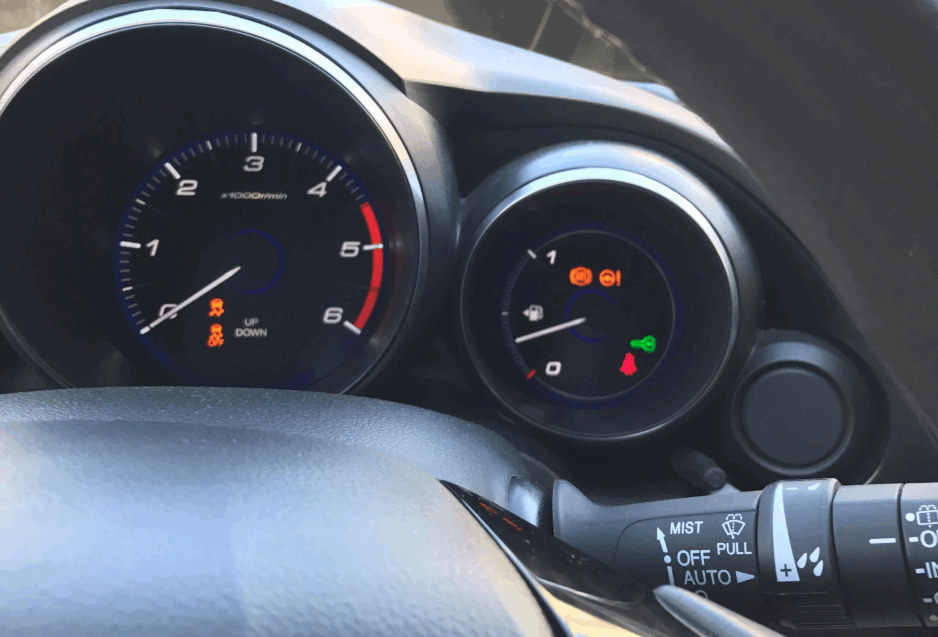
Why Does a Honda Civic Alarm Keep Going Off?
A Honda Civic alarm usually goes off because one part of the security system sends a false warning. The system monitors several components at the same time. If one sensor reports unusual activity, the Body Control Module activates the alarm to protect the vehicle. Although this response is normal during a break-in attempt, faulty components often trigger the same reaction.
A weak car battery ranks among the most common causes. Low voltage affects the electrical system and creates unstable signals between different modules. As a result, the alarm may sound even when the vehicle is parked. Battery problems become more noticeable during cold weather because low temperatures reduce battery performance.
A failing key fob battery can also confuse the security system. When the battery loses power, the key fob may send inconsistent signals to the Smart Entry System. The vehicle may believe the key has left or entered its detection range unexpectedly. Consequently, the alarm activates without any real security threat.
Faulty hood, door, or trunk latch sensors also cause frequent false alarms. These sensors confirm whether every opening remains fully closed. Dirt, corrosion, moisture, or normal wear can prevent them from working correctly. Even a slightly misaligned hood latch may tell the security system that someone has opened the hood.
Electrical issues create another common source of false alarms. Damaged wiring, loose connectors, or poor grounding interrupt communication between the sensors and the Body Control Module. In some cases, aftermarket alarm systems or remote starters interfere with the factory security system. Identifying the exact cause before replacing parts reduces repair costs and prevents unnecessary component replacement.
How Can You Tell What Is Triggering the Alarm?
Finding the exact cause of a Honda Civic alarm problem starts with identifying when the alarm activates. The timing often reveals which component is failing. For example, an alarm that sounds immediately after locking the car usually points to a faulty door, hood, or trunk sensor. In contrast, an alarm that activates several hours later often suggests a weak battery or an intermittent electrical fault.
Next, inspect the dashboard for warning lights before starting the engine. A battery warning light, key indicator, or security light may provide an early clue. Although these indicators do not always confirm the exact problem, they help narrow the diagnosis and eliminate unnecessary inspections. If no warning lights appear, continue with a physical inspection of the vehicle.
Check every door, the hood, and the trunk to ensure they close completely. A worn latch or damaged switch can remain partially engaged even after the panel appears closed. Dirt, rust, and moisture also reduce sensor accuracy over time. Cleaning the latch mechanism and confirming proper alignment often solves the problem without replacing any parts.
If the alarm continues to activate, test the vehicle battery and the key fob battery. Low voltage affects multiple electronic modules and may create random security alerts. Replacing an old key fob battery is inexpensive and eliminates one of the most common causes of false alarms.
Finally, connect an OBD-II scanner that supports Honda body systems. Standard code readers only access the engine control module, while advanced scanners communicate with the Body Control Module. The stored fault codes help identify defective sensors, communication errors, or electrical faults. This step provides the most reliable diagnosis and prevents replacing parts based on guesswork.
How Do You Fix a Honda Civic Alarm That Keeps Going Off?
Fixing a Honda Civic alarm starts with the simplest and most common causes. Replacing inexpensive parts before diagnosing the problem often wastes both time and money. Instead, inspect each component in a logical order. This approach helps you identify the fault faster and avoids unnecessary repairs.
Begin by testing the vehicle battery. A healthy battery should maintain stable voltage when the engine is off and while it is running. If the battery struggles to hold a charge, replace it before inspecting other components. Stable voltage allows the security system to communicate correctly and prevents random alarm activation.
Next, replace the key fob battery if it has not been changed in the last two or three years. A weak battery reduces the reliability of the remote signal and may confuse the Smart Entry System. Fortunately, replacing the battery takes only a few minutes and costs much less than replacing electronic modules.
Then inspect the hood latch, door latches, and trunk latch. Remove any dirt, grease, or corrosion that may interfere with the built-in switches. If a latch feels loose or fails to lock securely, replace the faulty component. A properly functioning latch sends a consistent signal to the Body Control Module and prevents false security alerts.
If the alarm still activates, inspect the wiring around the battery, fuse box, and door harnesses. Look for damaged insulation, loose connectors, or signs of moisture. Electrical problems often appear after collision repairs or aftermarket accessory installations. Repairing damaged wiring restores stable communication between the sensors and the security system.
Finally, reset the alarm system after completing the repairs. If the problem continues after every component passes inspection, scan the Body Control Module for diagnostic trouble codes. Persistent communication errors or internal module failures usually require professional diagnosis because they involve specialized equipment and software. Replacing the Body Control Module should always be the final solution after every other possible cause has been eliminated.
Can You Reset the Honda Civic Alarm System Yourself?
Yes, you can reset a Honda Civic alarm system yourself in many situations. A manual reset often works after replacing the battery, changing the key fob battery, or fixing a faulty sensor. However, a reset will not solve hardware failures or electrical faults. It only clears temporary errors that prevent the security system from operating normally.
Start by unlocking the driver’s door with the physical key instead of the remote. Insert the key into the door lock, turn it to the unlock position, and hold it for several seconds. Then lock and unlock the door once more before starting the engine. This process allows the security system to recognize an authorized key and may cancel the false alarm.
Another common method involves disconnecting the negative battery terminal. Leave the battery disconnected for about ten to fifteen minutes before reconnecting it. Once the battery is connected again, start the engine and allow the vehicle to idle for a few minutes. This procedure resets several electronic modules and may clear temporary security faults.
If your Honda Civic uses a Smart Entry System, replace the key fob battery before attempting another reset. A weak key fob battery can interrupt communication with the security system and cause repeated false alarms. After installing the new battery, lock and unlock the vehicle several times to confirm that the remote functions correctly.
If the alarm continues to activate after a reset, stop repeating the procedure. Frequent resets only hide the symptoms and do not remove the underlying fault. At this stage, inspect the sensors, test the electrical system, or scan the Body Control Module for diagnostic trouble codes. A successful repair always depends on identifying the root cause rather than resetting the alarm repeatedly.
When Should You Visit a Mechanic?
Some Honda Civic alarm problems require professional diagnosis because they involve complex electrical systems. If basic troubleshooting does not stop the false alarms, a qualified technician can identify faults that are difficult to detect at home. Continuing to drive with an unresolved electrical issue may also create additional problems over time.
Visit a mechanic if the alarm continues to sound after you replace the vehicle battery and the key fob battery. The same recommendation applies if you have already inspected the hood latch, door latches, and trunk latch without finding any damage. At this point, the fault often lies deeper within the vehicle’s security system.
Electrical wiring problems also require professional attention. Damaged wiring inside the doors, dashboard, or engine compartment can interrupt communication between the sensors and the Body Control Module. These faults may appear only under certain temperatures or weather conditions, making them difficult to diagnose without specialized equipment.
You should also seek professional help if the security warning light remains illuminated or if the alarm activates together with other electrical issues. Power door locks, interior lights, remote keyless entry, and the immobilizer often share the same control module. When several systems fail at the same time, the Body Control Module or its communication network may be malfunctioning.
An experienced technician can use a professional diagnostic scanner to access manufacturer-specific fault codes that standard OBD-II scanners cannot read. These codes provide valuable information about sensor failures, communication errors, and module faults. Accurate diagnosis reduces unnecessary part replacement and shortens repair time.
Professional repairs may cost more than basic maintenance, but they often save money in the long run. Identifying the exact cause before replacing expensive components prevents repeated repairs and restores the security system to reliable operation.
How Can You Prevent the Alarm from Going Off Randomly?
Regular maintenance is the most effective way to prevent false alarm activation. A well-maintained security system receives stable electrical signals and responds only to genuine security threats. Simple inspections performed throughout the year can significantly reduce unexpected alarm problems.
Start by checking the vehicle battery at regular service intervals. Battery performance naturally declines with age, and unstable voltage affects multiple electronic systems. Replacing an aging battery before it fails helps maintain consistent communication between the Body Control Module and every security sensor.
Replace the key fob battery every two to three years, even if the remote still appears to work normally. A weak battery often causes intermittent communication issues before it stops functioning completely. Preventive replacement costs very little and eliminates one of the most common causes of false alarms.
Keep the hood latch, door latches, and trunk latch clean throughout the year. Dust, road salt, grease, and moisture gradually reduce sensor reliability. Cleaning these components and applying a suitable lubricant helps each switch operate smoothly and report accurate status to the security system.
Avoid installing low-quality aftermarket alarm systems or electrical accessories unless they are designed specifically for your Honda Civic. Poor installation can interfere with the factory wiring and create communication errors between electronic modules. Professional installation greatly reduces this risk.
Finally, perform a complete diagnostic scan during routine maintenance, especially if the vehicle is more than five years old. Detecting minor electrical faults before they become major failures helps protect the alarm system and improves the overall reliability of your Honda Civic.
Conclusion
A Honda Civic alarm usually keeps going off because the security system receives incorrect information from a sensor, the vehicle battery, the key fob, or the electrical system. Identifying the exact source of the problem is more effective than replacing parts at random. A systematic inspection also reduces repair costs and prevents unnecessary component replacement.
Most owners can solve the issue by checking the battery, replacing the key fob battery, inspecting the hood and door latches, and resetting the alarm after completing the repairs. However, persistent false alarms often indicate a deeper electrical fault that requires professional diagnosis. Modern Honda Civic models rely on multiple electronic modules, so accurate testing becomes essential when simple solutions no longer work.
Regular maintenance remains the best way to prevent future alarm problems. Keeping the battery in good condition, cleaning latch sensors, and inspecting the electrical system at scheduled service intervals help the factory security system operate reliably. By following a logical troubleshooting process and addressing problems early, you can restore your Honda Civic’s security system and avoid unexpected false alarms in the future.