A Honda LaneWatch camera improves visibility during lane changes by displaying the passenger-side blind spot on the infotainment screen. When the camera stops working, it becomes harder to monitor nearby traffic. A black screen, a blurry image, or a camera that does not activate with the right turn signal are all common signs of a system problem. In many cases, the issue comes from a dirty camera lens, a loose connector, damaged wiring, or outdated software instead of a failed camera.
The Honda LaneWatch system depends on several components working together. The camera captures a live image beside the vehicle. The wiring harness transfers the signal to the infotainment system. The display then shows the video in real time. If one component fails, the entire system may stop working or produce an unstable image. Finding the exact cause before replacing parts helps reduce unnecessary repair costs.
This guide explains why a Honda LaneWatch camera may stop working and how to identify the source of the problem. It also covers practical repair methods, replacement costs, camera calibration, and preventive maintenance. By the end of this article, you will know how to restore the system safely and decide whether a simple repair or a complete camera replacement is the better solution.
Why Is My Honda Lane Watch Camera Not Working?
A Honda LaneWatch camera usually stops working because one part of the system can no longer send or display a clear video signal. The problem may appear as a black screen, a frozen image, poor picture quality, or a camera that does not activate when you switch on the right turn signal. Although these symptoms often look similar, they do not always have the same cause. Identifying the exact symptom is the first step toward an accurate diagnosis.
A black screen often indicates an interruption between the camera and the infotainment display. A loose wiring harness, a damaged connector, or a blown fuse can prevent the video signal from reaching the screen. However, the display itself may also malfunction. If other display functions work normally while the LaneWatch image remains unavailable, the fault is more likely within the camera system than the infotainment unit.
Image quality also provides valuable clues. A blurry or distorted picture usually results from a dirty camera lens, moisture inside the side mirror housing, or physical damage to the camera module. In some cases, the image may flicker or disappear only while driving over rough roads. This behavior often points to an unstable electrical connection instead of a failed camera.
Some drivers notice that the camera works only occasionally. For example, it may activate after restarting the engine but stop working again a few minutes later. This pattern commonly suggests an intermittent electrical fault, a failing camera module, or software instability. Understanding when the problem occurs helps narrow the possible causes and reduces unnecessary repairs before replacing expensive components.
What Causes a Honda Lane Watch Camera to Stop Working?
Several issues can prevent a Honda LaneWatch camera from operating correctly. In most cases, the problem does not come from the camera itself. Instead, it develops when another component interrupts the video signal or affects image quality. Understanding the most common causes helps you identify the fault more quickly and avoid replacing parts that still work properly.
A dirty camera lens is one of the most common causes of poor performance. Road dust, mud, snow, and water spots can block the camera’s field of view and reduce image clarity. Although the camera still functions, the display may appear blurry or partially obstructed. Cleaning the lens with a soft microfiber cloth often restores normal image quality within minutes.
Electrical problems also cause many LaneWatch failures. A loose connector, damaged wiring harness, or blown fuse can interrupt communication between the camera and the infotainment system. As a result, the display may remain black or fail to activate when you use the right turn signal. These faults become more common after a side mirror replacement, a minor collision, or previous repair work around the door panel.
Moisture inside the side mirror housing can damage the camera over time. Water may enter through cracked mirror covers, worn seals, or impact damage. Once moisture reaches the camera module, corrosion can affect internal circuits and reduce image stability. Drivers often notice flickering, color distortion, or a complete loss of video before the camera stops working entirely.
Software issues can also affect system performance. An outdated infotainment system or a failed software update may prevent the display from communicating with the camera correctly. In addition, replacing the side mirror or camera without performing proper calibration can create display errors even when every component functions normally. For this reason, checking both the hardware and software is essential before replacing the camera.
How Can You Diagnose a Honda Lane Watch Camera Problem?
Diagnosing a Honda LaneWatch camera problem begins with a careful visual inspection. Many faults have obvious signs that you can identify without using specialized tools. Checking visible components first saves time and helps prevent unnecessary repairs. It also makes it easier to determine whether the issue involves the camera, the wiring, or the infotainment system.
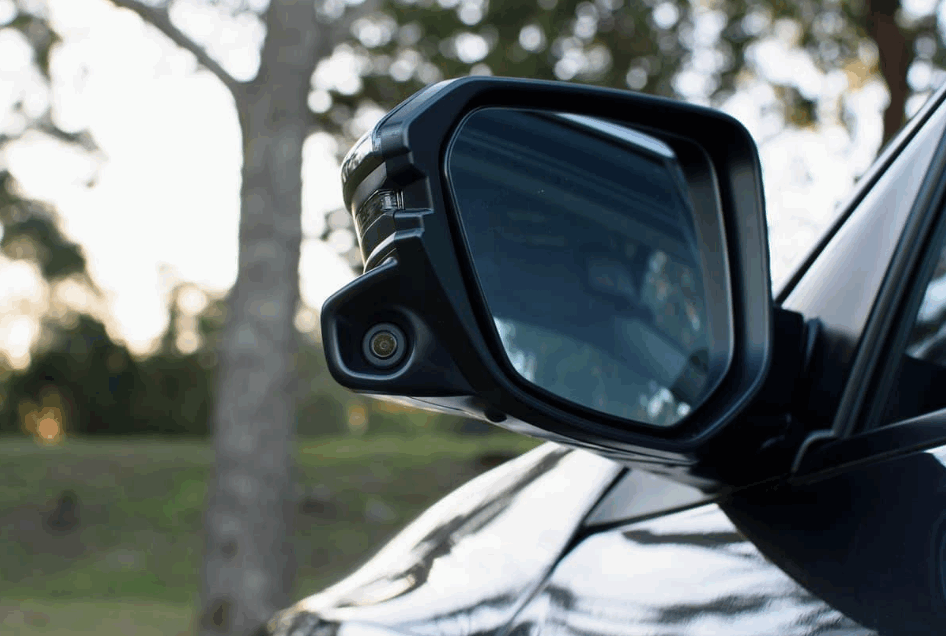
First, examine the camera lens beneath the passenger-side mirror. Dirt, road salt, insect residue, or water spots can block the lens and reduce image quality. Also, inspect the mirror housing for cracks or signs of moisture. Water intrusion often damages the camera module and gradually causes flickering, distorted images, or complete signal loss.
Next, test whether the LaneWatch system activates correctly. Start the engine and switch on the right turn signal or press the LaneWatch button if your vehicle has one. When no image appears, verify that the infotainment screen still functions normally with features such as the rearview camera or media controls. If those functions operate correctly, the problem most likely lies within the LaneWatch system rather than the display.
Finally, inspect the fuse and the wiring connected to the passenger-side mirror. Loose connectors or damaged wires can interrupt the video signal even when the camera itself remains operational. For a more accurate diagnosis, connect a professional scan tool and check for diagnostic trouble codes. Those codes often identify communication failures, electrical faults, or internal camera problems that are difficult to detect during a standard visual inspection.
How Do You Fix a Honda Lane Watch Camera That Is Not Working?
Fixing a Honda LaneWatch camera depends on the underlying cause of the problem. Most issues have straightforward solutions, especially when the camera still functions but produces poor image quality or fails to activate consistently. Starting with the simplest repairs helps avoid unnecessary costs and reduces the risk of replacing components that still operate correctly.
Begin by cleaning the camera lens with a clean microfiber cloth and a non-abrasive glass cleaner. Dirt, road grime, and water spots often reduce visibility and create a blurry image. After cleaning the lens, restart the vehicle and test the system again. If the image returns to normal, no additional repair is necessary.
When cleaning does not solve the problem, inspect the electrical system. Check the fuse that protects the LaneWatch circuit and replace it if it has blown. Then examine the wiring harness and connectors inside the passenger-side mirror and door panel. Damaged wires or loose connectors can interrupt the video signal and prevent the camera from communicating with the infotainment system.
Software should also be part of the inspection process. An outdated infotainment system or an incomplete software update may cause communication errors between the display and the camera. Installing the latest software version can restore normal operation on some Honda models. If the camera or side mirror has been replaced recently, perform the required camera calibration to ensure the system displays the correct viewing angle.
Replace the camera only after completing every diagnostic step. A new OEM camera provides the best compatibility and image quality, while proper calibration ensures accurate performance. Following this repair sequence improves diagnostic accuracy, minimizes repair expenses, and restores the LaneWatch system safely.
How Much Does It Cost to Repair or Replace a Honda LaneWatch Camera?
The cost of repairing a Honda LaneWatch camera depends on the source of the problem. Minor issues usually require inexpensive repairs, while a damaged camera or infotainment component can increase the total cost significantly. Identifying the exact fault before replacing parts helps prevent unnecessary expenses and ensures the correct repair.
Simple maintenance is often the least expensive solution. Cleaning the camera lens costs very little and can restore a clear image if dirt or road debris blocks the view. Replacing a blown fuse or securing a loose electrical connector is also affordable because these repairs require only basic parts and minimal labor. In many cases, these simple fixes solve the problem without replacing the camera.
Repair costs increase when wiring damage or water intrusion affects the electrical system. Technicians may need to remove the passenger-side door panel and side mirror to inspect the wiring harness or replace damaged connectors. Labor charges vary by location and vehicle model, so obtaining a professional inspection before approving repairs is a practical way to avoid unexpected costs.
Replacing the LaneWatch camera is usually the most expensive option. An OEM replacement camera generally offers the best compatibility with the factory infotainment system and maintains the original image quality. After installation, some Honda models also require camera calibration to ensure the viewing angle remains accurate. Choosing genuine parts and professional installation may cost more initially, but it often reduces the risk of recurring problems and helps restore reliable system performance.
Can You Drive with a Honda LaneWatch Camera That Is Not Working?
Yes, you can usually drive with a Honda LaneWatch camera that is not working because the system is a driver-assistance feature rather than a basic safety control. The camera improves visibility on the passenger side, but it does not control steering, braking, or vehicle stability. Even so, losing this feature reduces your awareness of nearby traffic and increases the need for careful observation during lane changes.
Drivers should rely on traditional safe driving practices whenever the LaneWatch system fails. Check both side mirrors, review the rearview mirror, and perform a shoulder check before changing lanes. These actions help compensate for the missing camera view and reduce the risk of overlooking a vehicle in the blind spot. Maintaining a safe following distance also provides more time to react to surrounding traffic.
Although driving remains possible, the problem should not be ignored for long. A malfunctioning camera may indicate damaged wiring, water intrusion, or an electrical fault that could affect other vehicle systems if left unrepaired. Scheduling an inspection as soon as possible helps identify the root cause before the damage becomes more extensive or expensive to repair.
Restoring the LaneWatch system improves convenience and enhances overall driving confidence. A clear camera image provides additional visibility when merging, changing lanes, or navigating heavy traffic. Combined with proper mirror use and safe driving habits, a fully functioning LaneWatch system offers another layer of awareness that supports safer everyday driving.
Conclusion
A Honda LaneWatch camera can stop working for several reasons, including a dirty lens, damaged wiring, water intrusion, software issues, or a faulty camera module. Identifying the root cause is the most important step because different problems require different solutions. A careful inspection often reveals whether the issue can be fixed with simple maintenance or requires professional repair.
Start with the easiest checks before replacing any parts. Clean the camera lens, inspect the fuse, examine the wiring, and verify that the infotainment system functions correctly. If the problem continues after these steps, a professional diagnosis can confirm whether the camera needs calibration or replacement. This approach reduces unnecessary repair costs and improves the accuracy of the repair process.
Restoring a properly functioning LaneWatch system improves visibility during lane changes and supports safer driving. Although you can still operate the vehicle without this feature, repairing the system helps you regain the additional awareness that Honda designed to reduce blind-spot risks. Keeping the camera clean and addressing small issues early also helps maintain reliable performance over the long term.