As modern vehicles become increasingly connected, drivers expect more than just reliable transportation. They want the convenience of starting their car remotely, checking its status from anywhere, receiving maintenance alerts, and accessing advanced safety features through a smartphone. Hyundai Bluelink delivers all of these capabilities, making it one of Hyundai’s most valuable connected vehicle services. However, one question continues to stand out among both current Hyundai owners and prospective buyers: How much does Hyundai Bluelink cost in 2026?
The answer is not as simple as quoting a single price. Hyundai Bluelink pricing depends on several factors, including your vehicle’s model year, the region where you purchased the vehicle, and the subscription package you choose after any complimentary service period expires. While many new Hyundai models include free access to Bluelink for a limited time, owners eventually need to decide whether renewing the subscription is worth the ongoing expense.
Understanding the actual cost involves more than comparing monthly or annual fees. Drivers also want to know which features remain available after the free trial, whether remote start and vehicle diagnostics justify the subscription price, and how Bluelink compares with connected services offered by competing brands such as Kia Connect, Toyota Remote Connect, and HondaLink.
In this comprehensive guide, we’ll break down everything you need to know about Hyundai Bluelink cost in 2026. You’ll discover the latest subscription plans, complimentary trial periods, included features, renewal pricing, supported Hyundai models, and expert insights to help you determine whether Bluelink offers good value for your driving needs. By the end of this article, you’ll have a clear understanding of what you’re paying for and whether Hyundai Bluelink deserves a place in your annual vehicle budget.
What Is Hyundai Bluelink?
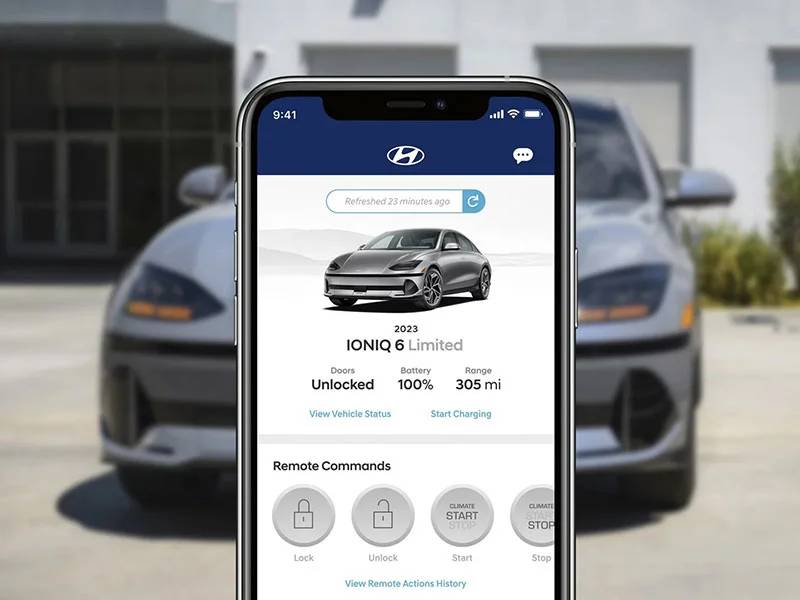
Hyundai Bluelink is a connected vehicle service that allows drivers to communicate with compatible Hyundai vehicles through the MyHyundai mobile app, the owner portal, and certain in-car controls. Instead of treating the car as a standalone machine, Bluelink connects it to a cellular network so owners can monitor, locate, and control selected functions from a distance.
For many drivers, the most recognizable Bluelink feature is remote start. On compatible models, owners can start the engine from their phone and adjust the cabin temperature before entering the vehicle. This can be particularly useful during freezing winters or extremely hot summers. Depending on the vehicle, users may also be able to lock or unlock the doors, check fuel or battery status, locate the car, manage electric vehicle charging, and review diagnostic information.
Bluelink also includes safety and vehicle care functions. Eligible services may include Automatic Collision Notification, SOS Emergency Assistance, roadside assistance, maintenance reminders, vehicle health reports, and alerts related to the vehicle’s location or driving activity. Some supported vehicles also provide connected navigation tools, destination search, and route information.
Hyundai currently uses two closely related names for its connected service in the United States. Traditional Bluelink is generally associated with many 2023 and older Hyundai vehicles, while Bluelink+ launched with the 2023 IONIQ 6 and expanded to most compatible 2024 and newer Hyundai models. The most important difference for buyers is that eligible Bluelink+ services are included at no additional cost for the original purchaser or lessee, while owners of older vehicles may need to pay for individual subscription packages after a complimentary trial ends.
Not every Hyundai supports the same functions. Availability depends on the model, trim, model year, hardware, cellular compatibility, and geographic location. For example, certain older Hyundai vehicles lost access to Bluelink because the cellular networks required by their original telematics systems were discontinued. Hyundai confirms that some affected 2012 through 2019 vehicles can no longer use the service unless they were eligible for a specific software update.
This variation is one reason the Hyundai Bluelink cost can appear confusing. Two owners may drive similar Hyundai models but face completely different pricing because one vehicle uses the older paid subscription structure while the other qualifies for complimentary Bluelink+.
Hyundai Bluelink Cost in 2026
The Hyundai Bluelink cost in 2026 depends primarily on the vehicle’s model year and whether it qualifies for Bluelink+.
For many 2023 and older Bluelink-equipped vehicles in the United States, Hyundai uses the traditional three-package structure. The packages are Connected Care, Remote, and Guidance. Hyundai’s owner information lists each package at $9.90 per month or $99 per year after the applicable trial period expires.
| Bluelink Package | Monthly Cost | Annual Cost | Main Functions |
|---|---|---|---|
| Connected Care | $9.90 | $99 | Emergency assistance, collision notification, diagnostics, maintenance information |
| Remote | $9.90 | $99 | Remote start, climate settings, door lock and unlock, vehicle status, car finder |
| Guidance | $9.90 | $99 | Destination search, send-to-car functions, connected navigation services |
| All Three Packages | $29.70 | $297 | Combined safety, remote access, and navigation services |
Choosing annual billing can reduce the effective cost. At the listed monthly rate, one package would cost $118.80 over 12 months. The $99 annual option therefore saves $19.80 per package. A driver maintaining all three packages for a full year would pay approximately $297 annually instead of $356.40 through monthly billing.
However, not every owner needs all three packages. A driver who mainly wants remote start and smartphone door controls may focus on the Remote package, although subscription eligibility and package requirements can depend on the vehicle and account. Someone who values emergency support and diagnostic reports may prioritize Connected Care. Guidance may be less essential for drivers who already rely on Apple CarPlay, Android Auto, Google Maps, or another smartphone navigation service.
The pricing situation is very different for newer eligible vehicles. Hyundai states that Bluelink+ is available to original purchasers and lessees of qualifying new 2024 model year or newer Bluelink-equipped vehicles, beginning with the 2023 IONIQ 6. Eligible Bluelink+ services are provided without an additional subscription charge for the original owner or lessee.
This means the practical Hyundai Bluelink cost for many new Hyundai buyers in 2026 is $0 for the standard eligible Bluelink+ service. Still, this does not mean every connected feature is free. Separate services such as an in-vehicle Wi-Fi hotspot, streaming subscriptions, third-party applications, or newly introduced digital features may require an additional trial or paid plan. Hyundai notes that Wi-Fi Hotspot and Streaming on select 2026 and newer models require an eligible data plan, an active Bluelink account, and cellular coverage. Third-party streaming providers may also charge their own fees.
Owners should therefore verify pricing with their vehicle identification number rather than relying only on the model name. The MyHyundai account can display the vehicle’s current subscription status, supported packages, expiration dates, and available renewal options. Pricing may also change, so the final amount shown in the owner’s account should be treated as the most relevant quote for that specific vehicle.
Is Hyundai Bluelink Free?
Hyundai Bluelink can be free, but the answer depends on which version of the service your vehicle supports.
For eligible new Hyundai vehicles equipped with Bluelink+, the core connected services are complimentary for the original purchaser or lessee. Bluelink+ began with the 2023 Hyundai IONIQ 6 and became available on most compatible 2024 and newer Hyundai models. These services can include remote start, door locking and unlocking, vehicle location, diagnostics, safety alerts, and electric vehicle charging controls when supported by the vehicle.
The word “complimentary” is important. Hyundai is not charging the original qualifying owner an additional recurring fee for the included Bluelink+ services. The cost is effectively incorporated into the new vehicle ownership experience. This can represent meaningful savings compared with the traditional subscription structure, which could cost as much as $297 per year for all three older Bluelink packages.
Certified pre-owned buyers may receive a different benefit. Hyundai’s Bluelink+ launch announcement states that qualifying certified pre-owned vehicles can include complimentary service for the first year of ownership. After that period, the owner may need to review the available subscription terms associated with the vehicle.
For many older Bluelink-equipped vehicles, the service is free only during an introductory trial. Once that trial expires, owners generally need to subscribe to the packages they want to continue using. Hyundai’s published information for the traditional plan lists Connected Care, Remote, and Guidance at $9.90 per month or $99 per year for each package.
The complimentary period for older vehicles is not identical across every model year. Some vehicles were originally sold with one year of Connected Care, while various later model years received longer promotional access. Because these offers changed over time, owners should not assume that a trial mentioned for another Hyundai model also applies to their vehicle.
It is also important to distinguish Bluelink from separate paid services. Even when Bluelink+ is complimentary, owners may still pay for Wi-Fi data, video or music streaming subscriptions, parking services, charging services, or optional digital upgrades. These products may appear inside the same app or connected ecosystem, but they are not necessarily included in the standard Bluelink+ benefit.
After a traditional Bluelink trial expires, paid connected features such as app-based remote start, remote door controls, connected destination search, and certain reports may become unavailable until the owner renews the required package. Basic vehicle functions remain usable, and a factory key fob may still provide remote start on models equipped with that feature. However, key-fob operation has a shorter range and does not offer the same smartphone controls or status information.
Before paying, owners should log in to MyHyundai and check three details: the exact service version attached to the vehicle, the packages that are currently active, and the renewal date. This prevents drivers from purchasing unnecessary services or assuming that a feature is included when it requires a separate plan.
Hyundai Bluelink Subscription Plans Explained
For owners of Hyundai vehicles that use the traditional Bluelink subscription model, the service is divided into three primary packages. Each package focuses on a different aspect of connected vehicle ownership, allowing drivers to choose the services that best match their daily driving habits. Understanding what each plan includes can help determine whether paying for a subscription is worthwhile after the complimentary period expires.
Connected Care
Connected Care is designed to improve driver safety while helping owners stay informed about their vehicle’s condition. This package includes Automatic Collision Notification, which can notify a response center if the vehicle detects a severe collision. Drivers also have access to SOS Emergency Assistance, Roadside Assistance connection, monthly Vehicle Health Reports, maintenance notifications, and diagnostic information that can help identify potential problems before they become costly repairs.
For many owners, the biggest advantage of Connected Care is peace of mind. The vehicle continuously monitors key systems and can alert drivers to maintenance needs without waiting for a warning light to appear on the dashboard. Families with young drivers or individuals who frequently travel long distances often appreciate the additional layer of emergency support.
The downside is that some drivers may rarely use these emergency services, making the annual subscription feel unnecessary if they already have roadside assistance through their insurance provider or another membership program. However, the preventive maintenance reports and diagnostic features can still provide long-term value by helping owners address minor issues before they develop into expensive repairs.
Connected Care is best suited for drivers who prioritize safety, reliability, and proactive vehicle maintenance over convenience features.
Remote Package
The Remote package is often considered the most popular Bluelink subscription because it includes the features drivers use every day. Through the MyHyundai app, owners can remotely start or stop the engine, set the cabin temperature before entering the vehicle, lock or unlock the doors, locate the vehicle in a crowded parking lot, activate the horn and lights, and check important vehicle information such as fuel level, battery status, window position, and tire pressure on supported models.
Remote start is especially valuable during extreme weather conditions. Instead of sitting in a freezing or overheated vehicle while waiting for the cabin to reach a comfortable temperature, drivers can prepare the vehicle several minutes before leaving home or the office. This convenience becomes even more noticeable for commuters who park outdoors throughout the day.
The package also improves security. If an owner forgets to lock the vehicle after parking, the doors can often be secured remotely using the mobile app. Likewise, the car’s location can be displayed on a map, reducing the frustration of searching through large parking garages or unfamiliar locations.
The main limitation is that these features depend on both cellular connectivity and an active subscription. Without either one, remote commands cannot be transmitted to the vehicle. Despite this limitation, many owners consider the Remote package the easiest subscription to justify because it provides benefits that can be used almost every day.
Guidance Package
The Guidance package focuses primarily on navigation and connected travel services. Instead of relying entirely on built-in maps or smartphone navigation, Guidance enhances the in-vehicle navigation system with cloud-based information and destination management tools.
Drivers can search for destinations through the mobile app and send them directly to the vehicle before beginning a trip. Depending on the vehicle and software version, connected routing can use real-time traffic conditions to recommend faster routes and provide updated estimated arrival times. Some vehicles may also receive enhanced points of interest, weather information, and navigation-related services.
The usefulness of the Guidance package depends heavily on how drivers prefer to navigate. Owners who frequently use Apple CarPlay or Android Auto with Google Maps or Waze may find fewer reasons to maintain a separate navigation subscription. However, drivers who prefer Hyundai’s integrated navigation system often appreciate the seamless experience and the ability to plan routes before entering the vehicle.
Ultimately, the best subscription package depends on individual priorities. Drivers seeking additional safety features may find Connected Care the most valuable. Those looking for everyday convenience typically benefit the most from the Remote package, while owners who regularly rely on Hyundai’s factory navigation system may gain the greatest advantage from Guidance.
Features Included With Hyundai Bluelink
One of the biggest reasons drivers continue paying for Hyundai Bluelink after the complimentary period is the wide range of connected features available through the service. Although availability varies by vehicle model, trim level, and model year, Bluelink combines convenience, safety, security, and maintenance tools into a single connected ecosystem.
Remote Start remains the signature feature for many Hyundai owners. Using the MyHyundai app, drivers can start the engine from virtually anywhere with cellular coverage. Many compatible models also allow users to adjust the cabin temperature before entering the vehicle, making winter mornings and hot summer afternoons significantly more comfortable.
Remote Door Lock and Unlock offers additional convenience and security. Instead of returning to the vehicle after realizing the doors were left unlocked, owners can secure the vehicle through the mobile app. Similarly, family members can be granted access without handing over a physical key, provided the vehicle supports the feature.
Vehicle Status Monitoring allows drivers to review important information without visiting the parking lot. Depending on the model, users may check fuel level, battery charge, estimated driving range, tire pressure, window status, door status, and whether the engine is currently running.
Find My Car simplifies locating a parked vehicle. The app displays the vehicle’s last reported location, making it especially useful in airports, shopping centers, sports venues, and unfamiliar cities where parking spaces can be difficult to remember.
Vehicle Health Reports help owners stay informed about their vehicle’s overall condition. Monthly reports summarize the status of important systems and highlight maintenance items that may require attention. Early awareness of potential issues can help reduce repair costs and improve long-term reliability.
Maintenance Alerts notify owners when routine services such as oil changes, tire rotations, or scheduled inspections are approaching. These reminders encourage preventative maintenance, which helps preserve vehicle performance and resale value.
Automatic Collision Notification adds another layer of protection. If the vehicle detects a significant collision, the system may automatically contact an emergency response center, allowing trained representatives to attempt communication with the occupants and coordinate emergency assistance when appropriate.
SOS Emergency Assistance provides drivers with direct access to emergency support through the vehicle. This feature can be particularly valuable during medical emergencies or roadside incidents where immediate assistance is needed.
For electric vehicles such as the Hyundai IONIQ 5 and IONIQ 6, Bluelink offers additional EV-specific functions. Owners can monitor battery state of charge, schedule charging sessions during lower electricity rate periods, locate nearby charging stations, and manage charging remotely through the mobile application.
Some newer Hyundai vehicles also support Digital Key technology, allowing compatible smartphones to function as vehicle keys. Depending on the model, drivers can unlock, lock, and even start the vehicle using their phone without carrying the traditional key fob.
While not every Hyundai includes every feature, Bluelink continues to expand with software updates and new connected technologies. Drivers should review the specifications for their particular vehicle to determine which services are available before purchasing or renewing a subscription.
Which Hyundai Models Support Bluelink?
Hyundai has steadily expanded Bluelink availability across its lineup, making connected services accessible on many of its most popular vehicles. However, support varies based on the model year, trim level, and installed telematics hardware, meaning two versions of the same model may not offer identical features.
Among Hyundai’s SUV lineup, the Tucson has been one of the most widely supported models. Recent generations include extensive Bluelink functionality, including remote start, remote climate control, vehicle health reports, and smartphone-based vehicle management. Families choosing the Tucson often consider these features a valuable addition because they improve both convenience and day-to-day usability.
The Santa Fe also offers comprehensive Bluelink integration across many trim levels. Owners benefit from remote vehicle access, navigation services, maintenance alerts, and advanced safety features. Because the Santa Fe is frequently used as a family vehicle for long-distance travel, connected navigation and roadside assistance functions are particularly useful.
Hyundai’s flagship SUV, the Palisade, supports many of the brand’s most advanced connected services. Premium trims typically include remote parking functions, enhanced navigation, Digital Key compatibility on supported models, and a full suite of smartphone-connected features that complement the vehicle’s luxury positioning.
Compact sedans such as the Elantra and Sonata also support Bluelink on many recent model years. Drivers can remotely start the vehicle, monitor maintenance schedules, locate the vehicle through the mobile app, and receive important vehicle notifications while away from the car.
Hyundai’s electric vehicle lineup makes particularly strong use of connected technology. The IONIQ 5 and IONIQ 6 integrate Bluelink deeply into the ownership experience by allowing drivers to monitor battery charging, schedule charging sessions, precondition the cabin before departure, and locate public charging stations directly from the app. These EV-specific features are among the most practical examples of connected vehicle technology because they help maximize both convenience and charging efficiency.
The Kona, including the Kona Electric, also supports Bluelink on many recent model years. Owners can take advantage of remote access, charging management for electric models, and real-time vehicle monitoring through the MyHyundai application.
Although Bluelink is available on a broad range of Hyundai vehicles, owners should remember that feature availability depends on the specific vehicle identification number rather than the model name alone. Older vehicles may support only a limited number of connected services, while newer Bluelink+ models generally provide the most complete experience. Before purchasing a used Hyundai, buyers should verify that the vehicle remains eligible for connected services and confirm whether the original complimentary subscription has expired.
Is Hyundai Bluelink Worth the Cost?
Whether Hyundai Bluelink is worth paying for depends largely on how often you use its connected features and which Hyundai model you own. For many drivers, the service delivers enough convenience, security, and peace of mind to justify the subscription fee. For others, especially those who rarely use remote features, the annual cost may outweigh the benefits.
One of the strongest reasons to subscribe is convenience. Remote Start allows drivers to warm up or cool down the cabin before entering the vehicle, making everyday driving far more comfortable in regions with harsh winters or extremely hot summers. Being able to lock or unlock the doors remotely, locate the vehicle in a crowded parking lot, and check vehicle status from a smartphone eliminates many common frustrations that drivers encounter throughout the year.
Safety is another major advantage. Automatic Collision Notification and SOS Emergency Assistance can provide valuable support during emergencies by connecting occupants with trained response personnel. Although these services are rarely needed, many owners appreciate knowing that help is available if a serious accident occurs.
Bluelink also helps reduce the stress of vehicle ownership through proactive maintenance. Vehicle Health Reports, diagnostic information, and maintenance reminders encourage owners to address small problems before they develop into expensive repairs. This preventative approach may contribute to lower long-term maintenance costs and improved vehicle reliability.
Owners of Hyundai electric vehicles often receive even greater value. Remote charging controls, battery monitoring, charging schedules, and climate preconditioning are practical tools that can improve the overall EV ownership experience. These features save time while helping drivers maximize battery efficiency and driving range.
Despite these benefits, Bluelink is not essential for every driver. Owners who primarily use their vehicle for short daily commutes may find themselves using the mobile app only a few times each month. If remote start is already available through the factory key fob and smartphone controls are rarely needed, paying for multiple subscription packages may not provide sufficient value.
Navigation services also deserve consideration. Many drivers now depend on Apple CarPlay or Android Auto with Google Maps or Waze, reducing the need for Hyundai’s connected navigation features. In these cases, the Guidance package may offer limited additional benefit.
Cellular connectivity can also affect the user experience. Because Bluelink relies on a mobile network, remote commands cannot be completed if either the vehicle or the user’s smartphone lacks adequate signal. Although outages are uncommon, drivers should understand that connected services are not completely independent of network availability.
The value proposition has changed significantly with the introduction of Bluelink+. Owners of eligible 2024 and newer Hyundai models receive the core connected services at no additional cost for the original owner or lessee. For these customers, the question is no longer whether the subscription is worth paying for, but rather whether they are taking full advantage of features that are already included with the vehicle.
Overall, Hyundai Bluelink represents excellent value for drivers who regularly use remote access, connected safety features, and vehicle monitoring. Families, commuters, frequent travelers, and electric vehicle owners are likely to benefit the most. Drivers who rarely interact with connected technology may decide that the traditional subscription model offers fewer advantages, especially after the complimentary trial has expired.
Hyundai Bluelink vs. Competitors
Connected vehicle services have become increasingly common across the automotive industry, with nearly every major manufacturer offering a smartphone app that provides remote access, vehicle monitoring, and emergency assistance. While Hyundai Bluelink competes directly with Kia Connect, Toyota Remote Connect, HondaLink, FordPass, and NissanConnect Services, each platform has its own strengths and weaknesses.
| Feature | Hyundai Bluelink | Kia Connect | Toyota Remote Connect | HondaLink |
|---|---|---|---|---|
| Remote Start | Yes | Yes | Yes | Selected Models |
| Remote Lock & Unlock | Yes | Yes | Yes | Yes |
| Vehicle Health Reports | Yes | Yes | Limited | Limited |
| Vehicle Finder | Yes | Yes | Yes | Yes |
| Emergency Assistance | Yes | Yes | Yes | Yes |
| Connected Navigation | Yes | Yes | Yes | Limited |
| EV Charging Controls | Yes | Yes | Selected Models | Selected Models |
| Digital Key Support | Selected Models | Selected Models | Limited | Limited |
| Complimentary Service on Eligible New Models | Yes (Bluelink+) | Yes (Kia Connect on eligible models) | Varies | Varies |
Hyundai Bluelink and Kia Connect are often considered the closest competitors because both brands belong to the Hyundai Motor Group and share similar connected technology. Their mobile applications offer nearly identical remote functions, including remote start, climate control, vehicle location, maintenance notifications, and emergency services. The overall user experience is familiar for drivers who move between Hyundai and Kia vehicles.
Toyota Remote Connect focuses heavily on remote access and integration with Toyota’s Safety Connect and Drive Connect services. While Toyota offers reliable remote functionality, many advanced connected services require separate subscriptions, depending on the vehicle and package selected. Pricing structures can become more complicated because different connected services may have independent trial periods and renewal schedules.
HondaLink provides useful smartphone integration for compatible vehicles but generally offers fewer connected features than Hyundai Bluelink on comparable models. Basic remote commands and vehicle information are available on many vehicles, but the range of connected services depends significantly on trim level and installed hardware.
FordPass deserves special recognition because many of its remote functions remain complimentary for supported vehicles without requiring an annual subscription. This makes FordPass particularly attractive to budget-conscious drivers who want remote access without recurring fees. However, Hyundai’s Bluelink+ initiative has narrowed this competitive advantage by providing complimentary connected services on many newer Hyundai models.
Another important consideration is user interface quality. Hyundai has continued improving the MyHyundai mobile application, making remote commands faster and easier to access. Features such as charging management for electric vehicles, remote climate presets, and digital key integration create a more complete ownership experience compared with some competing systems.
When comparing subscription value, Hyundai performs particularly well for owners of newer vehicles equipped with Bluelink+. Receiving connected services without an additional recurring fee significantly increases the overall value of vehicle ownership. Owners of older Hyundai models should compare the annual subscription cost against how frequently they actually use remote features before deciding whether to renew.
Ultimately, Hyundai Bluelink remains one of the strongest connected vehicle platforms available today, combining comprehensive remote functionality, strong safety features, reliable vehicle diagnostics, and an intuitive mobile application that continues to evolve with each new generation of Hyundai vehicles.
How to Subscribe, Renew, or Cancel Hyundai Bluelink
Managing a Hyundai Bluelink subscription is a straightforward process, whether you are activating the service for the first time, renewing an existing subscription, or canceling automatic renewals. Most account management tasks can be completed online through the MyHyundai owner portal or the official MyHyundai mobile app.
How to Activate Bluelink
New Hyundai owners typically begin by creating a MyHyundai account and registering their vehicle using the Vehicle Identification Number (VIN). Once ownership has been verified, eligible Bluelink services can be activated by following the instructions provided in the app or through the vehicle’s infotainment system.
After activation is complete, the vehicle and smartphone establish a secure connection that allows remote commands and vehicle information to be exchanged through Hyundai’s connected services platform. Depending on the vehicle, activation may take several minutes before all features become available.
How to Renew Your Subscription
If your complimentary service period has expired, Hyundai will generally notify you before the subscription ends. Owners can review available plans by logging into their MyHyundai account, where current subscription status, expiration dates, and eligible renewal options are displayed.
Renewal typically requires selecting the desired package, confirming payment information, and completing the purchase online. Once payment has been processed, eligible connected services are usually restored without requiring another activation process.
Drivers should verify whether monthly or annual billing provides the better value. Annual plans often reduce the overall cost compared with paying month by month.
How to Cancel Bluelink
Owners who no longer wish to maintain a paid subscription can cancel through the MyHyundai owner portal or by contacting Hyundai Customer Care. Before canceling, it is important to understand which connected services will no longer be available.
After cancellation, remote start through the smartphone app, remote door controls, connected navigation services, vehicle status monitoring, and other subscription-based features may stop functioning. Standard vehicle operations remain unaffected, and features that do not require an active Bluelink subscription will continue to operate normally.
If automatic renewal is enabled, owners should cancel before the renewal date to avoid unwanted charges. Reviewing billing settings several days before expiration helps ensure there are no unexpected subscription renewals.
Can You Reactivate Bluelink Later?
Yes. In most cases, eligible Hyundai owners can reactivate Bluelink by purchasing a new subscription through their MyHyundai account. Once payment has been confirmed, supported services are generally restored without requiring extensive setup.
Drivers purchasing a used Hyundai should confirm that the previous owner’s account has been removed before attempting activation. Ownership verification is required to protect vehicle security and prevent unauthorized remote access.
Taking a few minutes to review your account information each year can help ensure you are paying only for the services you actually use. Whether you decide to continue with a paid subscription or take advantage of complimentary Bluelink+ services on a newer Hyundai, understanding your available options makes it easier to maximize the value of your connected vehicle experience.
Frequently Asked Questions
How much does Hyundai Bluelink cost in 2026?
The cost of Hyundai Bluelink depends on your vehicle’s model year and subscription eligibility. Owners of many older Hyundai models can purchase individual subscription packages for Connected Care, Remote, or Guidance, while eligible 2024 and newer Hyundai models equipped with Bluelink+ receive core connected services at no additional cost for the original owner or lessee. Because pricing and eligibility may vary by vehicle and region, owners should verify their subscription options through their MyHyundai account.
Is Hyundai Bluelink free?
Yes, but only for certain vehicles. Eligible new Hyundai models equipped with Bluelink+ include complimentary connected services for the original owner or lessee. Older Hyundai vehicles generally include a limited complimentary trial, after which a paid subscription is required to continue using many connected features.
What happens when my Bluelink subscription expires?
When a paid subscription expires, subscription-based connected services are typically disabled. Features such as smartphone remote start, remote lock and unlock, vehicle status monitoring, connected navigation, and certain safety services may no longer function until the subscription is renewed. Standard vehicle functions remain unaffected.
Can I use Hyundai Bluelink without paying?
Owners of eligible Bluelink+ vehicles can continue using included services without paying an additional subscription fee while they remain eligible under Hyundai’s program. Owners of older vehicles may continue driving normally after their subscription expires, but many connected features will no longer be available without renewing the appropriate package.
Is Remote Start included with Hyundai Bluelink?
Yes. Remote Start is one of the most popular Bluelink features and is included on compatible vehicles that support the Remote package or Bluelink+. Availability depends on the vehicle’s hardware, model year, and subscription status.
Which Hyundai models support Bluelink?
Bluelink is available on many Hyundai vehicles, including the Tucson, Santa Fe, Palisade, Kona, Elantra, Sonata, IONIQ 5, IONIQ 6, and several other recent models. Feature availability varies depending on the specific model year, trim level, and installed telematics equipment.
Does Hyundai Bluelink work with electric vehicles?
Yes. Hyundai’s electric vehicles make extensive use of Bluelink technology. Compatible EV owners can remotely monitor battery charge levels, schedule charging sessions, locate charging stations, precondition the cabin, and receive charging notifications through the mobile application.
Can I transfer my Bluelink account when I sell my vehicle?
No. When selling a Hyundai, the current owner should remove the vehicle from their MyHyundai account before completing the sale. The new owner must create their own account, verify ownership, and activate eligible Bluelink services before connected features become available.
Does Bluelink require cellular service?
Yes. Hyundai Bluelink communicates through an embedded cellular connection installed in the vehicle. Remote commands also require an internet connection on the user’s smartphone. If either the vehicle or the phone lacks adequate network coverage, certain connected services may be temporarily unavailable.
Is Hyundai Bluelink worth the money?
For many drivers, the answer is yes. Owners who frequently use remote start, smartphone vehicle controls, maintenance reports, and connected safety features often find that Bluelink improves both convenience and peace of mind. Drivers who rarely use connected technology may find less value in maintaining a paid subscription after the complimentary period ends.
Can I cancel Hyundai Bluelink at any time?
In most cases, yes. Owners can manage or cancel their subscription through the MyHyundai owner portal or by contacting Hyundai Customer Care. It is recommended to review renewal dates carefully to avoid automatic renewal charges.
Does Hyundai Bluelink improve resale value?
While Bluelink itself does not directly increase a vehicle’s resale value, buyers often view connected technology as a desirable feature. Vehicles equipped with active connected services and modern telematics may appear more attractive in the used vehicle market, particularly when all features function properly and the system can be easily transferred to the next owner.
Conclusion
Hyundai Bluelink has evolved from a premium connected vehicle service into an essential part of the ownership experience for many Hyundai drivers. Whether you drive a Tucson, Santa Fe, Palisade, Elantra, Sonata, or one of Hyundai’s latest electric vehicles, Bluelink provides a wide range of features that improve convenience, enhance safety, and simplify everyday vehicle management.
Understanding the Hyundai Bluelink cost is more important than ever because pricing now depends largely on your vehicle’s model year. Owners of many older Hyundai models may need to choose between individual subscription packages for Connected Care, Remote, and Guidance after their complimentary trial expires. In contrast, eligible owners of newer Hyundai vehicles equipped with Bluelink+ can enjoy a comprehensive suite of connected services without paying an additional subscription fee, making the overall ownership experience even more attractive.
When evaluating whether Bluelink is worth the cost, consider how often you actually use connected features. Drivers who regularly rely on remote start, smartphone vehicle controls, emergency assistance, maintenance notifications, or EV charging management are likely to receive significant value from the service. Those who rarely interact with connected technology may decide that a paid subscription offers fewer practical benefits.
Before renewing or purchasing a subscription, review your MyHyundai account to confirm your vehicle’s eligibility, available features, and current subscription status. Comparing the included services with your personal driving habits will help ensure that you choose the most cost-effective option.
As Hyundai continues expanding its connected vehicle ecosystem, Bluelink remains one of the most comprehensive and user-friendly platforms in the automotive industry. Whether your goal is greater convenience, improved vehicle security, or a smarter ownership experience, understanding Hyundai Bluelink pricing and subscription options allows you to make an informed decision and maximize the value of your Hyundai for years to come.